

Welcome to the Asynchronous Programming in C# 5.0 article series. If you are an old reader then you probably know what was explained in this series so far. If you are new then please find the previous articles in the following links.
- Asynchronous programming in C# 5.0: Part-1: Understand async and await
- Asynchronous Programming in C# 5.0 Part 2: Return Type of Asynchronous Method
- Asynchronous Programming in C# 5.0 Part 3: Understand Task in Asynchronous programming.
- Asynchronous Programming in C# 5.0 Part 4: Exception Handling in Asynchronous Programming
- Asynchronous Programming in C # 5.0 Parts 5: Access data using asynchronous function.
As the title suggests, in this article we will explain a few best practices in Asynchronous Programming. Let's try to understand them one by one with an example.
1. Avoid return Void from asynchronous function
We know that, there are three possible return types from an asynchronous function, they are:
- Void
- Task
- Task<T>
It is recommended not to return void from any asynchronous function. Now the question is, why? Let's explain. We will implement one asynchronous function with return type void. Have a look at the following code. We have defined Asyncfun() with void return type. 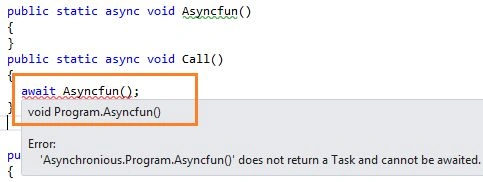
Now, from the Call() function we are trying to call this asynchronous function. And we are seeing that the compiler is saying that we cannot use the await keyword to call an asynchronous function that returns void. So, we need to return either Task or Task<T>.
Then, again question is, why do asynchronous functions support void? Is there some use of that? Yes, the use is there. Use void when you define an event handler with async qualifier, as in the following.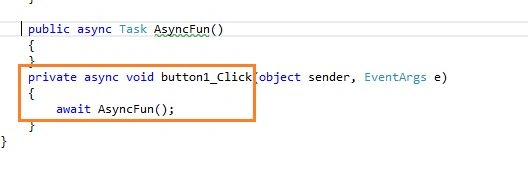
Let's see, we have qualify Button1_Click() event as asynchronous and it's return type is void.
2. Implement exception handling block in proper place
Be careful when you implement a try-catch block in an asynchronous function. Don't treat an asynchronous function as normal. Have a look at Following code.
using System;
using System.Runtime.CompilerServices;
using System.Threading;
using System.Threading.Tasks;
namespace Asynchronious
{
class Program
{
public static async Task Asyncfun()
{
throw new Exception("This is my exception");
}
public static async void Call()
{
await Asyncfun();
}
public static void Main(String[] args)
{
try
{
Call();
}
catch (Exception ex)
{
Console.WriteLine(ex.Message);
}
Console.ReadLine();
}
}
}
When we run this code we get the following error.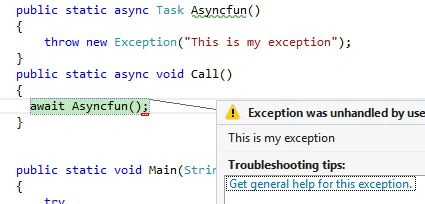
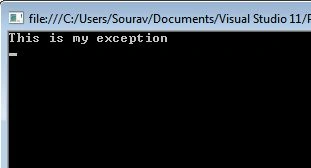
So, the try-catch block fails to handle the exception. Now, the question is where to implement the try-catch block? Implement the try-catch block within the asynchronous function.
using System;
using System.Runtime.CompilerServices;
using System.Threading;
using System.Threading.Tasks;
namespace Asynchronious
{
class Program
{
public static async Task<String> Asyncfun()
{
try
{
//Some business code is here
Sai KPosted Mar 10, 2022, 6:29 AM
Appreciate your contribution. It was helpful.