

Agenda
- Overview of Azure Container Apps and AWS Elastic Container Services
- High level view of AWS ECS components
- High level view of Azure Container App components
- Comparison of AWS ECS and Azure Container App components
- Features of ECS and Container Apps
Recently Microsoft released their new serverless service for running containers on the Azure platform - Azure Container Apps. It is still in public preview and not ready for production. Microsoft announced the Public Preview of the service in November 2021. This service closely resembles AWS's well matured container deployment service - Elastic Container Service aka ECS.
AWS announced the General Availability (GA) of the ECS services in April 2015. Initially, it started as a container deployment service backed by EC2 instances and supported only Linux containers. Later in December 2016, they added support for Windows Server 2016 containers (beta). In November 2017, Fargate launch type support was added to run containers on a serverless fashion. Fargate is a serverless, pay-as-you-go compute engine for deploying containers that currently supports Elastic Container Service (ECS) and Elastic Kubernetes Service (EKS).
Microsoft launched the public preview of their new container deployment service - Azure Container Apps - in November 2021. It is still in the evaluation phase and not matured enough to run production workloads, you need to wait some more time for the general availability of the service. During public preview, it is only available in limited regions, including Canada Central, West Europe, North Europe, East US, and East US2. You can deploy the Container Apps using Azure Portal, CLI, or ARM template. To deploy with Azure CLI, you need to add an extension for containerapp. (az extension add --name containerapp --upgrade). Since the Container Apps resources are migrating from Microsoft.Web namespace to Microsoft.App namespace, you need to register the namespace using az provider register --namespace Microsoft.App command.
High level view of AWS Elastic Container Service (ECS)
The primary component of the ECS service is the ECS cluster. As per the AWS documentation, a cluster is a logical grouping of tasks or services. It provides the infrastructure support for running containerized applications using Fargate, ECS instances, or the on-premises servers or virtual machines you manage on your data center. Every ECS cluster is deployed in a VPC, which can be a default VPC or a custom VPC created by the user. You can optionally enable the Container Insights feature to collect metrics for many resources, such as CPU, memory, disk, and network. Container Insights also provides diagnostic information, such as container restart failures, that you use to isolate and resolve issues quickly.
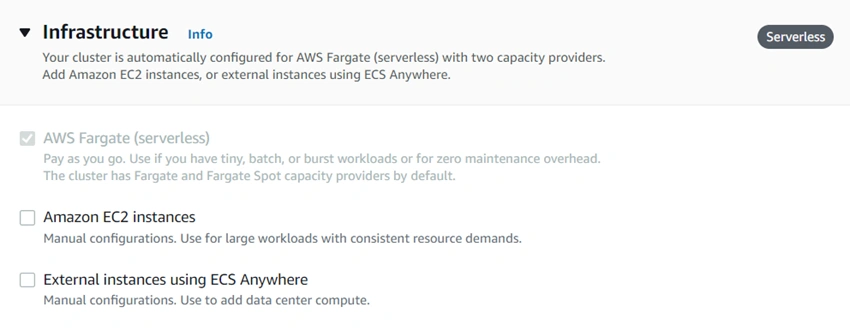
Image 1: ECS capacity providers - Fargate, EC2 instances, and external
To deploy your containers on the ECS cluster, you must define the Task Definitions. A Task Definition tells how many containers to run, CPU and memory allocation for containers, port configurations for containers, launch type compatibility, and the OS family. The launch type compatibility can be Fargate, EC2, or external. Task definition also allows configuring the AWS App Mesh based on the envoy proxy that makes it easy to monitor and control microservices. It standardizes microservices communication, and end-to-end visibility and ensures high availability. In a container definition, you can define one or more containers you want to launch together as a single task. While configuring the containers, you can specify the container name, image name, port mappings, health check, and environment variables.
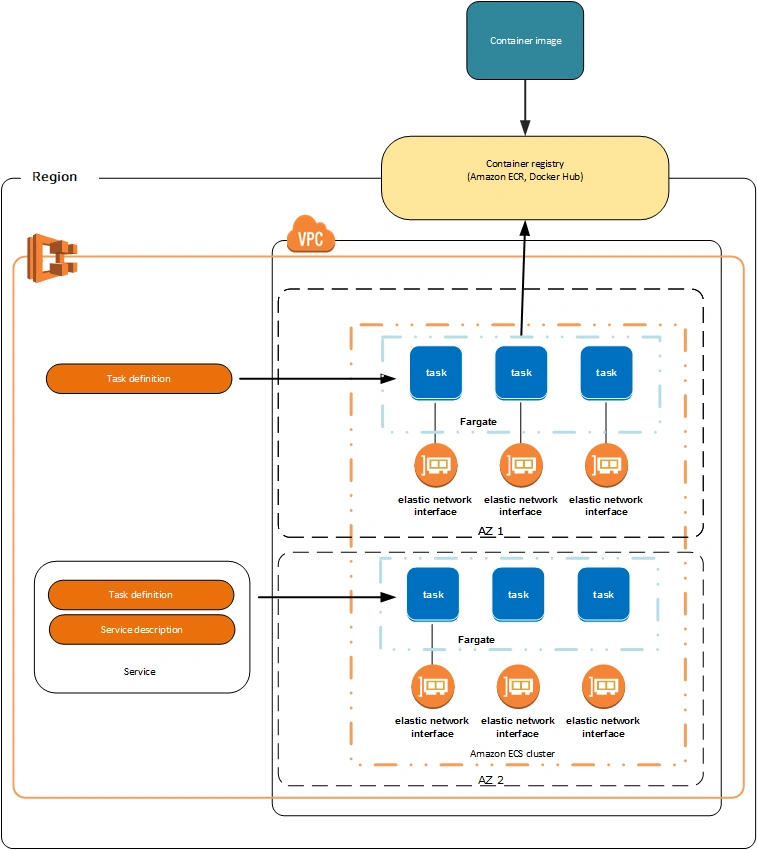
Image 2: Task definition with Fargate launch type
(Reference: https://docs.aws.amazon.com)
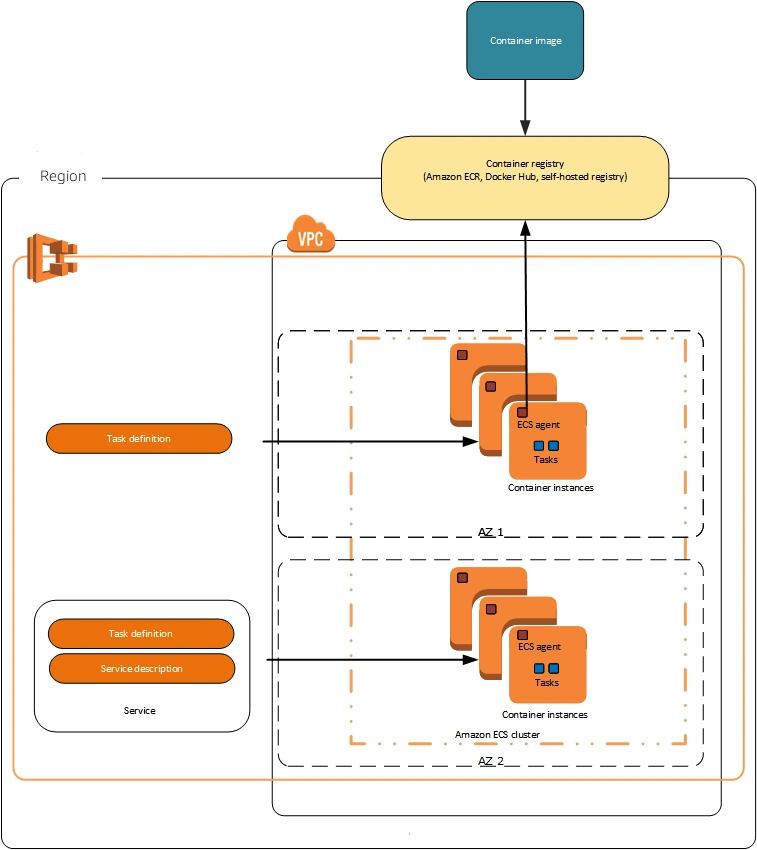
Image 3: Task definition with EC2 launch type
(Reference: https://docs.aws.amazon.com)
A service in ECS allows you to run a specific number of instances of a task definition in the cluster. Service will ensure the high availability of the containers by recreating the containers on failure. Containers will run as a task that is managed by the service. Every EC2 instance runs an ECS container agent that allows containers to connect to the cluster. ECS optimized AMIs comes with the ECS container agent preinstalled.
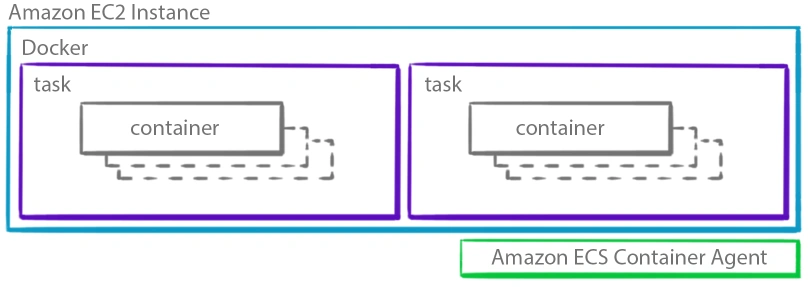
Image 4: Task placement in EC2
(Reference: https://d2908q01vomqb2.cloudfront.net)
High level view of Azure Container Apps
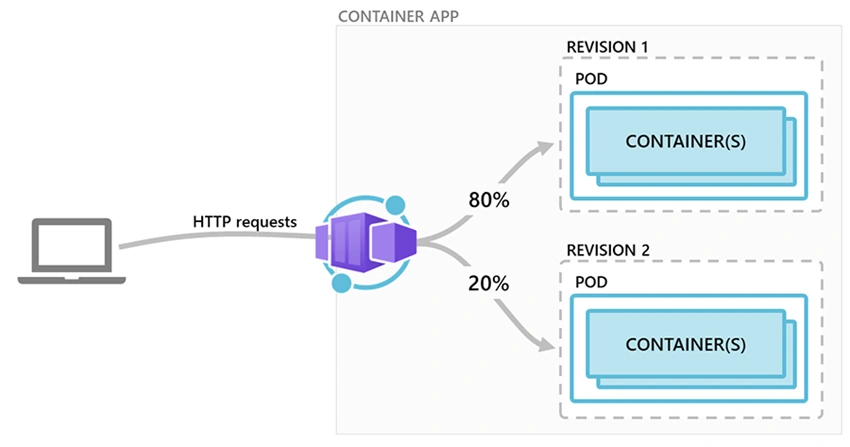
Azure Container Apps enables you to run your containerized applications in a serverless environment. Behind the scenes, it runs containers on Azure Kubernetes Service with Dapr, Envoy, and KEDA support. It allows you to run your API services, Background processing apps, Event Driven applications, and microservices. It provides Http ingress support, allowing you to access the web applications running in Container Apps using Http or Https. Container Apps can scale containers automatically based on CPU, and memory usage, HTTP traffic, Queues or any KEDA (Kubernetes Event Driven Autoscaling) supported parameters.
Azure Container Apps is still in Public Preview, and when it comes into GA, you may see many changes compared to the current preview version of Container Apps. In Container Apps, you need to create a Container App Environment defining the boundary for individual Container Apps. It logically groups multiple Container Apps that share the same Virtual Network and writes logs into the same Log Analytics workspace. You can deploy Container App Environment in an existing Virtual network also. You may deploy your Container Apps in the same Environment when your applications need to communicate using Dapr and share the same Dapr configuration.
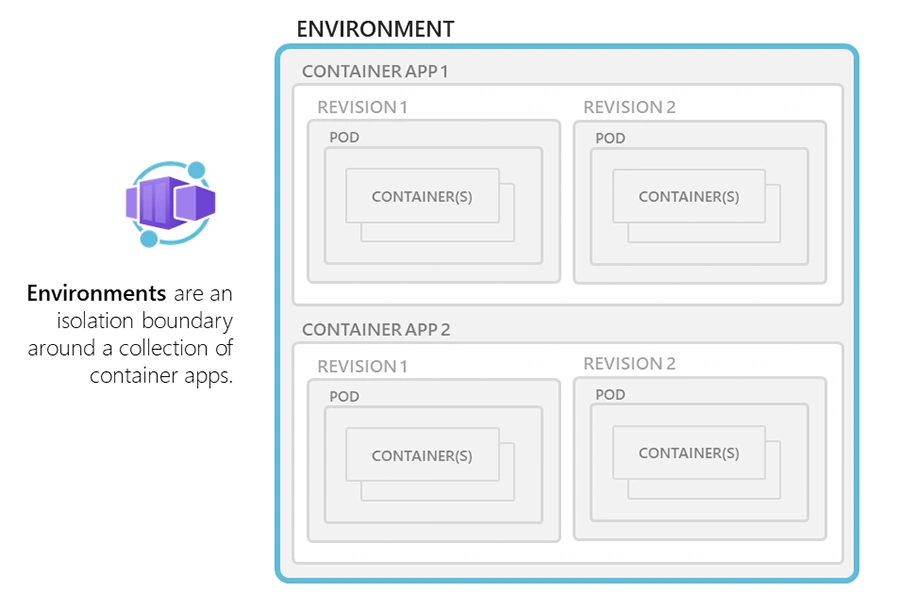
Image 5: Container App Environment
Join the conversation! Your thoughts help the community grow.