Here I will explain how to bind a generic list to a
GridView and how to bind database values to a generic list using ASP.NET. To do
that, first we start with a database table.
Creating Table
Now create a table named UserDetail with
columns Name, Address and Country. The table looks like below.
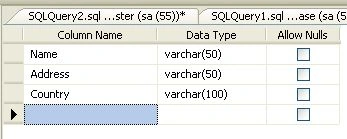
After creating the table, insert some values
into the table.
We can build a collection of objects; we first
need an object. I tend to use a Class1 object for that example. The Class1
object simply holds some information about a user - Name, Address, and Country.
To do that,
add one
class file to your website; for that, right-click on your website and select Add
New Item; a window will open; in that select Class file and give the name
Class1.
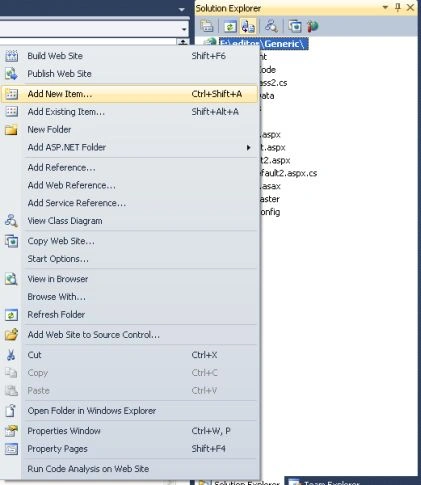
The following is the object I'm going to use.
using
System;
using
System.Collections.Generic;
using
System.Linq;
using
System.Web;
///
<summary>
///
Summary description for Class2
///
</summary>
public
class
Class1
{
//
// TODO: Add constructor logic here
//
private string name;
private string address;
private string country;
public string Name
{
get
{
return name;
}
set
{
name =
value;
}
}
public string Address
{
get
{
return address;
}
set
{
address =
value;
}
}
public string Country
{
get
{
return country;
}
set
{
country =
value;
}
}
}
Now
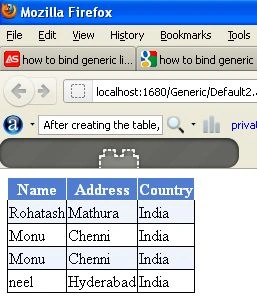
create a new website and drag and drop a GridView control onto the aspx page. The GridView
code looks like this.
<%@
Page Language="C#"
AutoEventWireup="true"
CodeFile="Default2.aspx.cs"
Inherits="Default2"
%>
<!DOCTYPE
html PUBLIC
"-//W3C//DTD XHTML 1.0 Transitional//EN"
"http://www.w3.org/TR/xhtml1/DTD/xhtml1-transitional.dtd">
<html
xmlns="http://www.w3.org/1999/xhtml">
<head
runat="server">
<title></title>
</head>
<body>
<form
id="form1"
runat="server">
<div>
<asp:GridView
runat="server"
ID="gvUserDetails"
AutoGenerateColumns="false">
<RowStyle
BackColor="#EFF3FB"
/>
<FooterStyle
BackColor="#507CD1"
Font-Bold="True"
ForeColor="White"
/>
<PagerStyle
BackColor="#2461BF"
ForeColor="White"
HorizontalAlign="Center"
/>
<HeaderStyle
BackColor="#507CD1"
Font-Bold="True"
ForeColor="White"
/>
<AlternatingRowStyle
BackColor="White"
/>
<Columns>
<asp:BoundField
HeaderText="Name"
DataField="Name"
/>
<asp:BoundField
HeaderText="Address"
DataField="Address"
/>
<asp:BoundField
HeaderText="Country"
DataField="Country"
/>
</Columns>
</asp:GridView>
</div>
</form>
</body>
</html>
Now that we have an object, we need a collection to hold them.
One of my favorite collection objects is the List, located in the
System.Collections.Generic namespace, so we'll start with that.
List<Class1>
obj1 = new List<Class1>();
Connection
String
string
strConnection = "Data Source=.; uid=sa; pwd=wintellect;database=Genericdatabase;";
Now double-click on the form and add the following code in Default.aspx.cs file.
using
System;
using
System.Collections.Generic;
using
System.Data;
using
System.Data.SqlClient;
public
partial class
Default2 : System.Web.UI.Page
{
List<Class1>
obj1 = new List<Class1>();
protected void Page_Load(object
sender, EventArgs e)
{
if (!IsPostBack)
{
BindUserDetails();
}
}
protected void BindUserDetails()
{
obj1 = GetUserDetails();
gvUserDetails.DataSource = obj1;
gvUserDetails.DataBind();
}
protected List<Class1>
GetUserDetails()
{
string strConnection =
"Data Source=.; uid=sa; pwd=wintellect;database=Genericdatabase;";
DataTable dt = new
DataTable();
SqlConnection con =
new SqlConnection(strConnection);
con.Open();
SqlCommand cmd = new
SqlCommand("select
* from UserDetail", con);
SqlDataAdapter da =
new SqlDataAdapter(cmd);
da.Fill(dt);
if (dt.Rows.Count > 0)
{
for (int i = 0;
i < dt.Rows.Count; i++)
{
Class1 userinfo =
new Class1();
userinfo.Name
= dt.Rows[i]["Name"].ToString();
userinfo.Address = dt.Rows[i]["Address"].ToString();
userinfo.Country = dt.Rows[i]["Country"].ToString();
obj1.Add(userinfo);
}
}
return obj1;
}
}


Join the conversation! Your thoughts help the community grow.