

Introduction
In most of the interviews while going in the machine test round companies are asking to do this task and many freshers are failing to complete this task. So, I thought to write this article to help them.
Let us create a treeview which will show all the projects and their modules. Now we will finish this task in step by step...
Step 1: Firstly, we will design our database,
Step 1: Firstly, we will design our database,
- Create a Database with name “ProjectTreeView”.
- Within the database create two tables “Project” and “Module” like the following figure:
Table:Project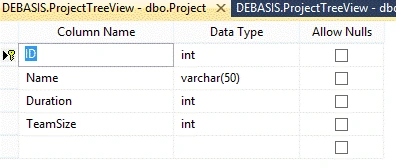
- Make “ID” column as Primary key with auto generated value.
Now enter some sample data within table “Project” like the following:

Table: Module
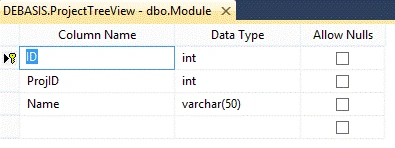
- Make the “ID” column as Primary Key with auto generated value.
- Make ProjID as Foreign Key.
>> Now Enter some data within it.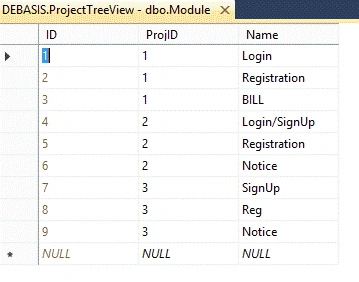
Your database structure should be like this.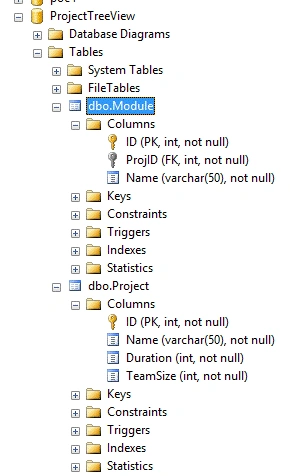
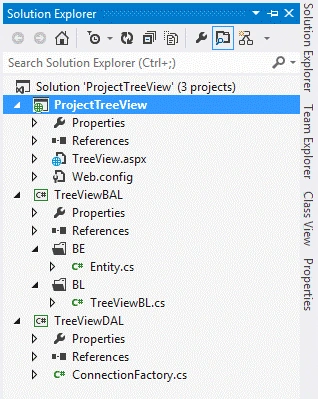
Step 2: Let us prepare our solution,
- Open Visual Studio, add a new project, web, then ASP.NET Empty Web Application.
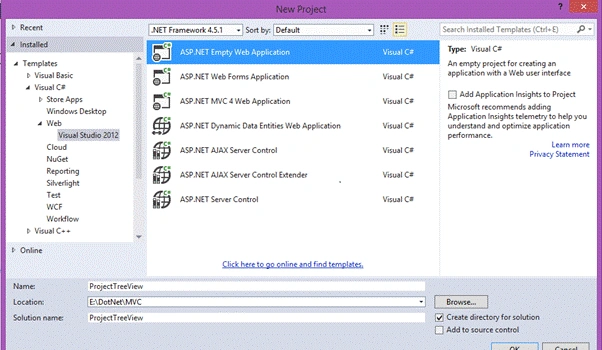
o Give Name : ProjectTreView
Step 3:
- Now right click on the Solution head, the click Add and then New Project
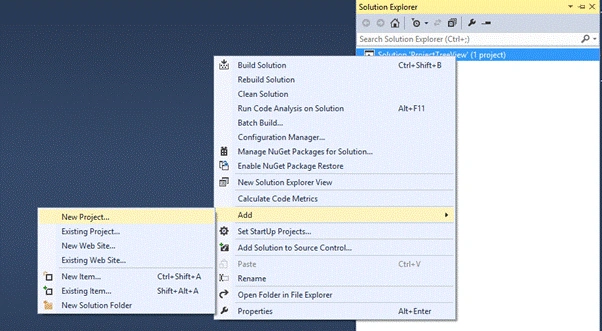
- Now New project dialog box will appear.
- From that dialog box, choose Visual C# from the left side, then click Class Library.
- Name it as “TreeViewBAL” like below.
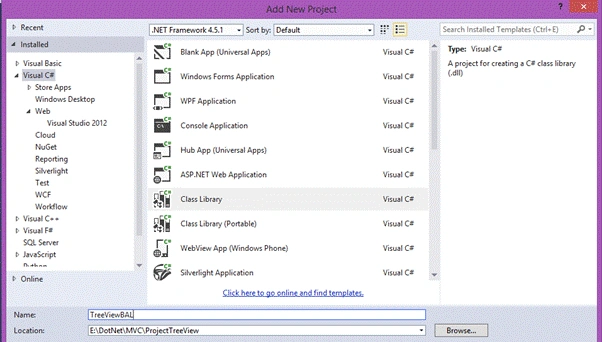
- Press ok.
Step 4:
- Now right click on the class Library “TreeViewBAL”, Add, then click New Folder.
- Name it as “BE”.
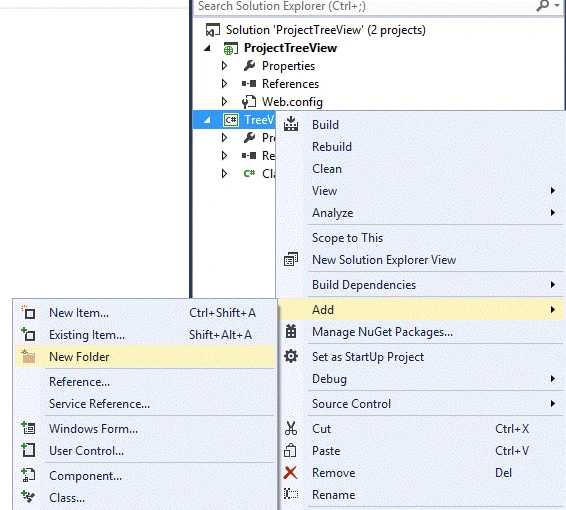
- Similarly add another folder with name “BL”.
Step 5:
- Now add another project of type class file, name it “TreeviewDAL” similarly as we have done in Step4.
Now the 3 tire architecture design is ready, but we have to connect them first before we start coding...
Add the reference of Project “TreeViewDAL” to “TreeViewBAL” then “TreeViewBAL” to “ProjectTreeView”.
TreeViewDAL -- TreeViewBAL
TreeViewBAL -- ProjectTreeView
Step 6:
- Go to Project “TreeviewDAL” and delete “class1” which is by default present.
- Right click on the project head, click Add, then class
- Name that class as “ConnectionFactory.cs”.
Write the following code inside it.
ConnectionFactory.cs- using System;
- using System.Collections.Generic;
- using System.Data;
- using System.Data.SqlClient;
- using System.Linq;
- using System.Text;
- using System.Configuration;
- namespace TreeViewDAL
- {
- public class ConnectionFactory
- {
- public static string connStr = "sqlcn";
- static SqlConnection conn;
- static SqlCommand cmd;
- static DataTable dt = new DataTable();
- public static DataTable ExecuteCommand(string Text, CommandType CmdType)
- {
- try
- {
- conn = new SqlConnection(ConfigurationManager.ConnectionStrings["MyConStr"].ConnectionString);
- SqlDataReader dr;
- //Opening Connection
- if (conn.State != ConnectionState.Open)
- conn.Open();
- cmd = new SqlCommand(Text, conn);
- cmd.CommandType = CmdType; //Assign the SqlString Type to Command Object
- dr = cmd.ExecuteReader();
- DataTable dt = new DataTable();
- //Loading all data in a datatable from datareader
- dt.Load(dr);
- //Closing the connection
- conn.Close();
- return dt;
- } catch
- {
- throw;
- }
- }
- }
- }
Step 7:
- Similarly like step6, Go to Project “TreeviewBAL” and delete “class1” which is by default present.
- Right click on the BL Folder Add class
- Name the class as “TreeViewBL.cs”.
Write the above code inside it.
TreeViewBL.cs- using System;
- using System.Collections.Generic;
- using System.Data;
- using System.Linq;
- using System.Text;
- using TreeViewBAL.BE;
- using TreeViewBAL.BL;
- namespace TreeViewBAL.BL
- {
- public class TreeViewBL
- {
- public static DataTable GetData(String Query)
- {
- try
- {
- DataTable dt = new DataTable();
- dt = TreeViewDAL.ConnectionFactory.ExecuteCommand(Query, CommandType.Text); //calling the connectionfactory methode from DAL
- return dt;
- } catch (Exception ex)
- {
- throw ex;
- }
- }
- }
- }

Vivek Kumar VishwasPosted Nov 13, 2017, 3:17 AM
<asp:TreeView ID="TreeView1" runat="server" ImageSet="XPFileExplorer" NodeIndent="15"> <HoverNodeStyle Font-Underline="True" ForeColor="#6666AA" /> <NodeStyle Font-Names="Tahoma" Font-Size="8pt" ForeColor="Black" HorizontalPadding="2px" NodeSpacing="0px" VerticalPadding="2px"></NodeStyle> <ParentNodeStyle Font-Bold="False" /> <SelectedNodeStyle BackColor="#B5B5B5" Font-Underline="False" HorizontalPadding="0px" VerticalPadding="0px" /> </asp:TreeView> SqlConnection con = new SqlConnection(ConfigurationManager.ConnectionStrings["constr"].ConnectionString.ToString()); protected void Page_Load(object sender, EventArgs e) { if (!this.IsPostBack) { DataTable dt = this.GetData("SELECT cid,cname, pid , pname FROM TopParent where pid=10"); this.PopulateTreeView(dt, 0, null); BindRepeaterRight(); } } private void PopulateTreeView(DataTable dtParent, int parentId, TreeNode treeNode) { foreach (DataRow row in dtParent.Rows) { TreeNode child = new TreeNode { Text = row["cName"].ToString(), Value = row["cId"].ToString() }; if (parentId == 0) { TreeView1.Nodes.Add(child); DataTable dtChild = this.GetData("select distinct cId, pid, cname from TopParent WHERE pid = " + child.Value); PopulateTreeView(dtChild, int.Parse(child.Value), child); //........................ //string query = "select distinct cId, pid, cname from TopParent WHERE cid = " + child.Value; //SqlCommand cmd = new SqlCommand(query, con); //con.Open(); //SqlDataReader dr; //dr = cmd.ExecuteReader(); //if (dr.Read()) //{ // TreeNode nnode = new TreeNode // { // Text = row["cName"].ToString(), // Value = row["cId"].ToString() // }; // TreeView1.Nodes.Add(nnode); // DataTable dtnChild = this.GetData("select cid,cname from TopParent WHERE cid = " + nnode.Value); // PopulateTreeView(dtnChild, int.Parse(nnode.Value), nnode); //} //con.Close(); } else { treeNode.ChildNodes.Add(child); } } } private DataTable GetData(string query) { DataTable dt = new DataTable(); string constr = ConfigurationManager.ConnectionStrings["constr"].ConnectionString; using (SqlConnection con = new SqlConnection(constr)) { using (SqlCommand cmd = new SqlCommand(query)) { using (SqlDataAdapter sda = new SqlDataAdapter()) { cmd.CommandType = CommandType.Text; cmd.Connection = con; sda.SelectCommand = cmd; sda.Fill(dt); } } return dt; } } please check the code and create 3 level nodes in asp.net c#
Sthitaprajnya Debasis NayakPosted Feb 5, 2016, 9:57 AM
Thanks all...
Sibeesh VenuPosted Feb 1, 2016, 1:14 AM
Nice Share
Shubham KumarPosted Feb 1, 2016, 12:48 AM
Nice
Sthitaprajnya Debasis NayakPosted Jan 30, 2016, 2:40 AM
Thank u Jaipal
Santhakumar MunuswamyPosted Jan 30, 2016, 2:32 AM
Thanks for nice share
Jaipal ReddyPosted Jan 29, 2016, 10:55 PM
Welcome to CsharpCorner . .