

This article shows you how to bind data in GridView controls without using any database. Also, we will learn here how to bind controls with data without using a database. Additionally, how to handle gridview common event in this will be discussed. Here I’ve described more events such as Edit, Update and Delete event.
This is using Image uploading and binding in GridView and then updating image in GridView.
Also read the following articles:
Binding Data in ListView on LinkButton Click
Initial Chamber
Step 1
Open Visual Studio and create an empty website, then provide a suitable name such as BindImageWithoutDB.
Step 2
In Solution Explorer you will get your empty website, then add some web forms.
BindImageWithoutDB (your empty website). Right-click and select Add New Item Web Form. Name it BindImageWithoutDB.aspx.
Design Chamber
Step-3
Open the BindImageWithoutDB.aspx file and write some code for the design of the application.
Step3.1
Put stylesheet code in head chamber of page.
Set your style of page according to your need of design as in the following:
Initial Chamber
Step 1
Open Visual Studio and create an empty website, then provide a suitable name such as BindImageWithoutDB.
Step 2
In Solution Explorer you will get your empty website, then add some web forms.
BindImageWithoutDB (your empty website). Right-click and select Add New Item Web Form. Name it BindImageWithoutDB.aspx.
Design Chamber
Step-3
Open the BindImageWithoutDB.aspx file and write some code for the design of the application.
Step3.1
Put stylesheet code in head chamber of page.
Set your style of page according to your need of design as in the following:
- <style type="text/css">
- body {
- color: #333;
- text-align: center;
- background-color: aqua;
- }
- </style>
Choose control from toolbox and put on your design page as in the following code snippet:
- <div style="float: left">
- <asp:Label ID="Label1" runat="server" Text="Display an Image :"></asp:Label>
- <asp:FileUpload ID="FileUpload1" runat="server" />
- <asp:Button ID="btnUpload" runat="server" Text="Display" OnClick="UploadImage" />
- </div>
- <asp:Label ID="lblResult" runat="server" />
- <br />
- <br />
- <div style="float: left">
- <asp:GridView ID="GridView1" runat="server" AutoGenerateColumns="False" OnRowCancelingEdit="GridView1_RowCancelingEdit" DataKeyNames="imgname" CellPadding="4"
- OnRowEditing="GridView1_RowEditing" OnRowUpdating="GridView1_RowUpdating" OnRowDeleting="GridView1_RowDeleting" HeaderStyle-BackColor="Tomato">
- <Columns>
- <asp:TemplateField HeaderText="Sr.No" HeaderStyle-Width="200px">
- <ItemTemplate>
- <asp:Label ID="lblImgId" runat="server" Text='<%#Container.DataItemIndex+1%>'></asp:Label>
- </ItemTemplate>
- </asp:TemplateField>
- <asp:TemplateField HeaderText="Date">
- <ItemTemplate>
- <asp:Label ID="lblDate" runat="server" ClientIDMode="Static" Text='<%# DataBinder.Eval(Container.DataItem,"imgdate") %>'></asp:Label>
- </ItemTemplate>
- </asp:TemplateField>
- <asp:TemplateField HeaderText="Name">
- <ItemTemplate>
- <asp:Label ID="lblTextBox1" runat="server" Text='<%# DataBinder.Eval(Container.DataItem,"imgname") %>'></asp:Label>
- </ItemTemplate>
- </asp:TemplateField>
- <asp:TemplateField HeaderText="Image Name">
- <ItemTemplate>
- <asp:Image ID="Image" runat="server" Height="100px" Width="20%" ImageUrl='<%# DataBinder.Eval(Container.DataItem,"imgurl") %>' />
- </ItemTemplate>
- <EditItemTemplate>
- <asp:Image ID="img_user" runat="server" ImageUrl='<%# Eval("imgurl") %>'
- Height="80px" Width="100px" /><br />
- <asp:FileUpload ID="FileUpload1" runat="server" />
- </EditItemTemplate>
- </asp:TemplateField>
- <asp:TemplateField HeaderStyle-Width="150px">
- <ItemTemplate>
- <asp:LinkButton ID="LkB1" runat="server" CommandName="Edit">Edit</asp:LinkButton>
- <asp:LinkButton ID="LkB11" runat="server" CommandName="Delete">Delete</asp:LinkButton>
- </ItemTemplate>
- <EditItemTemplate>
- <asp:LinkButton ID="LkB2" runat="server" CommandName="Update">Update</asp:LinkButton>
- <asp:LinkButton ID="LkB3" runat="server" CommandName="Cancel">Cancel</asp:LinkButton>
- </EditItemTemplate>
- </asp:TemplateField>
- </Columns>
- </asp:GridView>
- </div
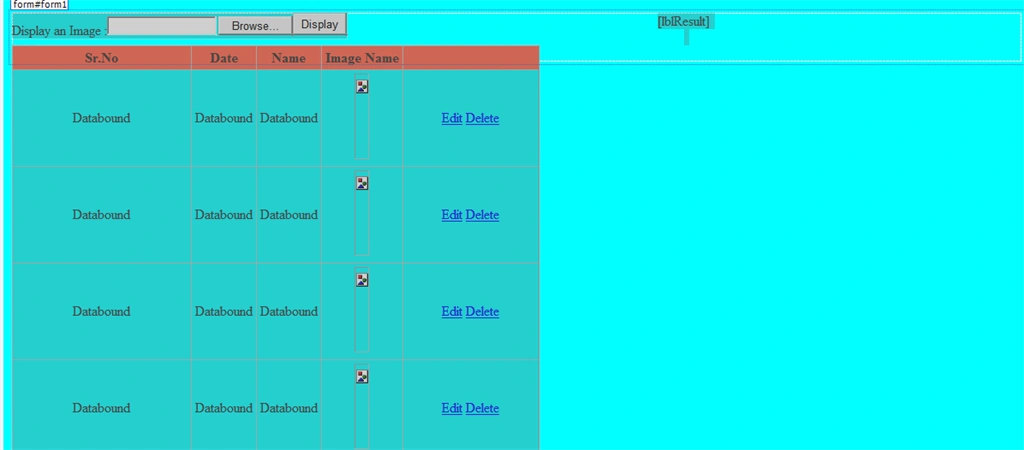
Here, I've designed the GridView Control and uploader used some property as in the following code snippet:
- <%@ Page Language="C#" AutoEventWireup="true" CodeFile="BindImageWithoutDB.aspx.cs" Inherits="BindImageWithoutDB" %>
- <!DOCTYPE html>
- <html xmlns="http://www.w3.org/1999/xhtml">
- <head runat="server">
- <title>C-sharp corner by Upendra</title>
- <style type="text/css">
- body {
- color: #333;
- text-align: center;
- background-color: aqua;
- }
- </style>
- </head>
- <body>
- <form id="form1" runat="server">
- <div style="float: left">
- <asp:Label ID="Label1" runat="server" Text="Display an Image :"></asp:Label>
- <asp:FileUpload ID="FileUpload1" runat="server" />
- <asp:Button ID="btnUpload" runat="server" Text="Display" OnClick="UploadImage" />
- </div>
- <asp:Label ID="lblResult" runat="server" />
- <br />
- <br />
- <div style="float: left">
- <asp:GridView ID="GridView1" runat="server" AutoGenerateColumns="False" OnRowCancelingEdit="GridView1_RowCancelingEdit" DataKeyNames="imgname" CellPadding="4"
- OnRowEditing="GridView1_RowEditing" OnRowUpdating="GridView1_RowUpdating" OnRowDeleting="GridView1_RowDeleting" HeaderStyle-BackColor="Tomato">
- <Columns>
- <asp:TemplateField HeaderText="Sr.No" HeaderStyle-Width="200px">
- <ItemTemplate>
- <asp:Label ID="lblImgId" runat="server" Text='<%#Container.DataItemIndex+1%>'></asp:Label>
- </ItemTemplate>
- </asp:TemplateField>
- <asp:TemplateField HeaderText="Date">
- <ItemTemplate>
- <asp:Label ID="lblDate" runat="server" ClientIDMode="Static" Text='<%# DataBinder.Eval(Container.DataItem,"imgdate") %>'></asp:Label>
- </ItemTemplate>
- </asp:TemplateField>
- <asp:TemplateField HeaderText="Name">
- <ItemTemplate>
- <asp:Label ID="lblTextBox1" runat="server" Text='<%# DataBinder.Eval(Container.DataItem,"imgname") %>'></asp:Label>
- </ItemTemplate>
- </asp:TemplateField>
- <asp:TemplateField HeaderText="Image Name">
- <ItemTemplate>
- <asp:Image ID="Image" runat="server" Height="100px" Width="20%" ImageUrl='<%# DataBinder.Eval(Container.DataItem,"imgurl") %>' />
- </ItemTemplate>
- <EditItemTemplate>
- <asp:Image ID="img_user" runat="server" ImageUrl='<%# Eval("imgurl") %>'
- Height="80px" Width="100px" /><br />
- <asp:FileUpload ID="FileUpload1" runat="server" />
- </EditItemTemplate>
- </asp:TemplateField>
- <asp:TemplateField HeaderStyle-Width="150px">
- <ItemTemplate>
- <asp:LinkButton ID="LkB1" runat="server" CommandName="Edit">Edit</asp:LinkButton>
- <asp:LinkButton ID="LkB11" runat="server" CommandName="Delete">Delete</asp:LinkButton>
- </ItemTemplate>
- <EditItemTemplate>
- <asp:LinkButton ID="LkB2" runat="server" CommandName="Update">Update</asp:LinkButton>
- <asp:LinkButton ID="LkB3" runat="server" CommandName="Cancel">Cancel</asp:LinkButton>
- </EditItemTemplate>
- </asp:TemplateField>
- </Columns>
- </asp:GridView>
- </div>
- </form>
- </body>
- </html>

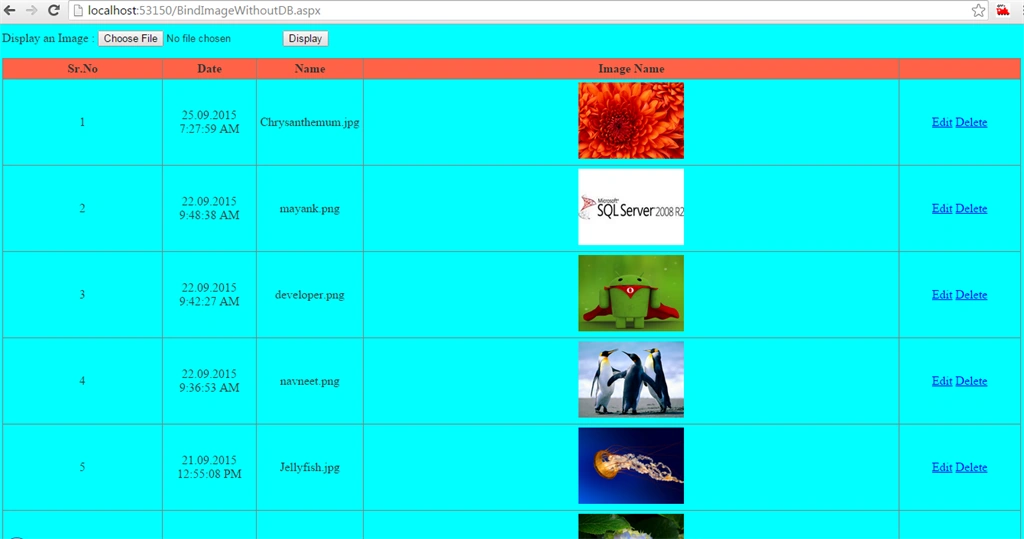
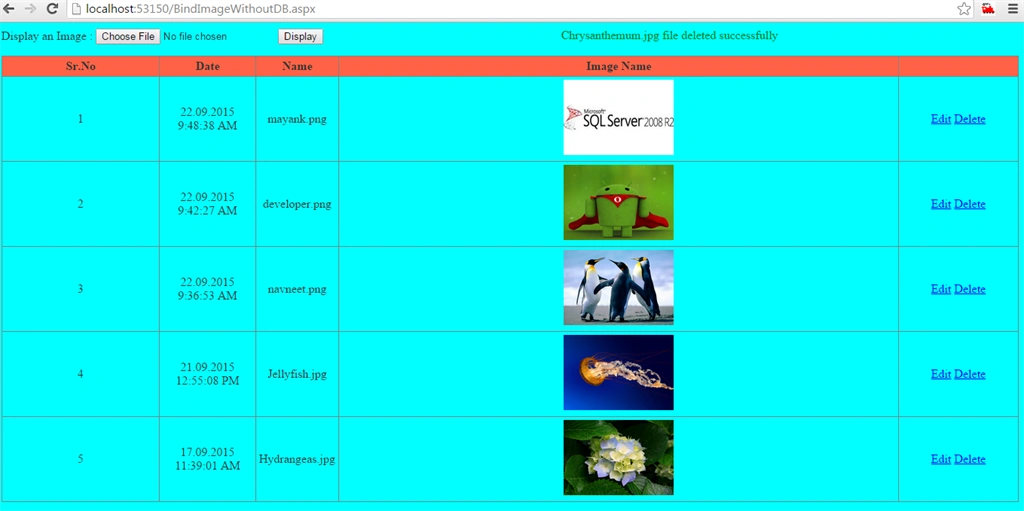
manish kumarPosted Mar 24, 2018, 1:56 PM
It having error i tried many times but same error occur (var files = from file in DirInfo.EnumerateFiles())
Vipul MalhotraPosted Sep 26, 2015, 4:05 AM
nice Article
Ajeet MishraPosted Sep 26, 2015, 2:10 AM
nice
Ankit BansalPosted Sep 26, 2015, 12:29 AM
Awesome..thanks for sharing..
Harshad PansuriyaPosted Sep 26, 2015, 12:17 AM
Nice one
Nilesh JadavPosted Sep 26, 2015, 12:05 AM
hahah !! Upendra Pratap Shahi Nice article sir !! But what about chambers ?? Just kidding
Shridhar SharmaPosted Sep 25, 2015, 2:35 PM
nice share :)
Santhakumar MunuswamyPosted Sep 25, 2015, 2:18 PM
Good one
Sujeet SumanPosted Sep 25, 2015, 2:15 PM
Nice Article.............