

Introduction
Hi friends!! In this article, we will learn how to calculate the driving distance between two places using Google Maps Distance Matrix API in Android. In real life, many times we want to know how far away our destination or our parcel or any product etc. is from our location. We can achieve this feature by using Google Maps Distance Matrix API. We need to pass some parameters in Google API then we get the distance between two places.
Prerequisites
- Having the latest version of Android Studio
- Having a basic knowledge of Android
- Having a basic knowledge of API
Example
We are going to calculate the driving distance using the below API URL.
API URL: https://maps.googleapis.com/maps/api/distancematrix/json?origins=28.6280,77.3649&destinations=29.4168, 77.4673&mode=driving&key=YOUR_GOOGLE_MAPS_API_KEY
Generate your API key Using the following URL Generate Google Map API Key
API Response
{
    "destination_addresses": [
        "Nai Abadi Sisauli, Sisauli, Uttar Pradesh 251319, India"
    ],
    "origin_addresses": [
        "065, Block A, Industrial Area, Sector 62, Noida, Uttar Pradesh 201301, India"
    ],
    "rows": [
        {
            "elements": [
                {
                    "distance": {
                        "text": "122 km",
                        "value": 122484
                    },
                    "duration": {
                        "text": "2 hours 13 mins",
                        "value": 7960
                    },
                    "status": "OK"
                }
            ]
        }
    ],
    "status": "OK"
}
Let's start with Android Studio,
Create New Android Project In Android Studio
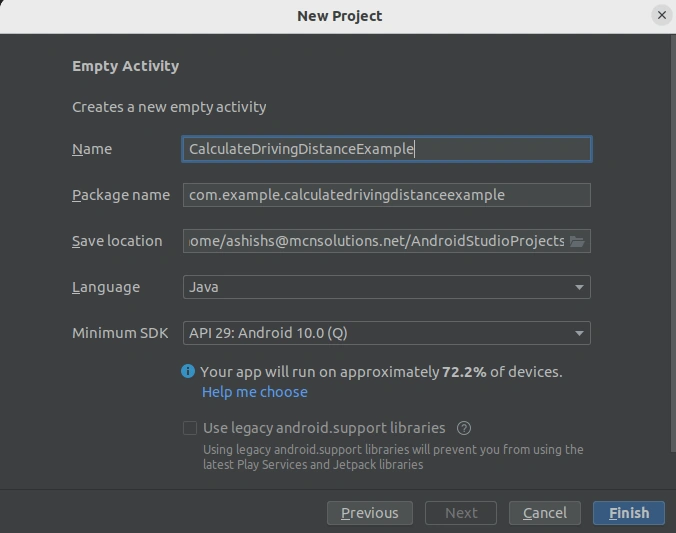
Open your Android Studio and create a new project. Edit the project name, android language, iOS language, and platform, and click Finish button.
Add the required dependency in the build.gradle
In our project, we need to add the retrofit dependency for sending API requests and parsing JSON.
implementation 'com.squareup.retrofit2:retrofit:2.7.2'
implementation 'com.squareup.retrofit2:converter-gson:2.7.2'
implementation 'com.squareup.okhttp3:okhttp:3.6.0'
Add Internet Permission into AndroidManifest.xml
<uses-permission android:name="android.permission.INTERNET"/>
Create a model class
We need to create a model class for parsing JSON. We can use this model class to easily parse the response into structured Java objects.
DistanceAndTimeResponse.java
import com.google.gson.annotations.Expose;
import com.google.gson.annotations.SerializedName;
import java.util.List;

public class DistanceAndTimeResponse {

    @Expose
    @SerializedName("destination_addresses")
    private String[] destination_addresses;

    @Expose
    @SerializedName("origin_addresses")
    private String[] origin_addresses;

    @Expose
    @SerializedName("rows")
    private List<Rows> rows;

    @Expose
    @SerializedName("status")
    private String status;


    public String[] getOrigin_addresses() {
        return origin_addresses;
    }

    public void setOrigin_addresses(String[] origin_addresses) {
        this.origin_addresses = origin_addresses;
    }

    public String[] getDestination_addresses() {
        return destination_addresses;
    }

    public void setDestination_addresses(String[] destination_addresses) {
        this.destination_addresses = destination_addresses;
    }

    public String getStatus() {
        return status;
    }

    public void setStatus(String status) {
        this.status = status;
    }

    public List<Rows> getRows() {
        return rows;
    }

    public void setRows(List<Rows> rows) {
        this.rows = rows;
    }

    public class Rows {
        @Expose
        @SerializedName("elements")
        public List<elements> element;

        public List<elements> getElement() {
            return element;
        }

        public void setElement(List<elements> element) {
            this.element = element;
        }
    }


    public class elements {

        @Expose
        @SerializedName("distance")
        private distance distance;

        @Expose
        @SerializedName("duration")
        private duration duration;

        public DistanceAndTimeResponse.distance getDistance() {
            return distance;
        }

        public void setDistance(DistanceAndTimeResponse.distance distance) {
            this.distance = distance;
        }

        public DistanceAndTimeResponse.duration getDuration() {
            return duration;
        }

        public void setDuration(DistanceAndTimeResponse.duration duration) {
            this.duration = duration;
        }
    }

    public class distance {

        @Expose
        @SerializedName("text")
        private String text;

        @Expose
        @SerializedName("value")
        private String value;

        public String getText() {
            return text;
        }

        public void setText(String text) {
            this.text = text;
        }

        public String getValue() {
            return value;
        }

        public void setValue(String value) {
            this.value = value;
        }
    }

    class duration {

        @Expose
        @SerializedName("text")
        private String text;

        @Expose
        @SerializedName("value")
        private String value;

        public String getText() {
            return text;
        }

        public void setText(String text) {
            this.text = text;
        }

        public String getValue() {
            return value;
        }

        public void setValue(String value) {
            this.value = value;
        }
    }

}
Create an ApiService.java class
Here, we are creating an interface and defining the API endpoint and base URL.
import retrofit2.Call;
import retrofit2.http.GET;
import retrofit2.http.Query;


public interface ApiService {
    String BASE_URL = "https://maps.googleapis.com/maps/api/distancematrix/";

    String ENDPOINT_GET_DISTANCE_FROM_TWO_LAT_LONG="json?";

    @GET(ENDPOINT_GET_DISTANCE_FROM_TWO_LAT_LONG)
    Call<DistanceAndTimeResponse> getDistanceAndTimeData(
            @Query("origins") String origins,
            @Query("destinations") String destinations,
            @Query("mode") String mode,
            @Query("key") String key);

}
Join the conversation! Your thoughts help the community grow.