This article will explain how to delete and update Child Table records implicitly when updating or deleting a Parent Table.
Introduction
CASCADING referential integrity in SQL Server.
Cascading Referential integrity applies to the DELETE and UPDATE statements only because they cause changes to existing rows.
There are two actions that can take place for either operation:
- CASCADE on DELETE
- CASCADE on UPDATE
Let's create two tables, one is the parent table with PRIMARY KEY and the other is child table with FOREIGN KEY.
CREATE TABLE EmpMaster
(
EmpId INT PRIMARY KEY,
EmpName VARCHAR(25)
);
CREATE TABLE EmpDetails
(
EmpId INT FOREIGN KEY REFERENCES EmpMaster(EmpId)
ON DELETE CASCADE,
DeptId INT PRIMARY KEY,
DeptName VARCHAR(20)
);
Inserting Records
insert into EmpMaster(EmpId,EmpName) values(1,'Kim')
insert into EmpMaster(EmpId,EmpName) values(2,'Slaut')
insert into EmpMaster(EmpId,EmpName) values(3,'John')
insert into EmpDetails(EmpId ,DeptId ,DeptName ) values(1,101,'AAA')
insert into EmpDetails(EmpId ,DeptId ,DeptName ) values(2,101,'AAA')
insert into EmpDetails(EmpId ,DeptId ,DeptName ) values(3,103,'CCC')
Why CASCADE must be used?
When you try to delete or update a Primary Key record without deleting or updating the Foreign Key record the following Error will occur. For example deleting a parent table record of EmpId.
delete from EmpMaster where EmpId=3
Server: Msg 547, Level 16, State 1, Line 1
The DELETE statement conflicted with the REFERENCE constraint "FK__EmpDetail__EmpId__147C05D0". The conflict occurred in database "master", table "dbo.EmpDetails", column 'EmpId'.
The statement has been terminated.
Update EmpMaster set EmpId=30 where EmpId=3Server: Msg 547, Level 16, State 1, Line 1
The UPDATE statement conflicted with the REFERENCE constraint "FK__EmpDetail__EmpId__1293BD5E". The conflict occurred in database "master", table "dbo.EmpDetails", column 'EmpId'.
To Avoid this type of error manually first you have to delete or update the Foreign Key column of child table then only delete or update SQL statement will execute on Parent Table. So to avoid this type of manually checking CASCADE is useful.
Explanation
1. Creating On DELETE CASCADE
One of the Foreign Key Constraints uses ON DELETE CASCADE option which may be added after the REFERENCES clause of CREATE TABLE command, as shown here.
CREATE TABLE EmpDetails
(
EmpId INT FOREIGN KEY REFERENCES EmpMaster(EmpId)
ON DELETE CASCADE,
DeptId INT,
DeptName VARCHAR(20)
)
Use of ON DELETE CASCADE
If CASCADE is specified, a row is deleted from the referencing table if that row is deleted from the parent table. Cascade deletes all rows containing data involved in the foreign key relationship. Deleting a record in the 'EmpMaster' table, all corresponding Foreign Key records in the Employees table must be deleted.
For example deleting a parent record of EmpId.In EmpDetails (child table) I am not deleting any child records.
delete from EmpMaster where EmpId=1
Let's see the result of both tables:

Select * from EmpMaster Select * from EmpDetails
(Parent Table) (Child Table)
You can see by using ON DELETE CASCADE on Foreign Key column you can delete the child table implicitly when deleting the parent table. No Error is raised here.
2. Use of ON UPDATE CASCADE
If the primary key for a record in the 'EmpMaster' table changes, all corresponding records in the 'EmpDetails' table must be updated using a cascading update.
Creating the ON UPDATE CASCADE on Foreign Key Table:
drop table empdetails
CREATE TABLE EmpDetails
(
EmpId INT FOREIGN KEY REFERENCES EmpMaster(EmpId)
ON UPDATE CASCADE,
DeptId INT,
DeptName VARCHAR(20)
)
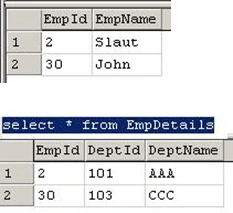
For example updating a Parent Record of EmpId.In EmpDetails (child table) I am not updating any child records.
Update EmpMaster set EmpId=30 where EmpId=3
Select * from EmpMaster
You can also create and use both ON DELETE and ON UPDATE CASCADE in a foreign key column Table as follows.
CREATE TABLE EmpDetails
(
EmpId INT FOREIGN KEY REFERENCES EmpMaster(EmpId)
ON DELETE CASCADE
On UPDATE CASCADE,
DeptId INT,
DeptName VARCHAR (20)
)
Hope this article helps you lot and enjoyed it!


Pawan TiwariPosted Apr 17, 2017, 1:45 AM
Thank you. Nice explain. Please describe other methods of cascading referential integrity i.e. NO ACTION, SET NULL AND SET DEFAULT
Syed ShakeerPosted Sep 23, 2014, 6:05 AM
Thanks Piyush
piyush sharmaPosted Sep 23, 2014, 5:41 AM
Nice artical
Arpit KumarPosted May 7, 2014, 8:06 AM
I enjoy the post Thanks a lot
esraa eldeebeditedPosted May 4, 2011, 9:16 PMEdited May 4, 2011, 9:16 PM
it is very useful and important . it's really excellent .thank yooooooooooooooooooooooou
Heba NasrPosted May 4, 2011, 9:12 PM
thanks alot for this article