

In the series of behavioral design patterns, the Command Pattern is the one that encapsulates method invocation. We can issue requests to objects without knowing anything about the operation being requested or the receiver of the request. Let’s go into detail and see what it is:
The Command Pattern
The Command Pattern encapsulates a request as an object, thereby letting you parameterize clients with various requests, queue or log requests, and support undoable operations. (Gamma et. al.).
Uses of The Command Pattern
Let’s understand it with an example of the use of the Command Pattern.
I will use the same example I did in my first blog; The Remote Control. A company that manufactures the remote control, has several vendors (classes). These vendors have their own set of methods and interfaces to be invoked, such as On, Off, Dim, IncreaseVolumne, DecreaseVolume and so on and so forth. There are not many common interfaces among several vendor classes other than ON or OFF.
The manufacturing company can expect more diverse classes in the future with just as diverse methods. A bad design for the problem would be:
If(slot1== TV), then light.On(),
else if(slot1==Washmachine), then washmachine.On()
One way of analyzing the preceding problem is to follow the Separation of Concerns Principle: The remote should know how to interpret button presses and make requests, but it should not know a lot about home automation.
Goals of a good design for this situation:
- Separate the remote’s ability to execute a command from the variety of operations and devices that can be supported.
- We should analyze our problem with the following two questions:
- What varies?
Devices and operations. - What stays the same?
The structure of the remote control.
- What varies?
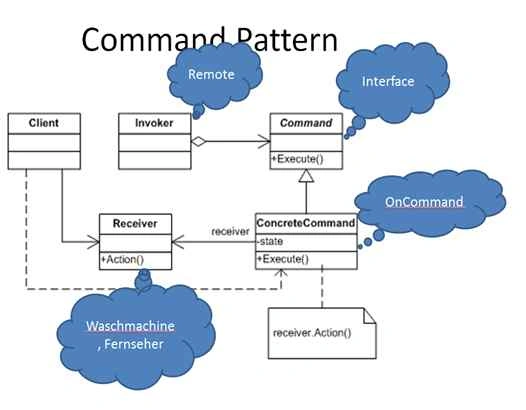
For the sake of a better understanding, I have mapped participants in the pattern with probable classes in my example.
Participants
The classes and/or objects participating in this pattern are:
- Command (Command)
– declares an interface for executing an operation. - ConcreteCommand (SwitchOnWaschmachine)
– defines a binding between a Receiver object and an action.
– implements Execute by invoking the corresponding operation(s) on Receiver. - Client (CommandApp)
– creates a ConcreteCommand object and sets its receiver. - Invoker (Remote)
– asks the command to carry out the request. - Receiver (Waschmachine, Fernseher, Microwelle)
– knows how to do the operations associated with carrying out the request.
Sequence Diagram
A Sequence Diagram shows how multiple participants communicates among each other.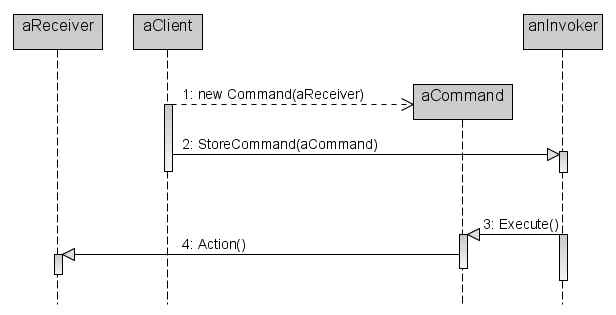
Step-by-step analysis:
- The client creates a ConcreteCommand object and specifies its receiver.
- An invoker object stores the concreteCommand object.
- The Invoker issues a request by calling Execute on the command. When commands are undoable, ConcreteCommand stores for undoing the command prior to invoking Execute.
- The concreteCommand object invokes operations on its receiver to carry out the request.
As it is said, if you are able to execute an action, you should also know how to undo the executed action. The same applies to our example too. If a household is started, the undo button should be able to shut it down. Or let’s say any last executed action should be reset when the undo button is pressed.
How to undo it
- Add undo() to the Command interface.
- Each ConcreteCommand must know how to undo the action it executed.
- Make the Remote remember the last command executed and call it’s undo method for the undo button.
- How does a remote remember a previously executed command?
- Undo for.
- Oven: simple (does an Oven need the hardcoded previous state on/off?).
- Washing machine: ask the device for the state before execution.
Command Pattern in action
Abstract Command class:
- public abstract class ICommand
- {
- public abstract void Exceute();
- public abstract void Undo();
- }
An Oven and Washing machine are receivers in our examples. They only know how can they be switched on or switched off.
Oven
- public class Oven
- {
- internal void SwitchOff()
- {
- MessageBox.Show("Oven is off");
- }
- internal void SwitchOn()
- {
- MessageBox.Show("Oven is on");
- }
- }
- //Washmachine
- public class Waschmachine
- {
- internal void SwitchOn()
- {
- MessageBox.Show("Switching On Washing Machine");
- }
- internal void SwitchOff()
- {
- MessageBox.Show("Switching Off Washing Machine");
- }
- }
Concrete commands implement abstract command interfaces. The Execute method in a concrete class encapsulates method invocation (_waschmachine.SwitchOn()). Concrete commands also know their receivers.
- public class SwitchOnWaschmachine:ICommand
- {
- private readonly Waschmachine _waschmachine;
- public SwitchOnWaschmachine(Waschmachine waschmachine)
- {
- _waschmachine = waschmachine;
- }
- public override void Exceute()
- {
- _waschmachine.SwitchOn();
- }
- public override void Undo()
- {
- _waschmachine.SwitchOff();
- }
- public override string ToString()
- {
- return "Washing Machine";
- }
- }
Hadshana KamalanathanPosted Sep 7, 2018, 12:02 PM
Thanks for sharing...