Introduction : The
ConditionedActivityGroup (CAG) activity provides condition-driven activity
execution that allows us to define very flexible behavior within our workflow.
The CAG contains a collection of child activities. Which is defined as a
Switch condition, but the conditions are applied to the activities themselves.
The Conditional logic use different permutation of activity execution, including parallel execution of activities , partially sequential execution etc.
Step 1 : Open Visual
Studio 2010.
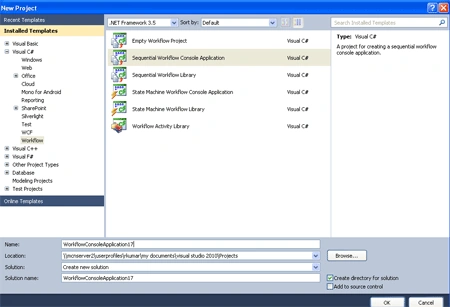
When we click in OK then
Workflow1.cs [Design] window open.
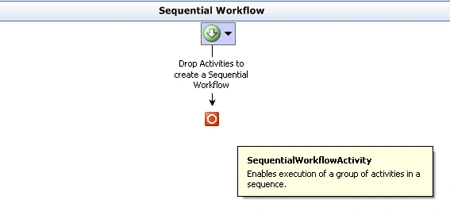
Step 2 : Drag activity
from Toolbox.
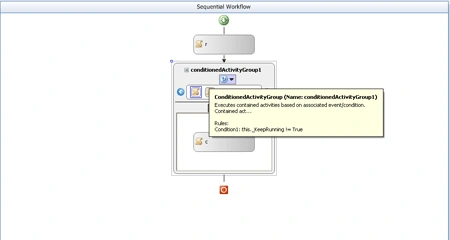
Step 3 : Now again drag
CodeActivity inside the ConditionedActivityGroup at this condition define two
CodeActivty for the application. Which are consist activity name and condition.
When we click first CodeActivity then Editing show Editing[1/2] and select other
activity then show Editing[2/2].
Step 4 : Now we select
CodeActivity and right-click.
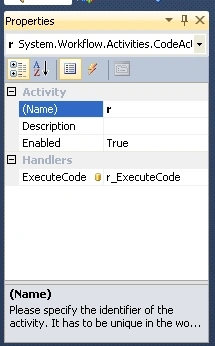
Step 5 : We select
ConditionedActivityGroup and right-click.
-
Go to the properties window.
-
Define UnitCondition,
ConditionName, Expression.
Expression :
this._KeepRunning != True

Step 6 : Again select
code activity inside the ConditionedActivityGroup.
Expression :
this._iChoice == 1
Step 7 : Go to
Workflow1.cs option and write the below code.
Code :
using
System;
using
System.ComponentModel;
using
System.ComponentModel.Design;
using
System.Collections;
using
System.Linq;
using
System.Workflow.ComponentModel.Compiler;
using
System.Workflow.ComponentModel.Serialization;
using
System.Workflow.ComponentModel;
using
System.Workflow.ComponentModel.Design;
using
System.Workflow.Runtime;
using
System.Workflow.Activities;
using
System.Workflow.Activities.Rules;
namespace
WorkflowConsoleApplication18
{
public sealed
partial class
Workflow1 :
SequentialWorkflowActivity
{
public Workflow1()
{
InitializeComponent();
}
private int
_iChoice;
public int
Choice
{
get {
return _iChoice; }
set { _iChoice =
value; }
}
private bool
_KeepRunning = true;
public bool
KeepRunning
{
get {
return _KeepRunning; }
set { _KeepRunning =
value; }
}
private void
r_ExecuteCode(object sender,
EventArgs e)
{
Console.WriteLine();
Console.WriteLine("*******ConditionalActivity
Workflow***********");
Console.WriteLine("What
do you want to do!");
Console.WriteLine("1.
Greeting");
Console.WriteLine("2.
Good Bye");
Console.WriteLine("Anything
else: Exit");
Console.Write("Enter
Choice");
switch (Console.ReadKey().Key)
{
case ConsoleKey.D1:
Choice = 1;
break;
case
ConsoleKey.NumPad1:
Choice = 1;
break;
case
ConsoleKey.D2:
Choice = 2;
break;
case
ConsoleKey.NumPad2:
Choice = 2;
break;
default:
Choice = -1;
KeepRunning = false;
break;
}
// KeepRunning = false;
private void
c_ExecuteCode(object sender,
EventArgs e)
{
Console.WriteLine("Exiting
the Conditional Activity");
}
private void
m_ExecuteCode(object sender,
EventArgs e)
{
Console.WriteLine();
Console.WriteLine("Enter
your Name");
string sName =
Console.ReadLine();
Console.WriteLine("Good
Morning {0}, Have a nice day", sName);
KeepRunning = false;
Console.ReadLine();
}
}
}
Step 8 : Go to
Program.cs option and write the below code.
Code :
using
System;
using
System.Collections.Generic;
using
System.Linq;
using
System.Text;
using
System.Threading;
using
System.Workflow.Runtime;
using
System.Workflow.Runtime.Hosting;
namespace
WorkflowConsoleApplication18
{
class Program
{
static void
Main(string[] args)
{
using (WorkflowRuntime
workflowRuntime = new
WorkflowRuntime())
{
AutoResetEvent waitHandle =
new AutoResetEvent(false);
workflowRuntime.WorkflowCompleted +=
delegate(object sender,
WorkflowCompletedEventArgs e) {
waitHandle.Set(); };
workflowRuntime.WorkflowTerminated +=
delegate(object sender,
WorkflowTerminatedEventArgs e)
{
Console.WriteLine(e.Exception.Message);
waitHandle.Set();
};
WorkflowInstance instance =
workflowRuntime.CreateWorkflow(typeof(WorkflowConsoleApplication18.Workflow1));
instance.Start();
waitHandle.WaitOne();
}
}
}
}
Step 9 : Now PressF5 and run
the application.

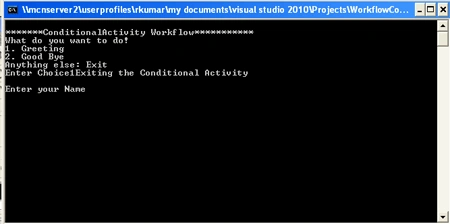
Step 10 : Now the
Console Screen pops up asking the choice from the user.
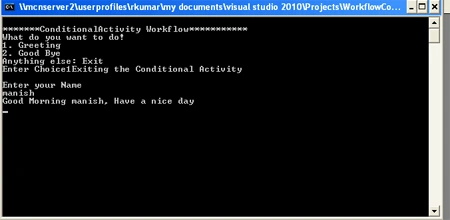
After User inputs the Name, the
output screen Displays the following message.

Join the conversation! Your thoughts help the community grow.