

Here I am using windows 7, but no need to worry, the process is same for all the windows version. By default IIS will be disabled in windows. So we need to manually enable the IIS. We need to set this in control panel. Here I will share you the exact procedure to follow. I hope you will like this.
Background
All of you might tried this already, but this is for the one who never worked or configured IIS. This is the first step you need to do when you are going to work with IIS.
Steps to configure IIS in windows
Go to control panel, you can access control panel by typing the command ‘control‘ in the command window ( Window key+R)

Go to control panel by command
Go to programs and features.
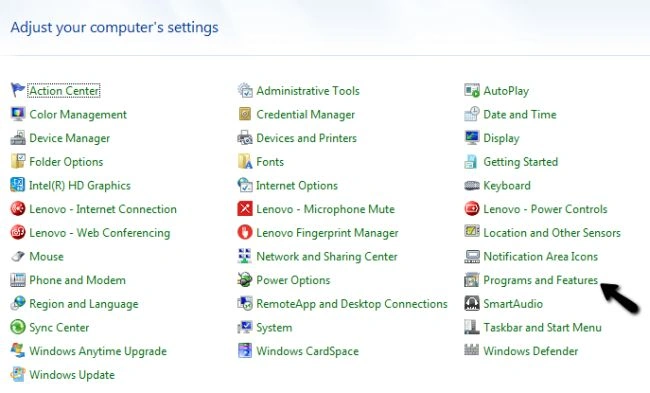
Configure IIS in Windows
Click on turn windows features on or off.

Configure IIS in Windows
Please wait for the windows to load the programs.

Configure IIS in Windows
Once everything is loaded, please enable the check box near to Internet Information Services.

Configure IIS in Windows
Please be noted that there are so many configurations, so I suggest you to enable whichever you need, you can see the options by extracting the tree structure.

Configure IIS in Windows
Once you select the features, click on OK. That’s all, IIS will be configured in few seconds.
Conclusion
Did I miss anything that you may think which is needed? I hope you liked this article. Please share me your valuable suggestions and feedback.
Your turn. What do you think?
Mohamed Gani MnPosted Nov 14, 2015, 5:52 AM
Good Leaning one
Santhakumar MunuswamyPosted Oct 18, 2015, 5:36 AM
Good one
Sibeesh VenuPosted Oct 8, 2015, 1:07 AM
Ankit Bansal Thanks buddy
Sibeesh VenuPosted Oct 8, 2015, 1:07 AM
Aqib Shehzad Thank you
Ankit BansalPosted Oct 8, 2015, 12:51 AM
nice one..
Muhammad Aqib ShehzadPosted Oct 7, 2015, 3:15 PM
good
Sibeesh VenuPosted Oct 7, 2015, 9:44 AM
Nilesh Jadav Thanks buddy
Sibeesh VenuPosted Oct 7, 2015, 9:44 AM
Harshad Pansuriya Thanks buddy
Sibeesh VenuPosted Oct 7, 2015, 9:43 AM
Rajeesh Menoth Thanks buddy
Nilesh JadavPosted Oct 7, 2015, 8:08 AM
Good !
Harshad PansuriyaPosted Oct 7, 2015, 7:17 AM
Nice one
Rajeesh MenothPosted Oct 7, 2015, 6:43 AM
Nice Share