Introduction
In many forum posts, developers and students have asked one common question, that is, how to use Web API REST Service in ASP.NET MVC application and how to make a call between them to exchange the information. So, considering this demand, I have decided to write this article to demonstrate how to consume ASP.NET Web API REST Service in ASP.NET MVC application with the help of HttpClient.
Prerequisites
If you don't know what Web API REST service and how to create, publish, and host ASP.NET Web API REST Service, then please refer to my video as well as articles using the following links. Also, follow the same sequence if you want to learn web API REST service from creating to hosting to consuming in the client application.
In this article, we will use the same hosted Web API REST service to consume in our created ASP.NET MVC web application. Now, let's start consuming Web API REST service in the ASP.NET MVC application step by step.
Step 1. Create an MVC Application.
- Start, followed by All Programs, and select Microsoft Visual Studio 2015.
- Click File, followed by New, and click Project. Select ASP.NET Web Application Template, provide the Project a name as you wish, and click OK.
- After clicking, the following Window will appear. Choose an empty project template and check on the MVC option.
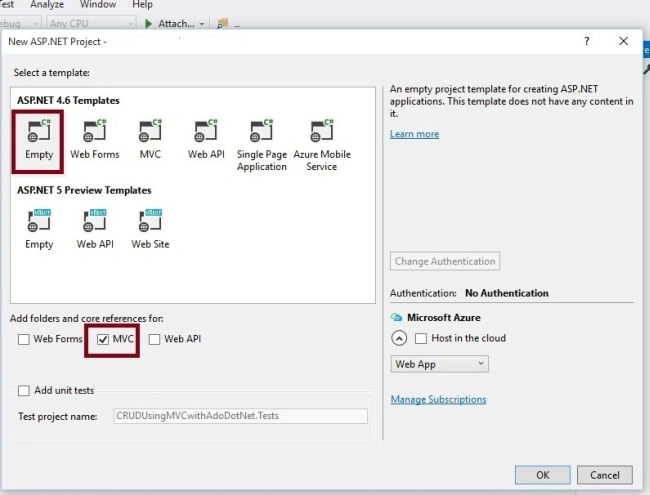
The preceding step creates the simple empty ASP.NET MVC application without a Model, View, and Controller, The Solution Explorer of created web application will look like the following.
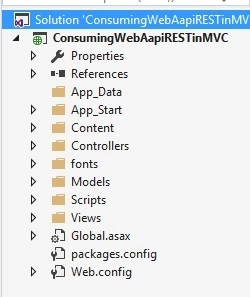
Step 2. Install HttpClient library from NuGet
We are going to use HttpClient to consume the Web API REST Service, so we need to install this library from NuGet Package Manager .
What is HttpClient?
HttpClient is base class which is responsible to send HTTP request and receive HTTP response resources i.e from REST services.
To install HttpClient, right click on Solution Explorer of created application and search for HttpClient, as shown in the following image.
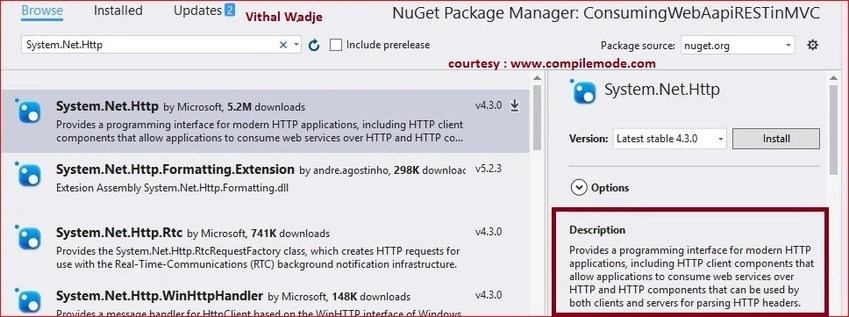
Now, click on Install button after choosing the appropriate version. It will get installed after taking few seconds, depending on your internet speed.
Step 3. Install WebAPI.Client library from NuGet
This package is used for formatting and content negotiation which provides support for System.Net.Http. To install, right click on Solution Explorer of created application and search for WebAPI.Client, as shown in following image.
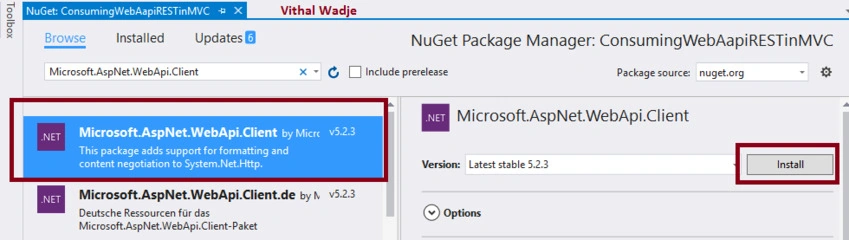
Now, click on Install button after choosing the appropriate version. It will get installed after taking few seconds depending on your internet speed. We have installed necessary NuGet packages to consume Web API REST services in web application. I hope you have followed the same steps.
Step 4. Create Model Class
Now, let us create the Model class named Employee.cs or as you wish, by right clicking on Models folder with same number of entities which are exposing by our hosted Web API REST service to exchange the data. The code snippet of created Employee.cs class will look like this.
Employee.cs
public class Employee
{
    public int Id { get; set; }
    public string Name { get; set; }
    public string City { get; set; }
}
Step 5. Add Controller Class
Now, let us add ASP.NET MVC controller, as shown in the screenshot given below.
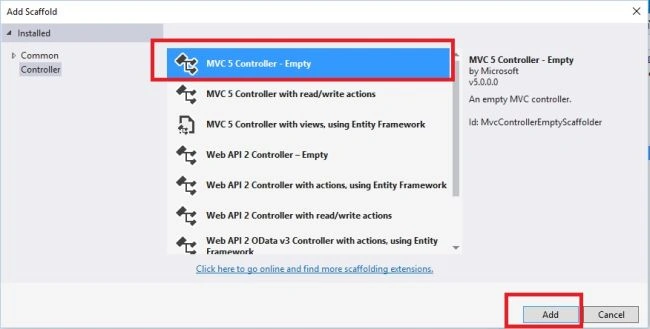
After clicking Add button, it will show in the Window. Specify the Controller name as Home with suffix Controller. Now, let's modify the default code of Home controller .
Our hosted Web API REST Service includes these two methods, as given below.
- GetAllEmployees (GET )
- GetEmployeeById (POST ) which takes id as input parameter
We are going to call GetAllEmployees method which returns the all employee details ,The hosted web api REST service base URL is http://192.168.95.1:5555/ and to call GetAllEmployees from hosted web API REST service, The URL should be Base url+api+apicontroller name +web api method name as following http://192.168.95.1:5555/api/Employee/GetAllEmployees.
In the preceding url
- http://localhost:56290 Is the base address of web API service, It can be different as per your server.
- api It is the used to differentiate between Web API controller and MVC controller request .
- Employee This is the Web API controller name.
- GetAllEmployees This is the Web API method which returns the all employee list.
After modifying the code of Homecontroller class, the code will look like the following.
Homecontroller.cs
using ConsumingWebAapiRESTinMVC.Models;
using Newtonsoft.Json;
using System;
using System.Collections.Generic;
using System.Net.Http;
using System.Net.Http.Headers;
using System.Threading.Tasks;
using System.Web.Mvc;

namespace ConsumingWebAapiRESTinMVC.Controllers
{
    public class HomeController : Controller
    {
        //Hosted web API REST Service base url
        string Baseurl = "http://192.168.95.1:5555/";
        public async Task<ActionResult> Index()
        {
            List<Employee> EmpInfo = new List<Employee>();
            using (var client = new HttpClient())
            {
                //Passing service base url
                client.BaseAddress = new Uri(Baseurl);
                client.DefaultRequestHeaders.Clear();
                //Define request data format
                client.DefaultRequestHeaders.Accept.Add(new MediaTypeWithQualityHeaderValue("application/json"));
                //Sending request to find web api REST service resource GetAllEmployees using HttpClient
                HttpResponseMessage Res = await client.GetAsync("api/Employee/GetAllEmployees");
                //Checking the response is successful or not which is sent using HttpClient
                if (Res.IsSuccessStatusCode)
                {
                    //Storing the response details recieved from web api
                    var EmpResponse = Res.Content.ReadAsStringAsync().Result;
                    //Deserializing the response recieved from web api and storing into the Employee list
                    EmpInfo = JsonConvert.DeserializeObject<List<Employee>>(EmpResponse);
                }
                //returning the employee list to view
                return View(EmpInfo);
            }
        }
    }
}
I hope, you have gone through the same steps and understood about the how to use and call Web API REST service resource using HttpClient .
Step 6. Create strongly typed View
Now, right click on Views folder of the created application and create strongly typed View named by Index by choosing Employee class to display the employee list from hosted web API REST Service, as shown in the following image.
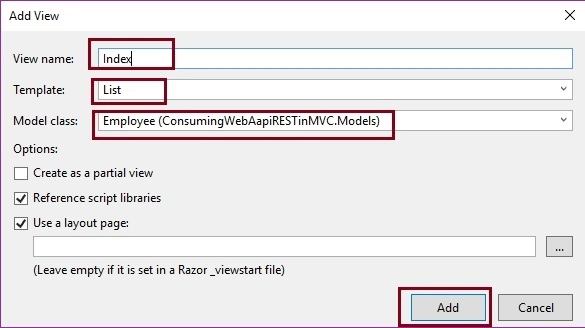
Now, click on Add button. It will create View named index after modifying the default code. The code snippet of the Index View looks like the following.
Index.cshtml
@model IEnumerable<ConsumingWebAapiRESTinMVC.Models.Employee>
@{
    ViewBag.Title = "www.compilemode.com";
}
<div class="form-horizontal">
    <hr />
    <div class="form-group">
        <table class="table table-responsive" style="width:400px">
            <tr>
                <th>
                    @Html.DisplayNameFor(model => model.Name)
                </th>
                <th>
                    @Html.DisplayNameFor(model => model.City)
                </th>
            </tr>
            @foreach (var item in Model) {
                <tr>
                    <td>
                        @Html.DisplayFor(modelItem => item.Name)
                    </td>
                    <td>
                        @Html.DisplayFor(modelItem => item.City)
                    </td>
                </tr>
            }
        </table>
    </div>
</div>
The preceding View will display all employees list . Now, we have done all the coding.
Step 7. Run the Application
After running the Application, the employee list from hosted web API REST service will look like this.
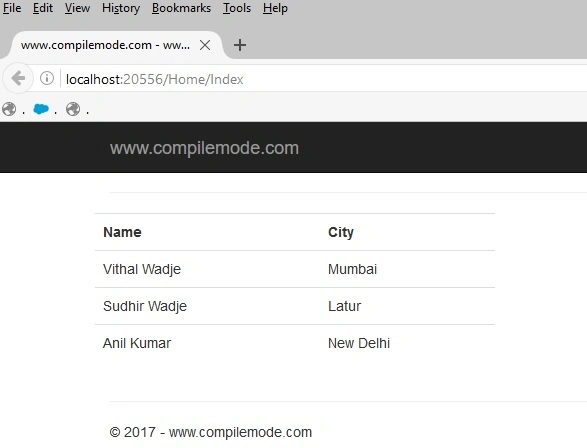
I hope, from the above examples, you have learned how to consume Web API REST Service in ASP.NET MVC using HttpClient.
Note
- Download the Zip file of the Published code to learn and start quickly.
- This article is just a guideline on how to consume Web API REST Service in ASP.NET MVC application using HttpClient.
- In this article, the optimization is not covered in depth; do it as per your skills.
Summary
I hope, this article is useful for all readers. If you have any suggestions, please mention them in the comments section.
Read more articles on ASP.NET


Rasmus OlssonPosted Nov 16, 2021, 4:05 PM
Good turitorial. The only problem I have is that I get a 404-error when running the application. Is there anything special you need to do with BaseUrl if you use localhost?
Gurpreet AroraPosted Jun 26, 2021, 6:59 PM
Nice Article :)
Nikhil TawaniaPosted May 1, 2021, 1:32 PM
Make it using VS Code please
The ShernPosted Apr 20, 2021, 10:29 AM
Hi sir, Iam getting a server error in Application.Can you help to understand what might be wrong. Iam using Visual studio 2019. Iam totally new to this area and found the article very helpful to get an idea.
Shwetha SatishPosted Apr 6, 2021, 6:14 AM
How to perform a search by id?
Yogesh RoyPosted Mar 22, 2021, 6:39 PM
Hello sir i am going to implement aadhar authentication api using c# web api, I follow the aadhaar documentation but still I have doubts to implement, plz guide me sir
Satya MaruthiPosted Mar 15, 2021, 10:21 AM
Thank you very much for your super work. By following your blog I have learned so many concepts in ASP.Net MVC, C#, etc. I would like to request you to provide me a sample code or tutorial on "How to Authorize Web API from MVC Application? I am using Web API and MVC (two projects) in the same solution. I am calling the Web API controller through the MVC. But when I am trying to use Authorize tag in the Web API controller, I am unable to access it. The authorization has been denied for this request as the outcoming result. I would like to use an access token for this Authorize option. It would be great if you provide me a sample tutorial to solve this issue. I look forward to hearing from you. Thanks in advance.
Yogesh KhurpePosted Mar 8, 2021, 3:10 PM
Nice article..!!
Abanoub haliemPosted Jan 19, 2021, 9:53 AM
I need to call web api in framework 4.0 without using httpClient because it not compatable with framework 4.0
deelliiee depPosted Sep 30, 2020, 2:06 AM
I checked the tutorial and the source code too but I couldnt find GetAllEmployees() or GetEmployeeById() were not found can you please help
Chittaranjan SwainPosted Oct 23, 2019, 11:22 AM
Nice article...
FASEEL ULLAPosted Jun 15, 2019, 3:52 AM
Hi sir i wanted how to get specific value by passing ID
Gabriel DekoladenuPosted Mar 11, 2019, 12:48 PM
Hello, thanks for the tutorial. For some reason on the view page I'm getting an error under @model IEnumerable... which states "The name 'model' does not exist in the current context". Are you familiar with this?
rupali patilPosted Dec 10, 2018, 1:19 AM
I am getting Error as 'The remote name could not be resolved '
Rafael GomesPosted Nov 13, 2018, 2:44 PM
Only success response handled. Do good coding practices matter in these articles.
Amit MakhijaPosted Nov 2, 2018, 6:36 AM
I see your all article, related to web restAPI but I didn't found where is GetAllEmployees??
Adalat KhanPosted Aug 11, 2018, 11:00 AM
Good article. Thanks for sharing
Vikas AgarwalPosted Jul 10, 2018, 8:35 AM
What is the best approach to call post method? Should we call directly from js file or we should call it from a controller in MVC application.
Reena NarvekarPosted Jun 19, 2018, 11:38 AM
How to pass key value for third party api if we want to consume in our application
SOFIA SHRESTHAPosted Jun 1, 2018, 4:30 PM
Is it best to call web api from controller or from model or from view?
Ravikiran PabbathiPosted Jan 24, 2018, 1:08 AM
In web application by using asp.net and mvc
Ravikiran PabbathiPosted Jan 24, 2018, 1:07 AM
Can you tell me the what are methods to consume the web api and rest api and all distributed applications
Ramendra kumar vermaPosted Jan 19, 2018, 4:09 AM
It should be consume api using jquery
Monika mauryaPosted Oct 23, 2017, 3:30 AM
I did not get where is the method defination of GetAllEmployees here?? i done same thing copy paste in my project but at last i get no record.
Jose Carlos MacorattiPosted Sep 28, 2017, 8:10 AM
Hi, if the response is not successful what happens with the return View(EmpInfo); ?
Mohan SrinivasPosted May 29, 2017, 6:22 AM
Https://api.yourmembership.com/reference/2_25/Sa_Members_Groups_Add.htm how to consume this api link
Darran JonesPosted Feb 23, 2017, 6:07 AM
Take a look at my DalSoft.RestClient it's a REST client that wraps HttpClient into a fluent API. It can reduce your code to two lines! dynamic restClient = new RestClient("http://192.168.95.1:5555"); List<Employee> EmpInfo = await restClient.Api.Employee.GetAllEmployees.Get(); https://github.com/DalSoft/DalSoft.RestClient
Emmanuel AjokuPosted Feb 23, 2017, 6:05 AM
Thanks a lot you solve my headache
Upendra Pratap ShahiPosted Feb 14, 2017, 12:44 PM
Nice article Vithal Wadje sir, thanks for sharing..
Sagar PardeshiPosted Feb 14, 2017, 4:46 AM
Nice article..Thanks
Vishal PrajapatiPosted Feb 13, 2017, 10:26 PM
Nice article..Thanks for sharing..
Satyaprakash SamantarayPosted Feb 13, 2017, 12:35 PM
That is very important in real time.
Humayun Kabir MamunPosted Feb 13, 2017, 2:19 AM
Thanks for this nice article...