
In this article we will see how to use content results in a controller in MVC.
Step 1
Create a MVC project from the "Empty" template.
Right-click on "Controllers" and select "Add" >> "Controller...".
Step 2
Select "MVC 5 Controller - Empty" to add an empty controller.
Click on the "Add" button.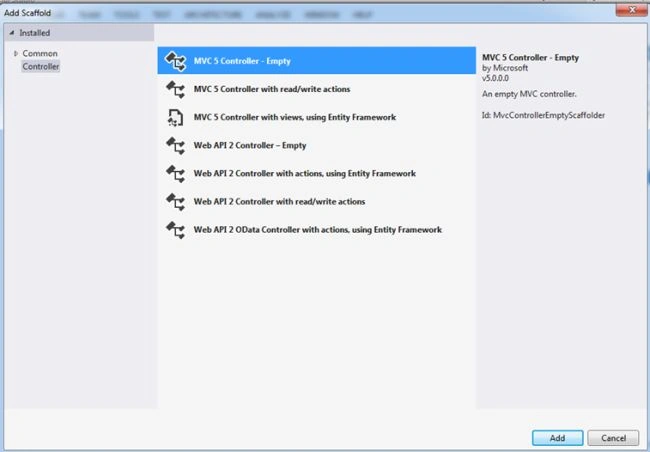
Step 3
Name the controller as in the following:
And it will add an action result method in the controller.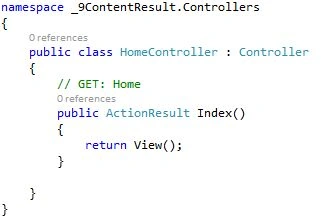
Step 4
ContentResult represents a user-defined content type. It is inherited from ActionResult. ContentResult has the following three properties:
Content that we want to render on browser
ContentEncoding that defines the encoding of the content
ContentType that informs the browser about the content like "text/plain", "text/html", "application/json" and so on.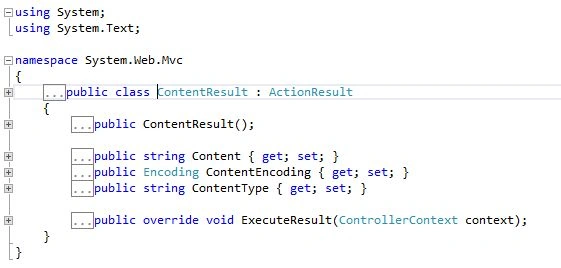
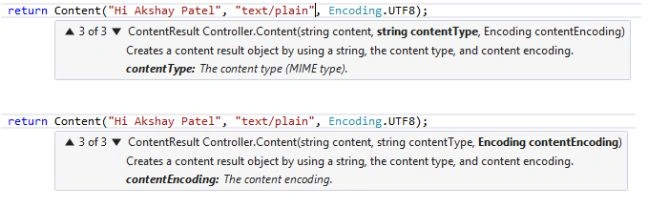
Here the ContentResult method returns an object of ContentResult. In the first parameter we pass the content that we want to render on the browser. The second parameter is of ContentType and the third one is content encoding.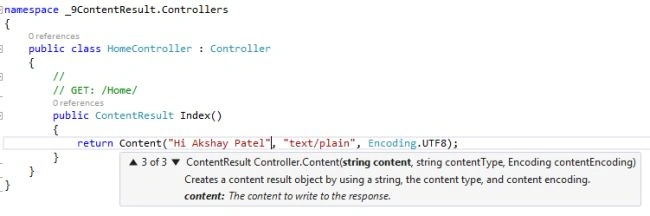
Step 5
Run the project and you will see, content is rendered in the browser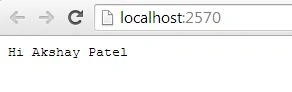
<< Day 8 Day 10 >>

Content Result in Controller Sample in MVC: Day 9
Join the conversation! Your thoughts help the community grow.
Sign in to leave a comment
It is the same account you read, post and publish with — and you will come straight back to this page.
Narayana GhantasalaPosted Mar 21, 2016, 3:00 AM
Is there any possible way to display that text in red color?
Lalit RaghavPosted Jun 30, 2015, 5:24 AM
thanks for this also