Convert Word to PDF C#
I am writing this article to share the details regarding a solution found in my research to convert Word files to PDFs. I had my library even though I found this one more efficient and easy to use in different applications.
IronPDF is the solution I found to convert Word documents to PDF. This library will work even if you don't have an MS work license. Let's discuss in the document how we can convert a Word document to a PDF file.
What I found interesting?
- We can convert Word files to PDF files.
- We can generate PDF files from different sources other than the Word files.
- No MS Office license is needed to generate the PDF; it works on the C# libraries.
- We can create custom PDFs, like documents using templates.
- Adding watermarks, designing or editing a PDF template in MS Word, and creating custom copies on a web server with customized information.
What is IronPDF?
IronPDF is a C# PDF library that makes it easy for .NET developers to create and manipulate PDFs. With IronPDF, you can easily convert Word /HTML content into a PDF in C#. The IronPDF library also supports digital signatures, form filling, PDF-to-image conversion, and more.
Whether you need to generate PDFs for your web application or simply want to add some PDF functionality to your existing .NET app, IronPDF is a .NET API. Check out our comprehensive documentation for converting MS Office Word docx to PDF to start today.
IronPDF will be utilized throughout this article to demonstrate how to convert and save a Word document into a PDF document using C# and .NET.
Prerequisites
- Visual Studio 2022 (Recommended)
- A running .NET application system with the latest .NET framework (Recommended)
- Microsoft Office installed (not mandatory)
- A stable internet connection to install the IronWordToPdf library for PDF conversion
Convert WORD Document to PDF
Step 1. Add WordToPdf to your solution
NuGet Package Manager
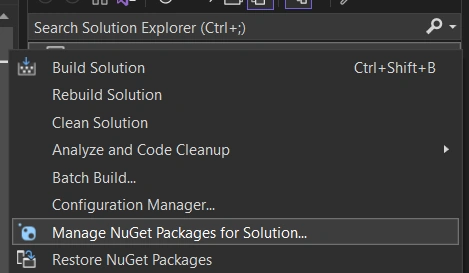
We must add the library to convert Word files to our project solution. In Visual Studio, right-click on your project's Solution Explorer and select `Manage NuGet Packages for Solution.
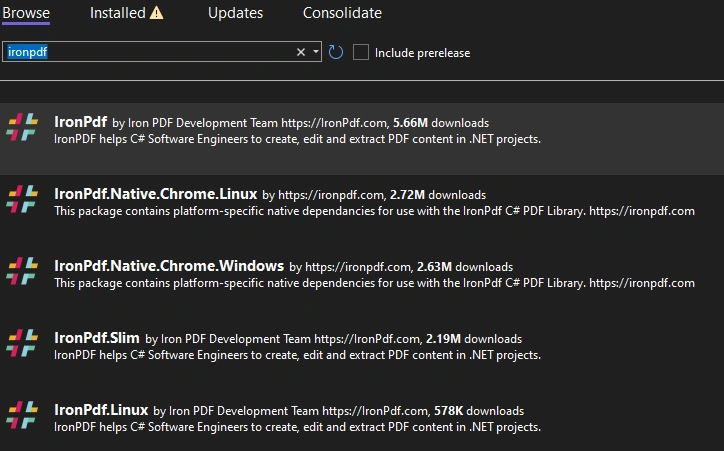
From there, simply search for IronPDF and install the latest version of your solution to use its reference. Click OK on any dialog boxes that come up.
Install via DLL
Another option is to install the IronPdf DLL download and add it to the project. Please click here to download. See the screenshot; this can be downloaded and manually installed on the project or GAC.
on NuGet Website
For a comprehensive rundown of IronPDF's features, compatibility, and downloads, please check out IronPDF on NuGet's official website.
Package Manager Console
Alternatively, in Visual Studio, navigate to the 'Tools' menu at the top and select 'NuGet Package Manager' and choose 'Package Manager Console' from the menu.
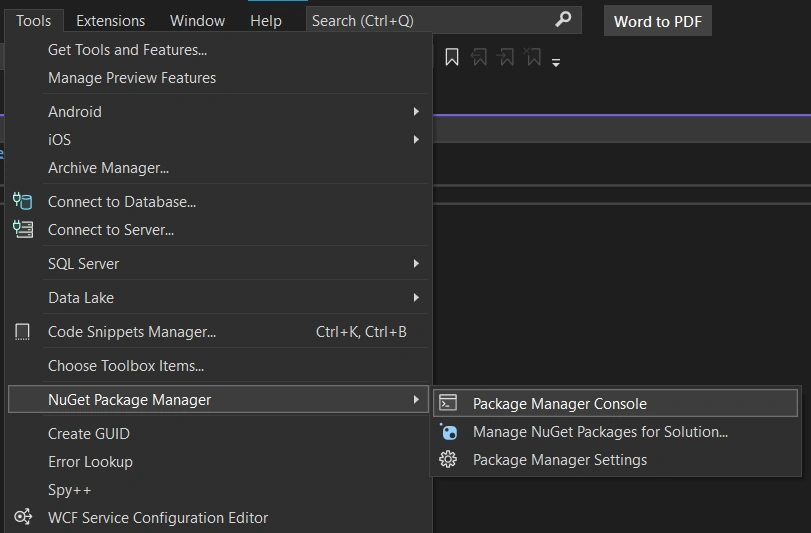
In the shell that opens, paste the following and press enter:
NuGet\Install-Package IronPdf
Step 2. Word document To HTML
We have to convert the Word file to HTML; then, we can convert it to PDF. This can be done manually using the "Save As" method or achieved using custom coding.
Why we are converting to HTML, IronPDF will assist us in adding HTML Fragments in the document before converting it; see below.
HTML Fragment helps to add an HTML string at the header of the PDF file. You can set multiple rendering options like header, footer, margin, paper size, and much more.
Why I converted to HTML? Here am discussing only surface-level details and leaving the rest for you all to try and use if you find it interesting.
Step 3. Adding namespaces of IronPdf
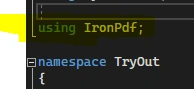
Open program.cs file and include the namespace "IronPDF" in your application as below.
Convert the Word document to PDF.
ChromePdfRenderer helps us to convert any webpage or HTML page, or "snippet" to a PDF document using an up-to-date embedded Chrome browser. This method helps us to add HTML fragments like the HTML header; you will see the details below.
I wrote a method to use in my application, as below.
public void WordtoPDF()
{
  var ironRenderer = new ChromePdfRenderer();
}
This library is capable of converting to PDF from different sources; select which one you need.
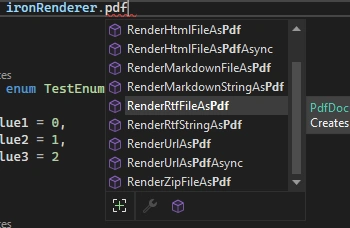
I tried only the HTML to PDF conversion technique, and you can try the other methods per your requirements.
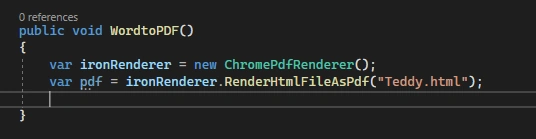
The RenderHTMLAsPdf class also has more flexibility to achieve what may require PDF features; please see the screenshot below. Try as per your requirement.
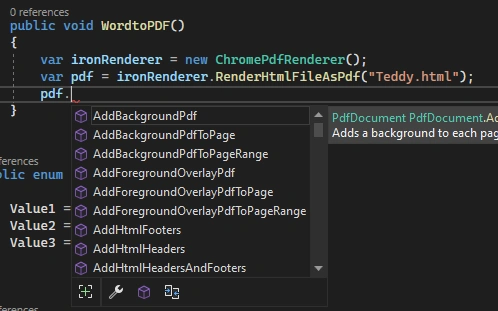
SaveAs method converting Word to the corresponding PDF. See the sample code I tried to convert the docx File. As we discussed above, we are not converting Word documents to PDF directly. We convert docx files to HTML and then convert the output HTML file to PDF files. I feel the ironPDF makes the pdf conversion easy.
static void Main(string[] args)
{
  try
  {
    var ironPdfRender = new ChromePdfRenderer();
    var pdfFile = ironPdfRender.RenderHtmlFileAsPdf("D:\\Tedz\\App\\Word2Pdf\\Word2Pdf\\docs\\TestFile.htm");
    pdfFile.ApplyWatermark("PDF OUTPUT FILE !!!!!!!!!!!!!", 45, 100);
    pdfFile.SaveAs("D:\\Tedz\\App\\Word2Pdf\\Word2Pdf\\docs\\TestFile.pdf");
  } catch (Exception ex) {
    throw ex;
  }
}
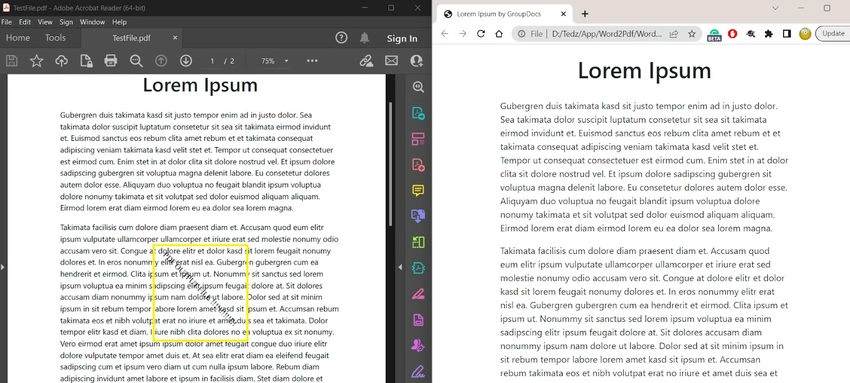
Output pdf document
I created a sample HTML file manually and tried to convert it into a PDF file. Also, I just tried to add a watermark as well. See the output PDF screenshot below.
"PDF OUTPUT FILE !!!!!!!!!!!!!" is the watermark we added, highlighted in the below screenshot.
Summary
If you're looking for an easy way to convert docx files to PDF programmatically, you can easily use this ironPDF library to convert your Word files. IronPDF helps us to generate PDFs programmatically from different sources. This library makes PDF conversion easy for us. Without documented support, you can easily use this library to convert your files to PDF.
Reference


kiran landePosted Mar 25, 2023, 8:13 AM
It works in local system but not working on Server it shows object reference error
Thanga ManiPosted Oct 17, 2022, 11:14 AM
Object reference not set to an instance of an object." line WordToPDF.Word2Pdf.Word2PdfCOnversion()
Vishal BhadouriaPosted Aug 23, 2022, 11:30 AM
Conversion took 2 minutes and 29 seconds. word file size: 183 KB
Hector CasellasPosted Feb 17, 2022, 5:39 PM
On my local machine works fine, but on server gives this error; "Object reference not set to an instance of an object." line WordToPDF.Word2Pdf.Word2PdfCOnversion()
Bob HornPosted Jan 28, 2022, 7:44 PM
Unhandled Exception: System.TypeLoadException: Could not load type 'WordToPDF.Word2Pdf' from assembly 'WordToPDF, Version=1.0.0.0, Culture=neutral, PublicKeyToken=null'.
sankar lalPosted Jan 24, 2022, 7:06 AM
Great Teddy Kurian, I have tried in vs2019 and it's working perfectly. this is a very simple solution.
joase andresPosted Dec 16, 2021, 8:43 PM
This library use word interop. Word has to be instaled in the computer. Adding, it does not work in a web server.
Cristina CordovaPosted Dec 1, 2021, 3:20 PM
I got this error "the document window is not activated."
Tuan PhamPosted Nov 29, 2021, 9:01 AM
Work well, but comments in word file is still display on PDF file.
Paul ScannellPosted Oct 13, 2021, 4:02 PM
Oops. It didn't work. I got this runtime error: System.InvalidCastException: 'Unable to cast COM object of type 'Microsoft.Office.Interop.Word.ApplicationClass' to interface type 'Microsoft.Office.Interop.Word._Application'. This operation failed because the QueryInterface call on the COM component for the interface with IID '{00020970-0000-0000-C000-000000000046}' failed due to the following error: Library not registered. (Exception from HRESULT: 0x8002801D (TYPE_E_LIBNOTREGISTERED)).'
Paul ScannellPosted Oct 13, 2021, 4:02 PM
This didn't work. I got this runtime error on the call to xxx:
fff vggvPosted Sep 30, 2021, 7:56 PM
Virustotal.com marks this dll as trojan. TScope.Trojan.MSIL
simbu arasanPosted Sep 8, 2021, 7:25 AM
Its not working.. throw exception as object reference issue at the end
Jose ViriatoPosted Aug 24, 2021, 8:24 AM
Not working on server. you need MS office installed
Mike PorterPosted Jul 13, 2021, 12:23 AM
Must use cominterop ..terribly slow
Osama FaragPosted May 20, 2021, 1:51 PM
I've tried it using vs 2019, and it works perfectly. Thank you
Adam SchachabovPosted May 6, 2021, 7:09 AM
Https://www.nuget.org/packages/WordToPDF/1.0.0 and WordToPDF.dll from the current article are the same? What licence does it have?
hemanath raviPosted Mar 11, 2021, 6:27 AM
Do we need to install Microsoft word for this code to work?
Gio TrujilloPosted Jan 13, 2021, 11:45 PM
En el visual corre sin problema, en el publicado en IIS no funciona, el error sale en el WordToPDF.Word2Pdf.Word2PdfCOnversion() aunque pongas la referencia directa por si hubiera una cruzada por ahi, alguien logro resolverlo?
thanh hngPosted Nov 23, 2020, 10:14 PM
Not working
Saleem BaigPosted Oct 28, 2020, 7:15 AM
For Every PDF generated, i'm getting label text in top of a page - This document is generated through Spice.Doc library' Can any one help from where i am getting this message in every PDF.
Sulivan OliveiraPosted Oct 27, 2020, 3:51 PM
Not work! Object reference not set to an instance of an object in objWorPdf.Word2PdfCOnversion();
Fernando ReyesPosted May 28, 2020, 4:01 PM
This does not work the problem is with this sentence objWorPdf.Word2PdfCOnversion();
Luengas SainzPosted May 13, 2020, 7:29 AM
Error: {"Referencia a objeto no establecida como instancia de un objeto."}
To Trong HanPosted Apr 9, 2020, 10:32 AM
I have installed MS Office pro 2016 but it not work on IIS of win 10
Jude DeepakPosted Mar 30, 2020, 1:48 AM
I have not received any error, everything seems working fine. But unfortunately i dont find my PDF in Output Location,
Mahesh RajputPosted Mar 2, 2020, 12:19 AM
Teddy Kurian This method or property is not available because a document window is not active. I am getting this error
Mahesh RajputPosted Mar 2, 2020, 12:18 AM
This method or property is not available because a document window is not active. Getting this error is anyone resolved this issue?
Ahmed RezkPosted Feb 20, 2020, 2:27 AM
I've follow steps above, all ok locally but when upload to server it gives error "Object Reference not set to an instance of object" at this line : objWorPdf.Word2PdfCOnversion() although I've installed microsoft word at server
David JoyPosted Feb 12, 2020, 2:45 PM
Works perfectly, thanks so much!
Mandar PatilPosted Nov 28, 2019, 1:21 AM
I created a windows app for convert word file into pdf but when I click on process button then it display error . error is ( An unhandled exception of type 'System.InvalidCastException' occurred in WordToPDF.dll Additional information: Unable to cast COM object of type 'Microsoft.Office.Interop.Word.ApplicationClass' to interface type 'Microsoft.Office.Interop.Word._Application'. This operation failed because the QueryInterface call on the COM component for the interface with IID '{00020970-0000-0000-C000-000000000046}' failed due to the following error: No such interface supported (Exception from HRESULT: 0x80004002 (E_NOINTERFACE)). )
Jitendra PancholiPosted Sep 23, 2019, 10:10 AM
Teddy Kurian Your solution doesn't work on server. It looks you're using installed MS Office which is not there on server.
Ali HassanabadiPosted Aug 13, 2019, 6:57 AM
Please tell us why it doesn't work on server (deployment), it is work greatly on local but when published it does't work it throw exception as System.NullReferenceException , is it depend on installed Microsoft Word Office,
Rajesh ThiruPosted Jun 27, 2019, 7:48 AM
While using this , it throws some error like - This method or property is not available because a document window is not active.
Senthil VPosted May 29, 2019, 3:53 AM
Teddy, The below mentioned exception is because of adding reference file to the solution.Now it's fixed and working fine.And, is there any limit to export word to PDF document by using this library. Waiting for your response.
Senthil VPosted May 28, 2019, 11:17 AM
Hi Teddy, I couldn't able to execute the given code.The below exception is occuring: Could not load type 'WordToPDF.Word2Pdf' from assembly 'WordToPDF, Version=1.0.0.0, Culture=neutral, PublicKeyToken=null'. Please assist me to achieve this.
Jitender ThakurPosted May 8, 2019, 11:25 PM
Hi Teddy, I have an issue 'System.NullReferenceException: 'Object reference not set to an instance of an object.'
Dhruv MauryaPosted May 8, 2019, 1:06 AM
Its worked on local machine but on server gives 500 internal server error. its not working on server because using word interop.......
Abanoub WageehPosted Apr 8, 2019, 1:38 PM
Worked on the local but when deployed to server it shows error - 'Object reference not set to an instance of an object. Can you help?
vikas dabadePosted Feb 21, 2019, 5:13 AM
Worked on the local but when deployed to server it shows error - 'Object reference not set to an instance of an object. Can you help?
Praveen ChandraPosted Feb 5, 2019, 8:26 PM
Is this solution working in VS2012? becuase the reference issue , i am not able to add the reference.
Piyush PansuriyaPosted Jan 23, 2019, 5:35 AM
Is it worked on server without installing msoffice?
hour sarakPosted Oct 26, 2018, 3:57 AM
It work in local but when i deploy project to server in error please help me to fix it
Tuan DoPosted Oct 18, 2018, 3:00 AM
It working for me! Thanks Teaddy
Tony ChenPosted Oct 5, 2018, 10:55 PM
You can try https://www.iditect.com/tutorial/docx-to-pdf/
Chakravarthy KukkalaPosted Sep 6, 2018, 4:19 AM
Hi Teddy , this This solution is working fine in VS 2017 with out any issue.
Balakrishnan GPosted Jul 22, 2018, 3:08 AM
Hi Teddy, I have an issue 'System.NullReferenceException: 'Object reference not set to an instance of an object.' while working with the Unity C#. So please tell me what are the platforms it could be support?
Alejandro ColoradoPosted Jun 27, 2018, 8:37 PM
This dll, use Microsoft.Office.Interop.Word bad Solution !
iam_SiriPosted Jun 11, 2018, 1:24 PM
I build solution , It Error "Could not be found" but I add Reference already.
Kranthi Vardhan KolluruPosted Jun 1, 2018, 8:09 AM
Locally working fine when hosted in IIS the code is executing successfully but the output pdf file missing. please give any suggestion
Ranjith MuthukumarPosted May 8, 2018, 3:33 AM
Hi Teddy, WordToPDF dll is a free library or any subscription need for this?
Poonam AmbePosted May 2, 2018, 4:37 AM
Getting error at ObjWorPdf.Word2PdfCOnversion() : System.NullReferenceException: 'Object reference not set to an instance of an object.'
rahul nasitPosted Apr 9, 2018, 3:30 AM
ObjWorPdf.Word2PdfCOnversion() return command failed error
Sunny SomaniPosted Apr 7, 2018, 7:23 AM
"This method or property is not available because a document window is not active." getting this error in word2pdfconversion()
Raza HaiderPosted Apr 5, 2018, 3:43 PM
Need to use this functionality in Framework 4.0.
Bipin BhattPosted Mar 28, 2018, 2:13 AM
Hi Teddy,I am still getting "Object reference not set to an instance of an object" , when i put the application in IIS as a virtual directory. Pls do reply..
André JuyPosted Mar 23, 2018, 1:22 PM
Congratulations, very good
Ketan PatelPosted Mar 19, 2018, 10:52 AM
NIce work....looks great
Yogendra GuptaPosted Mar 19, 2018, 2:25 AM
Hi Teddy, WordToPDF dll is a free library or any subscription need for this?
Foram PatelPosted Jan 22, 2018, 2:00 AM
Hello,how can i get wordtodoc.dll?Please help me
Teddy KurianPosted Dec 22, 2017, 5:00 AM
Iam working on the issues reported, once completed will update the Article.
Lokesh MulewaPosted Dec 22, 2017, 2:32 AM
No output pdf is generation and no error showing
Teddy KurianPosted Nov 30, 2017, 2:26 AM
Sorry For the Delay in response i will update the share the details.
Victor APosted Nov 27, 2017, 5:06 PM
Hi Teddy! I'm getting This method or property is not available because a document window is not active. just for one document after replacing some strings in it and with the same document but with other strings there is no problem - can you give some more information on how the word2pdfCOnversion() function works?
amt amtPosted Oct 10, 2017, 2:35 AM
Hi Teddy,I am getting "Object reference not set to an instance of an object" , when i put the application in IIS as a virtual directory. Pls do reply..
amt amtPosted Oct 10, 2017, 2:02 AM
Hi Teddy, Does this wordtopdf.dll use Microsoft Interop dll or has its dependencies? . Please clarify
Suneel Kumar DPosted Apr 12, 2017, 2:56 AM
This method or property is not available because a document window is not active.
Suneel Kumar DPosted Apr 12, 2017, 2:56 AM
I am getting below error
Aquib SayyedPosted Mar 2, 2017, 1:39 AM
Null reference exception at Word2PdfCOnversion()... running on server where MS Office is not installed, any resolution for this? does it use interop?
Sandip AtkolePosted Feb 14, 2017, 9:43 AM
Hi Teddy, Thanks for sharing this code. I am able to convert docx to pdf. I just want to know whether "WordToPDF.dll" is third party dll or has been developed by you. Please could you let me know license information to use this dll. Will there be any technical support?
Musa AjPosted Jan 25, 2017, 7:49 AM
Why i am getting "This method or property is not available because a document window is not active.Microsoft Word", even i installed MS office on server. The WordToPDF works only with Console application and it does not work with WebAPI.
Rich SorensenPosted Dec 18, 2016, 10:54 PM
Import Namespace does not exist error: I have an ASPX app in VB.Net (VS 2012) and am attempting to use this dll. I downloaded and placed the dll in the bin folder for the project, added a reference to it in project references, added an Imports WordToPdf line, and added the code to do the word to pdf processing. All is well so far and the syntax is correct. However, when I try to do a build, I get the above error, and the reference to WordToPDF is no longer available. Office 97 is installed on the machine, and this app also does word automation stuff. Any ideas on what the issue is?
Sanket PatelPosted Dec 16, 2016, 1:30 AM
Document window is not active error is there...in word2pdf conversion...how to solve it?
Mohammad SuleimanPosted Nov 29, 2016, 9:36 AM
You need office on the server
dhanush kodiPosted Nov 21, 2016, 12:45 AM
Its Working fine with localhost code , But when i Publish code and run that time i am getting "System.NullReferenceException: Object reference not set to an instance of an object." error message. Please help me how to resolve this issue ?
Kevin LimantoroPosted Sep 1, 2016, 3:40 AM
Seems like this dll actually run ms-word interop object inside, i need plugin that doesn't rely on those object at all..
Kien NguyenPosted Apr 15, 2016, 5:08 AM
This method or property is not available because a document window is not active.
Steven SuazaPosted Feb 22, 2016, 11:07 AM
Its Working fine with localhost code , But when i Publish code and run that time i am getting "System.NullReferenceException: Object reference not set to an instance of an object." error
Ketan BekinkarPosted Feb 6, 2016, 5:30 AM
Not working... Type or Namespace WordToPDF could not be found. Have included respected DLL but not sure y this message... Coz it is able to identify the Word2Pdf class below.
Xian ZengPosted Oct 14, 2015, 4:26 AM
this is depend on ms word,but thanks for share
Xian ZengPosted Oct 14, 2015, 4:25 AM
????ms office,?????????
R PlusPosted Sep 10, 2015, 3:24 AM
Please tell me how to fix this error system.runtime.interopservices.marshal.gettypefromclsid(system.guid)'.
R PlusPosted Sep 10, 2015, 3:23 AM
can you please tell me how to fix this error http://system.runtime.interopservices.marshal.gettypefromclsid(system.guid)'.
R PlusPosted Sep 10, 2015, 3:01 AM
I have this error Method not found: 'System.Type System.Runtime.InteropServices.Marshal.GetTypeFromCLSID(System.Guid)'.
R PlusPosted Sep 10, 2015, 3:01 AM
hai
R PlusPosted Sep 10, 2015, 3:01 AM
Method not found: 'System.Type System.Runtime.InteropServices.Marshal.GetTypeFromCLSID(System.Guid)'.
Vaibhav ApugadePosted Sep 3, 2015, 8:41 AM
Its Working fine with localhost code , But when i Publish code and run that time i am getting "System.NullReferenceException: Object reference not set to an instance of an object." error
Upendra Pratap ShahiPosted Aug 26, 2015, 1:13 AM
good one
Pardha SaradhiPosted Aug 6, 2015, 5:20 AM
Here iam using dotnet4.5 but where do we get WordToPDF dll ?
Nitin GumgaonkarPosted Jun 17, 2015, 6:54 AM
To run this application it is necessary office to be installed on machine.
bhushan jatPosted Apr 20, 2015, 9:40 AM
I am using .net 4.0. so any other solution for 4.0.
Mohammed BilalPosted Apr 16, 2015, 4:33 AM
Same question i also have... "How to use this without word installing..?"
Babken YeghiazaryanPosted Apr 13, 2015, 4:05 PM
How to use this without word installing..
G Sujith KumarPosted Apr 2, 2015, 12:40 AM
System.MissingMethodException: Method not found: 'System.Type System.Runtime.InteropServices.Marshal.GetTypeFromCLSID(System.Guid)'. at WordToPDF.Word2Pdf.Word2PdfCOnversion() error
mayank DesaiPosted Jan 2, 2015, 4:25 AM
Its Working fine with localhost code , But when i Publish code and run that time i am getting "System.NullReferenceException: Object reference not set to an instance of an object." error message. Please help me how to resolve this issue ?
mayank DesaiPosted Jan 2, 2015, 4:23 AM
Thanks For Reply :)
Teddy KurianPosted Dec 30, 2014, 1:31 AM
4.5 and above VS 2012
mayank DesaiPosted Dec 29, 2014, 11:20 AM
it is work for VS2010 ?
Ismail Hakki SenPosted Dec 8, 2014, 3:06 AM
is this library free? thanks for example.
Mic ChrPosted Dec 3, 2014, 6:28 AM
Does this library any settings, like the quality of PDF or sth?
wasim adddPosted Dec 3, 2014, 1:49 AM
useful ...thanks
Teddy KurianPosted Dec 3, 2014, 12:40 AM
ok
Praveen KumarPosted Dec 2, 2014, 10:55 PM
very useful article!
Sara SilvaPosted Dec 2, 2014, 4:11 PM
hello, where we get the WordToPDF.dll???