

Introduction
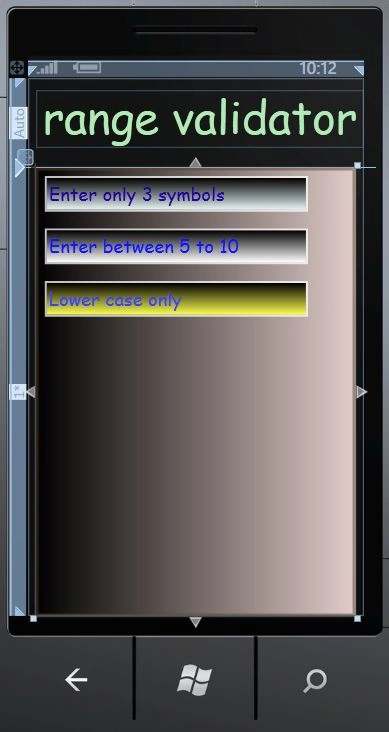
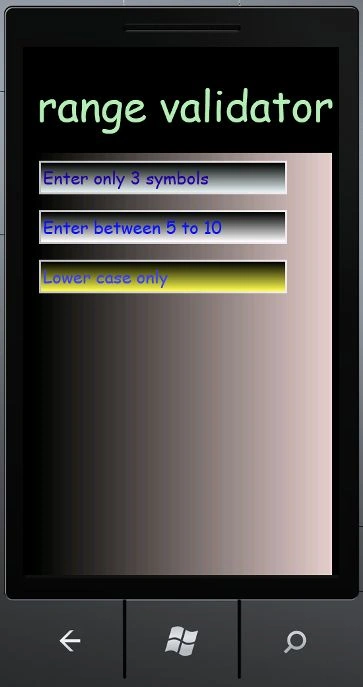
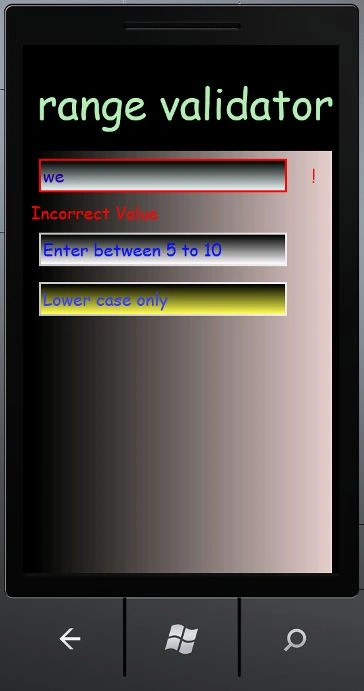
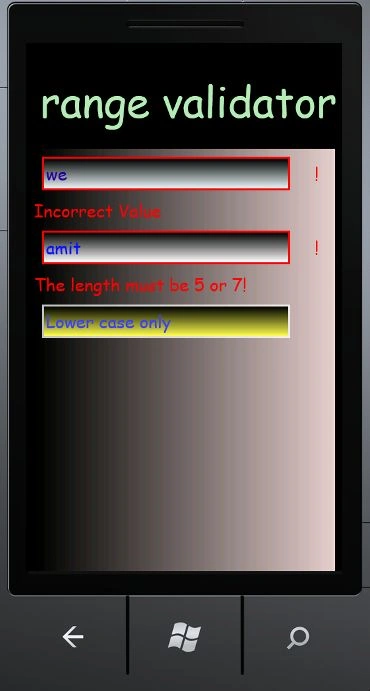
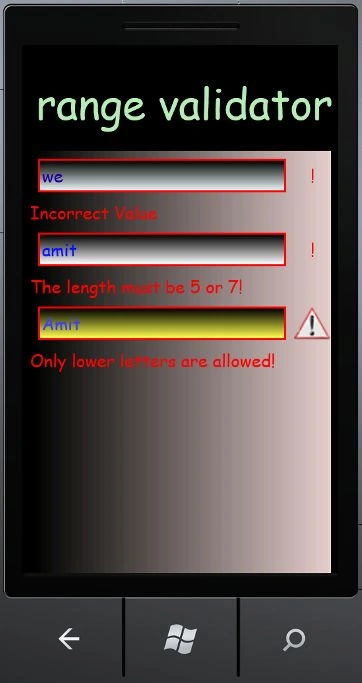
In this article we are going to explore how to make a range validator in Windows Phone 7 and the lower case validator will be described as well. Further in the details we have to make a custom control of range validation which will validate the range. So well we need a little introduction to the custom controls; these are those controls for us to create and later to be used by us. In this first of all we will know about the range validation; it's the phenomenon that if we want for the user to input only values between a limited range of digits such as up to three symbols or between the range which we have provided to make that control. Whenever you write inside the TextBox if it contains valid range input then it will not generate any kind of error; if it has invalid input then an error will be shown saying that you have to enter only the specified amount of text into the textbox. In this article we are going to see that. So to accomplish the functionality you have to follow the steps given below.
Step 1: In this step we have to create a Windows Phone library so let's see from where you have to add it which is given in the figure.
- Go to Visual Studio 2010
- Open New->Project
- Select the template silverlight for Windows Phone
- Select the Windows Phone library and give it a name as you want to give.
- Click OK.

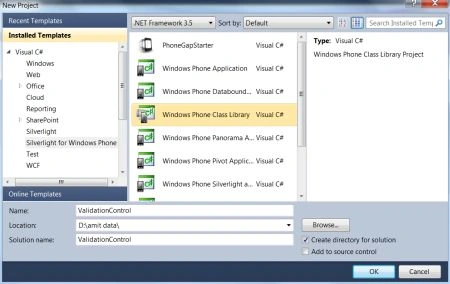
Step 2: In this step we will see the code for the Windows Phone library whose name is ValidationControl.cs so let's have a look on the code given below.
Code:
using System;
using System.Net;
using System.Windows;
using System.Windows.Controls;
using System.Windows.Documents;
using System.Windows.Ink;
using System.Windows.Input;
using System.Windows.Media;
using System.Windows.Media.Animation;
using System.Windows.Shapes;
using System.Text.RegularExpressions;
using System.Collections.Generic;
namespace ValidationControl
{
public class ValidationControl : TextBox
{
public static readonly DependencyProperty Is_val_prpt = DependencyProperty.Register("IsValid", typeof(bool),
typeof(ValidationControl), new PropertyMetadata(true, new PropertyChangedCallback(ValidationControl.OnIs_val_prptChanged)));
public static readonly DependencyProperty Val_rule_prpt = DependencyProperty.Register("ValidationRule", typeof(I_Val_Rule),
typeof(ValidationControl), new PropertyMetadata(new PropertyChangedCallback(ValidationControl.OnVal_rule_prptChanged)));
public static readonly DependencyProperty Val_content_prpt = DependencyProperty.Register("ValidationContent", typeof(object),
typeof(ValidationControl), new PropertyMetadata("Incorrect Value", new PropertyChangedCallbac(ValidationControl.OnVal_content_prptChanged)));
public static readonly DependencyProperty Val_symbol_prprt = DependencyProperty.Register("ValidationSymbol", typeof(object),
typeof(ValidationControl), new PropertyMetadata("!", new PropertyChangedCallback(ValidationControl.OnVal_symbol_prprtChanged)));
public static readonly DependencyProperty Val_contentstyle_prpt = DependencyProperty.Register("ValidationContentStyle", typeof(Style), typeof(ValidationControl), null);
public bool IsValid
{
get { return (bool)base.GetValue(Is_val_prpt); }
set { base.SetValue(Is_val_prpt, value); }
}
public Style ValidationContentStyle
{
get { return base.GetValue(Val_contentstyle_prpt) as Style; }
set { base.SetValue(Val_contentstyle_prpt, value); }
}
public object ValidationContent
{
get { return base.GetValue(Val_content_prpt) as object; }
set { base.SetValue(Val_content_prpt, value); }
}
public object ValidationSymbol
{
get { return base.GetValue(Val_symbol_prprt) as object; }
set { base.SetValue(Val_symbol_prprt, value); }
}
public I_Val_Rule ValidationRule
{
get { return base.GetValue(Val_rule_prpt) as I_Val_Rule; }
set { base.SetValue(Val_rule_prpt, value); }
}
public ValidationControl()
{
DefaultStyleKey = typeof(ValidationControl);
}
public override void OnApplyTemplate()
{
base.OnApplyTemplate();
}
protected override void OnLostFocus(RoutedEventArgs e)
{
bool isInputValid = true;
I_Val_Rule validationRule = this.ValidationRule;
if (validationRule != null)
{
isInputValid = validationRule.Validate(this.Text);
}
this.IsValid = isInputValid;
base.OnLostFocus(e);
}
private void ChangeVisualState(bool useTransitions)
{
if (!this.IsValid)
{
VisualStateManager.GoToState(this, "InValid", useTransitions);
}
else
{
VisualStateManager.GoToState(this, "Valid", useTransitions);
}
}
private static void OnIs_val_prptChanged(DependencyObject d, DependencyPropertyChangedEventArgs e)
{
ValidationControl control = d as ValidationControl;
bool newValue = (bool)e.NewValue;
control.ChangeVisualState(false);
//add some additional logic here.
}
private static void OnVal_symbol_prprtChanged(DependencyObject d, DependencyPropertyChangedEventArgs e)
{
//you may add some additional logic here.
}
private static void OnVal_content_prptChanged(DependencyObject d, DependencyPropertyChangedEventArgs e)
{
//you may add some additional logic here.
}
private static void OnVal_rule_prptChanged(DependencyObject d, DependencyPropertyChangedEventArgs e)
{
//you may add some additional logic here.
}
}
public interface I_Val_Rule
{
bool Validate(string input);
}
public class FixedLenghtValidationRule : I_Val_Rule
{
public int Length
{
get;
set;
}
public bool Validate(string input)
{
int inputLength = input != null ? input.Length : 0;
return inputLength == this.Length;
}
}
public class MinLengthValidationRule : I_Val_Rule
{
public int MinLength
{
get;
set;
}
public bool Validate(string input)
{
int inputLength = input != null ? input.Length : 0;
return inputLength >= this.MinLength;
}
}
public class MaxLenghtValidationRule : I_Val_Rule
{
public int MaxLength
{
get;
set;
}
public bool Validate(string input)
{
int inputLength = input != null ? input.Length : 0;
return inputLength <= this.MaxLength;
}
}
public class RegexValidationRule : I_Val_Rule
{
public RegexValidationRule(string pattern)
{
this.Pattern = pattern;
}
public string Pattern
{
get;
private set;
}
public bool Validate(string input)
{
return Regex.IsMatch(input, this.Pattern);
}
}
public class AndValidationRule : I_Val_Rule
{
public AndValidationRule()
{
this.Rules = new List<I_Val_Rule>();
}
public List<I_Val_Rule> Rules
{
get;
set;
}
public bool Validate(string input)
{
foreach (I_Val_Rule rule in this.Rules)
{
if (rule != null && !rule.Validate(input))
{
return false;
}
}
return true;
}
}
public class OrValidationRule : I_Val_Rule
{
public OrValidationRule()
{
this.Rules = new List<I_Val_Rule>();
}
public List<I_Val_Rule> Rules
{
get;
set;
}
public bool Validate(string input)
{
foreach (I_Val_Rule rule in this.Rules)
{
if (rule != null && rule.Validate(input))
{
return true;
}
}
return false;
}
}
}
Step 3: In this step you have to build the class library for which you have to click on the build project; it will be built successfully as well.
Step 4: Now you have to take another application which is Windows Phone application.
- Start another instance of Visual Studio 2010.
- Go to Menu->File->New->Project.
- Select the silverlight template for Windows Phone.
- Select the Windows Phone application.
- Click OK.

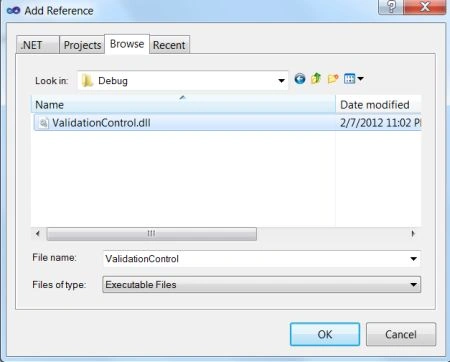
Step 5: In this step you will have to add the reference of the phone class library which was created; let us see from where you have to add this which is shown in the figure.

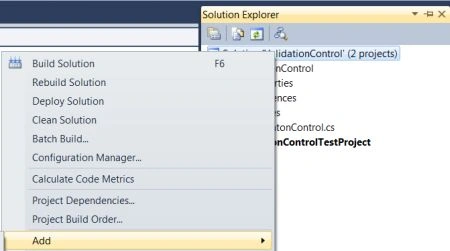
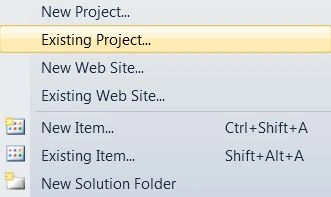
Step 6: In this step we have to add the complete phone library project to the Windows Phone application project; let us see how you will add it.
- Go to Solution Explorer.
- Right click and add select add select existing project.
- Select the Class library cs file and add it.
- You just see that whole library project will be added to the Windows Phone application project.
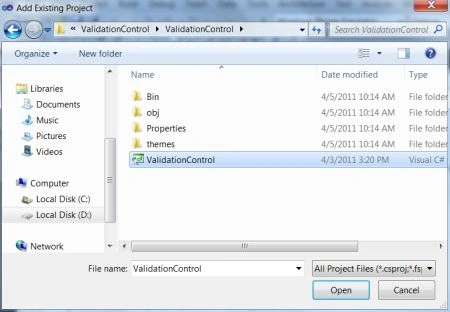
Step 7: In this step you will see that the project has been added to your Windows Phone application project which you can see in the figure given below:

Step 8: In this step you just see that the control named with Validation Control has been added to the toolbox which you can see in the figure given below; you can drag and drop that control to use it.

Step 9: In this step you just see the code for the MainPage.xaml.cs file which is given below.
Code:
using System;
using System.Collections.Generic;
using System.Linq;
using System.Net;
using System.Windows;
using System.Windows.Controls;
using System.Windows.Documents;
using System.Windows.Input;
using System.Windows.Media;
using System.Windows.Media.Animation;
using System.Windows.Shapes;
using Microsoft.Phone.Controls;
using ValidationControl;
namespace ValidationControlTestProject
{
public partial class MainPage : PhoneApplicationPage
{
// Constructor
public MainPage()
{

Laura ParkerPosted Feb 12, 2012, 11:13 PM
Well done Amit, This is really awesome