

Introduction
In this article I will explain how to create a zip file using ASP.NET & C#. In this purpose we can use Ionic.Zip.dll reference for creating Zip file in ASP.NET. So first we download the dll through this link Ionic.Zip.dll.
Assemblies Required
After downloading the Ionic.Zip.dll Zip file you can get many folders inside the zip file. Go to zip-v1.9-Reduced folder Inside the zip file, then open the particular folder that contain Ionic.Zip.Reduced.dll.
We must add the following namespace:
- using Ionic.Zip;
Code
The following code will create zip file in ASP.NET with the help of Ionic.Zip.Reduced.dll.
- protected void btn_zip_Click(object sender, EventArgs e)
- {
- string path = Server.MapPath("~/Test/");//Location for inside Test Folder
- string[] Filenames = Directory.GetFiles(path);
- using (ZipFile zip = new ZipFile())
- {
- zip.AddFiles(Filenames, "Project");//Zip file inside filename
- zip.Save(@"C:\Users\user\Desktop\Projectzip.zip");//location and name for creating zip file
- }
- }
- Code line number 03 describe the location of the file. Those files we can convert into zip format.
- Code line number 07 describe that the particular name of the file inside the zip file.
- Code line number 08 define the name of the zip file we are going to create.
Dll Reference
Add the Downloaded dll inside the Bin Folder.
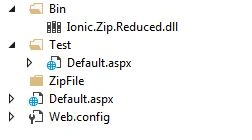
Design

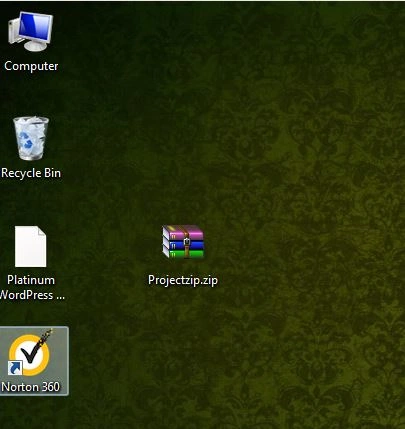
Output
Created the Zip file.
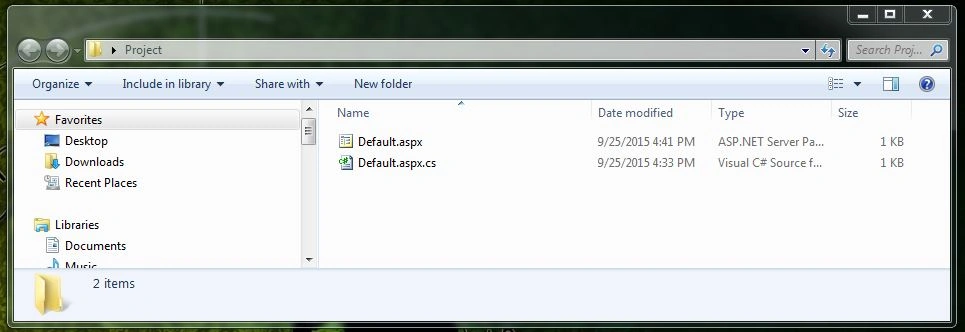
Inside The Zip File.
Reference
Summary
We learned how to create a Zip file using ASP.NET and C#. I hope this article is useful for all .NET beginners.
Nandha Kumar NagarajanPosted Jul 20, 2020, 7:54 AM
Hello sir , actually i want alias name for default.aspx &defalut.cs would you tell me how to set alias name.... i putted Zip.save(Response.outputStream)
kalai romiPosted Mar 24, 2020, 4:59 AM
Hello sir,Am receiving error as zipfile could not be found..missing directive or assembly reference..ZipFile zip = new ZipFile()
Anil KumarPosted Jun 23, 2017, 3:34 AM
Thanks sir, valuable sharing
Delpin Susai RajPosted Aug 28, 2016, 7:06 AM
Nice one
Santhakumar MunuswamyPosted Sep 30, 2015, 3:48 PM
Good One
Rajeesh MenothPosted Sep 30, 2015, 2:27 AM
Thank You Sibeesh Venu
Sibeesh VenuPosted Sep 30, 2015, 2:26 AM
Nice Share
Rajeesh MenothPosted Sep 30, 2015, 12:28 AM
Thank You Mohammed Ibrahim
Mohammed IbrahimPosted Sep 29, 2015, 3:29 PM
nice
Raja TPosted Sep 29, 2015, 12:34 PM
Good One, Thanks for sharing
Pawan ChandPosted Sep 29, 2015, 9:01 AM
In .net 4.5 there is Zip class in System.IO.Compression, which is used for creating, extracting, and opening zip archives. Better to use this instead of third party dll.
Rajeesh MenothPosted Sep 29, 2015, 7:54 AM
Hi @Pawan ,Here I am using third party dll reference but i will try based on your suggestion...
Sagar DonthineniPosted Sep 29, 2015, 7:39 AM
Can you please try to provide the code instead dll.
Rajeesh MenothPosted Sep 29, 2015, 7:36 AM
Thank You Ankit Bansal
Ankit BansalPosted Sep 29, 2015, 7:25 AM
nice..
RakeshPosted Sep 29, 2015, 7:19 AM
Good one
Rajeesh MenothPosted Sep 29, 2015, 5:17 AM
Thanks Vipul Malhotra
Vipul MalhotraPosted Sep 29, 2015, 5:03 AM
nice
Rajeesh MenothPosted Sep 29, 2015, 4:56 AM
Thanks Harshad Pansuriya :)
Harshad PansuriyaPosted Sep 29, 2015, 4:54 AM
Nice One