

We will learn here how to create a dynamic menu control with data without a database.
Initial Chamber
Step 1
Open your Visual Studio and create an empty website then provide a suitable name such as DynamicMenu.aspx.
Step 2
In Solution Explorer you will get your empty website, then add some web forms.
DynamicMenu (your empty website). Right-click and select Add New Item Web Form. Name it DynamicMenu.aspx.
Design Chamber
Step 3
Open the DynamicMenu.aspx file and write some code for the design of the application.
Step 3.1
Use the following stylesheet code in the head chamber of the page like:
- <style type="text/css">
- body
- {
- background-color:mediumaquamarine;
- font-family: Arial;
- font-size: 10pt;
- color: #444;
- }
- .ParentMenu, .ParentMenu:hover {
- width: 100px;
- background-color: #fff;
- color: #333;
- text-align: center;
- height: 30px;
- line-height: 30px;
- margin-right: 5px;
- }
- .ParentMenu:hover {
- background-color: #ccc;
- }
- .ChildMenu, .ChildMenu:hover {
- width: 110px;
- background-color: #fff;
- color: #333;
- text-align: center;
- height: 30px;
- line-height: 30px;
- margin-top: 5px;
- }
- .ChildMenu:hover {
- background-color: #ccc;
- }
- .selected, .selected:hover {
- background-color: #A6A6A6 !important;
- color: #fff;
- }
- .level2 {
- background-color: #fff;
- }
- </style>
Step 3.2
Choose menu control from the toolbox and use the following in your design page:
- <div>
- <asp:Menu ID="Menu1" runat="server" Orientation="Horizontal">
- <LevelMenuItemStyles>
- <asp:MenuItemStyle CssClass="ParentMenu" />
- <asp:MenuItemStyle CssClass="ChildMenu" />
- <asp:MenuItemStyle CssClass="ChildMenu" />
- </LevelMenuItemStyles>
- <StaticSelectedStyle CssClass="selected" />
- </asp:Menu>
- </div>
DynamicMenu.aspx
- <%@ Page Language="C#" AutoEventWireup="true" CodeFile="DynamicMenu.aspx.cs" Inherits="DynamicMenu" %>
- <!DOCTYPE html>
- <html xmlns="http://www.w3.org/1999/xhtml">
- <head runat="server">
- <title>Dynamic Menu Control Article for C# Corner by Upendra Pratap Shahi</title>
- <style type="text/css">
- body {
- background-color: mediumaquamarine;
- font-family: Arial;
- font-size: 10pt;
- color: #444;
- }
- .ParentMenu, .ParentMenu:hover {
- width: 100px;
- background-color: #fff;
- color: #333;
- text-align: center;
- height: 30px;
- line-height: 30px;
- margin-right: 5px;
- }
- .ParentMenu:hover {
- background-color: #ccc;
- }
- .ChildMenu, .ChildMenu:hover {
- width: 110px;
- background-color: #fff;
- color: #333;
- text-align: center;
- height: 30px;
- line-height: 30px;
- margin-top: 5px;
- }
- .ChildMenu:hover {
- background-color: #ccc;
- }
- .selected, .selected:hover {
- background-color: #A6A6A6 !important;
- color: #fff;
- }
- .level2 {
- background-color: #fff;
- }
- </style>
- </head>
- <body>
- <form id="form1" runat="server">
- <div>
- <asp:Menu ID="Menu1" runat="server" Orientation="Horizontal">
- <LevelMenuItemStyles>
- <asp:MenuItemStyle CssClass="ParentMenu" />
- <asp:MenuItemStyle CssClass="ChildMenu" />
- <asp:MenuItemStyle CssClass="ChildMenu" />
- </LevelMenuItemStyles>
- <StaticSelectedStyle CssClass="selected" />
- </asp:Menu>
- </div>
- </form>
- </body>
- </html>
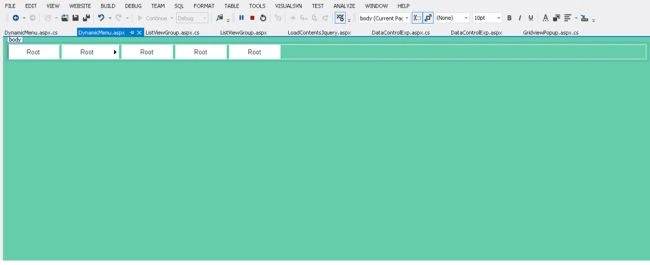
Figure 1: Design
Your design page looks as in above. But still your menu control is not yet designed. For this go further.
Code Chamber
Step 4
In the code chamber we will write some code so that our application works.
Adding the following namespaces in the namespace section of your code behind page.
- using System.IO;
- using System.Data;
- using System.Data.SqlClient;
- using System.Configuration;
DynamicMenu.aspx.cs
- using System;
- using System.Collections.Generic;
- using System.Linq;
- using System.Web;
- using System.Web.UI;
- using System.Web.UI.WebControls;
- using System.IO;
- using System.Data;
- using System.Data.SqlClient;
- using System.Configuration;
- public partial class DynamicMenu : System.Web.UI.Page
- {
- protected void Page_Load(object sender, EventArgs e)
- {
- if (!IsPostBack)
- {
- DataTable dt = this.BindMenuData(0);
- DynamicMenuControlPopulation(dt, 0, null);
- }
- }
- /// <summary>
- /// This function retur a datatable according to parent menu id passed by user
- /// </summary>
- /// <param name="parentmenuId">parent menu ID</param>
- /// <returns>data table</returns>
- protected DataTable BindMenuData(int parentmenuId)
- {
- //declaration of variable used
- DataSet ds = new DataSet();
- DataTable dt;
- DataRow dr;
- DataColumn menu;
- DataColumn pMenu;
- DataColumn title;
- DataColumn description;
- DataColumn URL;
- //create an object of datatable
- dt=new DataTable();
- //creating column of datatable with datatype
- menu= new DataColumn("MenuId",Type.GetType("System.Int32"));
- pMenu=new DataColumn("ParentId", Type.GetType("System.Int32"));
- title=new DataColumn("Title",Type.GetType("System.String"));
- description=new DataColumn("Description",Type.GetType("System.String"));
- URL=new DataColumn("URL",Type.GetType("System.String"));
- //bind data table columns in datatable
- dt.Columns.Add(menu);//1st column
- dt.Columns.Add(pMenu);//2nd column
- dt.Columns.Add(title);//3rd column
- dt.Columns.Add(description);//4th column
- dt.Columns.Add(URL);//5th column
- //creating data row and assiging the value to columns of datatable
- //1st row of data table
- dr = dt.NewRow();
- dr["MenuId"] = 1;
- dr["ParentId"] = 0;
- dr["Title"] = "Home";
- dr["Description"] = "";
- dr["URL"] = "~/Home.aspx";
- dt.Rows.Add(dr);
- //2nd row of data table
- dr = dt.NewRow();
- dr["MenuId"] = 2;
- dr["ParentId"] = 0;
- dr["Title"] = "Customer Service";
- dr["Description"] = "Customer Service";
- dr["URL"] = "~/Customer.aspx";
- dt.Rows.Add(dr);
- //3rd row of data table
- dr = dt.NewRow();
- dr["MenuId"] = 3;
- dr["ParentId"] = 0;
- dr["Title"] = "About";
- dr["Description"] = "About us page";
- dr["URL"] = "~/AboutUs.aspx";
- dt.Rows.Add(dr);
- //4th row of data table
- dr = dt.NewRow();
- dr["MenuId"] = 4;
- dr["ParentId"] = 0;
- dr["Title"] = "Contact Us";
- dr["Description"] = "Contact Us page";
- dr["URL"] = "~/Contact.aspx";
- dt.Rows.Add(dr);
- //5th row of data table
- dr = dt.NewRow();
- dr["MenuId"] = 5;
- dr["ParentId"] = 0;
- dr["Title"] = "Testmonial";
- dr["Description"] = "Testimonial page";
- dr["URL"] = "~/Testimonial.aspx";
- dt.Rows.Add(dr);
- //6th row of data table
- dr = dt.NewRow();
- dr["MenuId"] = 6;
- dr["ParentId"] = 2;
- dr["Title"] = "Consulting";
- dr["Description"] = "Consulting page";
- dr["URL"] = "~/Consult.aspx";
- dt.Rows.Add(dr);
- //7th row of data table
- dr = dt.NewRow();
- dr["MenuId"] = 7;
- dr["ParentId"] = 2;
- dr["Title"] = "Outsourcing";
- dr["Description"] = "Outsourcing page";
- dr["URL"] = "~/Outsource.aspx";
- dt.Rows.Add(dr);
- //8th row of data table
- dr = dt.NewRow();
- dr["MenuId"] = 8;
- dr["ParentId"] = 7;
- dr["Title"] = "Domestic";
- dr["Description"] = "Domestic outsourcing page";
- dr["URL"] = "~/Domestic.aspx";
- dt.Rows.Add(dr);
- //9th row of data table
- dr = dt.NewRow();
- dr["MenuId"] = 9;
- dr["ParentId"] = 7;
- dr["Title"] = "International";
- dr["Description"] = "International outsourcing page";
- dr["URL"] = "~/International.aspx";
- dt.Rows.Add(dr);
- ds.Tables.Add(dt);
- var dv = ds.Tables[0].DefaultView;
- dv.RowFilter = "ParentId='" + parentmenuId + "'";
- DataSet ds1 = new DataSet();
- var newdt = dv.ToTable();
- return newdt;
- }
- /// <summary>
- /// This is a recursive function to fetchout the data to create a menu from data table
- /// </summary>
- /// <param name="dt">datatable</param>
- /// <param name="parentMenuId">parent menu Id of integer type</param>
- /// <param name="parentMenuItem"> Menu Item control</param>
- protected void DynamicMenuControlPopulation(DataTable dt, int parentMenuId, MenuItem parentMenuItem)
- {
- string currentPage = Path.GetFileName(Request.Url.AbsolutePath);
- foreach (DataRow row in dt.Rows)
- {
- MenuItem menuItem = new MenuItem
- {
- Value = row["MenuId"].ToString(),
- Text = row["Title"].ToString(),
- NavigateUrl = row["URL"].ToString(),
- Selected = row["URL"].ToString().EndsWith(currentPage, StringComparison.CurrentCultureIgnoreCase)
- };
- if (parentMenuId == 0)
- {
- Menu1.Items.Add(menuItem);
- DataTable dtChild = this.BindMenuData(int.Parse(menuItem.Value));
- DynamicMenuControlPopulation(dtChild, int.Parse(menuItem.Value), menuItem);
- }
- else
- {
- parentMenuItem.ChildItems.Add(menuItem);
- DataTable dtChild = this.BindMenuData(int.Parse(menuItem.Value));
- DynamicMenuControlPopulation(dtChild, int.Parse(menuItem.Value), menuItem);
- }
- }
- }
- }
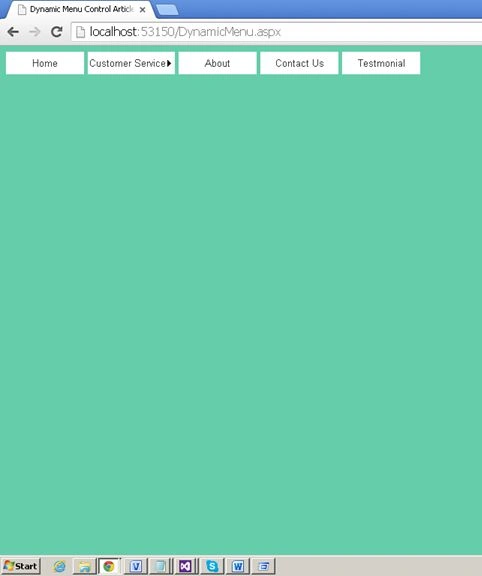
Figure 2: 0-level menu
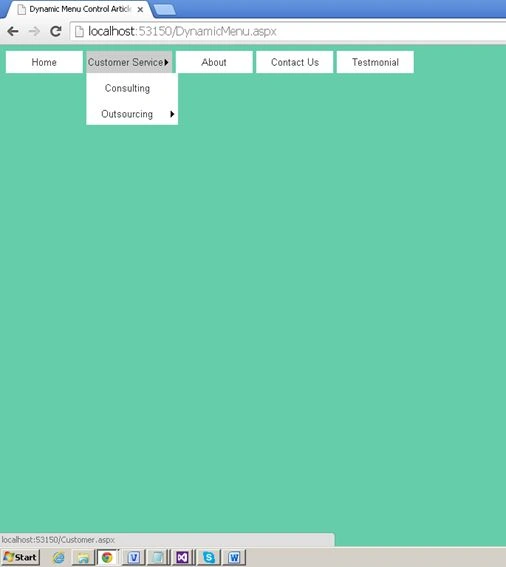
Figure 3: 1-level menu
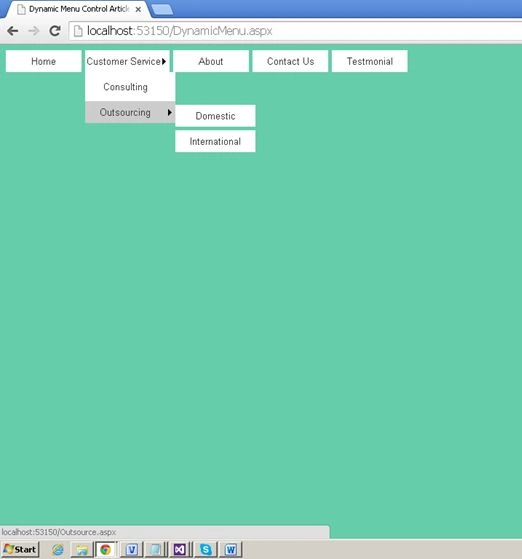
Figure 4: 2-level menu
I hope you liked this. Have a good day. Thank you for reading.
Munna RayPosted Jan 18, 2024, 4:52 AM
Create-dynamic-menu-in-Asp-Net-with-database and code of ing System;using System.Linq; using System.Text; using System.Web.UI; public partial class Dropdowncss3Menu : System.Web.UI.Page { StringBuilder sbMenu = new StringBuilder(); int childCount = 0; protected void Page_Load(object sender, EventArgs e) { if (!Page.IsPostBack) { //==== Bind parent dropdownlist bindParentItems(); //==== Bind Menu. generateDynamicMenu(); } } protected void btnAddMenuItem_Click(object sender, EventArgs e) { using (dynamicMenuEntities context = new dynamicMenuEntities()) { Menu obj = new Menu(); obj.MenuName = txtName.Text.Trim(); obj.ParentId = Convert.ToInt32(ddlParent.SelectedItem.Value); obj.URL = txtURL.Text.Trim(); context.Menus.Add(obj); context.SaveChanges(); //==== Rebind parent drop down with new values. bindParentItems(); //==== Clear Form Fields. clearFormFields(); //==== Rebind Menu. generateDynamicMenu(); //--- Show Success message. lblConfirmationMessage.Text = "Menu item saved successfully."; } } public void bindParentItems() { using (dynamicMenuEntities context = new dynamicMenuEntities()) { ddlParent.DataSource = (from r in context.Menus select new { r.Id, r.MenuName }).ToList(); ddlParent.DataTextField = "MenuName"; ddlParent.DataValueField = "Id"; ddlParent.DataBind(); //==== Insert Default value. ddlParent.Items.Insert(0, new ListItem("Select Parent", "-1")); ddlParent.Items.Insert(1, new ListItem("Default (Level 0)", "0")); } } public void clearFormFields() { txtURL.Text = string.Empty; txtName.Text = string.Empty; ddlParent.ClearSelection(); } public string getMenuItems(int parentId) { using (dynamicMenuEntities context = new dynamicMenuEntities()) { var menuObj = from r in context.Menus where r.ParentId == parentId select new { r.MenuName, r.URL, r.Id }; foreach (var obj in menuObj) { childCount = context.Menus.Count(r => r.ParentId == obj.Id); if (childCount > 0) { sbMenu.Append("<li><a target=\"_blank\" href=\"" + Page.ResolveUrl(obj.URL) + "\">" + obj.MenuName + "</a><ul>"); getMenuItems(obj.Id); sbMenu.Append("</ul></li>"); } else { sbMenu.Append("<li><a target=\"_blank\" href=\"" + Page.ResolveUrl(obj.URL) + "\">" + obj.MenuName + "</a></li>"); } } } return sbMenu.ToString(); } public void generateDynamicMenu() { //==== Created first ul element of the unordered list to generate menu also assigned id="menu" as our entire css is based on this id. sbMenu.Append("<ul id=\"menu\">"); //==== Call recursive method to get all child elements according to parents. //=== We pass 0 as an argument as 0 is the id of the default parent. string childItems = getMenuItems(0); sbMenu.Append(childItems); //==== Close dynamic menu unordered list. sbMenu.Append("</ul>"); //==== Show generated menu inside div. divToShowMenu.InnerHtml = sbMenu.ToString(); } }
Munna RayPosted Jan 18, 2024, 4:49 AM
Dropdowncss3Menu
sm sajPosted May 14, 2022, 5:30 AM
Project source code is not running. the error is -- One or more projects in the solution were not loaded correctly. please see the output window for details.
sm sajPosted May 14, 2022, 5:28 AM
Project source is not running.
Алекс ЦікавийPosted Aug 4, 2021, 7:06 PM
How do you create that arrow? Actually I need that arrow and change it to backwards, when child menu is open.
Алекс ЦікавийPosted Aug 4, 2021, 7:05 PM
How do you create this arrow? I don't see it in the code.
pm cdPosted Mar 12, 2020, 1:17 AM
How to create submenu more for "About' menu, example about1, about2
surendra kumarPosted Aug 2, 2019, 4:03 AM
How to make it responsive
Ramzanali MominPosted Aug 21, 2018, 4:58 AM
Very superb Article i salute you . sir
Rakesh KumarPosted Apr 30, 2018, 9:56 AM
Dear Upender ji, I just started learning .net and tried to build a menu with your informative and useful code, but getting an error message on the lineMenu1.Items.Add(menuItem) as Item Menu1 not available in current context
Anandita RaniPosted Jan 29, 2018, 12:07 AM
How to create 3rd level submenu using database..
Hasim RazaPosted Jan 21, 2016, 5:07 AM
Thanks for your article
Grace EnoughPosted Sep 7, 2015, 5:19 PM
Very good tutorial , you could do something similar but with a database ? It would be very useful , Thanks
Rajeesh MenothPosted Aug 16, 2015, 2:18 AM
Nice One
Jaipal ReddyPosted Jul 20, 2015, 3:10 AM
Nice work sir
Santhakumar MunuswamyPosted Jul 16, 2015, 3:59 PM
Nice Article! Thanks for sharing
Narasimha Reddy ChennupalliPosted Jul 16, 2015, 8:43 AM
Good one...
Sibeesh VenuPosted Jul 16, 2015, 12:57 AM
Thanks for the information
Debasis SahaPosted Jul 16, 2015, 12:46 AM
Nice one..
RakeshPosted Jul 15, 2015, 11:44 PM
Nice sir