

In this article, we will learn how to create a RDLC Report in ASP.Net using Visual Studio Report Designer. For demonstration purposes, I have created a database (named Sample) and created a table tbl_Employee in it. The following is the table design for creating tbl_Employee.

Add some records to tbl_Employee. I have attached the script of the database along with the source code for download.
Let's Begin.
1. Create an Empty ASP.NET Website and Add a Web Form(Default.aspx) to it.
2. Drop ScriptManager and ReportViewer controls from the Toolbox onto the Default.aspx Web form.

3. Click on ReportViewer Tasks and then click on Design a new report.

You will then then see the Data Source Configuration Wizard.
4. Click on New Connection.

Then select Microsoft SQL Server as the Data Source then click on "Continue".

5. Provide the Server Name and select your database from the drop-down list.

Then click on "OK".
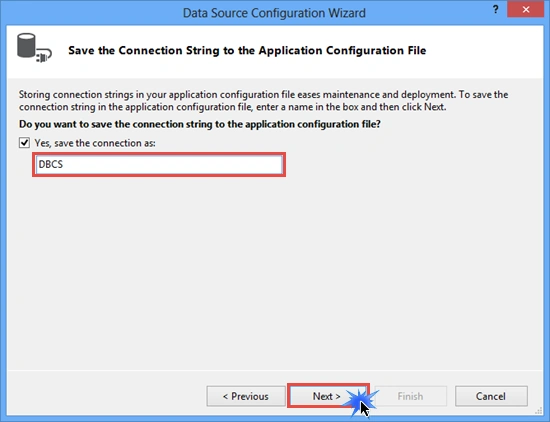
6. Provide a name to your connection String and click on "Next".
7. Select the database object you want in your dataset and provide a meaningful name for the DataSet. Click on "Finish".

8. Now the Report Wizard opens. Select the DataSource as Dataset (in other words EmployeeDS) that you created in the previous step then click on "Next".

9. Drag and drop the required fields from the Available fields into the Values section.
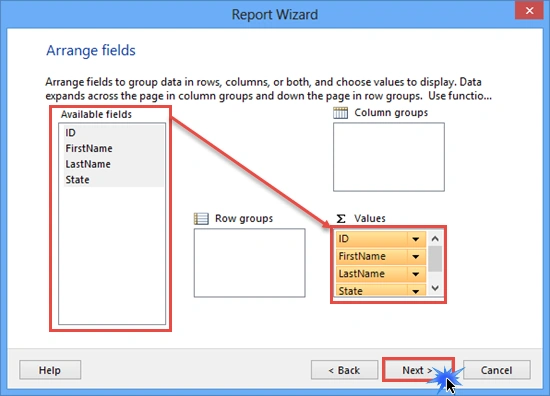
Click on "Next" because we didn't want to display a subtotal in our report.

10. Choose a style for your report then click on "Finish". I have selected Slate as the style for my report.

You will then see the report named Report1.rdlc created.

11. Now go to Default.aspx (where you have dropped the ReportViewer control) and than click on ReportViewer Tasks and select Report1.rdlc.

12. Build and run the application.

Click on the Save Button in the report and save the entire report in PDF/Excel/Word format.
I hope you like it. Thanks.
Mansoor AhmedPosted Jan 24, 2023, 7:24 AM
I Downloaded Your Project And Follows All Steps By Step. In The End. An error occurred during local report processing.The report definition for report 'Report1' has not been specified Object reference not set to an instance of an object. Getting This Error
IMAD AYOUBPosted Jul 26, 2021, 10:03 PM
Good article for web forms but how about asp.net core?
Guest UserPosted May 23, 2020, 5:56 AM
Sharma your app only uses mvc core? or Model View and Controller? I want to use similar logic to my app. pls help
Nand ChavanPosted Jun 6, 2019, 12:12 PM
Thank you sir. I downloaded the code, it works fine.
Hawk eyePosted May 17, 2019, 5:26 AM
Still havent posted coding :((
Anoop Kumar SharmaPosted Dec 23, 2014, 6:39 AM
Thanks Manish Kumar Choudhary and Humayun Kabir Mamun!!
Humayun Kabir MamunPosted Dec 23, 2014, 6:26 AM
Nice...
Manish Kumar ChoudharyPosted Dec 22, 2014, 10:57 PM
Nice one..
Anoop Kumar SharmaPosted Dec 22, 2014, 10:05 PM
Thanks Vithal Wadje Sir :-)
Vithal WadjePosted Dec 22, 2014, 10:03 PM
very useful ,keep it up