

Windows Communication Foundation (WCF) is an SDK for developing and deploying
services on Windows. WCF provides a runtime environment for your services,
enabling you to expose CLR types as services, and to consume other services as
CLR types. In this article, I am going to explain to you how to implement restful
service API using WCF 4.0. The Created API returns XML and JSON data using WCF
attribute.
Normally developer scared to use WCF because of a lot of confusing configuration. I
will try to use minimum configuration so that it will be easier to understand
for us. We will develop Restful WCS API in 6 steps. So let's start now.
What is REST?
Based on Roy Fielding
theory "Representational State Transfer (REST), attempts to codify the architectural
style and design constraints that make the Web what it is. REST emphasizes
things like separation of concerns and layers, statelessness, and caching,
which are common in many distributed architectures because of the benefits they
provide. These benefits include interoperability, independent evolution,
interception, improved scalability, efficiency, and overall performance."
Actually only the
difference is how clients access our service. Normally, a WCF service will use
SOAP, but if you build a REST service clients will be accessing your service
with a different architectural style (calls, serialization like JSON,
etc).
REST uses some common
HTTP methods to insert/delete/update/retrieve information which is below:
- GET - Requests a specific representation of a resource
- PUT - Create or update a resource with the supplied representation
- DELETE - Deletes the specified resource
- POST - Submits data to be processed by the identified resource
Why and where to use REST?
Few days back I was writing a service
which was supposed to access by heterogeneous language/platform/system. It can
be used by iPhone, Android, Windows Mobile, .NET web application, JAVA or PHP.
Using web service it was bit complex for me to expose it to everyone using
uniform system. Then we decided to use REST, which was easily espoused over
cloud. This was a great example which shows the capability of SIMPLE RESTful
SERVICE:). Below is some point which will help you
to understand why to use the RESTful services.
- Less overhead (no SOAP envelope to wrap every call in)
- Less duplication (HTTP already represents operations like DELETE, PUT, GET, etc. that have to otherwise be represented in a SOAP envelope).
- More standardized - HTTP operations are well understood and operate consistently. Some SOAP implementations can get finicky.
- More human readable and testable (harder to test SOAP with just a browser).
- Don't need to use XML (well you kind of don't have to for SOAP either but it hardly makes sense since you're already doing parsing of the envelope).
- Libraries have made SOAP (kind of) easy. But you are abstracting away a lot of redundancy underneath as I have noted. Yes in theory SOAP can go over other transports so as to avoid riding atop a layer doing similar things, but in reality just about all SOAP work you'll ever do is over HTTP.
Step by step guide
Generally, developer
scared to use WCF because of lot of confusing configuration. I will try to use
minimum configuration so that it will be easier to understand for us. We will
develop Restful WCS API in
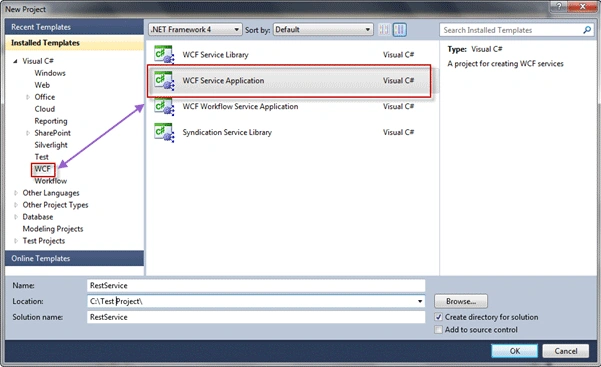
6 steps. So let's start now.

Gowtham RajamanickamPosted Apr 14, 2016, 6:07 AM
nice article..
Sam HobbsPosted Jul 27, 2012, 10:40 PM
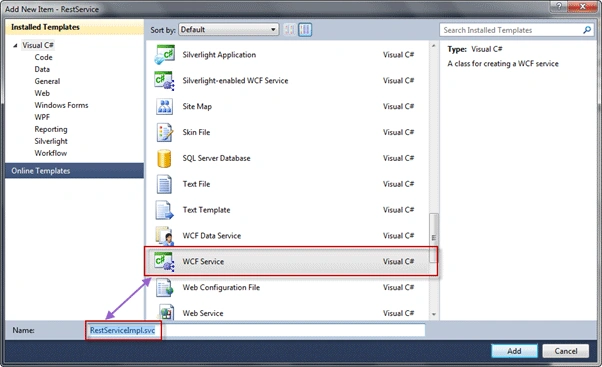
In step 1 you should tell us to name the project "RestService". Right? In step 3 instead of saying right-click on the solution, it is better to say right-click on the project. Right? Then say we need to add a new item and the new item is a "WCF service" file. When I read it the first time I thought you were adding a new project to the solution. Then in step 6 it will help to say that the services and behaviors will replace the behaviors; in the generated file, there is not a services section. Right? I am a beginner and I do not know hos to make it work. I downloaded the sample and when I debug it, the WCF Test Client executes but it does nothing; it does not show the application. When I build the application using your instructions in a separate project, I only get a web page with a directory listing of the project.
mdgardipeePosted Mar 7, 2011, 11:23 AM
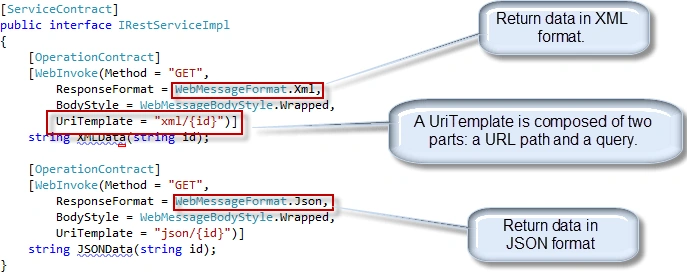
I have implemented your example and when I request either the XML or JSON I get an HTTP 400 error. Here is an excerpt from the code page. [OperationContract] [WebInvoke(Method = "GET", ResponseFormat = WebMessageFormat.Xml, BodyStyle = WebMessageBodyStyle.Wrapped, UriTemplate = "xml/{id}")] string XMLData(string id); What I am missing? Thanks, m.
dang ngoc tuanPosted Sep 15, 2010, 4:49 AM
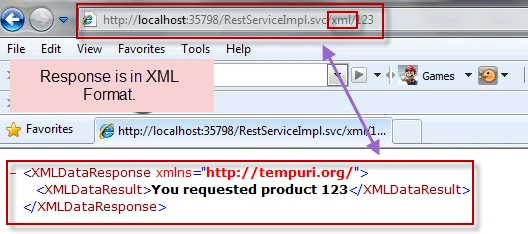
I got that result when using http://localhost:35798/RestServiceImpl.svc/xml/123: Service Endpoint not found.
none nonePosted Sep 11, 2010, 6:01 PM
Thx.
Raj KumareditedPosted Aug 31, 2010, 12:54 AMEdited Sep 6, 2010, 12:40 AM
Hey can you share How to lead a team successfully???? Share some tips with c-sharpcorner users.