

Introduction
This article introduces the creation of a SharePoint list using JQuery and SharePoint web services.
Requirement:
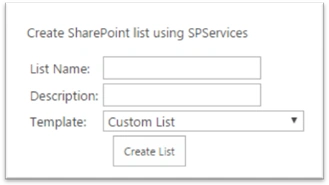
This is required when the client wants to customize their site and they don’t want to use the OOB options in SharePoint. So we can provide a custom page to create a SharePoint list using a custom dashboard.
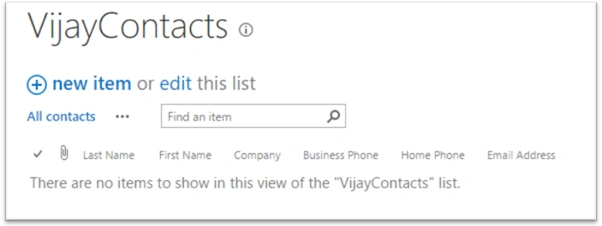
Here I am providing a sample example in a SharePoint page.
Step 1: Open your SharePoint site and create a SharePoint Page in SitePages library
Step2: Download JQuery and Spservices reference files from source code of this article
Step3: Add above downloaded reference files to the created page and add the following code in body of the page.
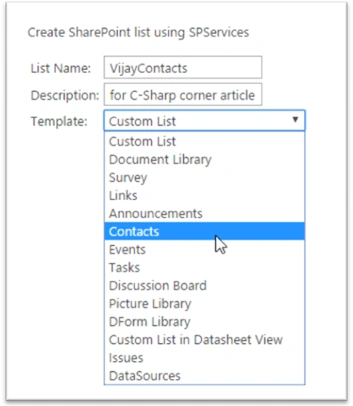
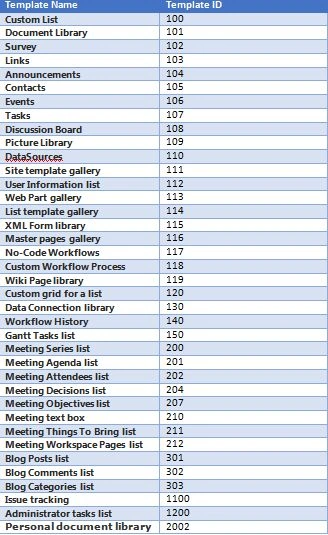
Note: If you want more templates, please refer list given at end of this article.
- <p>Create SharePoint list using SPServices</p>
- <div>
- <table>
- <tr>
- <td>List Name:</td>
- <td><input type="text" id="txtListName" /></td>
- </tr>
- <tr>
- <td>Description:</td>
- <td><input type="text" id="txtListDesc" /></td>
- </tr>
- <tr>
- <td>Template:</td>
- <td>
- <select id="selTemplate">
- <option value="100">Custom List</option>
- <option value="101">Document Library</option>
- <option value="102">Survey</option>
- <option value="103">Links</option>
- <option value="104">Announcements</option>
- <option value="105">Contacts</option>
- <option value="106">Events</option>
- <option value="107">Tasks</option>
- <option value="108">Discussion Board</option>
- <option value="109">Picture Library</option>
- <option value="115">DForm Library</option>
- <option value="120">Custom List in Datasheet View</option>
- <option value="1100">Issues</option>
- <option value="110">DataSources</option>
- </select>
- </td>
- </tr>
- <tr>
- <td></td>
- <td><input type="button" id="btnCreate" value="Create List" /></td>
- </tr>
- </table>
- </div>
Gunjan RajputPosted Feb 14, 2019, 1:39 AM
Hi, Does this work for custom list template as well?
Dhayanand KalimidiPosted Dec 29, 2017, 5:19 AM
Nice article. This is help full
Tejesh BarmaPosted Feb 16, 2016, 1:32 AM
<p>Create Sharepoint List Using SPServices</p> <div> <table> <tr> <td>List Name:</td> <td><input type="text" id="txtListName"/></td> </tr> <tr> <td>Description:</td> <td><input type="test" id="txtFirstName"/></td> </tr> <tr> <td>Template:</td> <td> <select id="selTemplate"> <option value="100">Custom List</option> <option value="101">Document Library</option> <option value="102">Survey</option> <option value="103">Links</option> <option value="104">Announcements</option> <option value="105">Contacts</option> <option value="106">Events</option> <option value="107">Tasks</option> <option value="108">Discussion Board</option> <option value="109">Picture Library</option> <option value="115">DForm Library</option> <option value="120">Custom List in Datasheet View</option> <option value="1100">Issues</option> <option value="110">DataSources</option> </select> </td> </tr> <tr> <td></td> <td><input type="button" id="btnCreate" value="Create List" /></td> </tr> </table> </div> <script type="text/javascript" src="/SiteAssets/scripts/jquery-2.1.4.min.js"></script> <script type="text/javascript" src="/SiteAssets/scripts/jquery.SPServices-2014.02.js"></script> <script type="text/javascript"> $(document).ready(function(){ alert('hello'); $('#btnCreate').click(function(){ CreateList(); }); }); function CreateList() { var strLastName=$('#txtListName').val(); var strDescription=$('#txtFirstName').val(); var strTemplate=$('#selTemplate').val(); $().SPServices({ operation:"AddList", async: false, listName: strLastName, description: strDescription, templateID: strTemplate, completefunc: function(xData, Status) { if (xData.status == 200) { alert(strLastName+ ' List created successfully'); } else { alert(xData.status); alert(xData.responseText); } } }); } </script>
Tejesh BarmaPosted Feb 16, 2016, 1:32 AM
Rupali,please insert below code into script editor.with ref of your jquery and spservice library files.
Humayun Kabir MamunPosted Feb 3, 2016, 11:16 PM
Nice...
Rupali ShindePosted Feb 3, 2016, 5:16 AM
can you please check it is working or not for office 365 ?? i tried ur code but it is not working ..if possible please upload source code
Rupali ShindePosted Feb 3, 2016, 4:07 AM
thanks for sharing
Sibeesh VenuPosted Feb 1, 2016, 1:11 AM
Nice Share
Ankit BansalPosted Feb 1, 2016, 12:38 AM
nice one..
Vijay BhaskarPosted Jan 31, 2016, 3:44 PM
Thank you for your encouragement..
Santhakumar MunuswamyPosted Jan 31, 2016, 12:35 PM
Thanks for nice article
Nanddeep NachanPosted Jan 31, 2016, 10:11 AM
Nice share