

Introduction
SQL Server has many data types. From geographic values to Integers, Doubles to Strings, and many more. These data types help store specific values.
Even though built-in data types can store specific values, sometimes you may need to create customized data types.
Speaking of it, I'd like to create a user-defined data type using 2 methods:
- T-SQL
- Manually
In our example, I'll be creating a UDDT named "CountryCode" which stores only 3 letters of the country.
How to Create a User-Defined Data Type using T-SQL?
- Launch SQL Server Management Studio.
- Connect to your Server.
- Click "New Query" in the menu items.
- Make sure you select the ideal database which you want to create.
- Write these TSQL codes:
Create Type CountryCode from varchar(3) NOT NULL -
Execute
-
The UDDT will be created under {Database}-Programmability-Types-User Defined Data Types section.
How to Create a User-Defined Data Type Manually?
- Launch SQL Server Management Studio.
- Connect to your Server.
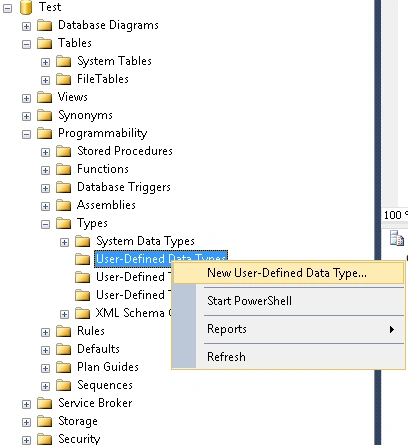
- Follow path {Database}-Programmability-Types-User Defined Data Types section and right-click on it.
- Choose "New User-Defined Data Type."
- Fill in specific information regarding the creation of data type:
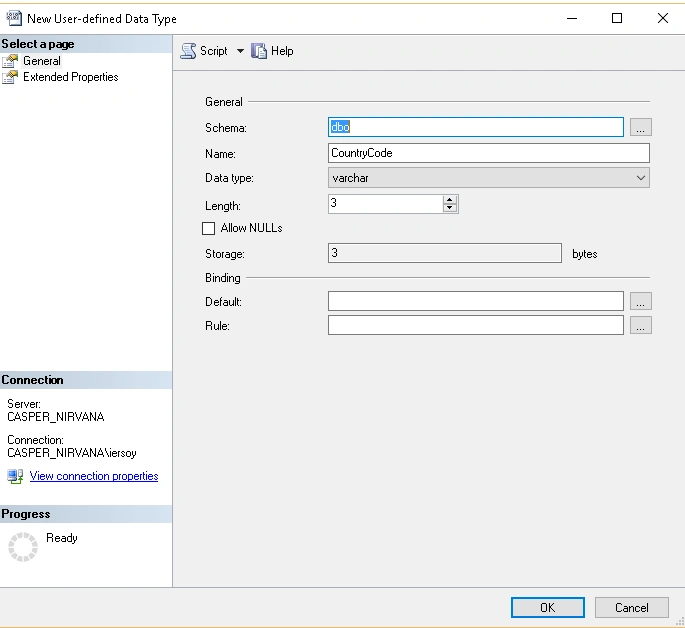
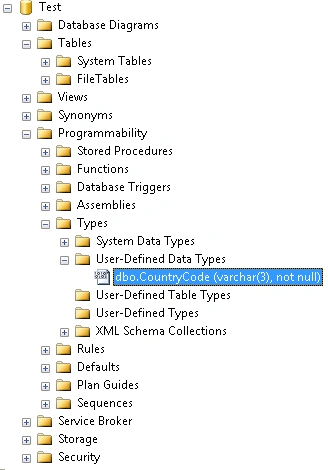
- When you're done filling in, click OK and this will create your User-Defined Data Type in the left panel.
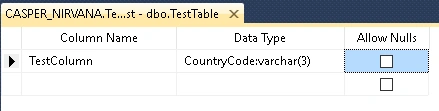
Now you can use your custom datatype in a table or SQL query.
UPDATE
As per feedback, I'd like to give a much more useful tip on
where to use User Defined Data Types?
User Defined Data Types standalone does not have an advantage over built-in. But if you create rules and bind them with the custom data type you've recently created, I'm sure It will meet your needs.
Let's create a rule
Create Rule CountryCode_Rule
as @CountryCode not like 'A%'
In the example code above, I've created a rule that accepts every input except starting with the 'A' letter. Entering an input starting with 'A' will throw an error indicating that the input and rule conflict.
But our work hasn't finished yet. We need to bind the Rule and User Defined Data Type. For this we use a stored procedure named "sp_bindrule":
sp_bindrule CountryCode_Rule,'CountryCode'
Executing this statement will now bind the rule to the 'CountryCode' custom data type. And you won't be able to enter any input the rule doesn't accept.
However, If you want to unbind the rule from User Defined Data Type, you need to use "sp_unbindrule" with the User Defined Data Type parameter.
sp_unbindrule 'CountryCode'
Read more articles on SQL Server
purushottam kumarPosted Aug 23, 2017, 2:49 AM
Very nice information thanks
SubashPosted Jul 21, 2016, 12:26 AM
Nice Information thanks to share
Muhammad Aqib ShehzadPosted Mar 23, 2016, 11:52 PM
good share
Kumaresh RajalingamPosted Mar 23, 2016, 9:15 PM
Nice one
Thiruppathi RPosted Mar 23, 2016, 1:21 AM
Thanks to Share
Sibeesh VenuPosted Mar 22, 2016, 6:37 AM
Nice Share
Shridhar SharmaPosted Mar 22, 2016, 6:26 AM
nice share
Former memberPosted Mar 22, 2016, 4:31 AM
what is the point for creating user define data type.....show a good use.
Ibrahim ErsoyPosted Mar 22, 2016, 2:58 AM
Thank you guys.I'm glad you like
Kashif SohailPosted Mar 21, 2016, 10:40 PM
Nice article
Pankaj Kumar ChoudharyPosted Mar 21, 2016, 10:37 AM
Nice explain Sir! User define data type provide freedom to user to define it own data type . User can define data types using in built data types as you describe(varchar,int) and also create data type for user define tables......
Vignesh ManiPosted Mar 21, 2016, 9:26 AM
Good
Mohammed IbrahimPosted Mar 21, 2016, 5:12 AM
nice
Debasis SahaPosted Mar 21, 2016, 4:02 AM
Good One..
Raja TPosted Mar 21, 2016, 12:17 AM
Nice, Thanks for sharing
Ankur MistryPosted Mar 20, 2016, 11:49 PM
Nice share helpful
Humayun Kabir MamunPosted Mar 20, 2016, 11:45 PM
Nice...