Creating WCF Services
Before Creating any WCF service I want to give a brief description about WCF. WCF is a Microsoft technology provided in DotNet Framework for development rich distributed application.
In Visual studio 2008 the first version of WCF was introduced. Before WCF we were mainly using "WEB SERVICES" for communication with diffrent platform applications. Introduction of WCF brings a great revolution in "SOA"(Service Oriented Archicture).
Here I will explain in detail how to create and consume WCF Service in your application. First for Creating WCF service open Visual studio and follow the given steps.
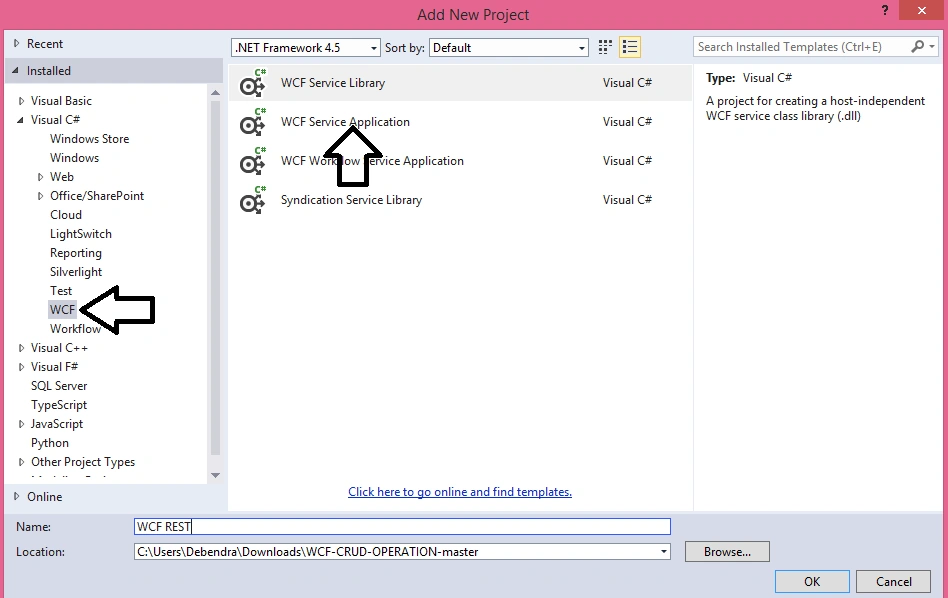
Create a new project of type(WCF) and choose the following template as shown below.
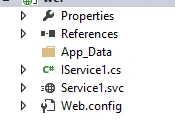
Now the following things get added into your project in solution Explorer.
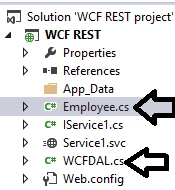
Now I am adding one model class called "Employee.cs" to my project as follow.
- using System;
- using System.Collections.Generic;
- using System.Linq;
- using System.Web;
- namespace WCF_REST
- {
- public class Employee1
- {
- public int EmpId { get; set; }
- public string EmpName { get; set; }
- public string CompanyName { get; set; }
- public string Location { get; set; }
- public string Dept { get; set; }
- }
- }
Now open the Web.config and write the following connection string in it.
- <connectionStrings>
- <add name="connect" connectionString="Server=Debendra; Database=students; User ID=sa;Password=123;" />
- </connectionStrings>
Now open the IService1.cs and define the following interfaces for operation.
- using System;
- using System.Collections.Generic;
- using System.Linq;
- using System.Runtime.Serialization;
- using System.ServiceModel;
- using System.ServiceModel.Web;
- using System.Text;
- using System.Data;
- namespace WCF_REST
- {
- // NOTE: You can use the "Rename" command on the "Refactor" menu to change the interface name "IService1" in both code and config file together.
- [ServiceContract]
- public interface IService1
- {
- [OperationContract]
- bool InsertData(Employee1 obj);
- [OperationContract(Name = "ShowAll")]
- [WebInvoke(Method = "GET", RequestFormat = WebMessageFormat.Json, ResponseFormat = WebMessageFormat.Json, UriTemplate = "/ShowAll")]
- List<Employee1> ShowAll();
- [OperationContract]
- [WebInvoke(Method = "POST", RequestFormat = WebMessageFormat.Json, ResponseFormat = WebMessageFormat.Json, UriTemplate = "/showdata/")]
- List<Employee1> getRecordbyId(int id);
- [OperationContract]
- bool UpdateData(Employee1 obj);
- [OperationContract]
- bool DeleteData(Employee1 obj);
- }
- [DataContract]
- public class Employee
- {
- string _name = "";
- string _email = "";
- string _phone = "";
- string _gender = "";
- [DataMember]
- public int EmpId
- {
- get { return EmpId; }
- set { EmpId = value; }
- }
- [DataMember]
- public string EmpName
- {
- get { return _name; }
- set { _name = value; }
- }
- [DataMember]
- public string CompanyName
- {
- get { return _email; }
- set { _email = value; }
- }
- [DataMember]
- public string Location
- {
- get { return _phone; }
- set { _phone = value; }
- }
- [DataMember]
- public string Dept
- {
- get { return _gender; }
- set { _gender = value; }
- }
- }
- }
- using System;
- using System.Collections.Generic;
- using System.Linq;
- using System.Web;
- using System.ServiceModel;
- using System.ServiceModel.Web;
- using System.Data.SqlClient;
- using System.Data;
- using System.Configuration;
- namespace WCF_REST
- {
- public class Service1 : IService1
- {
- WCFDAL myobject = new WCFDAL();
- public bool InsertData(Employee1 obj)
- {
- string query = "insert into Employee(EmpName,CompanyName,Location,Dept) values('" + obj.EmpName + "','" + obj.CompanyName + "','" + obj.Location + "','" + obj.Dept + "')";
- bool x = myobject.DML(query);
- return x;
- }
- public bool UpdateData(Employee1 obj)
- {
- string query = "update Employee set EmpName='" + obj.EmpName + "',CompanyName='" + obj.CompanyName + "',Location='" + obj.Location + "',Dept='" + obj.Dept + "' where Empid='" + obj.EmpId + "' ";
- bool x = myobject.DML(query);
- return x;
- }
- public bool DeleteData(Employee1 obj)
- {
- string query = "Delete from Employee where Empid='" + obj.EmpId + "'";
- bool x = myobject.DML(query);
- return x;
- }
- public List<Employee1> ShowAll()
- {
- List<Employee1> li = new List<Employee1>();
- string s = "select * from Employee";
- DataTable dt = new DataTable();
- dt = myobject.getdata(s);
- for (int i = 0; i < dt.Rows.Count; i++)
- {
- Employee1 emp = new Employee1();
- emp.EmpId = Convert.ToInt32(dt.Rows[i]["EmpId"]);
- emp.EmpName = dt.Rows[i]["EmpName"].ToString();
- emp.CompanyName = dt.Rows[i]["CompanyName"].ToString();
- emp.Dept = dt.Rows[i]["Dept"].ToString();
- emp.Location = dt.Rows[i]["Location"].ToString();
- li.Add(emp);
- }
- return li;
- }
- public List<Employee1> getRecordbyId(int id)
- {
- List<Employee1> li = new List<Employee1>();
- DataTable dt1 = new DataTable();
- string query="select * from Employee where EmpId='"+id+"'";
- dt1= myobject.getdata(query);
- if(dt1.Rows.Count>0)
- {
- for (int i = 0; i < dt1.Rows.Count; i++)
- {
- Employee1 emp = new Employee1();
- emp.EmpId = Convert.ToInt32(dt1.Rows[i]["EmpId"]);
- emp.EmpName = dt1.Rows[i]["EmpName"].ToString();
- emp.CompanyName = dt1.Rows[i]["CompanyName"].ToString();
- emp.Dept = dt1.Rows[i]["Dept"].ToString();
- emp.Location = dt1.Rows[i]["Location"].ToString();
- li.Add(emp);
- }
- return li;
- }
- else
- {
- return li;
- }
- }
- }
- }
- using System;
- using System.Collections.Generic;
- using System.Linq;
- using System.Web;
- using System.Data;
- using System.Data.SqlClient;
- using System.Configuration;
- namespace WCF_REST
- {
- public class WCFDAL
- {
- SqlCommand cmd;
- SqlDataAdapter da;
- DataSet ds;
- public static SqlConnection connection()
- {
- string s = ConfigurationManager.ConnectionStrings["connect"].ConnectionString;
- SqlConnection con = new SqlConnection(s);
- if (con.State == ConnectionState.Closed)
- {
- con.Open();
- }
- else
- {
- con.Open();
- }
- return con;
- }
- public bool DML(string Query)
- {
- cmd = new SqlCommand(Query, WCFDAL.connection());
- int x = cmd.ExecuteNonQuery();
- if(x==1)
- {
- return true;
- }
- else
- {
- return false;
- }
- }
- public DataTable getdata(string query)
- {
- da = new SqlDataAdapter(query, WCFDAL.connection());
- DataTable dt = new DataTable();
- da.Fill(dt);
- return dt;
- }
- }
- }
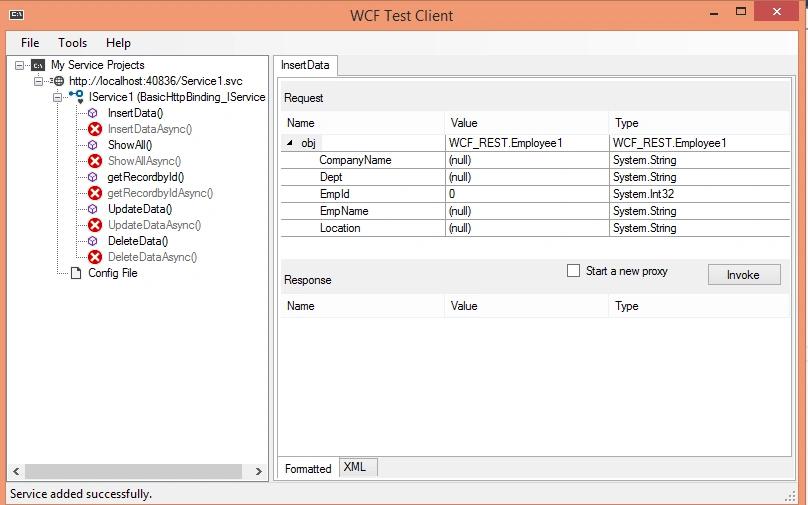
Now here you can test your individual service seperatly.
Consuming WCF Service in ASP DOTNET Application :
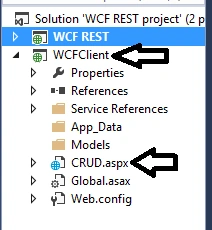
Now to Consume this service add a new project in this Solution Explorer Name it as "WCFClient" and add a page(CRUD.aspx) as follow.
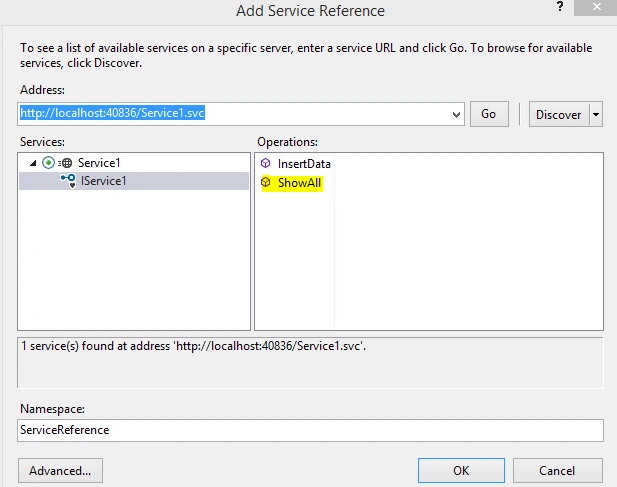
Now Add the Service Referance as follow.
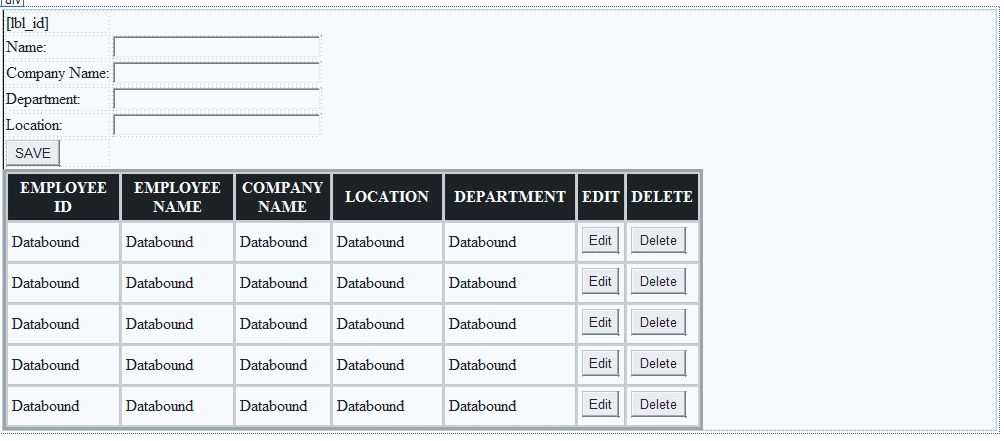
Now design the CRUD.aspx as follow to perform CRUD operation.
Here is the code for the design page.
- <%@ Page Language="C#" AutoEventWireup="true" CodeBehind="CRUD.aspx.cs" Inherits="WCFClient.CRUD" %>
- <!DOCTYPE html>
- <html xmlns="http://www.w3.org/1999/xhtml">
- <head runat="server">
- <title></title>
- </head>
- <body>
- <form id="form1" runat="server">
- <div>
- <table>
- <tr>
- <td>
- <asp:Label ID="lbl_id" Visible="false" runat="server"></asp:Label>
- </td>
- </tr>
- <tr>
- <td>
- Name:
- </td>
- <td>
- <asp:TextBox runat="server" ID="txt_name" Width="200px"></asp:TextBox>
- </td>
- </tr>
- <tr>
- <td>
- Company Name:
- </td>
- <td>
- <asp:TextBox runat="server" ID="txt_company" Width="200px"></asp:TextBox>
- </td>
- </tr>
- <tr>
- <td>
- Department:
- </td>
- <td>
- <asp:TextBox runat="server" ID="txt_dept" Width="200px"></asp:TextBox>
- </td>
- </tr>
- <tr>
- <td>
- Location:
- </td>
- <td>
- <asp:TextBox runat="server" ID="txt_location" Width="200px"></asp:TextBox>
- </td>
- </tr>
- <tr>
- <td>
- <asp:Button runat="server" ID="btn_save" Text="SAVE" OnClick="btn_save_Click" />
- </td>
- </tr>
- </table>
- <asp:GridView ID="GridView1" runat="server" BackColor="#CCCCCC" BorderColor="#999999" BorderStyle="Solid" BorderWidth="3px" CellPadding="4" CellSpacing="2" ForeColor="Black" Width="700px" AutoGenerateColumns="False" OnRowEditing="GridView1_RowEditing" OnRowUpdating="GridView1_RowUpdating" OnRowDeleting="GridView1_RowDeleting">
- <Columns>
- <asp:TemplateField HeaderText="EMPLOYEE ID">
- <ItemTemplate>
- <asp:Label ID="lbl_empid" runat="server" Text='<%# Bind("EmpId") %>'></asp:Label>
- </ItemTemplate>
- <ItemStyle Width="150px" />
- </asp:TemplateField>
- <asp:TemplateField HeaderText="EMPLOYEE NAME">
- <ItemTemplate>
- <asp:Label ID="Label2" runat="server" Text='<%# Bind("EmpName") %>'></asp:Label>
- </ItemTemplate>
- <ItemStyle Width="150px" />
- </asp:TemplateField>
- <asp:TemplateField HeaderText="COMPANY NAME">
- <ItemTemplate>
- <asp:Label ID="Label3" runat="server" Text='<%# Bind("CompanyName") %>'></asp:Label>
- </ItemTemplate>
- <ItemStyle Width="100px" />
- </asp:TemplateField>
- <asp:TemplateField HeaderText="LOCATION">
- <ItemTemplate>
- <asp:Label ID="Label4" runat="server" Text='<%# Bind("Location") %>'></asp:Label>
- </ItemTemplate>
- <ItemStyle Width="150px" />
- </asp:TemplateField>
- <asp:TemplateField HeaderText="DEPARTMENT">
- <ItemTemplate>
- <asp:Label ID="Label5" runat="server" Text='<%# Bind("Dept") %>'></asp:Label>
- </ItemTemplate>
- <ItemStyle Width="150px" />
- </asp:TemplateField>
- <asp:TemplateField HeaderText="EDIT" ShowHeader="False">
- <ItemTemplate>
- <asp:Button ID="Button1" runat="server" CausesValidation="False" CommandName="Edit" Text="Edit" />
- </ItemTemplate>
- </asp:TemplateField>
- <asp:TemplateField HeaderText="DELETE">
- <ItemTemplate>
- <asp:Button ID="Button2" runat="server" CausesValidation="False" CommandName="Delete" Text="Delete" />
- </ItemTemplate>
- </asp:TemplateField>
- </Columns>
- <FooterStyle BackColor="#CCCCCC" />
- <HeaderStyle BackColor="Black" Font-Bold="True" ForeColor="White" />
- <PagerStyle BackColor="#CCCCCC" ForeColor="Black" HorizontalAlign="Left" />
- <RowStyle BackColor="White" />
- <SelectedRowStyle BackColor="#000099" Font-Bold="True" ForeColor="White" />
- <SortedAscendingCellStyle BackColor="#F1F1F1" />
- <SortedAscendingHeaderStyle BackColor="#808080" />
- <SortedDescendingCellStyle BackColor="#CAC9C9" />
- <SortedDescendingHeaderStyle BackColor="#383838" />
- </asp:GridView>
- </div>
- </form>
- </body>
- </html>
Now write the following logic in the code behind window.
- using System;
- using System.Collections.Generic;
- using System.Linq;
- using System.Web;
- using System.Web.UI;
- using System.Web.UI.WebControls;
- using System.ServiceModel;
- using System.Data;
- namespace WCFClient
- {
- public partial class CRUD : System.Web.UI.Page
- {
- ServiceReference.Service1Client obj = new ServiceReference.Service1Client();
- ServiceReference.Employee1 emp = new ServiceReference.Employee1();
- protected void Page_Load(object sender, EventArgs e)
- {
- if(!IsPostBack)
- {
- BindData();
- }
- }
- public void BindData()
- {
- List<ServiceReference.Employee1> li = new List<ServiceReference.Employee1>();
- li = obj.ShowAll();
- GridView1.DataSource = li;
- GridView1.DataBind();
- }
- protected void btn_save_Click(object sender, EventArgs e)
- {
- if(btn_save.Text=="SAVE")
- {
- ServiceReference.Employee1 employee = new ServiceReference.Employee1();
- emp.EmpName = txt_name.Text;
- emp.CompanyName = txt_company.Text;
- emp.Dept = txt_dept.Text;
- emp.Location = txt_location.Text;
- bool x = false;
- x = obj.InsertData(emp);
- if (x == true)
- {
- Response.Write("<script LANGUAGE="'JavaScript'" >alert('Data Inserted Successfully.')</script>");
- clear();
- BindData();
- }
- else
- {
- Response.Write("<script LANGUAGE="'JavaScript'" >alert('Please try again.')</script>");
- }
- }
- else
- {
- ServiceReference.Employee1 employee = new ServiceReference.Employee1();
- emp.EmpName = txt_name.Text;
- emp.CompanyName = txt_company.Text;
- emp.Dept = txt_dept.Text;
- emp.Location = txt_location.Text;
- emp.EmpId = Convert.ToInt32(lbl_id.Text);
- bool x = false;
- x = obj.UpdateData(emp);
- if (x == true)
- {
- Response.Write("<script LANGUAGE="'JavaScript'" >alert('Data Updated Successfully.')</script>");
- btn_save.Text = "SAVE";
- GridView1.EditIndex =-1;
- clear();
- BindData();
- }
- else
- {
- Response.Write("<script LANGUAGE="'JavaScript'" >alert('Please try again.')</script>");
- }
- }
- }
- public void clear()
- {
- txt_company.Text = "";
- txt_dept.Text = "";
- txt_location.Text = "";
- txt_name.Text = "";
- }
- protected void GridView1_RowEditing(object sender, GridViewEditEventArgs e)
- {
- List<ServiceReference.Employee1> li = new List<ServiceReference.Employee1>();
- Label lbl = (Label)GridView1.Rows[e.NewEditIndex].FindControl("lbl_empid");
- int userId =Convert.ToInt32(lbl.Text);
- DataTable dt = new DataTable();
- li = obj.getRecordbyId(userId);
- foreach(var x in li)
- {
- txt_company.Text = x.CompanyName;
- txt_dept.Text = x.Dept;
- txt_location.Text = x.Location;
- txt_name.Text = x.EmpName;
- lbl_id.Text = (x.EmpId).ToString();
- btn_save.Text = "UPDATE";
- BindData();
- }
- }
- protected void GridView1_RowUpdating(object sender, GridViewUpdateEventArgs e)
- {
- }
- protected void GridView1_RowDeleting(object sender, GridViewDeleteEventArgs e)
- {
- Label lbl_delID = (Label)GridView1.Rows[e.RowIndex].FindControl("lbl_empid");
- ServiceReference.Employee1 obj1 = new ServiceReference.Employee1();
- obj1.EmpId = Convert.ToInt32(lbl_delID.Text);
- bool m= obj.DeleteData(obj1);
- if(m==true)
- {
- Response.Write("<script LANGUAGE="'JavaScript'" >alert('Data Deleted')</script>");
- }
- else
- {
- Response.Write("<script LANGUAGE="'JavaScript'" >alert('Please try again.')</script>");
- }
- BindData();
- }
- }
- }
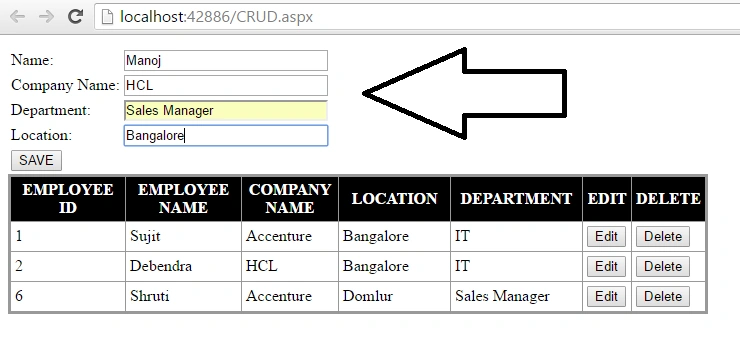
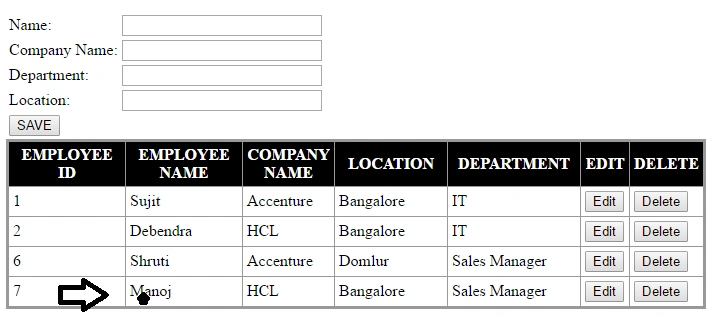
It will get added like this.
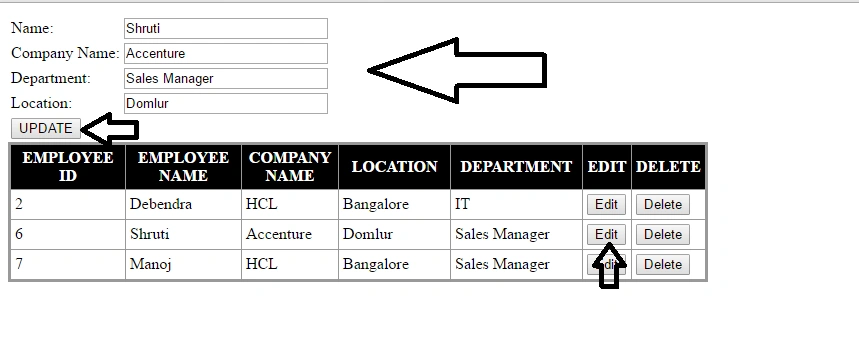
Now if you want to Edit you can Edit Like this.
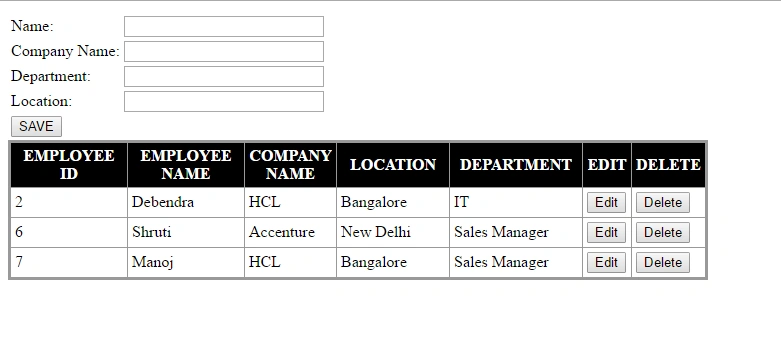
Now after Clicking Update it will update it as follows.

So you can update anything by clicking update button.Similarly the delete button will work and delete the record you selected.
So in this way we can create WCF service and Consume in our Asp.Net Application. You can check the project sample on gitHub.
Read more articles on ASP.NET:

Rahul Kumar SaxenaPosted Apr 30, 2016, 1:57 PM
Good Show
Ammar ShaukatPosted Apr 26, 2016, 4:56 AM
why you are adding connection string ?
Sonu ChaudharyPosted Apr 26, 2016, 4:04 AM
good one
Ammar ShaukatPosted Apr 26, 2016, 3:48 AM
You have no idea how write an article..
Ammar ShaukatPosted Apr 26, 2016, 3:36 AM
Debendra Dash
Ammar ShaukatPosted Apr 26, 2016, 3:36 AM
My solution explorer is not showing all files which you specified in your article .
Hari ShankerPosted Apr 25, 2016, 11:27 PM
Thanq ..
Kuppurasu NagarajPosted Apr 25, 2016, 11:57 AM
Nice Sharing