Today, we are going to see how to create an API in Node.js, with MySQL database.
Please follow the below steps,
Step 2: Now, let's install MySQL package by using the command: npm install mysql.
Step 3: The next step would be to connect our application with MySQL db.
Let's create a file database.js in our project and write the following code in it:
- var mysql = require('mysql');
-
- module.exports = function handle_db(req, res) {
- var pool = mysql.createPool({
-
- connectionLimit: 100,
- host: 'localhost',
- user: 'root',
- password: '*******',
- database: 'test'
-
- });
-
- pool.getConnection(function (err, connection) {
- if (err) {
- console.error("This is error msg, when connecting to db: " + err);
- connection.release();
-
- res.json({ "code": 100, "status": "Error in connecting database" });
- return;
- }
-
- console.log("from db config: connected as id: " + connection.threadId);
- connection.on('error', function (err) {
- res.json({ "code": 100, "status": "Error in connection database" });
- return;
-
- });
- return connection;
-
- });
- return pool;
- }
The code creates a connection with my local database and then, provides a connection object as an output from the function getConnection. We will use this object whenever we need a db connection object.
Now, let's include this file in our main file: app.js. Use the code, as shown below:
- var pool = require('./database')();
Step 4: We shall now create a welcome message from our API. For this, let's create a file routes.js in our project and write the following code:
- module.exports = function (app, pool) {
- app.get('/', function (req, res) {
- res.send("Welcome to C-sharp corner API");
- });
- };
We have, for now, set the initial application port to 5050, by using the below code in app.js.
- app.listen(process.env.PORT || 5050);
- console.log("App listening on port 5050");
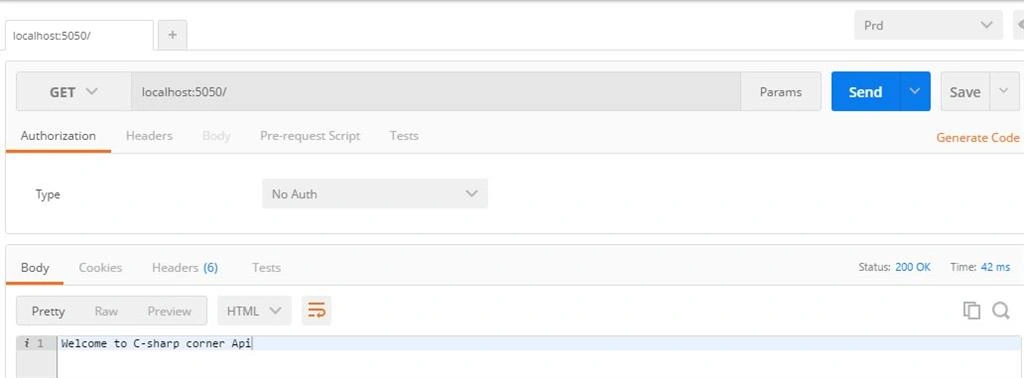
Let's run the application and view the output in Postman App. You can also see the same in a browser:
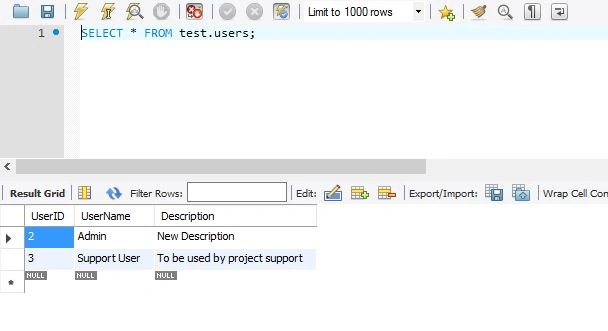
Step 5: Let's have a look on what data is there currently, in our table : users:
 Step 6:
 Let's create a folder called api. Inside it, let's create a file user.api.js and create a get function which fetches all the data from the users table and provide to us. The code for the same is as written below:
- module.exports = function (app, pool) {
-
- app.get('/api/users', function (req, res) {
- var con = pool.getConnection(function (err, con) {
- con.query('SELECT * FROM users', function (err, rows) {
-
- if (!err) {
-
- console.log(rows);
- res.json(rows);
-
- }
- else {
- console.error("From users.api.js :" + err);
- res.json(err);
- }
- con.release();
- });
- });
-
- });
The code states that when a GET request is sent with the url "/api/users", then we select all the data from the users table and send it to the response object.
Please make sure that you update the code in the routes.js, as shown below, to include this new file:
- module.exports = function (app, pool) {
-
- require('./api/user.api')(app,pool);
- app.get('/', function (req, res) {
-
- res.send("Welcome to C-sharp corner Api");
- });
- };
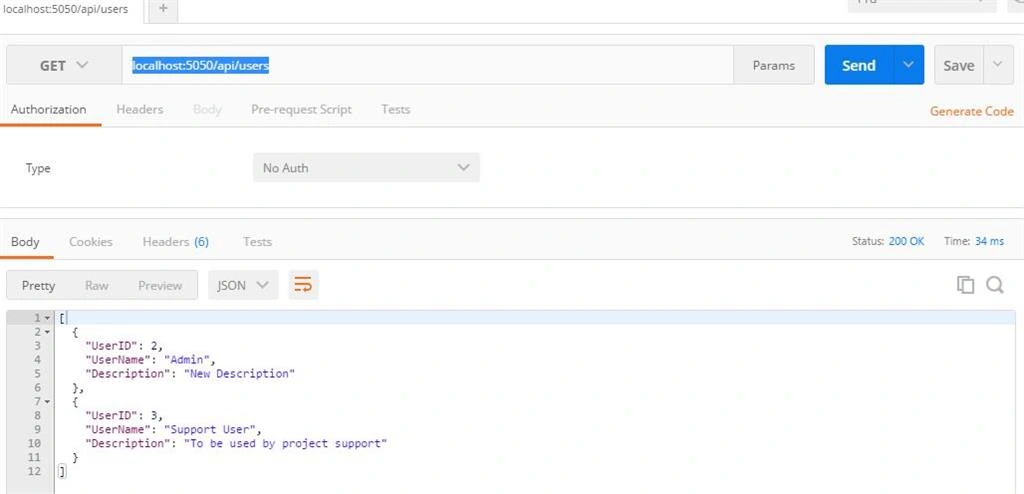
We can test this get statement in Postman app, using the url :
localhost:5050/api/users
Please see the below screenshot containing the output.
 Step 7:
 Now, let's create a GetByID, using the following code, in user.api.js file.
- app.get('/api/users/:id', function (req, res) {
- con = pool.getConnection(function (err, con) {
- con.query('SELECT * FROM users where userid=?', [req.params.id], function (err, rows) {
- if (!err) {
-
- console.log(rows);
- res.json(rows);
-
- }
- else {
- console.error("From users.api.js :" + err);
- res.json(err);
- }
- con.release();
- });
- });
-
- });
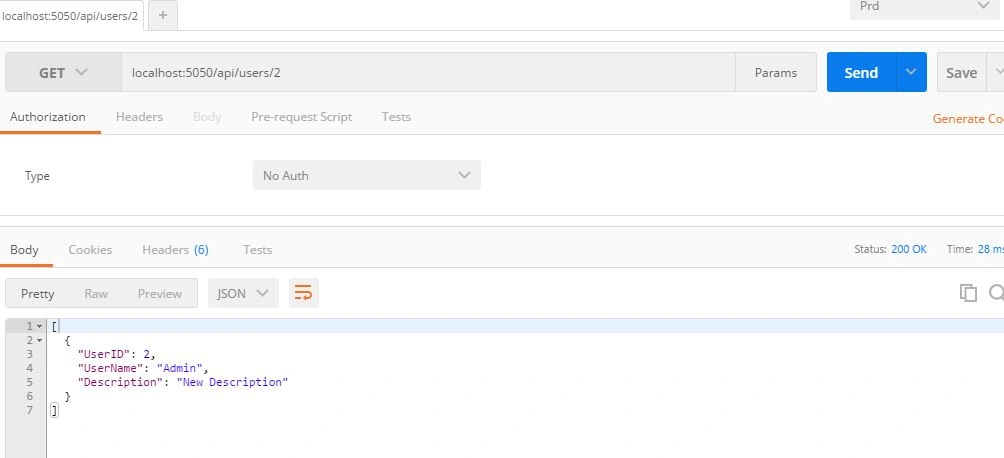
The code simply gets user on the basis of userid. Output can be seen below.
 Step 8:
 Now, let's create an update function by including this code in user.api.js file.
- app.put('/api/users/:id', function (req, res) {
- con = pool.getConnection(function (err, con) {
- con.query('UPDATE users SET UserName=? , Description=? where UserID=?', [req.body.username, req.body.desc, req.params.id], function (err, rows) {
- if (!err) {
-
- console.log(rows);
- res.json(rows);
-
- }
- else {
- console.error("From users.api.js :" + err);
- res.json(err);
- }
- con.release();
-
- });
- });
- });
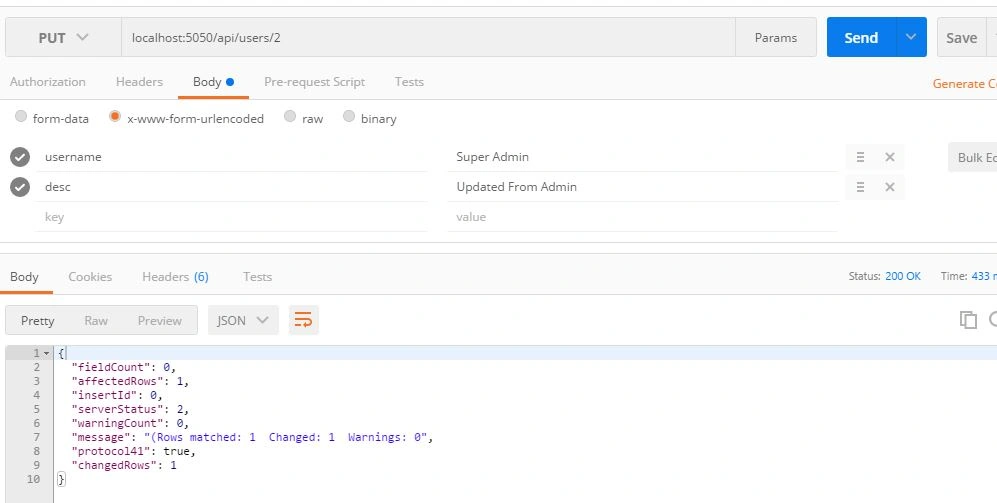
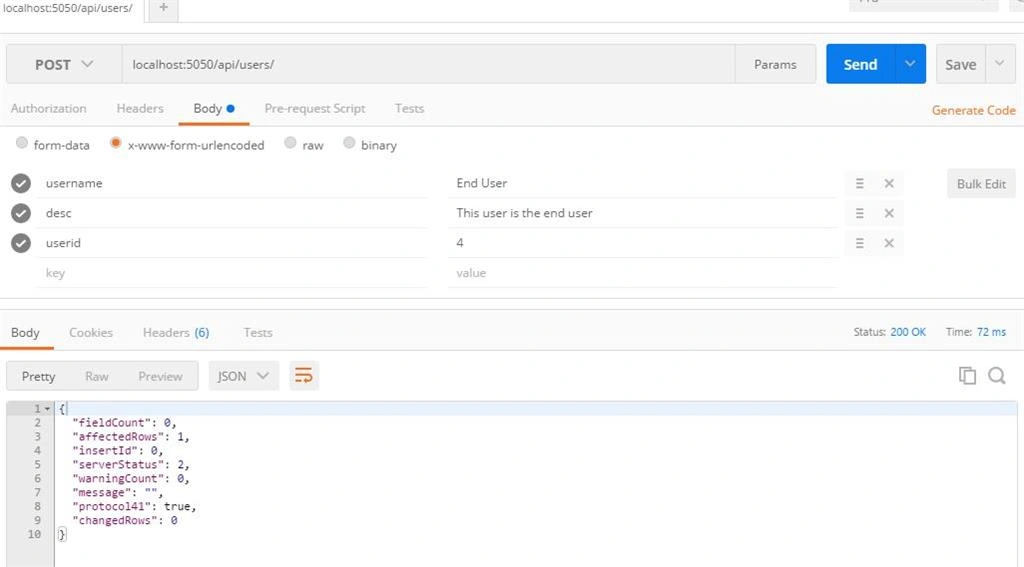
Please note that there are i/p parameters which we can easily provide using Postman, as shown below,
 Step 9:
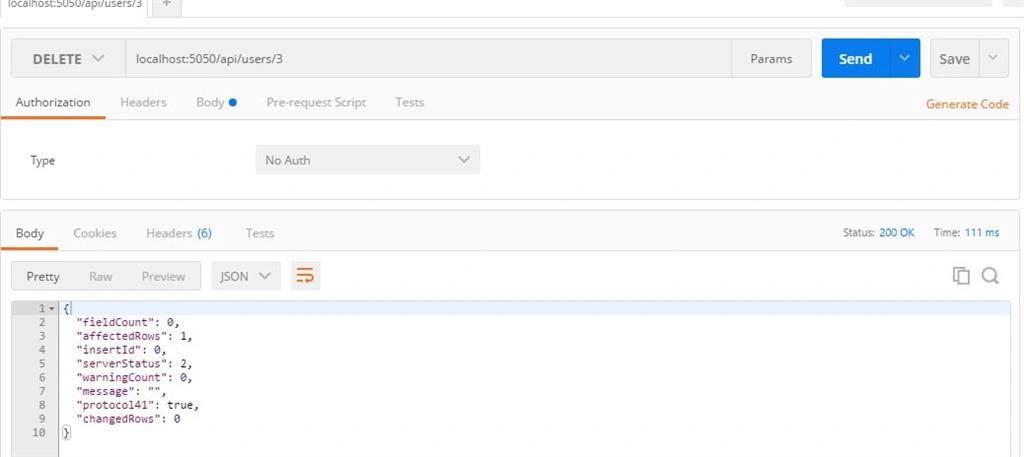
 In the same way, insert and delete functions would be coded, as shown below with respective screenshots:
INSERT
- app.post('/api/users/', function (req, res) {
- con = pool.getConnection(function (err, con) {
- con.query('INSERT INTO users (UserID,UserName,Description) VALUES(?,?,?)', [req.body.userid,req.body.username, req.body.desc], function (err, rows) {
- if (!err) {
-
- console.log(rows);
- res.json(rows);
-
- }
- else {
- console.error("From users.api.js :" + err);
- res.json(err);
- }
- con.release();
-
- });
- });
- });
 DELETE
- app.delete('/api/users/:id', function (req, res) {
- con = pool.getConnection(function (err, con) {
- con.query('DELETE FROM users WHERE UserID=?', [req.params.id], function (err, rows) {
- if (!err) {
-
- console.log(rows);
- res.json(rows);
-
- }
- else {
- console.error("From users.api.js :" + err);
- res.json(err);
- }
- con.release();
-
- });
- });
- });
The complete code of user.api.js is, as follows:
- module.exports = function (app, pool) {
-
- app.get('/api/users', function (req, res) {
- var con = pool.getConnection(function (err, con) {
- con.query('SELECT * FROM users', function (err, rows) {
-
- if (!err) {
-
- console.log(rows);
- res.json(rows);
-
- }
- else {
- console.error("From users.api.js :" + err);
- res.json(err);
- }
- con.release();
- });
- });
-
- });
-
- app.get('/api/users/:id', function (req, res) {
- con = pool.getConnection(function (err, con) {
- con.query('SELECT * FROM users where userid=?', [req.params.id], function (err, rows) {
- if (!err) {
-
- console.log(rows);
- res.json(rows);
-
- }
- else {
- console.error("From users.api.js :" + err);
- res.json(err);
- }
- con.release();
- });
- });
-
- });
-
- app.put('/api/users/:id', function (req, res) {
- con = pool.getConnection(function (err, con) {
- con.query('UPDATE users SET UserName=? , Description=? where UserID=?', [req.body.username, req.body.desc, req.params.id], function (err, rows) {
- if (!err) {
-
- console.log(rows);
- res.json(rows);
-
- }
- else {
- console.error("From users.api.js :" + err);
- res.json(err);
- }
- con.release();
-
- });
- });
- });
-
- app.post('/api/users/', function (req, res) {
- con = pool.getConnection(function (err, con) {
- con.query('INSERT INTO users (UserID,UserName,Description) VALUES(?,?,?)', [req.body.userid,req.body.username, req.body.desc], function (err, rows) {
- if (!err) {
-
- console.log(rows);
- res.json(rows);
-
- }
- else {
- console.error("From users.api.js :" + err);
- res.json(err);
- }
- con.release();
-
- });
- });
- });
-
- app.delete('/api/users/:id', function (req, res) {
- con = pool.getConnection(function (err, con) {
- con.query('DELETE FROM users WHERE UserID=?', [req.params.id], function (err, rows) {
- if (!err) {
-
- console.log(rows);
- res.json(rows);
-
- }
- else {
- console.error("From users.api.js :" + err);
- res.json(err);
- }
- con.release();
-
- });
- });
- });
-
- };
Hope this article helped in understanding how to create an API in Node.js.
I will next take up an article on how to consume this API in a Node.js Web App.
![]()


pooja guptaPosted Sep 8, 2016, 6:42 AM
Nice article with good explanation
Atul AgrawalPosted Aug 1, 2016, 2:45 AM
Please not use '*' in select query.
kalu singh raoPosted Jul 23, 2016, 1:14 PM
Good Job
Sanjay KumarPosted Jul 23, 2016, 12:11 PM
Nice articles
Pankaj Kumar ChoudharyPosted Jul 22, 2016, 11:15 PM
Nice Article On NodeJS, Keep Sharing on NodeJS....
Vignesh ManiPosted Jul 22, 2016, 5:28 PM
Nice one