

What is OData
This should be the first question if you're new to this term. Here is a brief introduction to it.
"The Open Data Protocol (OData) is a Web protocol for querying and updating data that provides a way to unlock your data and free it from silos that exist in applications today. OData does this by applying and building upon Web technologies such as HTTP, Atom Publishing Protocol (AtomPub) and JSON to provide access to information from a variety of applications, services, and stores. The protocol emerged from experiences implementing AtomPub clients and servers in a variety of products over the past several years. OData is being used to expose and access information from a variety of sources including, but not limited to, relational databases, file systems, content management systems and traditional Web sites."
"The Open Data Protocol (OData) is a Web protocol for querying and updating data that provides a way to unlock your data and free it from silos that exist in applications today. OData does this by applying and building upon Web technologies such as HTTP, Atom Publishing Protocol (AtomPub) and JSON to provide access to information from a variety of applications, services, and stores. The protocol emerged from experiences implementing AtomPub clients and servers in a variety of products over the past several years. OData is being used to expose and access information from a variety of sources including, but not limited to, relational databases, file systems, content management systems and traditional Web sites."
Reference - http://www.odata.org
Want to know more, like What, Why and How? Visit: http://www.odata.org/introduction
Now after having gone through the specification of OData you'll can learn where it can fit your requirements when designing service-architecture applications.
Let's avoid digging too deeply into these considerations and return to the subject of how to create an OData service using a WCF DataService.
Create an OData service using a WCF DataService
So go ahead and launch your VisualStudio 2010 (or 2012 if you have that one installed; it's available as an RC version at the time of writing this article).
Now create a web project or rather add a class library project. (Let's maintain a little layering and separation of the business.)
The following are a simple step-by-step walkthrough, keeping in mind that someday some beginner (new to VS) might be having trouble with written instructions. The following shows creation of a Class Library:
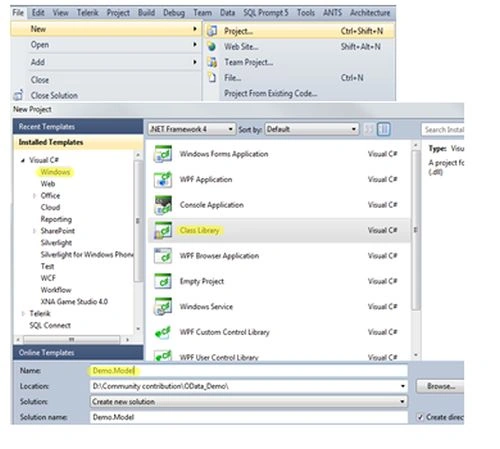
Name it "Demo.Model" as we're creating a sample service and this will work as Model (Data) for our service.
Now go ahead and add a new item -> "ADO.Net Entity Data Model":
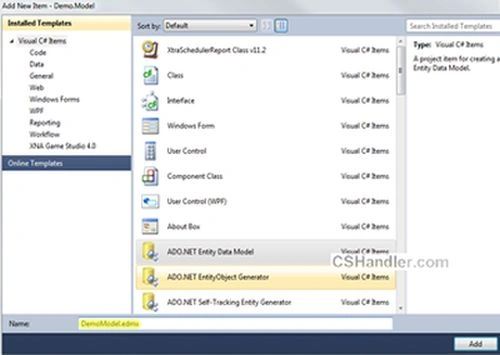
Name it "DemoModel.edmx". When you click Add, a popup will be waiting for your input. So either you can generate your entities from the database or you can just create an empty model which further can be used to generate your database. Make your choice.
But we're simply going to use the existing database as I already have a nice test database from Stackoverflow dumps.
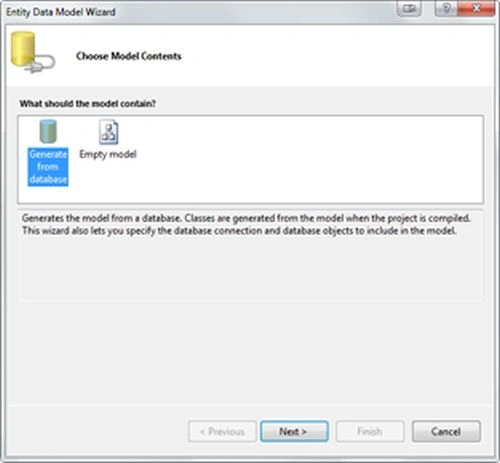
Click "Next >" and get your connection string using "New Connection" and you're ready to click "Next >" again:
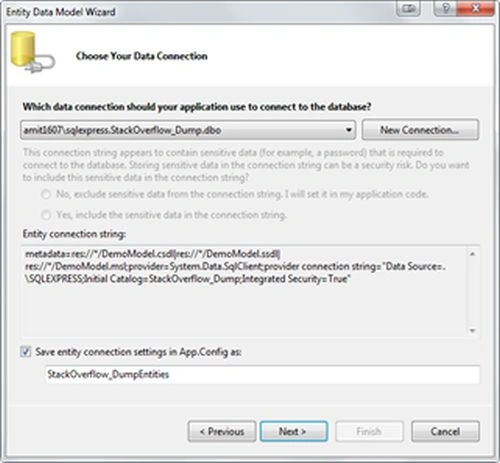
Select your database object to include into your Entities.
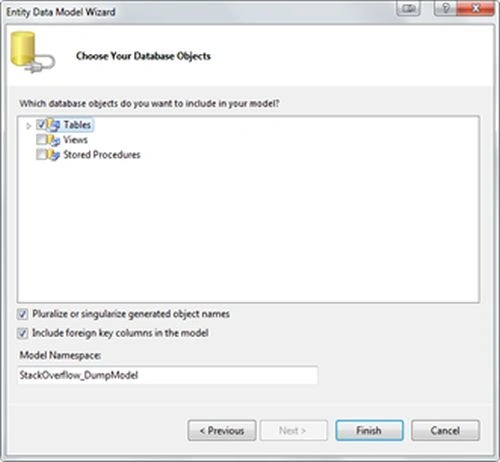
For creating the OData service we only need the Tables. So after clicking "Finish" your Entities diagram should look like this. Here's the important note: the relationship between the entities should be well-defined because the OData will be searching/locating your related entities based on your query (learn about URI Queries).
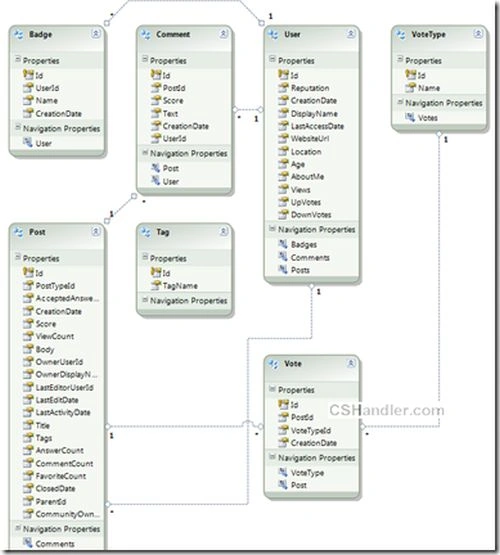
We're close enough to finish the job more than 50% work is done to create the service. Forget the time when we used to define/create/use the client proxy and other configuration settings including creating the methods for every type of data required.
(Note:- This article will only show you how to get the data from the OData service. I can in the future write about Create, Delete and Edit using HTTP requests PUT, DELETE and POST.)
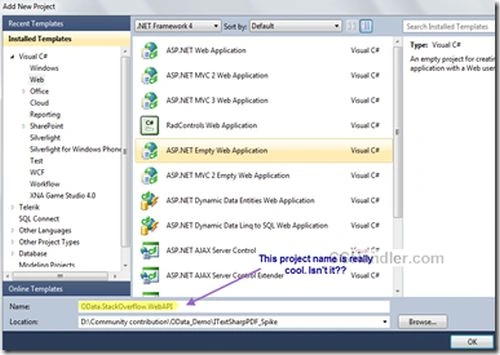
Now proceed to adding a new Web project (you should choose ASP.Net Empty website) from the templates; see:
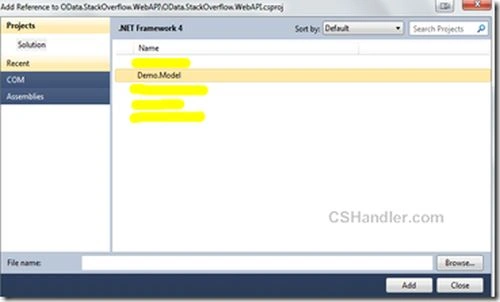
Add the project reference Demo. Model to the newly added website.
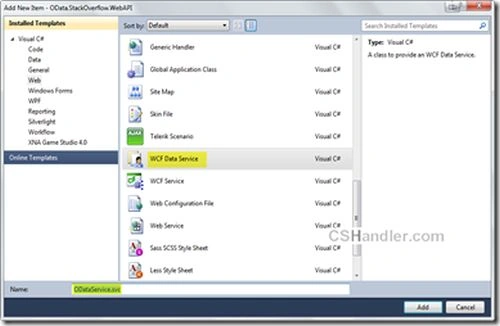
Now add a new item in the web project i.e. WCF Data service.
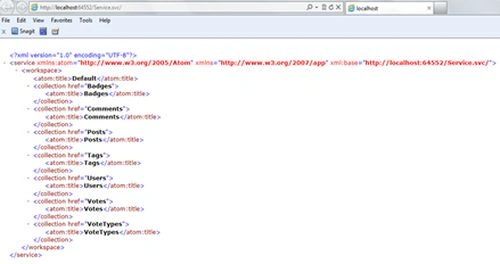
Now open the code behind file of your service file and write this code:


Sr KarthigaPosted Feb 26, 2016, 9:15 AM
good one
Sr KarthigaPosted Feb 26, 2016, 9:15 AM
nice explanation
Amit ChoudharyPosted Oct 25, 2012, 6:25 AM
Thanks Prashant Kotak for the research. Hope you didn't visited my blog at all. I have all articles, blogs compiled and inspired from other great writers. Yes I forgot to mention the Great Scott here he's my good community friend hope he won't mind it the way you did. :)
Prashant KotakeditedPosted Oct 15, 2012, 5:05 PMEdited Oct 15, 2012, 5:05 PM
Very nice, except... its all ripped from here: http://www.hanselman.com/blog/CreatingAnODataAPIForStackOverflowIncludingXMLAndJSONIn30Minutes.aspx You should at least credit the original Author if you are going to clone someones work. Shameful.
Anup GhanshalaPosted Aug 23, 2012, 12:59 AM
Amit Sir, Gr8 work.
Dinesh BeniwalPosted Aug 14, 2012, 12:06 PM
Good Work Amit.
Ravishankar SinghPosted Aug 10, 2012, 1:10 PM
Superbly explained Amit....Well Done!!
Akkiraju IvaturiPosted Aug 8, 2012, 9:54 PM
Nice article Amit...
Mahesh ChandPosted Aug 7, 2012, 4:07 PM
This is well-written article Amit.