

I am going to explain the way, you need to customize your Application's navbar. I find it interesting, that the new users who want to use ASP.NET, want to start their journey with a blast. I mean to do something crazy and interesting. They want to make a Website like in a day or two with Microsoft ASP.NET. However, it is not possible. Anyway, don't stop your shootings toward the sea. Continue with your struggles and one day, you will be able to make something like this. As I mentioned, the new users want everything in a day, and here is a way to customize your Application navbar, according to your needs.
What we will learn,
- Change Application Name.
- Add a logo to your navbar.
- Add extra menus and icons to them.
- Add Dropdown Menus.
- Work with colors.
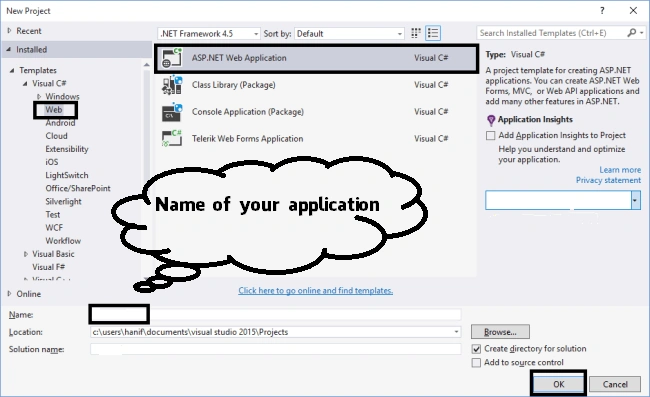
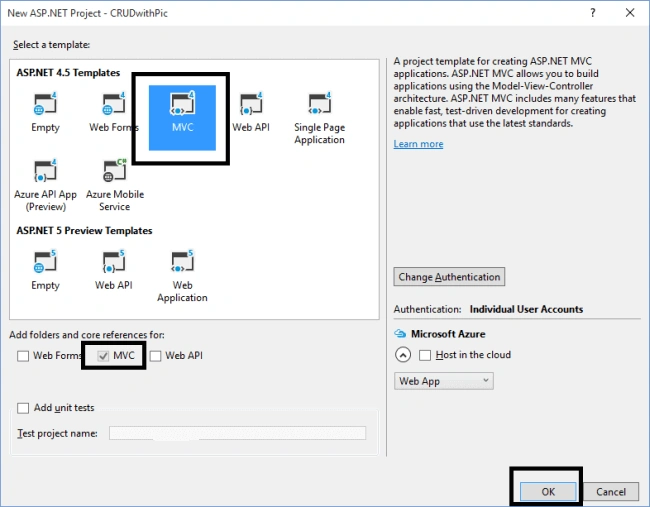
First of all, you need to open your Visual Studio 2015 and create a new MVC Web project. Follow these pictures.
Next, follow the picture, given below.
Let's start with the first one i.e. add your Application name. This is the first step of our idea, which we are implementing in a Website.
Changing the name of the Application
As its name says, you can change your Application name to the name, you need or want to implement in the Application. To do this, just go to Views/Shared/_Layout.chtml. Open it and find this code.
@Html.ActionLink("Application name", "Index", "Home", new { area = "" }, new { @class = "navbar-brand" })
Replace the code highlighted with the name, you want to use for your Application. I have used Bloodbook.
@Html.ActionLink("Bloodbook", "Index", "Home", new { area = "" }, new { @class = "navbar-brand" })
Its all done. Probably, you want to change the font for the name of an Application. It's simple. Go to Content/bootstrap.css, find and modify your navbar-brand code with this one or the font, you like.
.navbar-brand {
  float: left;
  padding: 15px 15px;
  font-size: 40px;
  line-height: 20px;
  font-family: 'Facebook Letter Faces';
}
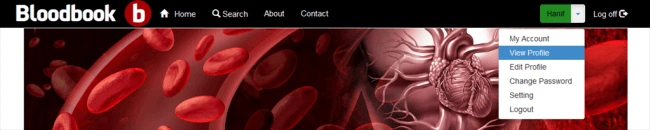
Now, run your Application and see the result.
Adding a logo to the navbar
This is another most wanted thing in designing navbars and it's too simple. For better results, your logo's resolution should be high with a transparent background. Again, go to Views/Shared/_Layout.chtml and add this code before or after your Application's name code.
<img src="~/Content/Images/icon.png" class="img-center" height="50" width="50" />
You can change the source of your image to your desired folder. You can use the class "img-center" or "img-cirlce". Now, run your Application and see the results.
Adding extra menus
Hmmm! This is what we need the most to design our navbar, according to our needs. Probably, we need more menus. I am adding here another menu with the name (Search) and you can add too. Again, go to Views/Shared/_Layout.chtml and find this code, and add the highlighted code. (You can find the code something like this, it might be different). You can also assign the icons from the glyph icon class. Refer to the code, given below.
<div class="navbar-collapse collapse">
    <ul class="nav navbar-nav">
        <li>
            <a href="@Url.Action("Index", "Home")">
                <span class="glyphicon glyphicon-home"></span>
                Home
            </a>
        </li>
        <li>
            <a href="@Url.Action("Contact", "Home")">
                <span class="glyphicon glyphicon-search"></span>
                Contact
            </a>
        </li>
        <li>
            <a href="@Url.Action("About", "Home")">
                About
            </a>
        </li>
        <li>
            <a href="@Url.Action("Search", "Home")">
                Search
            </a>
        </li>
    </ul>
    @Html.Partial("_LoginPartial")
</div>
Hal HayesPosted Jul 1, 2021, 11:38 PM
Exactly the content I was looking for -- Thanks!
Kasi McKenzie-StubbsPosted Jan 22, 2018, 1:00 AM
Hi, I'm trying to add my logo into the nav bar and placing the document path straight after '@Html.ActionLink(' Is this the wrong position? I keep getting an error message
Alexander AsignarPosted Jan 8, 2018, 9:05 PM
Can you post something about the pop.up login, i mean when i click the Login then the form pop.up...thanks
Alexander AsignarPosted Jan 8, 2018, 9:04 PM
Awesome Awesome Awesome...this is what i am looking for...thanks
Yal DaPosted Apr 30, 2017, 5:20 AM
Thank you sir. was helpful.
Amit Kumar SinghPosted Aug 27, 2016, 9:55 AM
Nice share sir
RajaPosted Aug 27, 2016, 7:31 AM
Good one..