

Introduction
In this article, you will learn how to manage multiple pages on the SharePoint Framework web part "Properties" pane. You will also see different fields or properties getting appended to the Properties pane.
In my previous articles, I have introduced the custom properties and explained check box field properties sample on SharePoint Framework (SPFx) web part.
In my SPFx article series, you can learn about SPFx introduction, prerequisites, steps for setting up the environment, and developing and testing the web parts using the local environments.
In the previous article sample, you will have seen descriptions and check box fields added to the properties pane on a single page. Here you can see them separated on multiple pages. I will be using the samples from the previous article.
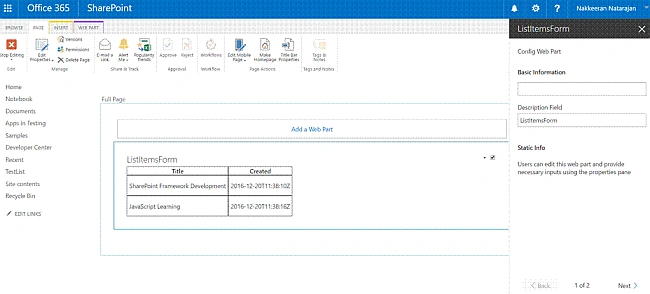
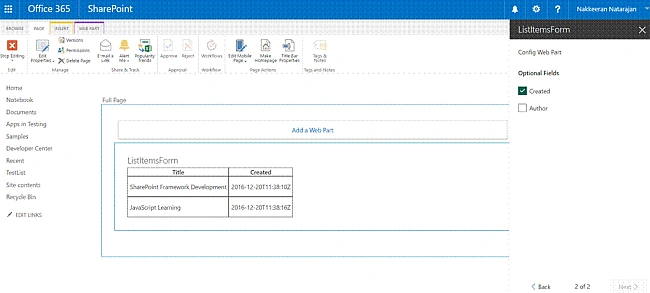
In this sample, the web part property pane contains two pages.
- The first page contains the text and label fields.
- The second page contains the check box fields.
Components
propertyPaneSettings method holds the basic pane structure where it defines the basic definition for the web part properties. Basically, in the property definition file, pane page contains the following components.
- Header
Contains the description property about the page. - Groups
Multiple groups with each group having multiple properties. - Group
Contains the group name and the properties. The properties can be anything like label, description, check box, drop down, etc.
Pages
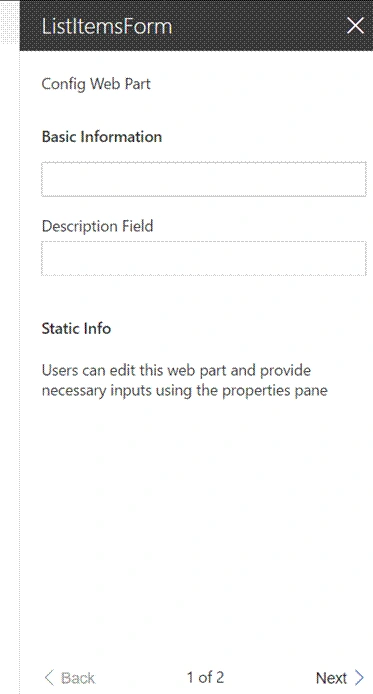
In the first page of property pane, let us show two groups.
- The first group contains a set of text field properties.
- The second group contains the label property, which shows the static text.
- The group contains the check box fields.
The below structure shows the first page of the properties pane which has a header and groups attached with multiple properties. At the bottom of the screen, you can see the pagination option.
Implementation
Let us look at the implementation. The property pane method which needs to be included in the web part file is shown below. It shows two pages with necessary headers and groups. The group contains the properties.
- protected get propertyPaneSettings(): IPropertyPaneSettings {
- return {
- pages: [
- {
- header: {
- description: strings.PropertyPaneDescription,
- },
- groups: [
- {
- groupName: strings.BasicInfo,
- groupFields: [
- PropertyPaneTextField('title', {
- label: strings.TitleFieldLabel
- }),
- PropertyPaneTextField('description', {
- label: strings.DescriptionFieldLabel
- })
- ]
- },
- {
- groupName: "Static Info",
- groupFields:
- [
- PropertyPaneLabel('About', {
- text:'Users can edit this web part and provide necessary inputs using the properties pane'
- })
- ]
- }
- ]
- },
- {
- header: {
- description: strings.PropertyPaneDescription
- },
- groups: [
- {
- groupName: "Optional Fields",
- groupFields: [
- PropertyPaneCheckbox('checkboxProperty1',{
- isChecked:false,
- isEnabled:true,
- text: this.checkboxProperty1
- }),
- PropertyPaneCheckbox('checkboxProperty2',{
- isChecked:false,
- isEnabled:true,
- text: this.checkboxProperty2
- })
- ]
- }
- ]
- }
- ]
- };
- }
IListItemsFormWebPartProps.ts file
The properties are defined using IListItemsFormWebPartProps.ts file.
- export interface IListItemsFormWebPartProps {
- description: string;
- checkboxProperty1: string;
- checkboxProperty2: string;
- }
mystrings.d.ts File
- declare interface IListItemsFormStrings {
- PropertyPaneDescription: string;
- BasicGroupName: string;
- DescriptionFieldLabel: string;
- TitleFieldLabel: string;
- BasicInfo: string;
- }
- declare module 'listItemsFormStrings' {
- const strings: IListItemsFormStrings;
- export = strings;
- }
- define([], function() {
- return {
- "PropertyPaneDescription": "Config Web Part",
- "BasicGroupName": "Group Name",
- "DescriptionFieldLabel": "Description Field",
- "BasicInfo": "Basic Information"
- }
- });
The necessary style content is present inside ListItemsForm.module.scss file. Refer to my previous article.
ListItemsFormWebPart.ts File
The ListItemsFormWebPart.ts file contains the implementation part.
mayur sorathiyaPosted Sep 4, 2019, 2:28 AM
How to Build custom controls for the SharePoint Framework web part property pane with angular 2+ ?