

Existing Patterns
Every enterprise application is backed by a persistent data store, typically a relational database. Object-oriented programming (OOP), on the other hand, is the mainstream for enterprise application development. According to Martin Fowler's post, currently there are 3 patterns to develop business logic:
- Transaction Script and Domain Model: The business logic is placed in-memory code and the database is used pretty much as a storage mechanism.
- Logic in SQL: Business logic is placed in SQL queries such as stored procedure.
Each pattern has its own pros and cons, basically it's a tradeoff between programmability and performance. Most people go with the in-memory code way for better programmability, which requires an Object-Relational Mapping (ORM, O/RM, and O/R mapping tool), such as Entity Framework. Great efforts have been made to reconcile these two, however it's still The Vietnam of Computer Science, due to the misconceptions of SQL and OOP.
The Misconceptions
SQL is Obsolete
The origins of the SQL take us back to the 1970s. Since then, the IT world has changed, projects are much more complicated, but SQL stays - more or less - the same. It works, but it's not elegant for today's modern application development. Most ORM implementations, like Entity Framework, try to encapsulate the code needed to manipulate the data, so you don't use SQL anymore. Unfortunately, this is wrongheaded and will end up with Leaky Abstraction.
As coined by Joel Spolsky, the Law of Leaky Abstractions states:
All non-trivial abstractions, to some degree, are leaky.
Apparently, RDBMS and SQL, being a fundamental of your application, is far from trivial. You can't expect to abstract it away - you have to live with it. Most ORM implementations provide native SQL execution because of this.
OOP/POCO Obsession
OOP, on the other hand, is modern and the mainstream of application development. It's so widely adopted by developers that many developers subconsciously believe OOP can solve all the problems. Moreover, many framework authors have the religion that any framework, if not support POCO, is not a good framework.
In fact, like any technology, OOP has its limitations too. The biggest one, IMO, is: OOP is limited to local process, it's not serialization/deserialization friendly. Each and every object is accessed via its reference (the address pointer), and the reference, together with the type metadata and compiled byte code (further reference to type descriptors, vtable, etc.), is private to local process. It's just too obvious to realize this.
By nature, any serialized data is value type, which means:
-
To serialize/deserialize an object, a converter for the reference is needed, either implicitly or explicitly. ORM can be considered as the converter between objects and relational data.
-
As the object complexity grows, the complexity of the converter grows respectively. Particularly, the type metadata and compiled byte code (the behavior of the object, or the logic), are difficult or maybe impossible for the conversion - in the end, you need virtually the whole type runtime. That's why so many applications start with Domain Drive Design, but end up with Anemic Domain Model.
-
On the other hand, relational data model is very complex by nature, compares to other data format such as JSON. This adds another complexity to the converter. ORM, which is considered as the converter between objects and relational data, will sooner of later hit the wall.
That's the real problem of object-relational impedance mismatch, if you want to map between arbitrary objects (POCO) and relational data. Unfortunately, almost all ORM implementations are following this path, none of them can survive from this.
The New Way
When you're using relational database, implementing your business logic using SQL/stored procedure is the shortest path, therefore can have best performance. The cons lies in the code maintainability of SQL. On the other hand, implementing your business logic as in-memory code, has many advantages in terms of code maintainability, but may have performance issue in some cases, and most importantly, it will end up with object-relational impedance mismatch as described above. How can we get the best of both?
RDO.Data, an open source framework to handle data, is the answer to this question. You can write your business logic in both ways, as stored procedures alike or in-memory code, using C#/VB.Net, independent of your physical database. To achieve this, we're implementing relational schema and data into a comprehensive yet simple object model:
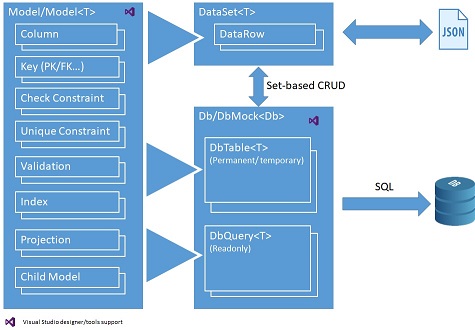
The following data objects are provided with rich set of properties, methods and events:
- Model/Model<T>: Defines the meta data of model, and declarative business logic such as data constraints, automatic calculated field and validation, which can be consumed for both database and local in-memory code.
- DataSet<T>: Stores hierarchical data locally and acts as domain model of your business logic. It can be conveniently exchanged with relational database in set-based operations (CRUD), or external system via JSON.
- Db: Defines the database session, which contains:
- DbTable<T>: Permanent database tables for data storage;
- Instance methods of Db class to implement procedural business logic, using DataSet<T> objects as input/output. The business logic can be simple CRUD operations, or complex operation such as MRP calculation:
- You can use DbQuery<T> objects to encapsulate data as reusable view, and/or temporary DbTable<T> objects to store intermediate result, to write stored procedure alike, set-based operations (CRUD) business logic.
- On the other hand, DataSet<T> objects, in addition to be used as input/output of your procedural business logic, can also be used to write in-memory code to implement your business logic locally.
- Since these objects are database agnostic, you can easily port your business logic into different relational databases.
- DbMock<T>: Easily mock the database in an isolated, known state for testing.
The following is an example of business layer implementation, to deal with sales orders in AdventureWorksLT sample. Please note the example is just CRUD operations for simplicity, RDO.Data is capable of doing much more than it.
- public async Task<DataSet<SalesOrderInfo>> GetSalesOrderInfoAsync(_Int32 salesOrderID, CancellationToken ct = default(CancellationToken))
- {
- var result = CreateQuery((DbQueryBuilder builder, SalesOrderInfo _) =>
- {
- builder.From(SalesOrderHeader, out var o)
- .LeftJoin(Customer, o.FK_Customer, out var c)
- .LeftJoin(Address, o.FK_ShipToAddress, out var shipTo)
- .LeftJoin(Address, o.FK_BillToAddress, out var billTo)
- .AutoSelect()
- .AutoSelect(c, _.Customer)
- .AutoSelect(shipTo, _.ShipToAddress)
- .AutoSelect(billTo, _.BillToAddress)
- .Where(o.SalesOrderID == salesOrderID);
- });
- await result.CreateChildAsync(_ => _.SalesOrderDetails, (DbQueryBuilder builder, SalesOrderInfoDetail _) =>
- {
- builder.From(SalesOrderDetail, out var d)
- .LeftJoin(Product, d.FK_Product, out var p)
- .AutoSelect()
- .AutoSelect(p, _.Product)
- .OrderBy(d.SalesOrderDetailID);
- }, ct);
- return await result.ToDataSetAsync(ct);
- }
- public async Task<int?> CreateSalesOrderAsync(DataSet<SalesOrderInfo> salesOrders, CancellationToken ct)
- {
- await EnsureConnectionOpenAsync(ct);
- using (var transaction = BeginTransaction())
- {
- salesOrders._.ResetRowIdentifiers();
- await SalesOrderHeader.InsertAsync(salesOrders, true, ct);
- var salesOrderDetails = salesOrders.GetChild(_ => _.SalesOrderDetails);
- salesOrderDetails._.ResetRowIdentifiers();
- await SalesOrderDetail.InsertAsync(salesOrderDetails, ct);
- await transaction.CommitAsync(ct);
- return salesOrders.Count > 0 ? salesOrders._.SalesOrderID[0] : null;
- }
- }
- public async Task UpdateSalesOrderAsync(DataSet<SalesOrderInfo> salesOrders, CancellationToken ct)
- {
- await EnsureConnectionOpenAsync(ct);
- using (var transaction = BeginTransaction())
- {
- salesOrders._.ResetRowIdentifiers();
- await SalesOrderHeader.UpdateAsync(salesOrders, ct);
- await SalesOrderDetail.DeleteAsync(salesOrders, (s, _) => s.Match(_.FK_SalesOrderHeader), ct);
- var salesOrderDetails = salesOrders.GetChild(_ => _.SalesOrderDetails);
- salesOrderDetails._.ResetRowIdentifiers();
- await SalesOrderDetail.InsertAsync(salesOrderDetails, ct);
- await transaction.CommitAsync(ct);
- }
- }
- public Task<int> DeleteSalesOrderAsync(DataSet<SalesOrderHeader.Key> dataSet, CancellationToken ct)
- {
- return SalesOrderHeader.DeleteAsync(dataSet, (s, _) => s.Match(_), ct);
- }
The above code can be found in the downloadable source code, which is a fully featured WPF application using well known AdventureWorksLT sample database. The structure of the sample solution can be found here.
RDO.Data Features, Pros and Cons
RDO.Data Features
- Comprehensive hierarchical data support.
- Rich declarative business logic support: constraints, automatic calculated filed, validations, etc, for both server side and client side.
- Comprehensive inter-table join/lookup support.
- Reusable view via DbQuery<T> objects.
- Intermediate result store via temporary DbTable<T> objects.
- Comprehensive JSON support, better performance because no reflection required.
- Fully customizable data types and user-defined functions.
- Built-in logging for database operations.
- Extensive support for testing.
- Rich design time tools support.
- And much more...
Pros
- Unified programming model for all scenarios. You have full control of your data and business layer, no magic black box.
- Your data and business layer is best balanced for both programmability and performance. Rich set of data objects are provided, no more object-relational impedance mismatch.
- Data and business layer testing is a first class citizen which can be performed easily - your application can be much more robust and adaptive to change.
- Easy to use. The APIs are clean and intuitive, with rich design time tools support.
- Rich feature and lightweight. The runtime DevZest.Data.dll is less than 500KB in size, whereas DevZest.Data.SqlServer is only 108KB in size, without any 3rd party dependency.
- The rich metadata can be consumed conveniently by other layer of your application such as the presentation layer.
Cons
- It's new. Although APIs are designed to be clean and intuitive, you or your team still need some time to get familiar with the framework. Particularly, your domain model objects are split into two parts: the Model/Model<T> objects and DataSet<T> objects. It's not complex, but you or your team may need some time to get used to it.
- To best utilize RDO.Data, your team should be comfortable with SQL, at least to an intermediate level. This is one of those situations where you have to take into account the make up of your team - people do affect architectural decisions.
- Although data objects are lightweight, there are some overhead comparisons to POCO objects, especially for the simplest scenarios. In terms of performance, It may get close to, but cannot beat, native stored procedure.
Ron MittelmanPosted Jan 10, 2020, 5:06 PM
Found issue, should be using IHostingEnvironment instead of IWebHostEnvironment. Now getting this error at run-time: System.TypeLoadException HResult=0x80131522 Message=Could not load type 'Microsoft.AspNetCore.Mvc.MvcJsonOptions' from assembly 'Microsoft.AspNetCore.Mvc.Formatters.Json, Version=3.0.0.0, Culture=neutral, PublicKeyToken=adb9793829ddae60'. Source=DevZest.Data.AspNetCore at the following line: services.AddMvc() .AddDataSetMvc() // Add DataSet MVC support .SetCompatibilityVersion(CompatibilityVersion.Version_2_2); It says version 2.2 is obsolete, but replacing it with .Version_3_0 or .Version.Latest does not help.
Ron MittelmanPosted Jan 10, 2020, 12:54 PM
Can't get last part of tutorial (Movies.AspNetCore) to work properly. Keep getting following error: 'IWebHostEnvironment' does not contain a definition for 'IsDevelopment' and the best extension method overload 'HostingEnvironmentExtensions.IsDevelopment(IHostingEnvironment)' requires a receiver of type 'IHostingEnvironment'. Can you help with this?
Ron MittelmanPosted Jan 8, 2020, 6:04 PM
In tutorial under "Movies.WPF Project", several errors popped up when I modified App.xaml.cs file, on lines referring to Db object. I added nuget package for DevZest.Data.SqlServer and this got rid of the errors. I am not sure this was the proper fix. Please advise. Thank you...
Ron MittelmanPosted Jan 8, 2020, 3:02 PM
Found tutorial from your web site. Having trouble in last step of Movies project, "Add table property". Class is added and coded per example, Db class shows in Db Visualizer. Clicking Plus button on top corner of Db Visualizer brings up "Add Db Table" dialog, but nothing in Model drop-down. No Movie class available, co can't continue. Can you help? Is it better to ask questions in GitHub?
Ron MittelmanPosted Jan 8, 2020, 12:48 PM
Can't find tutorial anymore. Wanted to start again, but all I can find is the GitHub project. Where is the online tutorial itself. You should update this article to mention it.
Chittaranjan SwainPosted Oct 28, 2019, 11:07 PM
Nice one well explained....
Sourav Kumar DasPosted Oct 24, 2019, 11:45 PM
Nice Article.
Ron MittelmanPosted Oct 24, 2019, 12:05 PM
Wow, found you. All of a sudden your articles have been removed from CodeProject. Only found you here by google search. Having problem doing the tutorial. In the Movies.DbInit project tutorial, I was able to get through step 4, Add class _DevDb to project Movies.DbInit. I did this and copied in the code from the tutorial. In Step 5, Right click in code editor of class _DevDb, click "Generate Db..." context menu item, I do not get the "Generate Db..." choice when I right-click in the code window. Why would this happen? Note I do NOT have SQL Server installed, only SSMS. Is that the reason? Thanks...