

This article explains the following:
- How to bind the ListBox from the database.
- How to delete selected item from ListBox as well as in the database.
Database Chamber
Use the following table and Stored Procedure to demonstrate this concept.
- Create table Mas_Employee
- (
- Id int primary key identity(1,1),
- Name varchar(50)
- )
- --To get all the employees
- Create Procedure USP_Select_Mas_Employee
- @Id int = null
- AS
- Begin
- Select E.Id, E.Name
- From Mas_Employee E
- Where Id = Isnull(@Id, Id)
- End
- --To Insert employee details
- Create Procedure USP_Insert_Mas_Employee
- @Name varchar(50)
- AS
- Begin
- Insert into Mas_Employee(Name) Values(@Name)
- End
- --To Delete employee details
- Create Procedure USP_Delete_Mas_Employee
- @Id int
- AS
- Begin
- Delete From Mas_Employee
- where Id=@Id
- End
To create the project -
- Go to Start, then All Programs and click Microsoft Visual Studio 2010.
- Go to File, New, Project..., Visual C# , Web. Then select ASP.NET Empty Web Application.
- Provide the project a name and specify the location.
Web.Config:
Create the connection string in the Web.Config file as in the following code snippet:
- <connectionStrings>
- <add name="conStr"
- connectionString="Password= 1234; User ID=sa; Database=DB_CsharpCorner; Data Source=."
- providerName="System.Data.SqlClient"/>
- </connectionStrings>
Webform Design:
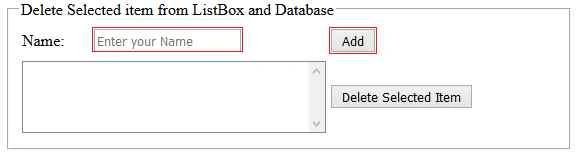
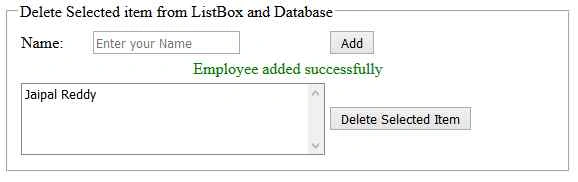
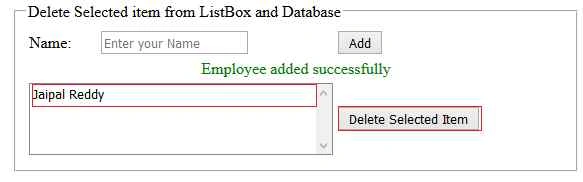
Design you Webform (.aspx page) as in the following:
- <form id="form1" runat="server">
- <div style="width: 100%;" align="center">
- <fieldset style="width: 40%;">
- <legend>Delete Selected item from ListBox and Database</legend>
- <table style="width: 100%;">
- <tr>
- <td>
- Name:
- </td>
- <td>
- <asp:TextBox ID="txtEmpName" runat="server"></asp:TextBox>
- </td>
- <td>
- <asp:Button ID="btnAdd" runat="server" Text="Add" OnClick="btnAdd_Click" />
- </td>
- </tr>
- <tr>
- <td colspan="3" style="text-align:center;">
- <asp:Label ID="lblMsg" runat="server"></asp:Label>
- </td>
- </tr>
- <tr>
- <td colspan="2">
- <asp:ListBox ID="lstEmployee" runat="server"></asp:ListBox>
- </td>
- <td>
- <asp:Button ID="btnDelete" runat="server" Text="Delete Selected Item" OnClick="btnDelete_Click" />
- </td>
- </tr>
- </table>
- </fieldset>
- </div>
- </form>
Jaipal ReddyPosted Oct 19, 2015, 8:15 AM
Thank you Santhakumar Munuswamy sir.
Santhakumar MunuswamyPosted Oct 18, 2015, 4:48 AM
Good one
Jaipal ReddyPosted Oct 10, 2015, 1:12 AM
Thank you Sibeesh Sir.
Sibeesh VenuPosted Oct 9, 2015, 1:12 AM
Nice Share
Jaipal ReddyPosted Oct 9, 2015, 12:04 AM
Thank you Rajeesh.
Rajeesh MenothPosted Oct 8, 2015, 2:26 PM
Nice One!
Jaipal ReddyPosted Oct 8, 2015, 1:31 PM
Thank you Sujeet Suman.
Sujeet SumanPosted Oct 8, 2015, 1:08 PM
Nice Article.................
Jaipal ReddyPosted Oct 8, 2015, 12:58 PM
Thank you Shridhar Sharma.
Jaipal ReddyPosted Oct 8, 2015, 12:58 PM
Thank you Nilesh Jadav.
Jaipal ReddyPosted Oct 8, 2015, 12:57 PM
Thank you Viipiin Tyagi.
Shridhar SharmaPosted Oct 8, 2015, 12:46 PM
good one
Nilesh JadavPosted Oct 8, 2015, 9:08 AM
Good one sir
Vipin TyagiPosted Oct 8, 2015, 7:44 AM
Nice Article
Jaipal ReddyPosted Oct 8, 2015, 4:27 AM
Thank you Harshad Pansuriya.
Harshad PansuriyaPosted Oct 8, 2015, 4:13 AM
Nice one