

Introduction
NFTs have become one of the most exciting parts of the Web3 world. And now, thanks to Base, deploying your own NFT collection is easier and cheaper than ever. Base is built on the OP Stack and is fully compatible with Ethereum tools, so you can use everything you already know, just faster and with lower fees.
In this article, we will cover
- Creating an ERC-721 smart contract
- Uploading your images and metadata to IPFS
- Minting your NFTs
- Listing them for sale
Let’s get started!
Step 1. Project Setup
Tools you will need:
- Node.js & npm
- MetaMask wallet
- Hardhat (for smart contract deployment)
- Pinata or NFT.storage (for uploading metadata)
Initialize the project
mkdir base-nft-collection
cd base-nft-collection
npm init -y
npm install --save-dev hardhat
npx hardhat
Choose “Create a basic sample project.”
Step 2. Install NFT Dependencies
npm install @openzeppelin/contracts dotenv @nomicfoundation/hardhat-toolbox
These give you
- ERC-721 smart contract templates
- Secure environment variable handling
- Testing and deployment tools
Step 3. Create Your NFT Contract
In the /contracts folder, create a file: MyNFT.sol
// SPDX-License-Identifier: MIT
pragma solidity ^0.8.20;

import "@openzeppelin/contracts/token/ERC721/extensions/ERC721URIStorage.sol";
import "@openzeppelin/contracts/access/Ownable.sol";

contract MyNFT is ERC721URIStorage, Ownable {
    uint256 public tokenCounter;

    constructor(address initialOwner) ERC721("MyBaseNFT", "MBNFT") Ownable(initialOwner) {
        tokenCounter = 0;
    }

    function mintNFT(address to, string memory tokenURI) public onlyOwner {
        _safeMint(to, tokenCounter);
        _setTokenURI(tokenCounter, tokenURI);
        tokenCounter++;
    }
}
This smart contract lets the owner mint ERC-721 NFTs with a custom URI for each one. It's perfect for creating a small NFT collection where the owner controls all minting.
Step 4. Upload Metadata to IPFS
Use Pinata or NFT.Storage to upload
- Your images
- A metadata JSON file for each NFT. Example
{
  "name": "Base NFT #1",
  "description": "This is my first NFT on Base",
  "image": "ipfs://Qm...yourImageHash"
}
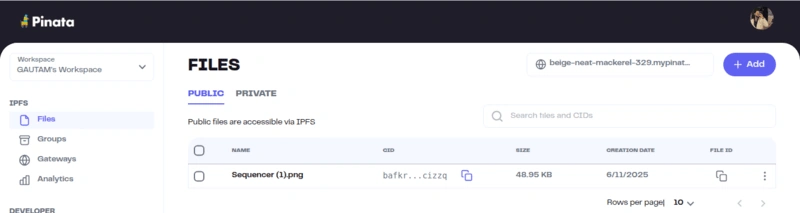
Upload and copy the IPFS CID (link) for each file.
Step 5. Write Deployment Script
Create a file scripts/deploy.js
- This script is used to deploy your MyNFT smart contract to the blockchain using Hardhat and ethers.js. First, it fetches the wallet address (called the deployer) which will be used to deploy the contract. Then, it loads the compiled version of your MyNFT contract using getContractFactory.
- After that, it deploys the contract and passes the deployer's address to the constructor so the deployer becomes the owner of the contract.
- The script then waits for the deployment to finish completely and confirms that the contract is live on the network.
- Finally, it prints out the address of the wallet that deployed the contract and the address where the contract is deployed. If anything goes wrong during the process, it catches the error and displays it in the terminal.
async function main() {
  const [deployer] = await ethers.getSigners();

  const NFT = await ethers.getContractFactory("MyNFT");
  const contract = await NFT.deploy(deployer.address);
  await contract.waitForDeployment();

  console.log("✅ Contract deployed by:", deployer.address);
  console.log("📍 Contract deployed to:", await contract.getAddress());
}

main().catch((error) => {
  console.error(error);
  process.exitCode = 1;
});
Step 6. Hardhat Configuration
In your hardhat.config.js
require("@nomicfoundation/hardhat-toolbox");

module.exports = {
  solidity: {
    version: "0.8.20",
    settings: {
      optimizer: {
        enabled: true,
        runs: 200,
      },
    },
  },
  networks: {
    baseSepolia: {
      url: "https://sepolia.base.org", // Use your correct RPC here
      accounts: ["72c32e19f598a84a5083e124f627a48d33fe4181af00392cff9a90d7f438bb3e"]  // Don't forget to replace this
    }
  }
};
- This is the Hardhat config file. It sets the Solidity version to 0.8.20, enables optimizer for better performance, and configures the Base Sepolia network using its RPC URL and your wallet’s private key.
- The toolbox import adds useful features like testing and deployment tools.
Make sure you have .env with
PRIVATE_KEY=your_wallet_private_key
Step 7. Get Test ETH on Base
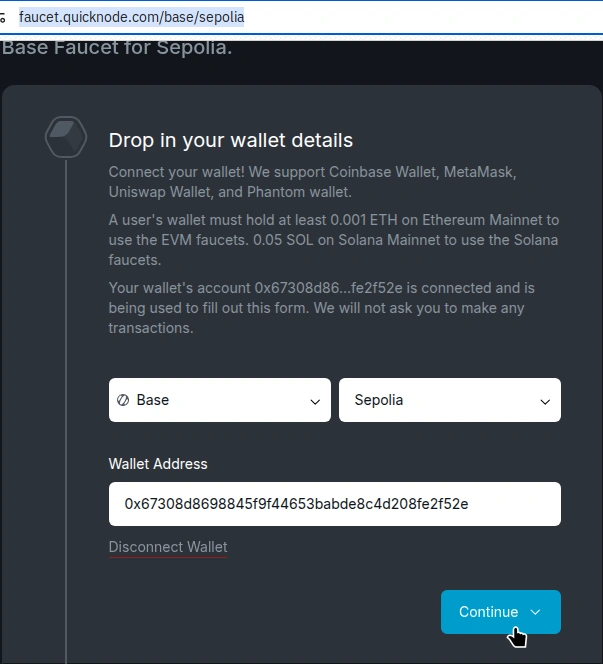
Go to the Base Sepolia Faucet, connect your wallet, and get test ETH
Step 8. Deploy Your NFT Contract
npx hardhat run scripts/deploy.js --network baseSepolia
Here, you can see that the contract is successfully deployed.

Step 9. Mint Your NFTs
You can now mint NFTs by calling mintNFT() with:
- Your wallet address
- The IPFS link to your metadata
Use Hardhat console or write another script like scripts/mint.js.
Example
const contract = await ethers.getContractAt("MyNFT", "YOUR_CONTRACT_ADDRESS");
await contract.mintNFT("YOUR_WALLET_ADDRESS", "ipfs://...yourMetadataLink");
Step 10. List NFTs on a Marketplace
After deployment and minting, you can list your NFTs on Base-supported marketplaces like:
- Zora
- OpenSea Testnet
- Or custom marketplaces via smart contracts
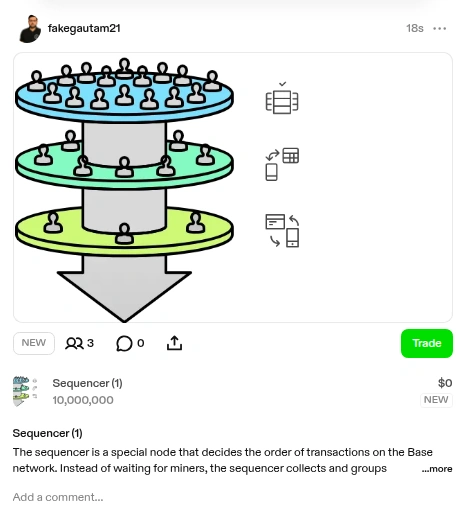
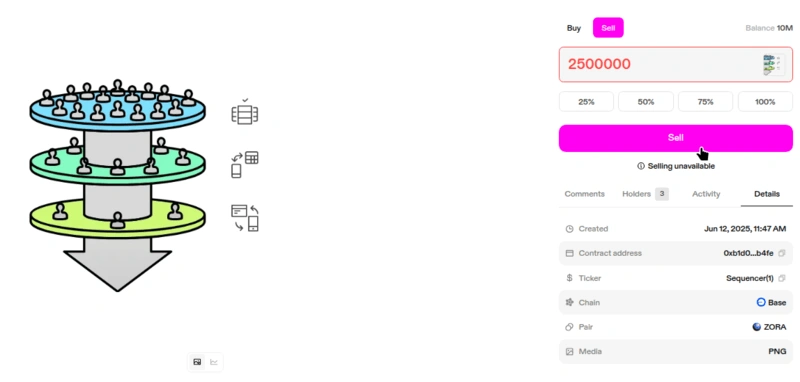
If you want, you can also sell your NFT like this
- In this, I'm trying to sell 2,500,000 units of a token.
- Key details include the contract address, token ticker ("Sequencer"), and its pairing with ZORA on the Base chain.
- The media type linked to this NFT is a PNG image, and the asset was created on June 12, 2025.
Final Thoughts
Creating and launching an NFT collection on Base is easier, faster, and cheaper than on Ethereum. With tools like Hardhat, OpenZeppelin, and IPFS, you don’t need to be a blockchain expert to build something great. This article gave you everything you need to write an NFT smart contract, upload metadata, Mint your collection, and prepare for public sales.
Join the conversation! Your thoughts help the community grow.