

What is a Windows Service
- Enables you to create long-running executable applications that run in their own windows session.
- Can be automatically started when the computer boots, can be paused and restarted without any user interaction.
- Easily installable by running the command line utility InstallUtil.exe and passing the path to the service's executable file.
Why a Windows Service?
One of the most common requirements of some businesses is long-running scheduled jobs based on some time interval. For example: sending a newsletter everyday afternoon or send an email alert to the customer for every one hour.
So building a Windows Service could be one of the reliable solutions to do the goal that can do the required job in the behind the scenes without interfering others users on the same computer.
Introduction
This article explains a step-by-step process of developing and installing a Windows Service to do a scheduled job based on a time interval.
Open Visual Studio and from the menus select "File" -> "New" -> "Project...".
A New Project window will open. Choose "Visual C#" >> "Windows" project type and select "Windows Service" from the right hand side and name the project "TestWindowsService" as shown in the following screenshot.

After you click "OK", the project will be created and you will see the design view of the service as shown in the following screen. Right-click the "Service1.cs" file in Solution Explorer and rename it "to" Scheduler or any other name that you want to give it. Then click “click here to switch to code view”.
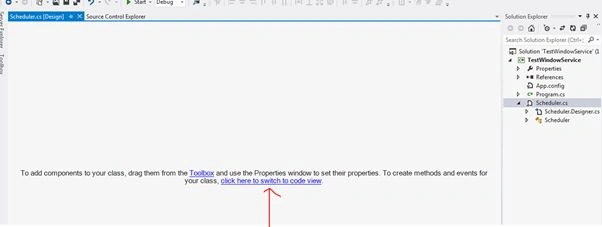
In the code view, you can see two methods called OnStart() and OnStop(). The OnStart() triggers when the Windows Service starts and the OnStop() triggers when the service stops.
using System;
using System.Collections.Generic;
using System.ComponentModel;
using System.Data;
using System.Diagnostics;
using System.Linq;
using System.ServiceProcess;
using System.Text;
using System.Threading.Tasks;
using System.Timers;

namespace TestWindowService
{
    public partial class Scheduler : ServiceBase
    {
        public Scheduler()
        {
            InitializeComponent();
        }
        protected override void OnStart(string[] args)
        {

        }
        protected override void OnStop()
        {

        }
    }
}
Right-click the TestWindowService project, add a new class and name it "Library.cs". This class will be useful to create the methods that we require in the project. If your TestWindowService is a big project, you can create a ClassLibrary project and reference it to your TestWindowService.
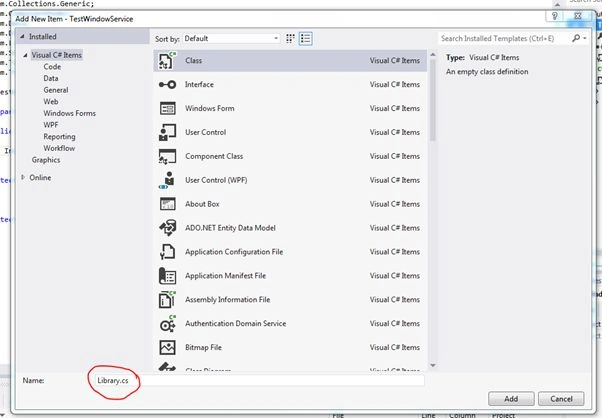
Library.cs
Make the class public and declare it as a Static class.
using System;
using System.Collections.Generic;
using System.Linq;
using System.Text;
using System.Threading.Tasks;
using System.IO;

namespace TestWindowService
{
    public static class Library
    {

    }
}
Create a log method (WriteErrorLog) to log the exceptions.
public static void WriteErrorLog(Exception ex)
{
    StreamWriter sw = null;
    try
    {
        sw = new StreamWriter(AppDomain.CurrentDomain.BaseDirectory + "\\LogFile.txt", true);
        sw.WriteLine(DateTime.Now.ToString() + ": " + ex.Source.ToString().Trim() + "; " + ex.Message.ToString().Trim());
        sw.Flush();
        sw.Close();
    }
    catch
    {
    }
}
Create one more log method (WriteErrorLog) to log the custom messages.
public static void WriteErrorLog(string Message)
{
    StreamWriter sw = null;
    try
    {
        sw = new StreamWriter(AppDomain.CurrentDomain.BaseDirectory + "\\LogFile.txt", true);
        sw.WriteLine(DateTime.Now.ToString() + ": " + Message);
        sw.Flush();
        sw.Close();
    }
    catch
    {
    }
}
Scheduler.cs
Now return to our Scheduler.cs file and declare a Timer.
using System;
using System.Collections.Generic;
using System.ComponentModel;
using System.Data;
using System.Diagnostics;
using System.Linq;
using System.ServiceProcess;
using System.Text;
using System.Threading.Tasks;
using System.Timers;

namespace TestWindowService
{
    public partial class Scheduler : ServiceBase
    {
        private Timer timer1 = null;

        public Scheduler()
        {
            InitializeComponent();
        }
        protected override void OnStart(string[] args)
        {
        }
        protected override void OnStop()
        {
        }
    }
}
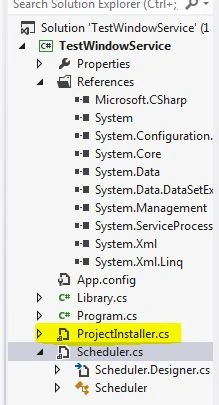
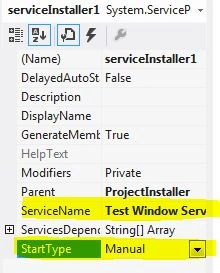
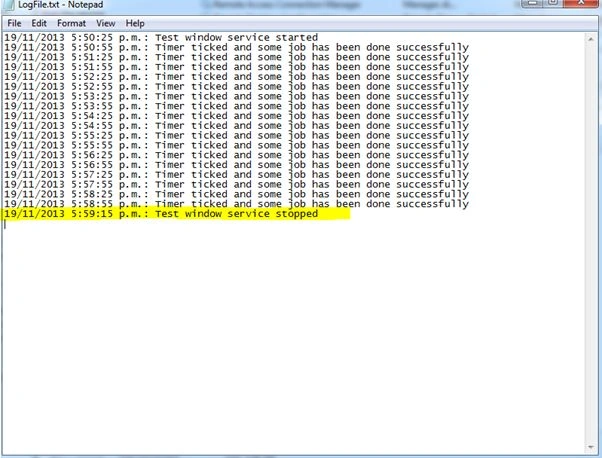
Write the following code in the OnStart() method and timer1_Tick():







margam chakriPosted Jan 11, 2022, 11:24 AM
Thank you very much it's helped a lot of time and simply and neatly explained
Chatrughan PrasadPosted May 11, 2021, 5:12 AM
Perfect Tutorial...easy to understand
Niels IllemPosted Apr 13, 2021, 2:43 PM
Great tutorial! Now I understand how to build a service, thanks!
Noel MacaraPosted May 11, 2020, 10:32 AM
Nice clean article. Thank you. I still have much to learn about building a Windows Service. Do you have any more examples to offer.
Dipak NilePosted Jan 13, 2020, 12:38 PM
Nice article, thanks for sharing.
JESURAJA IPosted Jan 9, 2020, 11:58 PM
How to install the windows service in other computer
Aruna RanatungaPosted Nov 25, 2019, 4:33 PM
How can we start this windows app automatically ?
Dinesh GabhanePosted Nov 7, 2019, 8:32 AM
Very Nice Article
DeepanPosted Jul 13, 2019, 1:12 AM
Thanks for sharing
Protas MbanjwaPosted Jul 4, 2019, 8:15 AM
Thank you sir
umar drazPosted Jun 28, 2019, 8:44 AM
Is it possible we can use windows service into to different project's
neeraj chaurasiaPosted May 14, 2019, 2:32 AM
Thank u sir
Prakash ChasiyaPosted Dec 14, 2018, 12:49 AM
Well written article. Thanks for sharing.
Marilena WeizmannPosted Dec 7, 2018, 7:36 AM
10,000,000,000 LIKES !!! Excellent Article !
Hariharan KrishnamoorthiPosted Dec 4, 2018, 6:43 AM
Hi Naresh, It is good to add few points on How to debug the Windows services in Visual Studio for Developer friendly.
Hariharan KrishnamoorthiPosted Dec 4, 2018, 3:43 AM
Its really helpful.
Krishna GOUTEPosted Nov 20, 2018, 12:25 AM
Great Article and Thanks for sharing
Dharmendra Kumar PanditPosted Sep 1, 2018, 4:54 AM
I want to start SqlServer services on computer startup. Using windows services
Adin AronsonPosted Aug 30, 2018, 2:32 AM
I would recommend developers check out TopShelf NuGet too for converting a console app into a Windows Service
thau tranPosted Jun 16, 2018, 9:02 AM
Thanks you!
Jorge TorresPosted Apr 27, 2018, 9:16 AM
Quiero instalar mi servicio en una maquina donde no hay visual studio .Que pasos debo realizar.
Luis BernalPosted Apr 26, 2018, 12:29 PM
Thanks, this is help me too much!
Ammar ShaukatPosted Apr 23, 2018, 6:09 AM
Which means Windows Service is just like a library which keeps on running in background . In case if we need a mechanism for communication between different softwares , then WCF will be the solution.
Suresh KamrushiPosted Apr 13, 2018, 6:13 AM
Perfect article. Thanks for writing
Subham PolpagedarPosted Apr 12, 2018, 2:19 AM
How can I run multiple Windows services in one .EXE ?
Ng JayPosted Apr 5, 2018, 11:22 AM
I tried changing the path of the log file to @"D:/LogFile.txt and "D://LogFile.txt". But there are errors.......Help me, thanks.
Emanuele LeoniPosted Apr 3, 2018, 10:33 AM
Great article Naresh. In your opinion, Can I use a windows service to monitoring a console application, and in case of exception write a log and restart the console application?
sethu sunddareshPosted Mar 20, 2018, 5:51 AM
Hi thanks. i was using sample project like same but there was not InstallUtil.exe in bin how to get the exe . pls replay.......
Rakesh SasiPosted Feb 27, 2018, 2:05 AM
Error 1053: The service did not respond to the start or control request in a timely fashion.Can you give me a solution for that?This happens when I start the service.
Dahiana DahianaPosted Feb 9, 2018, 8:46 AM
Gracias! me ayudo much?simo ;)
Vipin MittalPosted Jan 30, 2018, 6:42 AM
Thanx for this....very helpfull..
Սուրեն ԱթոյանPosted Jan 29, 2018, 12:48 AM
Thanks a lot for tutorial !
Govind Singh RawatPosted Nov 22, 2017, 12:41 AM
Great, it will be very helpful to me.
Vignesh RajaPosted Nov 17, 2017, 12:49 PM
Works great... Cool explanation.. Thanks !
Anel HodzicPosted Nov 9, 2017, 7:40 AM
This is awesome tutorial mate. Thanks a lot for it. You should consider the fact of using EventLogger instead of .TXT log file
Sean GrahamPosted Sep 27, 2017, 8:27 AM
This is jolly wonderful article, and useful very. I use this now to create them windows services. Thanks much.
Gideon KwasiPosted Jun 25, 2017, 7:19 AM
What if I want to install on another PC which does not run visual studio ? Is there any other means to install windows services aside using the visual studio developer command prompt ?
Gideon KwasiPosted Jun 25, 2017, 7:16 AM
Very helpful article.
Mohammed WardPosted Jun 19, 2017, 1:16 AM
Thanks why comment can't be less than 18 characters
Jack ZengPosted Mar 17, 2017, 2:09 AM
Thank you very much! You are a good man. I see this article in china.
Ashok JangamPosted Feb 28, 2017, 2:00 AM
I have installed my windows service successfully, but it is not visible in 'Services and Applications" window. what to do?
Ebere EmelikePosted Feb 9, 2017, 2:03 PM
Thank you for this article. Great!!!
Gusti AryaPosted Jan 22, 2017, 9:26 PM
Thanks for the Article sir, it's very useful, but I want to ask, if I updated my windows service code, do I have to uninstall existing service then install it again?
Supraj vPosted Jan 17, 2017, 12:23 AM
How to host this in azure
Shailesh BankarPosted Jan 5, 2017, 8:23 AM
Hi, I tried to make a service like you've done. But while installing that exe using that VS console, its giving me error like- Exception occurred while initializing the installation:System.IO.FileNotFoundException: Could not load file or assembly 'file ://C:\WindowsService\TestWindowsService\TestWindowsService\bin\Debug\TestWindowsService.exe' or one of its dependencies. The system cannot find the file specified.. Please help.
Naveen KumarPosted Dec 26, 2016, 10:07 AM
Its works fine Thanks So much
Manish JainPosted Dec 9, 2016, 1:31 AM
Nice Article Sir and very good working code.
Carlos RicoPosted Nov 15, 2016, 2:30 PM
Thanks for this article and take my like, good man !!!
Mohsin AzamPosted Nov 9, 2016, 5:29 AM
Thanks For Nice Article and Style of understanding..:)
mack davidPosted Sep 21, 2016, 9:50 AM
This is best one article so far I have read online. I would like to appreciate you for making it very simple and easy. I have found another nice post related to this post over the internet which also explained very well.https://www.mindstick.com/Articles/988/windows-service-in-dot-net
Suppa BalfaPosted Jul 21, 2016, 2:26 PM
Download link is broken
D v KootenPosted Jul 12, 2016, 12:02 PM
Thank you very much, very easy to understand and complete. Just the following (some of it written in other remarks): 1 Open Developer Command Prompt via Run as Administrator otherwise you get an Access Denied Error. 2) On logon use .\YourWinLogonName (instead of YourWinLogonName) otherwise you get The account name is invalid or does not exist. 3) If you set the service as automatic the option to set the "Account" to "LocalSystem" does not appear (at least I guess that is the cause) 4) Also an Automatic service has to be started the first time manually using My Computer, Services 5) Use InstallUtil.exe /u “MyService.exe” if you want to uninstall it again.
kalu singh raoPosted Jul 9, 2016, 10:34 AM
Nice...
Mukesh vermaPosted May 27, 2016, 7:53 AM
nice article
Muhammed AbdussalamPosted Apr 6, 2016, 1:17 PM
Simple and powerful.. ;) Thank you very much.
manoj t sPosted Mar 8, 2016, 9:00 AM
in the VS Cmd prompt
manoj t sPosted Mar 8, 2016, 8:59 AM
here it is showing 'Access is denied'
Shamim RezaPosted Feb 27, 2016, 4:55 AM
nice article for beginners.
Humayun Kabir MamunPosted Feb 18, 2016, 1:33 AM
Nice...
Bhavin MehtaPosted Feb 10, 2016, 3:05 AM
Nice Article.
Fevzi SivriPosted Jan 30, 2016, 7:33 AM
Thank you Great sample
Shrimant TelgavePosted Jan 19, 2016, 11:57 AM
ohhh ya great ....
Sumeet BrahamankarPosted Jan 11, 2016, 6:16 AM
Nice Article
Malik AamirPosted Jan 1, 2016, 5:10 AM
It really help beginners like me.
Aakriti GangwalPosted Dec 11, 2015, 1:09 AM
Thanks for such a clear explanation. It helped a lot :)
Girjesh VishakarmaPosted Dec 10, 2015, 7:10 AM
Great article .. .... Thank You
Banketeshvar NarayanPosted Nov 20, 2015, 4:57 AM
Nice Article..
Harminder SinghPosted Oct 31, 2015, 2:28 AM
great article
Shahbaz AhmadPosted Oct 27, 2015, 9:18 AM
Hi kunal, I think you should be used threading concept in your project. call a function inside thread and call after certain time period as your require.
kunal kumarPosted Oct 15, 2015, 8:00 AM
hi i did that and really it will helpful to me but i need to create one window application in which i have a grid view in which i need to show what are the services are there and what is the status for that services either is is stop or started, can someone help me on that....
Elian FernandezPosted Oct 12, 2015, 11:08 AM
Excellent article. I need to do something similar but checking scheduled times stored in a database(If ScheduledTime <= DateTime.Now then Execute action(Funtion stored in DLL but I need to call it from a WCF Service method)). I get these scheduled times using a function implemented in a DLL that it is called from a WCF Service where a method that implements the service call that function in the DLL. Please, some help about how to do that?
Cody S.Posted Aug 29, 2015, 8:39 AM
it says "Access is denied." Please help. I'm a beginner.
SavindraSingh ShahooPosted Jul 22, 2015, 8:10 AM
This is an excellent article. That helped me develop one service for network monitoring. However, I am still not clear on how to install the service on other computers?
Iswarya RengarajanPosted Jul 9, 2015, 5:15 AM
very useful for me to learn window service
Srinivas MNDPosted Jun 26, 2015, 8:29 AM
It's a good example. But how to set this to run weekly? Do I need to put the value of the "Interval" by calculating in seconds....it quite difficult!
Ashish ShuklaPosted Jun 24, 2015, 6:15 AM
It's very helpful for beginners...!!
Jaipal ReddyPosted Jun 6, 2015, 7:49 AM
5/5
Chandni JainPosted Jun 3, 2015, 2:53 AM
hello i am tring your above example and it works fine but as soon as i am trying to connect with sql db it doesn't wotk. how to resolve it?
krishna kumar singhPosted May 11, 2015, 1:32 PM
Best article ever
Jaison JoePosted Apr 29, 2015, 5:42 AM
Nice...!!!
Mahesh RajolePosted Apr 9, 2015, 6:58 AM
Hi Naresh, am trying to get DataSet OnStrart() of service but while service in Debug mode it getting the DataSet but after install this service couldn't start.
s sPosted Mar 27, 2015, 1:28 AM
But how can we access this service from another windows form application. For eg. what if I want to call some method which is implemented in the service
Shaili DashoraPosted Mar 11, 2015, 1:23 PM
nice one
Tom MohanPosted Mar 11, 2015, 12:21 PM
nice one
Praveen KumarPosted Mar 11, 2015, 9:52 AM
very helpful! Nice explanation
Mahesh ChandPosted Mar 11, 2015, 8:47 AM
Job well done!
Sandeep Singh ShekhawatPosted Mar 11, 2015, 7:56 AM
+5
NitinPosted Mar 11, 2015, 5:28 AM
great article
Humayun Kabir MamunPosted Mar 11, 2015, 4:53 AM
Nice...
Venkatajalapathy KPosted Mar 11, 2015, 3:21 AM
Useful for me...Thanks..
Imran Khan MemonPosted Mar 2, 2015, 2:15 PM
Nice work dear
Manzoor AhmedPosted Feb 20, 2015, 8:30 AM
Thanks dude you helped me out ...
Vaishak GopiPosted Feb 13, 2015, 5:28 AM
Good one..
Srinivasan K KPosted Feb 6, 2015, 1:40 AM
Helpful article for a beginner too...
Guest UserPosted Feb 6, 2015, 1:35 AM
Time worth spend to read this article!
Vikram AgrawalPosted Jan 21, 2015, 11:39 PM
Very Helpful Article........
MUHAMMAD TASADDUQ ALIPosted Jan 17, 2015, 2:58 AM
Solution for Installation failed : Go to "Start" >> "All Programs" >> "Microsoft Visual Studio 2012" >> "Visual Studio Tools" then right click "Developer Command Prompt for VS2012" and Run as Administrator.
K P Singh ChundawatPosted Dec 26, 2014, 6:07 AM
nice article sir..
KumarPosted Dec 8, 2014, 3:19 PM
Very nice Article with simple explanation....Thanks Naresh...!
Mazen SenihPosted Dec 1, 2014, 1:01 PM
I think the Log's Stream Writer sould be intitialized in a static constructer, so we don't have to re-create it every time.
Silver ZPosted Nov 28, 2014, 7:02 AM
what is much better to use? Timer or Thread..How can I use Thread instead of Timer..
ASHWIN RAJPosted Nov 21, 2014, 6:58 AM
i wrote some functions to update my database in ' Library.cs ' file , But it is not working properly . WriteErrorLog function works correctly .
ASHWIN RAJPosted Nov 21, 2014, 6:57 AM
good article ..
Manish Kumar ChoudharyPosted Nov 19, 2014, 6:11 AM
very helpful for me Naresh Avari sir. Thanks..
Pandurang PailvanPosted Nov 13, 2014, 7:31 AM
Very good article...........
boeie boeiePosted Oct 13, 2014, 9:21 AM
Naresh, You forgot to mention in your tutorial that you should start the developer console with ADMIN priviledges, or else you get the security exception.
abdul muqeetPosted Jul 15, 2014, 4:48 AM
I got the same error , when i try to install exe "InstallUtil.exe "TestWindowService.exe"" its getting Rollback
Ajinkya KasarPosted May 6, 2014, 3:57 AM
Very thanks to Naresh Avari . this are very helpful for me. but when i run this code i got this exception(System.Security.SecurityException ) during service installation process.and installation is rollback can you help me to resolve? Exception description says : The source was not found,but some or all event logs could not be searched inaccessible logs: security.
vigneshwarr sPosted Apr 22, 2014, 3:22 AM
NIce Article..It Helped me a lot
Rakhi SinghPosted Apr 9, 2014, 2:30 AM
Superb work.
AniPosted Feb 28, 2014, 2:48 AM
Good Article
Sumit DhawanPosted Feb 24, 2014, 2:40 AM
When I build the solution,I still cant find the .exe file for service in the folder where project is located??
Dinesh BeniwalPosted Feb 24, 2014, 2:08 AM
Well explained Naresh, Welcome to the C# Corner.