

This application is adapted to viewing text files, it can carry out also creation of new files and editing of existing files. It allows the user to enter the name of a created or opened file. The user can scroll the text in a multi-line text component then there are seen other areas of the text. It is possible to enter the new text, to erase the old text, to save the created text in a file.
1. ShapeBoxT - The three-dimensional shape for the multi-line text
- Class ShapeBoxT allows theapplication to become text editor. It realizes as the foreground of the texteditor. It means, that it carries out the interface.
- Class ShapeBoxT represents theparental 3D shape which contains the interface for the text editor. It containsseparate 3D box and its general components, which are used to present the texteditor and to execute its operations.
- ShapeBoxT supports the texteditor through TextHyp member. This class has been developed earlier and used tostart the multi-line text.
- ShapeBox has set of the generalcomponents, which are used to present the application. It - labels, text fields,and the user buttons which execute various operations.
- using System;
- using System. Collections;
- using System. Drawing;
- using Microsoft. DirectX;
- using D3D=Microsoft. DirectX.Direct3D;
- namespace Code9
- {
- public class ShapeBoxT
- {
- private D3D.Device device;
- private D3D.Mesh shMesh;
- private D3D.Material shMaterial;
- public string str;
- public Position pos;
- public Position posc;
- public Orientation orient;
- public Size size;
- public Position pos4;
- public Orientation orient4;
- public Size size4;
- public float scaleX;
- public bool InFocus;
- public string type;
- public int Alfa=15;
- public Framer fram;
- public Translator trans;
- public ButtonSph3 bmenu1;
- public MenuHypButton bhypmenu1;
- public TextHyp OTH1;
- public LineTextCyl LTC1;
- public int k=10;
- public Chars CharList;
- public Letters MeshList;
This shape contains the following components:
- Translator trans - the derivativecomponent representing an opportunity of moving 3D shape, realization of thegeneral management 3D shape and demonstrations of application name.
- Framer fram - a derivativecomponent which gives an opportunity of change of the size of 3D shape.
- MenuHypButton bhypmenu1 - thethree-dimensional push-button menu, realizes the basic functions of the texteditor.
- TextHyp OTH1 - a multi-line textfield where the user enters the text.
- LineTextCyl LTC1 - a separatetext line in which editing the text is carried out.
1.1 Creation of the text editor shape
ShapeBoxT represents the
application of the text editor, the interface of the editor is included in it.
If the copy of this class is initialized, the constructor of a class initialize
its members of starting values. In this function, class ShapeBoxT, is created.
However, components of the interface, such as the menu and the multi-line text,
are created and initialized in method InitializeGpaphics which is developed
further. The following definition shows, as the constructor works.
- public ShapeBoxT (D3D.Device device1, string str1, string tmp, Position pos1, Orientation orient1, Size size1, string type1, AlfabitEn AlfE)
- {
- device = device1;
- str=str1;
- pos=pos1;
- posc=pos;
- orient=orient1;
- size=size1;
- type=type1;
- InFocus=false;
- scaleX=1.0f;
- type = "Box";
- Position pos11;
- Orientation orient11;
- pos11.x=pos.x-size.width/2.0f;
- pos11.y=pos.y+size.height/2.0f;
- pos11.z=pos.z-size.depth/2.0f+size.depth/2.0f;
- Size size11;
- size11.width=size.width;
- int radius=1;
- size11.height=4.0f*radius;
- size11.depth=4.0f*radius;
- float length=size.depth;
- orient11=orient;
- fram=new Framer (device, str + "fram", pos11, orient11, size11, length, radius);
- Position pos2;
- Orientation orient2;
- Size size2;
- pos2.x=pos.x+size.width/2.0f;
- pos2.y=pos.y-size.height/2.0f;
- pos2.z=pos.z;
- orient2=orient;
- radius=1;
- size2.width=size.depth;
- size2.height=4.0f*radius;
- size2.depth=4.0f*radius;
- length=size2.width;
- trans=new Translator (device, str + "trans", "Teditor", pos2, orient2, size2, length, radius);
- Position pos3;
- Orientation orient3;
- Size size3;
- size3=size;
- shMesh=D3D.Mesh. Box (device, size3.width, size3.height, size3.depth);
- shMesh = shMesh. Clone (D3D.MeshFlags. Managed, D3D.VertexFormats. PositionNormal | D3D.VertexFormats. Diffuse, device);
- D3D.CustomVertex. PositionNormalColored [] Dest =
- (D3D.CustomVertex. PositionNormalColored []) shMesh. LockVertexBuffer (typeof (D3D.CustomVertex. PositionNormalColored), 0, shMesh. NumberVertices);
- for (int x=0; x <(Dest. GetLength (0)); x ++)
- {
- Dest [x] .Color = Color. FromArgb (Alfa, 255, 0, 0) .ToArgb ();
- }
- shMesh. UnlockVertexBuffer ();
- pos4=new Position ();
- orient4=new Orientation ();
- size4=new Size ();
- pos4.x=0.0f; pos4.y =-30.0f; pos4.z =-10.0f;
- orient4.x=0.0f; orient4.y=1.0f; orient4.z=0.0f; orient4.angle=0.75f;
- size4.width=20.0f; size4.height=40.0f; size4.depth=20.0f;
- OTH1 = new TextHyp (device, tmp, "HypText1", pos4, orient4, size4, k, 1, AlfE);
- }
Drawing of the shape is carried out by special method Draw ().
Its contents is resulted further:
- public void Draw (D3D.Device device1, Position pos1, Orientation orient1, Size size1, string type1, float buttlen)
- {...}
1.3 Clearing
Clearing of resources is made by
method Dispose () and destructor.
2 Menus - Performance of functions
Till now, for realization of actions three-dimensional buttons as rather independent components were used. They have a little interactions with each other. Thus, if the user clicks by the button - separate function is carried out. For realization of group of the interconnected functions it is necessary to provide communication between components so, that one component can cooperate with another. For this purpose it is possible to use the three-dimensional push-button menu. Buttons allow us to store pointers on carried out actions and to communicate between them. The push-button menu has been developed earlier as class MenuHypButton. Certainly, this class approaches for this case, but there is a problem: as buttons carry out various functions, you should process clicks of the mouse differently in different applications. For example, button Copy could copy the contents of the buffer while other button Exit could finish the application. Use only MenuHypButton does not allow you to do it. What it is necessary to make for this purpose? Simply, you should add function - we shall tell My_Copy () - in Form1 and to cause it in the necessary event. The following sections describe each of the derivative buttons developed for the menu of the text editor.
2.1 The general functions for processing events of the menu
Work with the three-dimensional push-button menu is carried out as follows:
- The choice of menu button inTranslator - activization of the menu is carried out;
- Navigation in 3D space for achoice of the button connected with necessary function is carried out:
- Click by the button of the mouseon the active button is carried out.
For this purpose the following functions are used:
- public void MenuItem_GetFocus (string msg1, string msg2)
- {...}
- public void MenuItem_LostFocus (string msg1, string msg2)
- {...}
- public void MenuItem_Click (string msg1, string msg2)
- {...}
2.3 MyCut - The button to cut out
The second button which will be developed for the 3D menu - the button to cut. After pressing it handler of event MyCut should be coded to cut the text fragment
2.4 MyPaste - The button to insert
When the button to insert click, are carried out the following action. The content of the text buffer is inserted into the current position of the text cursor.
2.5 MyEnd - The button stop
Users who will press by the button end - will finish work with the menu.
2.6 MyExit - The button of closing
The final button which will be developed for the 3D menu - the button of closing. It is most simple of its buttons. Everything, that it does, closing of the application, sending the exit message.
3. TextHyp - The multi-line text
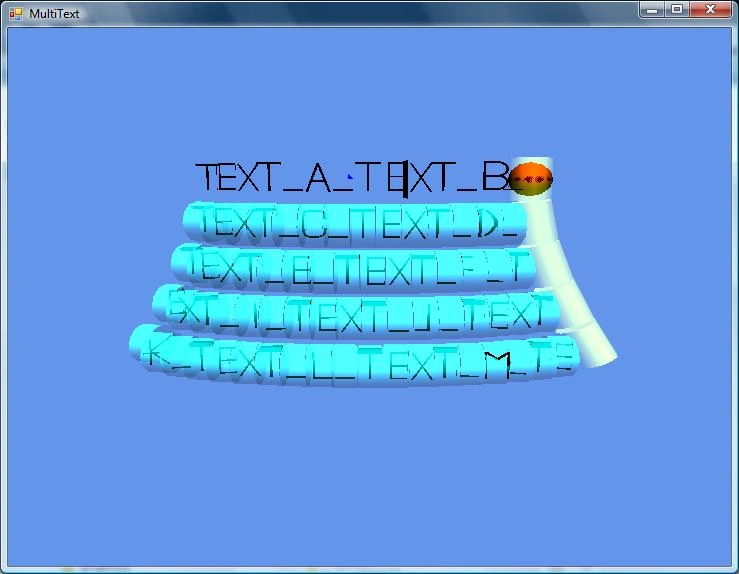
Fig.1 the Multi-line text
Having developed the three-dimensional push-button menu it is possible to proceed to realization of the multi-line text for the text editor. It is carried out in class TextHyp of our application of the text editor. The declaration of a class is given below.
Join the conversation! Your thoughts help the community grow.