

Today, I have provided an article showing you how to display the return value from a Stored Procedure output parameter in a Query Window in SQL Server 2012. In this article, we create a Stored Procedure to avoid duplicate record insertion in the SQL Server database prior to insertion into the database. You can determine the value of the out parameter corresponding to the different condition as an out parameter. Let's have a look at a practical example. The example is developed in SQL Server 2012 using the SQL Server Management Studio.
Output Keyword
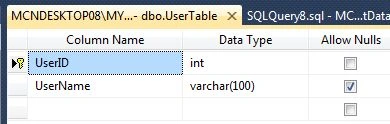
The Output keyword to the parameters in the Stored Procedures can return the values of the parameters to the calling program. Now create a table named UserTable with the columns UserID, UserName. Set the identity property=true for UserID. The table looks as in the following:
Now create a Stored Procedure:
- Create PROCEDURE [dbo].[ExecuteProcedurewithOUTParameter]
- (
- @UserName VARCHAR(100),
- @ResultValue int out
- )
- AS
- BEGIN TRAN
- IF EXISTS
- (
- SELECT * FROM Testoutvalue
- WHERE Name = @UserName
- )
- BEGIN
- SET @ResultValue = -5
- END
- ELSE
- BEGIN
- INSERT INTO Testoutvalue
- (
- Name
- )
- VALUES
- (
- @UserName
- )
- set @ResultValue = 1
- END
- IF @@ERROR <> 0
- BEGIN
- ROLLBACK TRAN
- END
- ELSE
- BEGIN
- COMMIT TRAN
- END
- Select @ResultValue


SharadPosted Jul 22, 2015, 12:20 AM
Excellent
Santosh YadavPosted Mar 31, 2013, 11:04 AM
Very good article keep it up.