Here is the 9th part of this article series about "Python". In this article series, you will learn Python step-by-step easily.
Getting Theme
For getting the theme of Python, kindly go through my previous articles.
Looping
If you are a programmer, then you must be aware of the concept behind looping. But still, allow me to explain the concept of looping briefly.
As we know, the statements in the programs are executed one-by-one from the first statement up to the last. But think of the situation where you need to use a certain statement multiple times or maybe you are interested in implementing some logic that requires some set of conditions and maybe some other typical situation.
So, for this type of functionality, we generally use loops.
Types of Loops
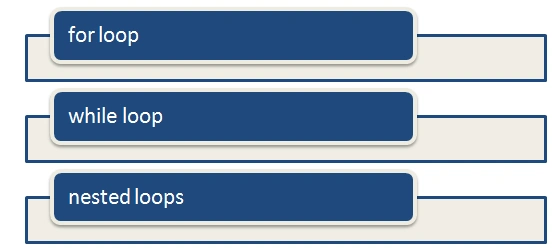
Python provides the following 3 types of loops.
Let's explore them one-by-one with some examples.
For Loop
A "for" loop executes a set of statements multiple times depending on the conditions defined in the for a loop.
Flow
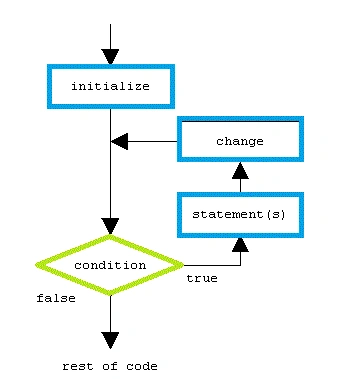
Let's have a look at the operational flow.
Example
- sum = 0
- i = 0
-
- for i in range(10):
-
- sum = sum + i
- print (sum)
Output
While Loop
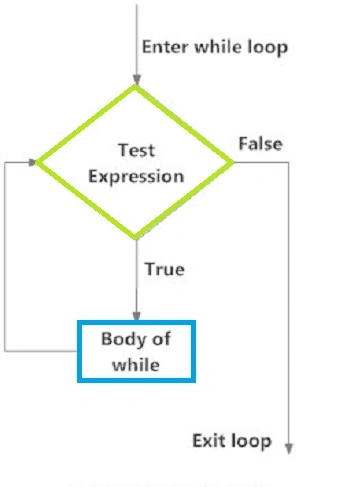
A "while" loop is similar to a "for" loop. In a while loop, a set of statements is executed multiple times until it finds the condition to be true. But there is a little catch; the while loop tests the condition before executing the loop body (conditions inside the while loop body).
Flow
Let's have a look at the operational flow.
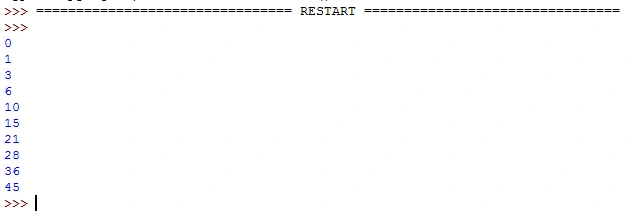
Example
- sum = 0
- i = 0
-
-
- while (i<10):
-
- sum = sum + i
- print (sum)
- i = (i + 1)
Output
Nested Loop
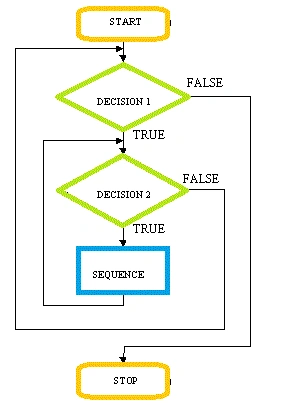
As the name says it all, in implementing a nested loop for certain functionality, you can also use a loop inside a loop.
Flow
Let's have a look at the operational flow.
For Example
Loop Control Statements
In general, we can say that Loop control statements work randomly rather than sequentially.
Let me explain that statement. In general, statements execute one-by-one starting from the first statement up to the last statement, but loop control statements help in executing a statement randomly depending on the defined condition in the snippet.
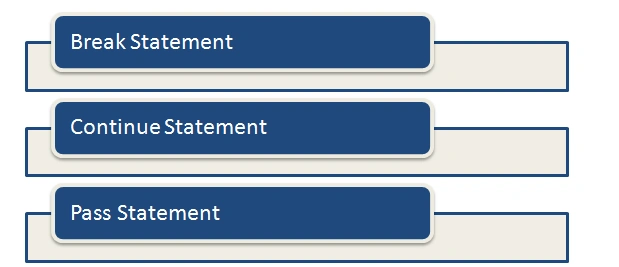
Let's have a look at the loop control statements provided by Python.
Break Statement
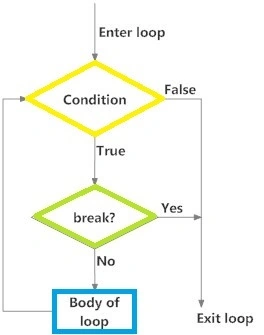
The break statement terminates the loop statement and transfers the execution to the statement directly, depending on the loop condition.
Flow
Here's a functioning flow of the break statement:
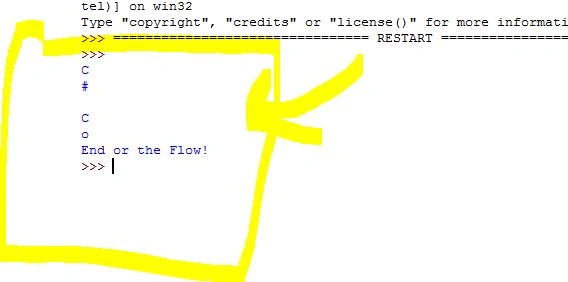
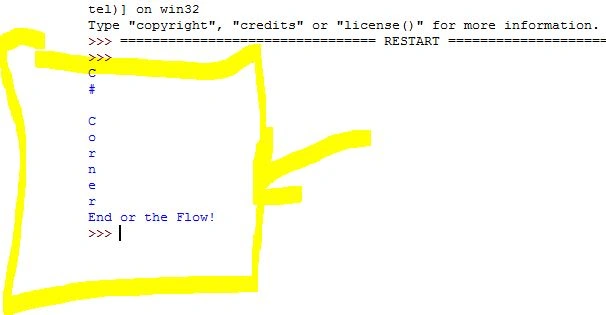
- for alphabets in "C# Corner":
- if alphabets == "":
- break
- print(alphabets)
- print("End or the Flow!")
Output
Continue Statement
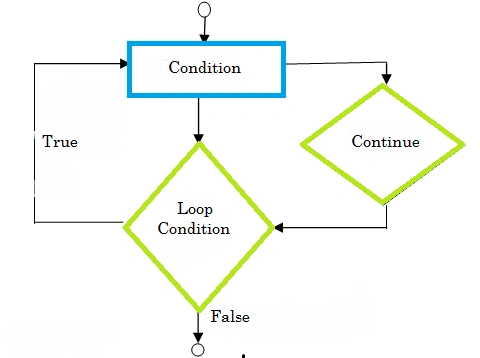
The Continue statement helps in skipping out of the loop body and resets the condition again as per the conditions provided.
Flow
Here's a functioning flow of the continue statement.
Example
- for alphabets in "C# Corner":
- if alphabets == "r":
- continue
- print(alphabets)
- print("End or the Flow!")
Output
Pass Statement
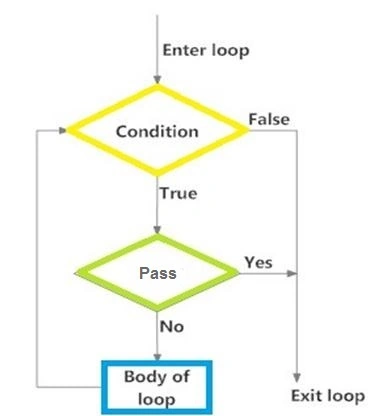
The Pass statement is used when a statement is required syntactically and you don't want any statement or condition in the code to execute as per the requirements.
Flow
Here's a functioning flow of the pass statement.
- for alphabets in "C# Corner":
- if alphabets == "r":
- pass
- print(alphabets)
- print("End or the Flow!")
Output
Here are some guidelines provided by me.
- Do as much as code you can.
- Code anything you want, the best way to learn.
- Don't just study things, try to learn them.
- Work on your concepts.
- Work on the fundamentals of any technology or stuff you want to learn.
I tried to make it an interesting and interactive article and wish you guys will like that. Meanwhile, if you have any suggestions, then please mention it in the comments section.
Keep sharing!


 As we know, the statements in the programs are executed one-by-one from the first statement up to the last. But think of the situation where you need to use a certain statement multiple times or maybe you are interested in implementing some logic that requires some set of conditions and maybe some other typical situation.
So, for this type of functionality, we generally use loops.
Types of Loops
Python provides the following 3 types of loops.
As we know, the statements in the programs are executed one-by-one from the first statement up to the last. But think of the situation where you need to use a certain statement multiple times or maybe you are interested in implementing some logic that requires some set of conditions and maybe some other typical situation.
So, for this type of functionality, we generally use loops.
Types of Loops
Python provides the following 3 types of loops.
 Let's explore them one-by-one with some examples.
For Loop
A "for" loop executes a set of statements multiple times depending on the conditions defined in the for a loop.
Flow
Let's have a look at the operational flow.
Let's explore them one-by-one with some examples.
For Loop
A "for" loop executes a set of statements multiple times depending on the conditions defined in the for a loop.
Flow
Let's have a look at the operational flow.
 Example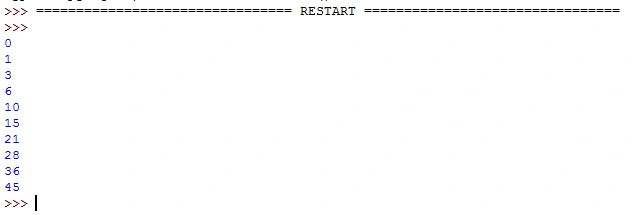
Abhishek JaiswalPosted May 20, 2015, 3:52 AM
Thanks buddy! :)
Gowtham RajamanickamPosted May 20, 2015, 1:14 AM
good one
Vincent Maverick DuranoPosted May 18, 2015, 8:57 AM
Great job. It makes me want to to learn python.
Abhishek JaiswalPosted May 18, 2015, 1:56 AM
Thank you guys! :)
Gopi ChandPosted May 18, 2015, 1:33 AM
Commendable job..
Sibeesh VenuPosted May 18, 2015, 1:30 AM
Good one