

Getting Started
- Create a new Project. Open Visual Studio 2012.
- Go to "File" => "New" => "Project...".
- Select "Web" in installed templates.
- Select "ASP.NET MVC 4 Web Application".
- Enter the Name and choose the location.
- Click "OK".
I would recommend reading this article first to learn about Entity Framework: http://www.c-sharpcorner.com/UploadFile/raj1979/unit-testing-in-mvc-4-using-entity-framework/
Once you configure Entity Framework your window will look like this:
This is my database layout: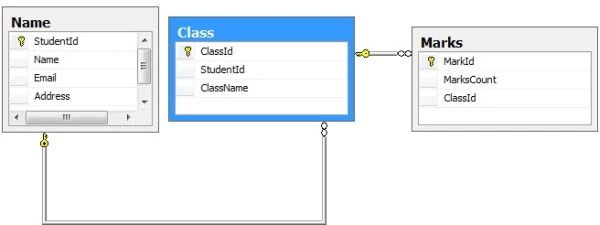
The following is the controller code:
- using MVCDropDownCascadingSample.Models;
- StudentEntities _studentEntities = new StudentEntities();
- public ActionResult Index()
- {
- ViewBag.Names = _studentEntities.Names.ToList();
- ViewBag.Classes = _studentEntities.Classes.ToList();
- ViewBag.Marks = _studentEntities.Marks.ToList();
- return View();
- }
- /// <summary>
- /// Loads all classes based on student id
- /// </summary>
- /// <param name="studentId"></param>
- /// <returns></returns>
- private IList<Class> GetClasses(int studentId)
- {
- return _studentEntities.Classes.Where(m => m.StudentId == studentId).ToList();
- }
- /// <summary>
- /// load all marks based on class id
- /// </summary>
- /// <param name="classId"></param>
- /// <returns></returns>
- private IList<Mark> GetMarks(int classId)
- {
- return _studentEntities.Marks.Where(c => c.MarkId == classId).ToList();
- }
- /// <summary>
- /// Filter classes based on student id
- /// </summary>
- /// <param name="studentid"></param>
- /// <returns></returns>
- [AcceptVerbs(HttpVerbs.Get)]
- public JsonResult LoadClassesByStudentId(string studentid)
- {
- var classesList = this.GetClasses(Convert.ToInt32(studentid));
- var classesData = classesList.Select(m => new SelectListItem()
- {
- Text = m.ClassName,
- Value = m.ClassId.ToString(),
- });
- return Json(classesData, JsonRequestBehavior.AllowGet);
- }
- /// <summary>
- /// filter marks based on class id
- /// </summary>
- /// <param name="classid"></param>
- /// <returns></returns>
- [AcceptVerbs(HttpVerbs.Get)]
- public JsonResult LoadMarksByClassId(string classid)
- {
- var marksList = this.GetMarks(Convert.ToInt32(classid));
- var marksData = marksList.Select(c => new SelectListItem()
- {
- Text = c.MarksCount,
- Value = c.MarkId.ToString(),
- });
- return Json(marksData, JsonRequestBehavior.AllowGet);
- }
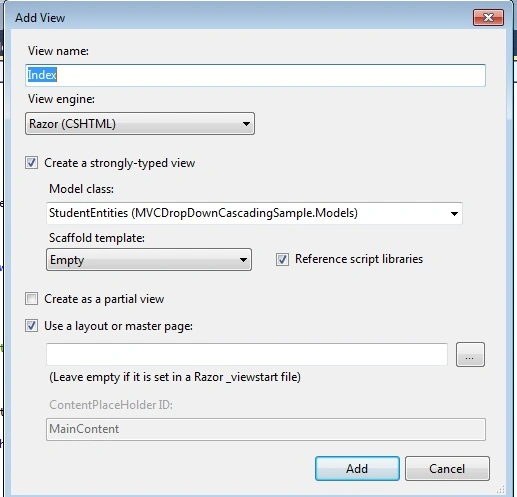
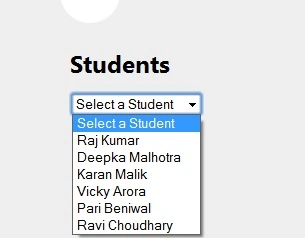
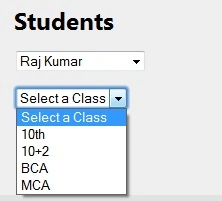
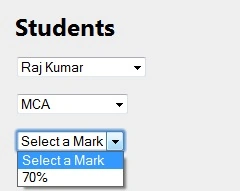
Aman KaushikPosted Nov 6, 2017, 3:18 AM
Var classesData = classesList.Select(m => new SelectListItem(). getting an error in this line. can someone tell me what select is and what it does?
Amit RaiPosted Oct 5, 2017, 4:45 PM
Not working. help for thi 9005080002
Guest UserPosted Sep 9, 2017, 5:16 AM
It worked great! Thanks! Actually I've used your code as a reference and followed steps!
Manav PandyaPosted Oct 2, 2016, 5:55 AM
Nice share ...
Rakesh KumarPosted May 15, 2015, 3:33 AM
jquery not working?????
Sandip PaulPosted Dec 20, 2014, 7:24 AM
i have done this same way and got result also i got a popup when i change the first combobox
Former memberPosted Oct 10, 2014, 8:24 AM
Its not working, finding the solution but didn`t get, pl sir provide solution.
Jose MarinPosted Jun 25, 2014, 1:29 PM
Are missing some files, couse the project doesn?t work
Mansur HaiderPosted Jun 16, 2014, 5:34 AM
it`s not working ..... please give the right solution.
S SPosted Nov 23, 2013, 3:18 AM
Does not work for Edit View. Cascading does not work on Edit view. Plz provide solution.
ZeroPosted Sep 14, 2013, 11:26 AM
GREAT. good work