

Today, I have provided an article showing you how to add and delete items in a ListBox using ASP.NET. In this article, we will use a TextBox control, an Add Button and a Delete Button. When a user enters text into a TextBox and clicks on the Add Button the TextBox text will be shown in the ListBox. After that select text from the ListBox and click on the Delete Button to remove the text from the list. All you have to do is implement and hook it up to your website. First, start Visual Studio .NET and make a new ASP.NET web site using Visual Studio 2010.
Now you have to create a web site.
- Go to Visual Studio 2010
- New-> Select a website application
- Click OK

Now add a new page to the website.
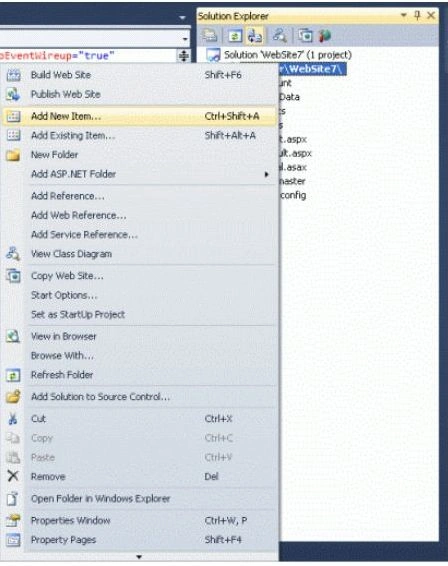
- Go to the Solution Explorer
- Right-click on the Project name
- Select add new item
- Add new web page and give it a name
- Click OK
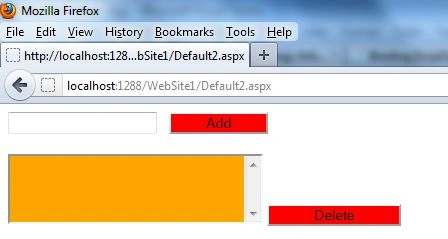
Design the page and place the required controls in it. Now drag and drop one TextBox, an Add Button and a Delete Button control on the form. When a user enters some text into a TextBox and clicks on the add Button, text will be shown in the ListBox. After that, select text from the ListBox and click on the Delete Button to remove the text from the ListBox control. Let's take a look at a practical example.
.aspx Code
<%@ Page Language="C#" AutoEventWireup="true" CodeFile="Default2.aspx.cs" Inherits="Default2" %>
<!DOCTYPE html PUBLIC "-//W3C//DTD XHTML 1.0 Transitional//EN" "http://www.w3.org/TR/xhtml1/DTD/xhtml1-transitional.dtd">
<html xmlns="http://www.w3.org/1999/xhtml">
<head runat="server">
<title></title>
</head>
<body>
<form id="form1" runat="server">
<div>
<asp:TextBox ID="TextBox1" runat="server"></asp:TextBox>
<asp:Button ID="Button1" runat="server" style="background-color:Red"
OnClick="Button1_Click" Text="Add" Width="99px" />
<br />
<br />
<asp:ListBox ID="ListBox1" runat="server" style="background-color:Orange" Width="255px"></asp:ListBox>


Join the conversation! Your thoughts help the community grow.