

Many times there is a need in a project's reporting module to Export Gridview into PDF, So by considering the above requirement I decided to write this article especially focusing on beginners and those who want to learn how Export GridView to PDF Using Asp.net C# with the help itextsharp dll.
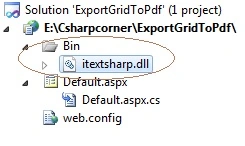
- To Export the Grid view, we need to use the reference of itextsharp.dll.
- Download the itextsharp.dll from the Internet.
The itextsharp.dll is the free dll available to download which provides some methods to Export Grid view into the pdf file, after adding the reference, use the following references of itextsharp.dll as
- using iTextSharp.text;
- using iTextSharp.text.pdf;
- using iTextSharp.text.html.simpleparser;
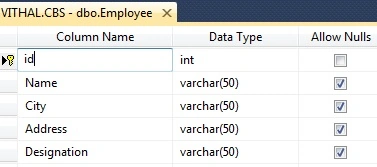
- "Start" - "All Programs" - "Microsoft Visual Studio 2010".
- "File" - "New Project" - "C#" - "Empty Project" (to avoid adding a master page).
- Give the Project name such as ExportGridToPDF or another as you wish and specify the location.
- Then right-click on Solution Explorer - "Add New Item" - Default.aspx page.
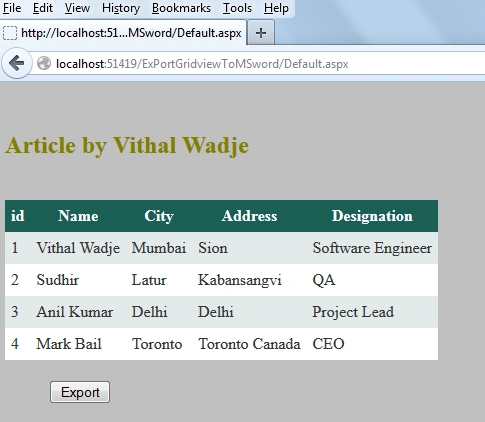
- one Buttons, one label and a grid view.
Now let us create function to bind the records to Grid view from Database, If you are beginner and don’t know in details how to bind Grid view from database then refer my following article.
now, for this article create the following function into the default.aspx.cs page to bind the Grid view
- private void Bindgrid()
- {
- connection();
- query = "select *from Employee";//not recommended this i have wrtten just for example,write stored procedure for security
- com = new SqlCommand(query, con);
- SqlDataReader dr = com.ExecuteReader();
- GridView1.DataSource = dr;
- GridView1.DataBind();
- con.Close();
- }
- protected void Button1_Click(object sender, EventArgs e)
- {
- ExportGridToword();
- }
- public override void VerifyRenderingInServerForm(Control control)
- {
- //required to avoid the runtime error "
- //Control 'GridView1' of type 'GridView' must be placed inside a form tag with runat=server."
- }
- private void ExportGridToPDF()
- {
- Response.ContentType = "application/pdf";
- Response.AddHeader("content-disposition", "attachment;filename=Vithal_Wadje.pdf");
- Response.Cache.SetCacheability(HttpCacheability.NoCache);
- StringWriter sw = new StringWriter();
- HtmlTextWriter hw = new HtmlTextWriter(sw);
- GridView1.RenderControl(hw);
- StringReader sr = new StringReader(sw.ToString());
- Document pdfDoc = new Document(PageSize.A4, 10f, 10f, 10f, 0f);
- HTMLWorker htmlparser = new HTMLWorker(pdfDoc);
- PdfWriter.GetInstance(pdfDoc, Response.OutputStream);
- pdfDoc.Open();
- htmlparser.Parse(sr);
- pdfDoc.Close();
- Response.Write(pdfDoc);
- Response.End();
- GridView1.AllowPaging = true;
- GridView1.DataBind();
- }
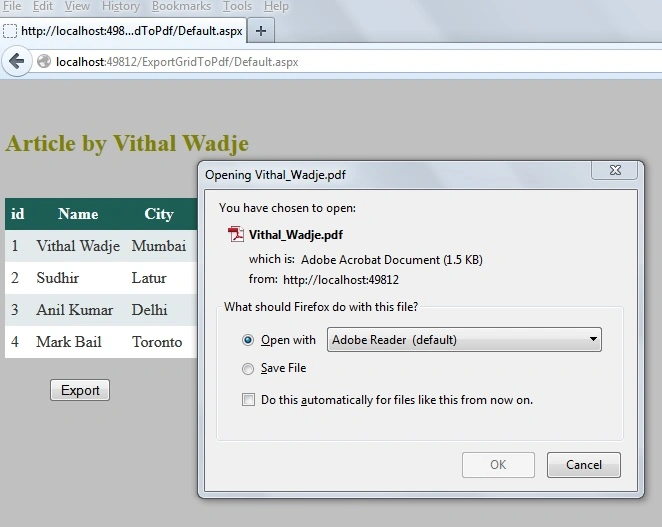
Now double click on Export button and call the above function on "onclick" as
- protected void Button1_Click(object sender, EventArgs e)
- {
- ExportGridToPDF();
- }
- using System;
- using System.Web.UI;
- using System.Configuration;
- using System.Data.SqlClient;
- using System.IO;
- using System.Web;
- using iTextSharp.text;
- using iTextSharp.text.pdf;
- using iTextSharp.text.html.simpleparser;
- public partial class _Default : System.Web.UI.Page
- {
- private SqlConnection con;
- private SqlCommand com;
- private string constr, query;
- private void connection()
- {
- constr = ConfigurationManager.ConnectionStrings["getconn"].ToString();
- con = new SqlConnection(constr);
- con.Open();
- }
- protected void Page_Load(object sender, EventArgs e)
- {
- if (!IsPostBack)
- {
- Bindgrid();
- }
- }
- public override void VerifyRenderingInServerForm(Control control)
- {
- //required to avoid the runtime error "
- //Control 'GridView1' of type 'GridView' must be placed inside a form tag with runat=server."
- }
- private void Bindgrid()
- {
- connection();
- query = "select *from Employee";//not recommended this i have wrtten just for example,write stored procedure for security
- com = new SqlCommand(query, con);
- SqlDataReader dr = com.ExecuteReader();
- GridView1.DataSource = dr;
- GridView1.DataBind();
- con.Close();
- }
- protected void Button1_Click(object sender, EventArgs e)
- {
- ExportGridToPDF();
- }
- private void ExportGridToPDF()
- {
- Response.ContentType = "application/pdf";
- Response.AddHeader("content-disposition", "attachment;filename=Vithal_Wadje.pdf");
- Response.Cache.SetCacheability(HttpCacheability.NoCache);
- StringWriter sw = new StringWriter();
- HtmlTextWriter hw = new HtmlTextWriter(sw);
- GridView1.RenderControl(hw);
- StringReader sr = new StringReader(sw.ToString());
- Document pdfDoc = new Document(PageSize.A4, 10f, 10f, 10f, 0f);
- HTMLWorker htmlparser = new HTMLWorker(pdfDoc);
- PdfWriter.GetInstance(pdfDoc, Response.OutputStream);
- pdfDoc.Open();
- htmlparser.Parse(sr);
- pdfDoc.Close();
- Response.Write(pdfDoc);
- Response.End();
- GridView1.AllowPaging = true;
- GridView1.DataBind();
- }
- }
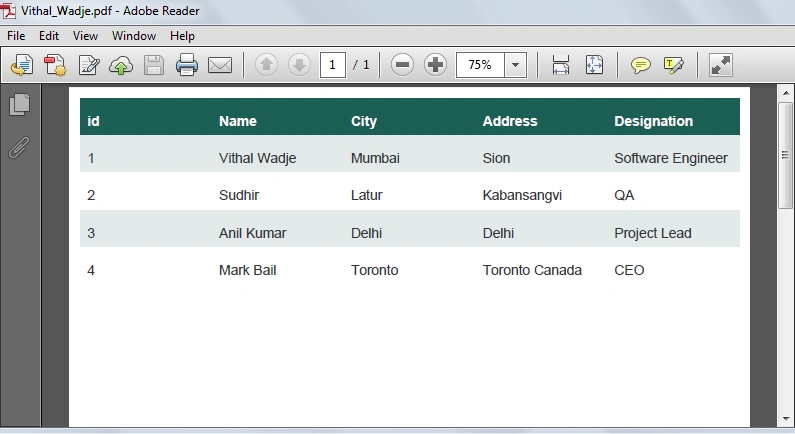
- Download the zip file from the attachment for the full source code of an application.
- change connection string from web.config file as per your server location.
Summary
Anil AjmeraPosted Sep 8, 2023, 4:50 AM
In PDF report, the background colour and the text colours are not being inherited
Don AugastinPosted Jul 23, 2020, 10:55 AM
///VerifyRenderingInServerForm(Control control)/// working for export 1 page of grid data. But its not working to export more than 10 page. I need to export more than 10 page (10 datas per page). Please help...
Subin ThomasPosted Sep 26, 2019, 1:42 AM
Working fine but can you tell me how to add some text in this , is it possible?
Pramod PeyyalaPosted Aug 10, 2018, 1:15 AM
How to download pdf insted of open?
Rahul KondhalkarPosted Jul 31, 2018, 3:51 AM
Getting Unable to cast object of type 'iTextSharp.text.html.simpleparser.CellWrapper' to type 'iTextSharp.text.Paragraph'. error at click on download button...
Francisco VargasPosted Mar 1, 2018, 7:41 PM
Me da error : No se puede convertir un objeto de tipo 'iTextSharp.text.html.simpleparser.CellWrapper' al tipo 'iTextSharp.text.Paragraph'.
ShivanyaPosted Sep 18, 2017, 2:28 AM
Thank You Very Much Sir, It is very useful...
Darwin SutharPosted Aug 9, 2017, 12:28 PM
By this code the data exported to pdf and downloaded, now i want to pdf should open in another tab in the same browser.. please help me....
Darwin SutharPosted Aug 9, 2017, 12:25 PM
Working good. Thanks a lot
chaitanya pathakPosted Dec 21, 2016, 3:22 AM
Excellent Article for beginer
Mayur KoshtiPosted Nov 17, 2016, 12:21 AM
Hi am getting this error even my gridview is in form tag and i already given runat=server still it is showing error would you like to help me out for this An exception of type 'System.Web.HttpException' occurred in System.Web.dll but was not handled in user codeAdditional information: Control 'ContentPlaceHolder1_GridView1' of type 'GridView' must be placed inside a form tag with runat=server.
Vithal WadjePosted Mar 22, 2016, 10:47 AM
Use iTextSharp properties to apply css
shanigarapu rakeshPosted Mar 22, 2016, 2:12 AM
the above code is not working in my project. it is generating only data. styles not apply..
Shridhar SharmaPosted Mar 21, 2016, 6:47 AM
nice share sir. :)
Vithal WadjePosted Feb 28, 2016, 11:38 PM
Download latest iTextSharp dll
Mohammad AmanPosted Feb 27, 2016, 7:24 AM
On local it is working . when i am uploading on server it is not generating pdf,, in my code HTMLWorker is giving warning "iTextSharp.text.html.simpleparser.HTMLWorker is obsolete"
Vithal WadjePosted Sep 3, 2015, 1:19 PM
Download sample code
Santiago BevilacquaPosted Sep 3, 2015, 2:07 AM
hello, In the exported pdf there is no column header. How can I fix it?
Promita DuttaPosted Aug 21, 2015, 6:23 AM
how do I add author name in pdf document and another problem is when i click page index and then click export button its give error... I want pdf page by page... plz help me out,,
Venkat SPosted Jun 19, 2015, 5:14 AM
if it is possible export values to pdf,without using iTextSharp....
Khargesh RajputPosted May 27, 2015, 12:38 AM
sir i am getting error The URI prefix is not recognized on line htmlparser.Parse(sr);
Nayan PatelPosted Apr 22, 2015, 12:51 AM
no data in pdf
Vithal WadjePosted Nov 19, 2014, 7:17 AM
Add the reference of Itextsharp in your project
santhosh kumarPosted Nov 19, 2014, 6:45 AM
Hai, frinds i need the same for windows application in c#.net from the datagridview . when is use this i get errors, can anyone help me for finding the exact code for exporting the datagridview to a pdf file.
Vithal WadjePosted Nov 10, 2014, 3:47 AM
sure i will check
Poonam MalvePosted Nov 10, 2014, 2:40 AM
actually the i tried same procedure u explained... its working fine for it... but when i applied in my project its not working overthere... please refer the snapshot -> http://i.imgur.com/DCW2ios.png - for sample project(working fine) and http://i.imgur.com/n1ymZCn.png - for my project
Vithal WadjePosted Nov 10, 2014, 2:32 AM
its may be a popup blocker in your browser,send me screen shot if you have possible
Poonam MalvePosted Nov 10, 2014, 1:27 AM
tried in both firefox and crome
Vithal WadjePosted Nov 9, 2014, 7:51 AM
which browser you have using
Poonam MalvePosted Nov 9, 2014, 7:07 AM
After clicking on Export Button , popup didn't appeared.... please suggest where m going wrong?
Former memberPosted Jun 13, 2014, 3:54 AM
This is really nice article http://www.webcodeexpert.com/2013/06/bind-and-export-gridview-data-to-pdf.html
Vithal WadjePosted Jun 8, 2014, 10:09 AM
yes, i think so,but try it may be supported
super developerPosted Jun 8, 2014, 8:08 AM
Not support arabic text
Vithal WadjePosted Apr 14, 2014, 2:04 PM
yes,their is lots of free dll you can google it,also we can write C# custom code but its very time consuming
Prasanna Kumar MuduliPosted Apr 10, 2014, 10:02 AM
Is there any way available,that export of gridview to PDF without using iTextSharp dll?If yes,please explain..
Sompal AryaPosted Mar 14, 2014, 2:47 AM
I have given gridview column width & color but when i did export to pdf there was no color & width of columns