Developers often need to transform table data, convering rows to column or column to rows. We can do that using the SQL Pivoting feature. I am not here to tell you how to use pivot, you can learn about that from the following link:
Pivot Examples in SQL Server
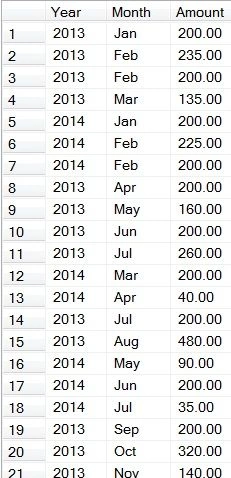
Assume you have data in your table as below.
And you want the data to be in the following format, as a summarized report:

The SQL Script for creating the table and inserting the data above will be displayed as in Figure-1.
USE [tempdb]
Go
CREATE TABLE [dbo].[tblTransaction](
[TranDate] [date] NULL,
[TranAmount] [decimal](18, 2) NULL
) ON [PRIMARY]
GO
INSERT [dbo].[tblTransaction] ([TranDate], [TranAmount])
VALUES ('2013-01-01', CAST(200.00 AS Decimal(18, 2)))
, ('2013-02-01', CAST(235.00 AS Decimal(18, 2)))
, ('2013-02-01', CAST(200.00 AS Decimal(18, 2)))
, ('2013-3-01', CAST(135.00 AS Decimal(18, 2)))
, ('2014-01-01', CAST(200.00 AS Decimal(18, 2)))
, ('2014-02-01', CAST(225.00 AS Decimal(18, 2)))
, ('2014-02-01', CAST(200.00 AS Decimal(18, 2)))
, ('2013-4-01', CAST(200.00 AS Decimal(18, 2)))
, ('2013-5-01', CAST(160.00 AS Decimal(18, 2)))
, ('2013-6-01', CAST(200.00 AS Decimal(18, 2)))
, ('2013-7-01', CAST(260.00 AS Decimal(18, 2)))
, ('2014-3-01', CAST(200.00 AS Decimal(18, 2)))
, ('2014-4-01', CAST(40.00 AS Decimal(18, 2)))
, ('2013-7-01', CAST(200.00 AS Decimal(18, 2)))
, ('2013-8-01', CAST(480.00 AS Decimal(18, 2)))
, ('2014-5-01', CAST(90.00 AS Decimal(18, 2)))
, ('2014-6-01', CAST(200.00 AS Decimal(18, 2)))
, ('2014-7-01', CAST(35.00 AS Decimal(18, 2)))
, ('2013-9-01', CAST(200.00 AS Decimal(18, 2)))
, ('2013-10-01', CAST(320.00 AS Decimal(18, 2)))
, ('2013-11-01', CAST(140.00 AS Decimal(18, 2)))
, ('2013-11-01', CAST(220.00 AS Decimal(18, 2)))
, ('2014-7-01', CAST(200.00 AS Decimal(18, 2)))
, ('2014-8-01', CAST(65.00 AS Decimal(18, 2)))
, ('2014-9-01', CAST(95.00 AS Decimal(18, 2)))
, ('2014-10-01', CAST(200.00 AS Decimal(18, 2)))
, ('2013-11-01', CAST(350.00 AS Decimal(18, 2)))
, ('2013-12-01', CAST(200.00 AS Decimal(18, 2)))
, ('2013-12-01', CAST(550.00 AS Decimal(18, 2)))
, ('2014-11-01', CAST(385.00 AS Decimal(18, 2)))
, ('2014-11-01', CAST(200.00 AS Decimal(18, 2)))
, ('2014-11-01', CAST(45.00 AS Decimal(18, 2)))
, ('2014-12-01', CAST(75.00 AS Decimal(18, 2)))
, ('2014-12-01', CAST(265.00 AS Decimal(18, 2)))
Go
SELECT year(TranDate) as Year, left(datename(month,TranDate),3) as Month, TranAmount as Amount FROM tblTransaction
The data should be displayed as in the following format:

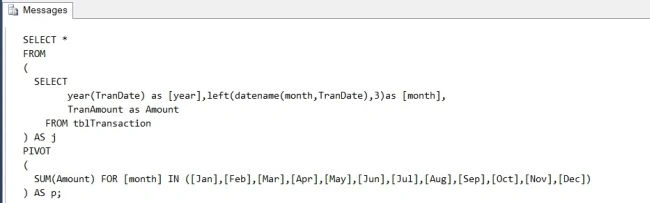
You need to write a SQL Script using Pivot but you can generate a SQL Script by executing the following Script for the "tblTransaction" table created above.
USE [tempdb]
GO
DECLARE @columns NVARCHAR(MAX), @sql NVARCHAR(MAX);
SET @columns = N'';
SELECT @columns += N', p.' + QUOTENAME(month)
FROM (SELECT distinct month(TranDate) as m, left(datename(month,TranDate),3)as [month] FROM dbo.tblTransaction AS p
) AS x;
SET @sql = N' SELECT * FROM
(
SELECT
year(TranDate) as [year],left(datename(month,TranDate),3)as [month],
TranAmount as Amount
FROM tblTransaction
) AS j
PIVOT
(
SUM(Amount) FOR [month] IN ('
+ STUFF(REPLACE(@columns, ', p.[', ',['), 1, 1, '')
+ ')
) AS p;';
Print @sql;
When the preceding script is executed you should get the Pivot SQL Script in your SQL Server Management Studio Editor as shown below. Copy and paste then execute the generated script.
Now enjoy what you have the very easy way!!!! :)
A point of interest: you can modify the script depending on your database records.
Finally
USE [tempdb]
GO
Drop Table tblTransaction

sunny kumarPosted Mar 5, 2019, 4:18 AM
How can i use this query in mvc
AnkurPosted Dec 10, 2013, 4:16 AM
nice one, informative
Preet SinghPosted Dec 9, 2013, 11:26 PM
Thanks :)
Gaurav SaxenaPosted Dec 9, 2013, 5:32 AM
Very nice article. Really much helpful to me.
Dinesh BeniwalPosted Dec 9, 2013, 1:55 AM
Great, Welcome to the C# Corner Preet.