This is in continuation to the articles of the series “
Learning Ansible”. In the previous article
Getting started with Ansible – Part 9 we have seen how we can set up the local NTP configuration file and how we can deploy it to the servers to get the benefit of setting up the configuration at one place and not doing this again and again in case we have 100s of servers.
But If we look closely at the playbook that we wrote we can see that if we again run the same playbook then the NTP service will again get restarted, and this should not happen as we have already deployed the NTP config file and if we have not done any change in that config then the NTP service should not get restarted.
So, we should devise a way such that NTP service will only get restarted if we have made some change in NTP configuration files. To resolve this, we can make use of handlers in Ansible. Thus, in this article we will be covering Handlers in Ansible.
Handlers in Ansible
Handlers are just like regular tasks in an Ansible playbook (see Tasks) but are only run if the Task contains a “notify” directive and also indicates that it changed something. For example, if a config file is changed then the task referencing the config file templating operation may notify a service restart handler.
Handlers are the same as tasks, but they get executed only when they are notified but tasks get executed every time we run the playbook. Handlers should be in the same line as that of tasks inside the playbook.
- ---
-
- - name: Deploying NTP Service
- hosts: all
- become: yes
- tasks:
- - name: Install packages on RedHat OS
- yum:
- name: "{{item}}"
- state: present
- loop:
- - ntp
- - unzip
- - git
- - wget
- - zip
- when: ansible_os_family == "RedHat"
-
- - name: Install packages on Debian OS
- apt:
- name: "{{item}}"
- state: present
- loop:
- - ntp
- - unzip
- - git
- - wget
- - zip
- when: ansible_os_family == "Debian"
-
- - name: Start and Enable NTP service in RedHat OS
- service:
- name: ntpd
- state: started
- enabled: yes
- when: ansible_os_family == "RedHat"
-
- - name: Start and Enable NTP service in Debian OS
- service:
- name: ntp
- state: started
- enabled: yes
- when: ansible_os_family == "Debian"
-
- - name: Deploy the NTP configuration file for Debian OS
- copy:
- src: files/ntp_debian.conf
- dest: /etc/ntp.conf
- backup: yes
- when: ansible_os_family == "Debian"
- notify:
- - Restart NTP service in Debian OS
-
- - name: Deploy the NTP configuration file for RedHat OS
- copy:
- src: files/ntp_redhat.conf
- dest: /etc/ntp.conf
- backup: yes
- when: ansible_os_family == "RedHat"
- notify:
- - Restart NTP service in RedHat OS
-
- handlers:
- - name: Restart NTP service in RedHat OS
- service:
- name: ntpd
- state: restarted
- when: ansible_os_family == "RedHat"
-
- - name: Restart NTP service in Debian OS
- service:
- name: ntp
- state: restarted
- when: ansible_os_family == "Debian"
We can syntax check our playbook with the below command.
ansible-playbook ntp_playbook.yml --syntax-check
and then can run the playbook with the below command.
ansible-playbook ntp_playbook.yml
OUTPUT
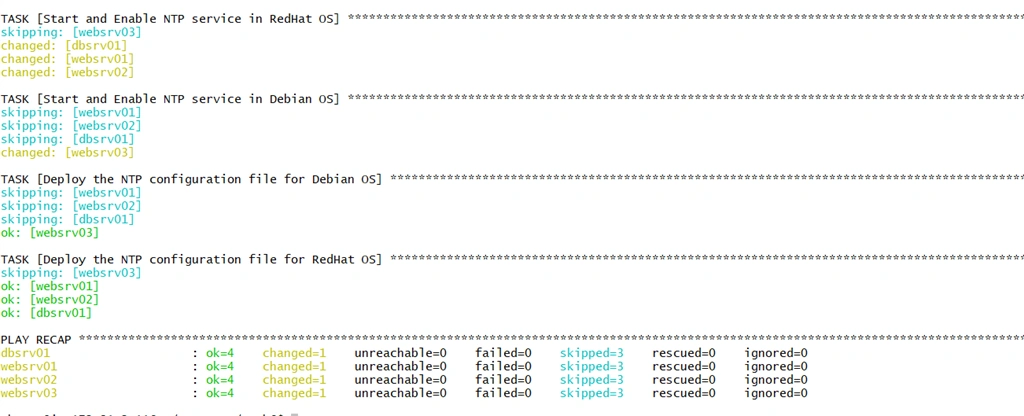
Here we can see that as we have not changed anything inside the RedHat and Debian NTP configuration files, our handlers didn’t execute.
Now let’s try to add some dummy values inside the RedHat and Debian NTP configuration files and see if our handlers get executed or not.
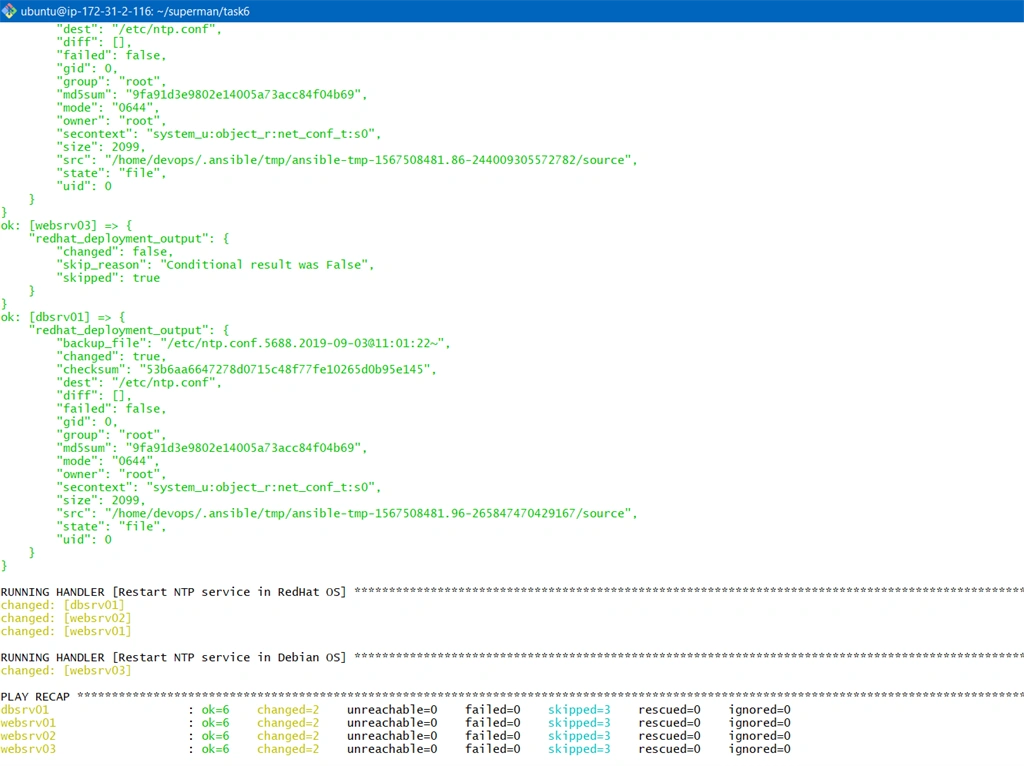
Now ansible knows that the source NTP configuration files and the destination NTP configuration files are different so will execute the tasks and will notify the handlers.
I am using the debug module to print the output for one of the tasks that deploy NTP configuration files for suppose RedHat OS based servers.
I have registered redhat_deployment_output variables that will store the JSON output of our task “Deploy the NTP configuration file for RedHat OS” and will get it printed using the debug module.
Below is the updated playbook.
- ---
-
- - name: Deploying NTP Service
- hosts: all
- become: yes
- tasks:
- - name: Install packages on RedHat OS
- yum:
- name: "{{item}}"
- state: present
- loop:
- - ntp
- - unzip
- - git
- - wget
- - zip
- when: ansible_os_family == "RedHat"
-
- - name: Install packages on Debian OS
- apt:
- name: "{{item}}"
- state: present
- loop:
- - ntp
- - unzip
- - git
- - wget
- - zip
- when: ansible_os_family == "Debian"
-
- - name: Start and Enable NTP service in RedHat OS
- service:
- name: ntpd
- state: started
- enabled: yes
- when: ansible_os_family == "RedHat"
-
- - name: Start and Enable NTP service in Debian OS
- service:
- name: ntp
- state: started
- enabled: yes
- when: ansible_os_family == "Debian"
-
- - name: Deploy the NTP configuration file for Debian OS
- copy:
- src: files/ntp_debian.conf
- dest: /etc/ntp.conf
- backup: yes
- when: ansible_os_family == "Debian"
- notify:
- - Restart NTP service in Debian OS
-
-
- - name: Deploy the NTP configuration file for RedHat OS
- copy:
- src: files/ntp_redhat.conf
- dest: /etc/ntp.conf
- backup: yes
- when: ansible_os_family == "RedHat"
- notify:
- - Restart NTP service in RedHat OS
- register:
- redhat_deployment_output
- - debug:
- var: redhat_deployment_output
-
- handlers:
- - name: Restart NTP service in RedHat OS
- service:
- name: ntpd
- state: restarted
- when: ansible_os_family == "RedHat"
-
- - name: Restart NTP service in Debian OS
- service:
- name: ntp
- state: restarted
- when: ansible_os_family == "Debian"
OUTPUT
We can see that the changed value is true for dbsrv01, similarly it is true for webserver 01 and 02 except web server 03 as web server 03 is a Debian based server.
We can also see from the output that our handlers also got triggered and executed successfully.
Handlers are lists of tasks, not really any different from regular tasks, that are referenced by a globally unique name, and are notified by notifiers. If nothing notifies a handler, it will not run. Regardless of how many tasks notify a handler, it will run only once, after all of the tasks complete in a particular play.
IMPORTANT NOTE
Handlers gets executed in the end of the playbook, so if you want to execute some task immediately as soon as the configuration gets changes then handlers won’t help and that can be handled via Conditions.
Summary
In this article we have learned about handlers and their use case and how they can be implemented in a real-life project scenario.
I hope you find this article helpful. Stay tuned for more … Cheers!!
You can also check out some of my previous articles of the series “Learning Ansible” here,



Join the conversation! Your thoughts help the community grow.