Introduction
This article starts with the basics of the SQL keyword. These keywords are for data filtration in a SQL database table.
From Command
Select * From TableName
Select Column From TableName
Example
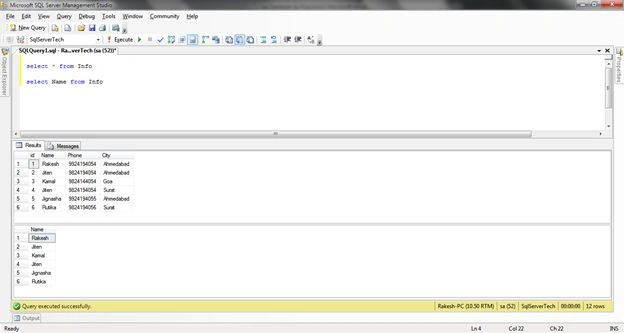
select * from Info
select Name from Info
Where Command
Select * from TableName where Condition
Select column1, column2 from TableName where Condition
Example
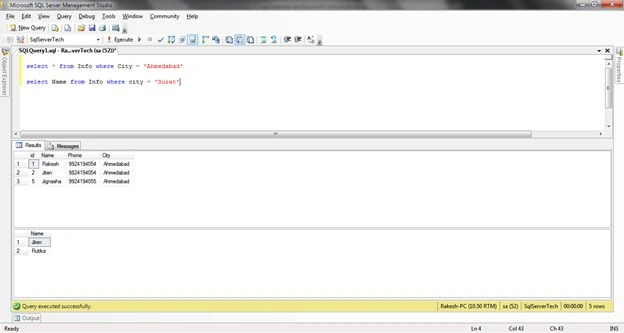
select * from Info where City = 'Ahmedabad'
select Name from Info where city = 'Surat'
Top Command
This command selects the top rows in a database table.
Select Top value from TableName
Example
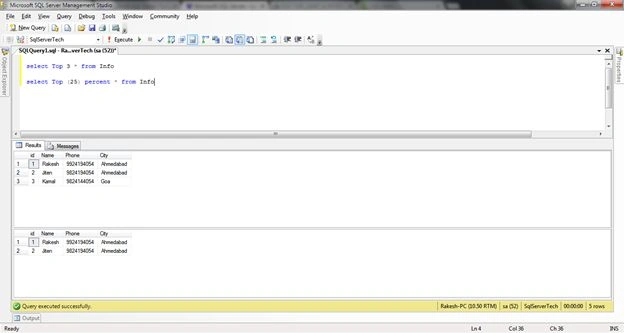
select Top 3 * from Info
select Top (25) percent * from Info
As Command
Use for Alias Keyword.
Select ExitingColumnName AS NewAliasColumnName from TableName
Example
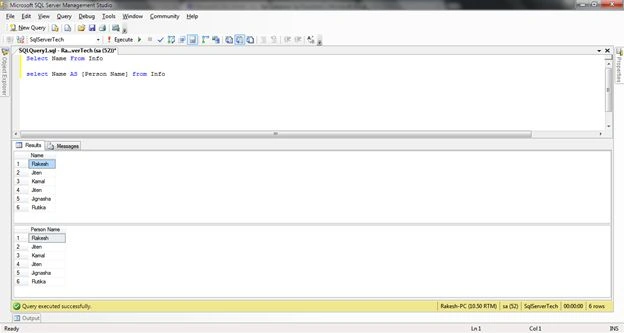
Select Name From Info
select Name AS [Person Name] from Info
AND Command
select * from TableName where condition1 AND Condition2
select ColumnName from TableName where condition1 AND Condition2
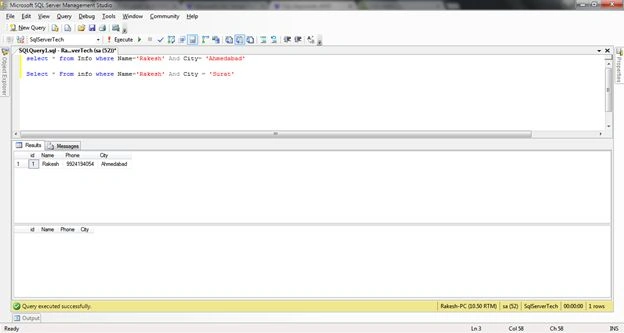
Example
select * from Info where Name='Rakesh' And City= 'Ahmedabad'
Select * From info where Name='Rakesh' And City = 'Surat'
OR Command
select * from TableName where condition1 OR Condition2
select ColumnName from TableName where condition1 OR Condition2
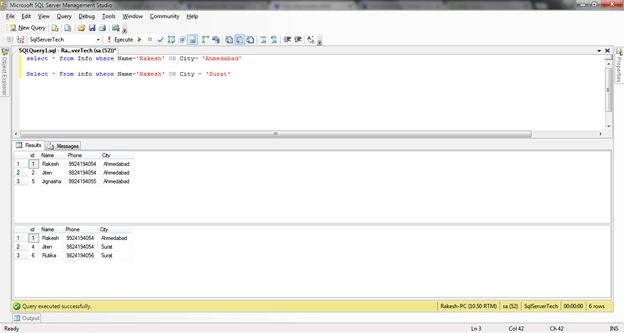
Example
select * from Info where Name='Rakesh' OR City= 'Ahmedabad'
Select * From info where Name='Rakesh' OR City = 'Surat'
Between Command
Select * from TableName where columnCondition Between StartValue AND EndValue
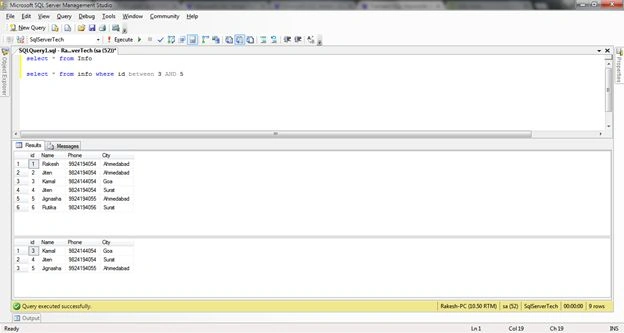
Example
select * from Info
select * from info where id Between 3 AND 5
IN Command
select * from TableName where condition IN (‘DATAValue’)
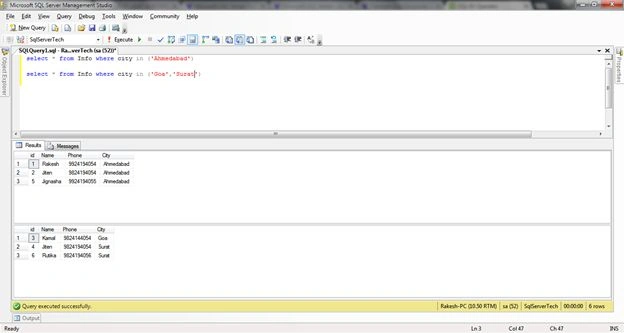
Example
select * from Info where city in ('Ahmedabad')
select * from Info where city in ('Goa','Surat')
LIKE Command
select * from TableName From ColumnName LIKE ‘%VALUE%’
Example
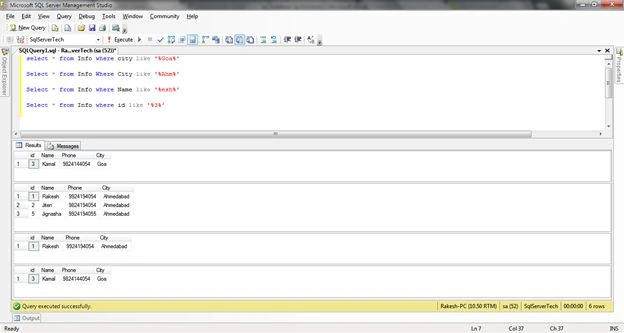
select * from Info where city like '%Goa%'
Select * from Info Where City like '%Ahm%'
Select * from Info where Name like '%esh%'
Select * from Info where id like '%3%'
Distinct Command
Don't display the same multiple records.
Select DISTINCT ColumnName From TableName
Example
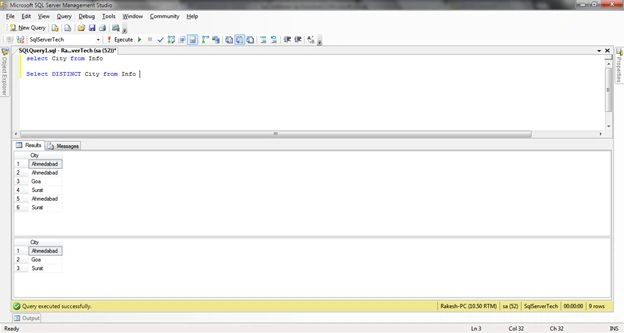
select City from Info
Select DISTINCT City from Info
Order By Command
Sorts data in ascending or descending order.
Select * from TableName Order By ColumnName ASC | DESC
Select columnName from TableName Order By ColumnName ASC | DESC
Example
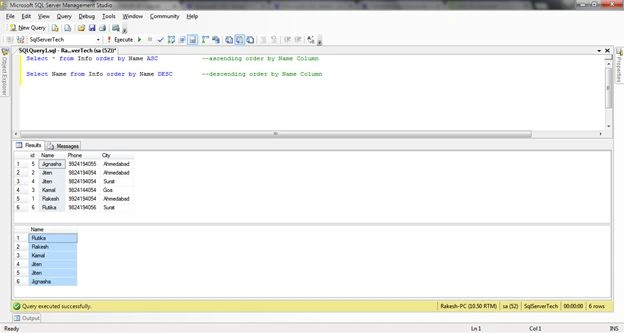
Select * from Info order by Name ASC --ascending order by Name Column
Select Name from Info order by Name DESC --descending order by Name Column
Group By Command
Selects data in a group.
Select conditionwithcolumn from TableName Group by ColumnName
Example
select city, count(Name) As Number_of_Person from Info Group by City
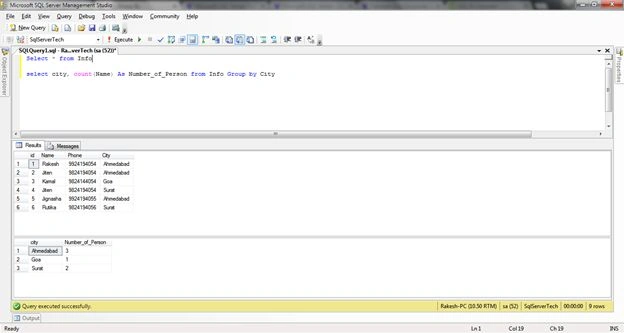
Counts the total number of people in each city.
SQL Join
A join is the most important concept of SQL databases. In this, any two or more tables are joined with the same data column field. Many types of joins are available in SQL Server.
Find a detailed article about joins in SQL Server here: Joins in SQL Server.
Basic Command
Select column1, column2
From Table1
[Type of Join] Table2
ON condition
Cross Join
All data records are selected from the selected database table.
Command
Select column from Table1 CROSS JOIN Table2
Example
select EmployeeData.EmployeeID,EmployeeData.EmployeeName,Department.Department
from EmployeeData
Cross Join Department
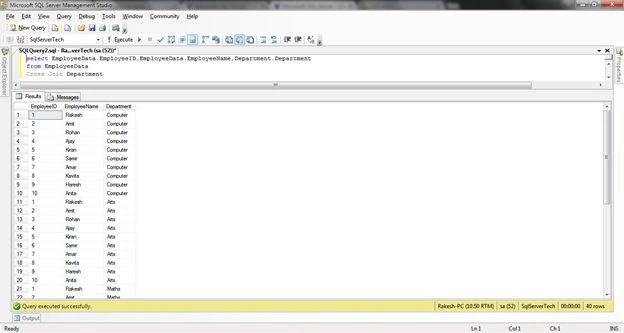
If 5 data records are in Table1 and 2 in Table2, then in a cross join, the output is from both tables and is multiple records.
Example
[5 record * 2 record = Total 10 records display]
Inner Join
Command
Select Table1.column,
Table2.column,
From Table1
Inner join Table2 ON Table1.ColumnID = Table2.ColumnID
Example
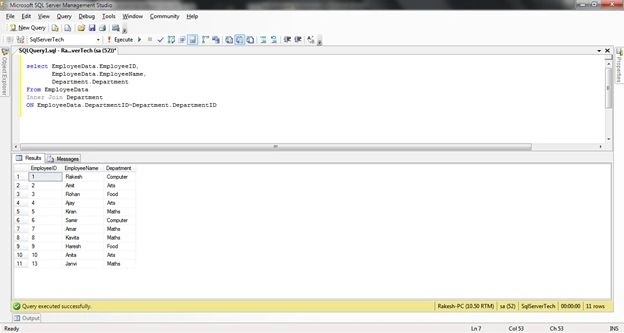
select EmployeeData.EmployeeID,
EmployeeData.EmployeeName,
Department.Department
From EmployeeData
Inner Join Department
ON EmployeeData.DepartmentID=Department.DepartmentID
Outer Join
Two types of outer joins in SQL database.
Left Outer Join
Command
Select Table1.column,
Table2.column,
From Table1
Left outer join Table2 ON Table1.ColumnID = Table2.ColumnID
Example
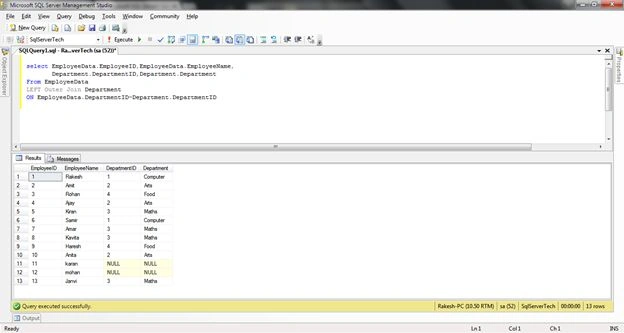
select EmployeeData.EmployeeID,EmployeeData.EmployeeName,
Department.DepartmentID,Department.Department
From EmployeeData
LEFT Outer Join Department
ON EmployeeData.DepartmentID=Department.DepartmentID
Right Outer Join
Command Example
Select Table1.column,
Table2.column,
From Table1
Right outer join Table2 ON Table1.ColumnID = Table2.ColumnID
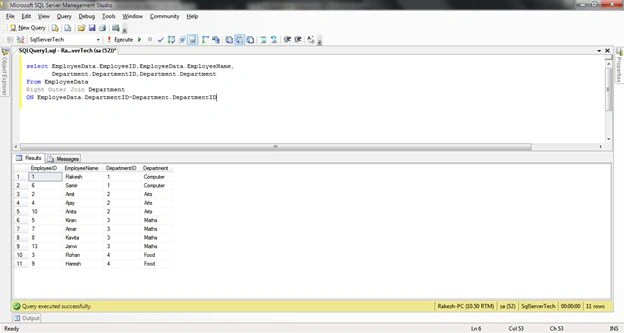
select EmployeeData.EmployeeID,EmployeeData.EmployeeName,
Department.DepartmentID,Department.Department
From EmployeeData
Right Outer Join Department
ON EmployeeData.DepartmentID=Department.DepartmentID
Union Command
Select column1, column2
from Table1
TypeofJoin Teble2
ON Table1.ColumnID = Table2.ColumnID
UNION
Select column1, column2
from Table1
TypeofJoin Teble2
ON Table1.ColumnID = Table2.ColumnID
Example
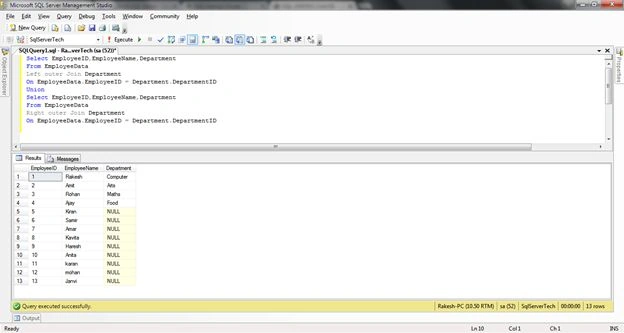
Select EmployeeID,EmployeeName,Department
From EmployeeData
Left outer Join Department
On EmployeeData.EmployeeID = Department.DepartmentID
Union
Select EmployeeID,EmployeeName,Department
From EmployeeData
Right outer Join Department
On EmployeeData.EmployeeID = Department.DepartmentID
Union ALL Command
Select column1, column2
from Table1
TypeofJoin Teble2
ON Table1.ColumnID = Table2.ColumnID
UNION ALL
Select column1, column2
from Table1
TypeofJoin Teble2
ON Table1.ColumnID = Table2.ColumnID
Example
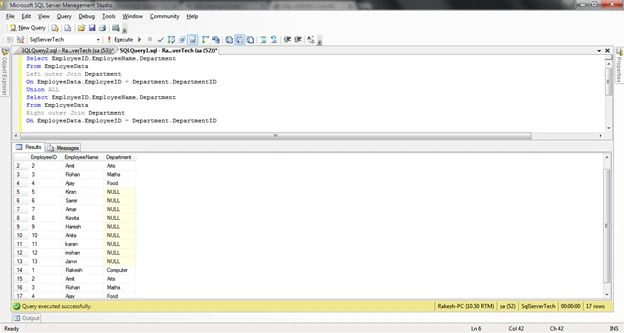
Select EmployeeID,EmployeeName,Department
From EmployeeData
Left outer Join Department
On EmployeeData.EmployeeID = Department.DepartmentID
Union ALL
Select EmployeeID,EmployeeName,Department
From EmployeeData
Right outer Join Department
On EmployeeData.EmployeeID = Department.DepartmentID
Summary
I hope you understand SQL database condition keywords and joins.
Reference


Pankaj Kumar ChoudharyPosted Jun 1, 2015, 12:34 PM
nice article sir........
RakeshPosted Jun 1, 2015, 12:15 PM
A
Karthik Muthu KaruppanPosted May 4, 2015, 2:20 PM
nice
Tausif BandarkarPosted May 3, 2015, 5:22 AM
Thanks Mr.Rakesh chavda for explained in easy way...I appreciate
Gopi ChandPosted May 2, 2015, 3:02 PM
Better presentation of article.. :)
RakeshPosted May 1, 2015, 3:58 AM
Thank you
NitinPosted May 1, 2015, 3:29 AM
nice
RakeshPosted May 1, 2015, 12:24 AM
Thank you Rakesh Kumar
RakeshPosted Apr 30, 2015, 4:07 PM
Nicely explained...Easy to understand for beginners..Keep it up
RakeshPosted Apr 30, 2015, 3:19 PM
Thank you Sir
Santhakumar MunuswamyPosted Apr 30, 2015, 3:03 PM
Thanks for nice article
Santhakumar MunuswamyPosted Apr 30, 2015, 3:03 PM
Welcome
Santhakumar MunuswamyPosted Apr 30, 2015, 3:03 PM
Good Start