

Introduction
NLog is a flexible and free logging platform for various .NET platforms, including .NET standard. NLog makes it easy to write to several targets. (database, file, console) and change the logging configuration on the fly.
You can refer to this URL to get more details about NLog.
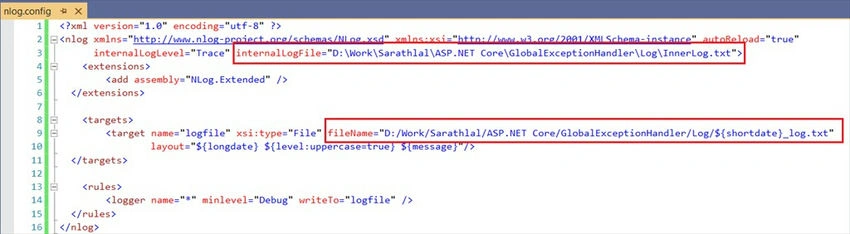
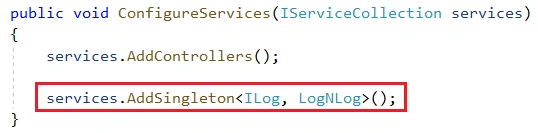
We will write a middleware in the ASP.NET Core application to catch all the exceptions globally and use NLog to write errors into a text file. We can see all the actions step by step.
Create an ASP.NET Core Web API application
We can open Visual Studio and choose ASP.NET Core and API templates to create a Web API project.
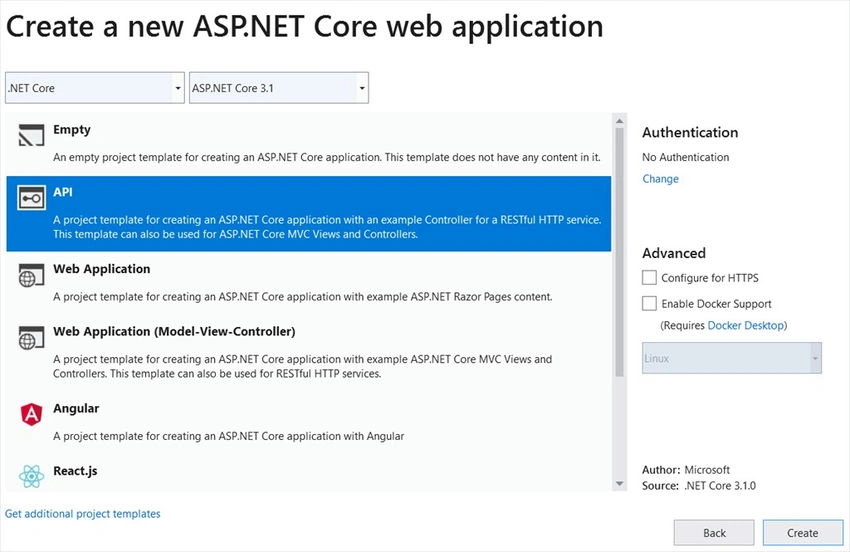
This template will create a Web API project in .NET Core 3.1. I am using the latest .NET SDK 3.1.
We can add the “NLog.Web.AspNetCore” library to the project using the NuGet package manager.
Create an interface “ILog” inside a new folder “Logging”. We will add all other logging-related files inside this folder.
ILog.cs
namespace GlobalExceptionHandler.Logging
{
    public interface ILog
    {
        void Information(string message);
        void Warning(string message);
        void Debug(string message);
        void Error(string message);
    }
}
Though we will handle only exceptions in this application, we have provided options for all other logging like Info, Warning, and Debug in the above interface.
We can create a “LogNLog” class and implement the ILog interface.
LogNLog.cs
using NLog;

namespace GlobalExceptionHandler.Logging
{
    public class LogNLog : ILog
    {
        private static readonly ILogger logger = LogManager.GetCurrentClassLogger();

        public LogNLog()
        {
        }

        public void Information(string message)
        {
            logger.Info(message);
        }

        public void Warning(string message)
        {
            logger.Warn(message);
        }

        public void Debug(string message)
        {
            logger.Debug(message);
        }

        public void Error(string message)
        {
            logger.Error(message);
        }
    }
}
Create an “ErrorDetails” class to handle return messages from HTTP response after an exception occurs.
ErrorDetails.cs
using System.Text.Json;

namespace GlobalExceptionHandler.Logging
{
    public class ErrorDetails
    {
        public int StatusCode { get; set; }
        public string Message { get; set; }

        public override string ToString()
        {
            return JsonSerializer.Serialize(this);
        }
    }
}
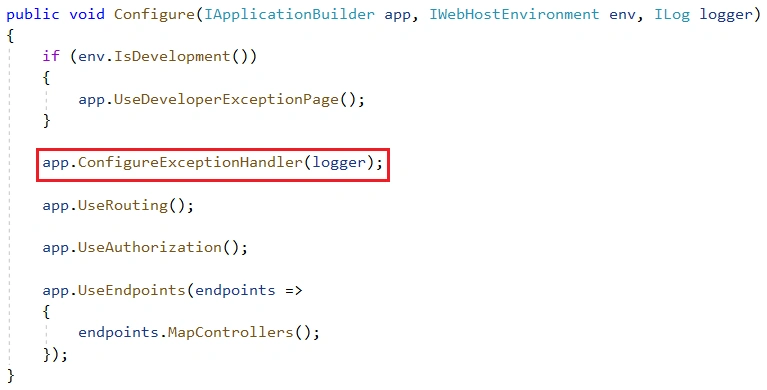
We can create the exception middleware class “ExceptionMiddlewareExtension” and “ConfigureExceptionHandler” methods inside it. This is a static method.
ExceptionMiddlewareExtension.cs
using Microsoft.AspNetCore.Builder;
using Microsoft.AspNetCore.Diagnostics;
using Microsoft.AspNetCore.Http;
using System.Net;

namespace GlobalExceptionHandler.Logging
{
    public static class ExceptionMiddlewareExtension
    {
        public static void ConfigureExceptionHandler(this IApplicationBuilder app, ILog logger)
        {
            app.UseExceptionHandler(appError =>
            {
                appError.Run(async context =>
                {
                    context.Response.StatusCode = (int)HttpStatusCode.InternalServerError;
                    context.Response.ContentType = "application/json";

                    var contextFeature = context.Features.Get<IExceptionHandlerFeature>();
                    if (contextFeature != null)
                    {
                        logger.Error($"Something went wrong: {contextFeature.Error}");

                        await context.Response.WriteAsync(new ErrorDetails()
                        {
                            StatusCode = context.Response.StatusCode,
                            Message = "Internal Server Error. Error generated by NLog!"
                        }.ToString());
                    }
                });
            });
        }
    }
}

Thomas RajPosted Sep 2, 2021, 9:16 AM
Is this Applicable for Real Time Applications too? How much can these Logs store?
Amit DhivarPosted Jan 20, 2021, 5:54 AM
Thank you Sarathlal Saseendran! This was very helpful.
Bheesham Kumar SharmaPosted Feb 5, 2020, 1:17 PM
How we can log error in database?
Sundaram SubramanianPosted Dec 29, 2019, 10:19 PM
More useful. As usual, you are writing articles based on market demands. Keep doing the same.
Sourav Kumar DasPosted Dec 27, 2019, 4:29 AM
Nice and useful article Sir. Thanks for sharing.
Jaimin ShethiyaPosted Dec 27, 2019, 2:56 AM
Nice article :)
Amit MohantyPosted Dec 26, 2019, 10:18 PM
Nice article
Ankur MistryPosted Dec 26, 2019, 9:59 PM
Good job helpful stuff Sarathlal Saseendran
Chittaranjan SwainPosted Dec 26, 2019, 7:39 PM
Nice and very useful article.