

Introduction
In this article, I will show how to host a static website on the internet and make it live using CloudFlare Pages without cost.
Prerequisites
Log in to the Cloudflare Pages and a static website.
Step 1. Navigate to https://pages.cloudflare.com/ link and sign up if you are a new user. You need to verify your email address so that you can successfully log in to the site.
Step 2. After a successful login, you can able to see the Dashboard page. On the right side of the menu, you can able to see the Workers & Pages and then choose the Pages.

Step 3. I have prepared a simple website, and I have put it in a folder. If you have your website on Git, you can connect and directly deploy it, but I have it locally, so I'm choosing upload assets to upload the site.

On the next page, enter the Project Name, then press Create project and upload the assets. Once the files are uploaded successfully, you can press Deploy to Deploy the site.
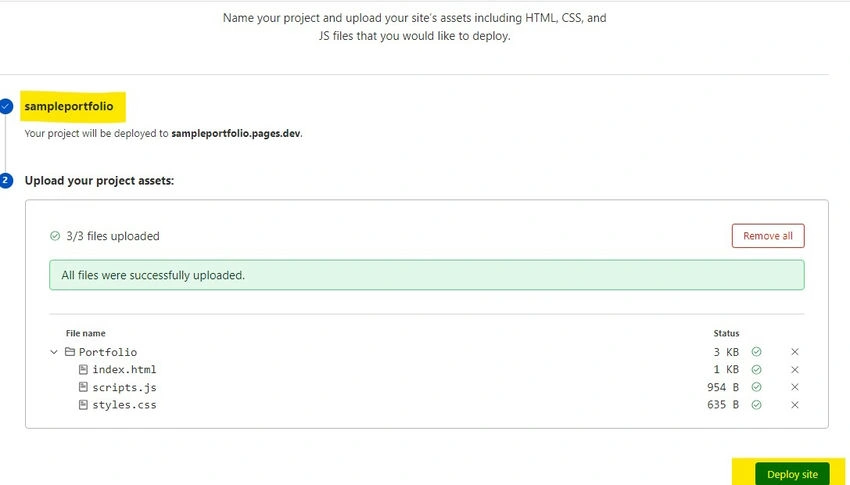
Step 4. After the successful deployment, kindly provide some time for DNS reflection and then navigate to the domain available on the site.

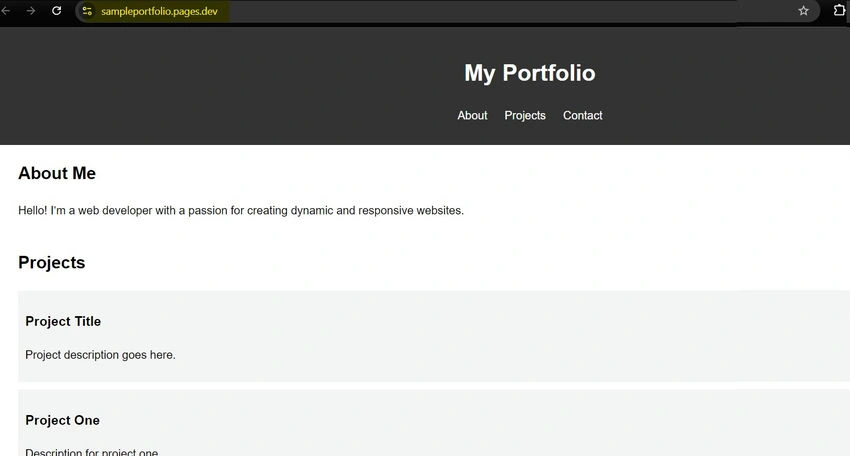
Now, check the domain, and you will see your site is successfully available on the internet.
Conclusion
We have successfully hosted our website without cost, and we can have a custom domain name for the site. Kindly explore the Cloudflare pages for more services they provide.
Wayne TylerPosted Nov 26, 2024, 12:27 PM
Cloudflare Pages is an excellent option for hosting static websites, especially since it's free and simple to set up. It's a great choice if you have a lightweight site and need reliable performance without spending anything. Here's how you can make the most out of it while exploring additional hosting options for scaling: For Static Hosting: Cloudflare Pages offers a fantastic free-tier option with built-in global CDN to deliver fast performance for your static content. Perfect for personal projects or portfolio sites. For Dynamic Content or Scaling Needs: If you plan to go beyond static sites—adding a CMS or dynamic content—you'll need something more flexible. Consider Cloudways, which provides managed hosting on top-tier cloud providers like AWS, Google Cloud, and DigitalOcean. Their hosting is optimized for performance, with built-in firewalls, Cloudflare CDN integration, and malware protection. Exclusive BFCM 2024 Deal on Cloudways: If you're thinking about scaling, Cloudways is offering a 40% discount for 4 months and 40 free migrations as part of their Black Friday/Cyber Monday deal (Nov 7 - Dec 5, code: BFCM2024). Other Options: You might also explore Netlify or Vercel for static or hybrid hosting needs, as they focus on modern frameworks and serverless functions. If you're not planning to grow beyond static content, stick with Cloudflare Pages. But if you foresee adding dynamic features or needing more robust infrastructure, Cloudways can be a strong upgrade option! ??Thanks for sharing!