

Introduction
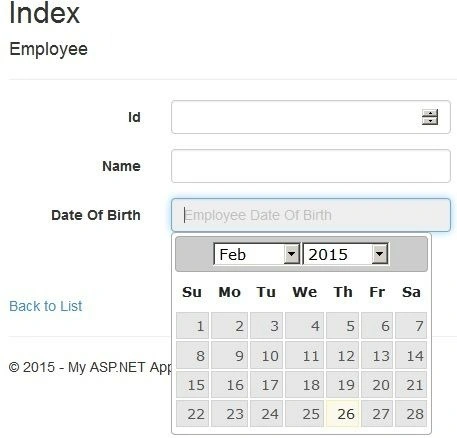
In this example, we will describe how to add a jQuery Datepicker to an MVC application. jQuery is one of the widely used scripting languages for web development. jQuery provides built-in support for a DateTime picker. In this article, I explain how to add a jQuery Datepicker with MVC.
The following is the procedure to add the jQuery Datepicker to an MVC application.
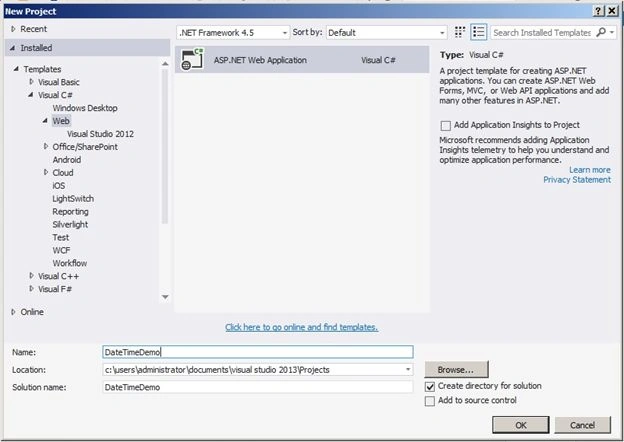
Step 1. Go to New Project and select the Web tab and select ASP.Net Web Application. Provide a suitable name for your project, such as DateTimeDemo, and click the OK button.
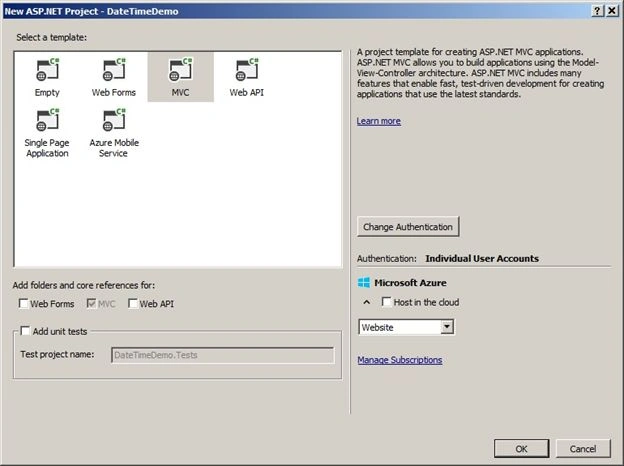
Step 2. Then the following screen will appear. Select the MVC tab and click the OK button.
Step 3. A project solution has been created with some pre-defend controllers, scripts and so on. Now go to the Model folder and a class called Employee with three auto-implemented properties like.
public class Employee
{
    [Required]
    [Display(Name = "Id")]
    public int EmpId { get; set; }
    [Display(Name = "Name")]
    [Required]
    public string EmpName { get; set; }
    [Required]
    [Display(Name = "Date Of Birth")]
    [DisplayFormat(ApplyFormatInEditMode = true, DataFormatString = "{0:dd/MMM/yyyy}")]
    public DateTime DOB { get; set; }
}
In this code, I have done some basic Data annotation validation with all those three properties. You can ignore if you want.
Step 4. Now go to the Controllers folder and right-click on the Add Controller option then the following window will appear. Select MVC5 Controller-Empty. Provide a name for the controller, say Employee, and click on the Add button.

Step 5. Controller code will be automatically generated with one Index action method like.
public class EmployeeController : Controller
{
    // GET: Employee
    public ActionResult Index()
    {
        return View();
    }
}
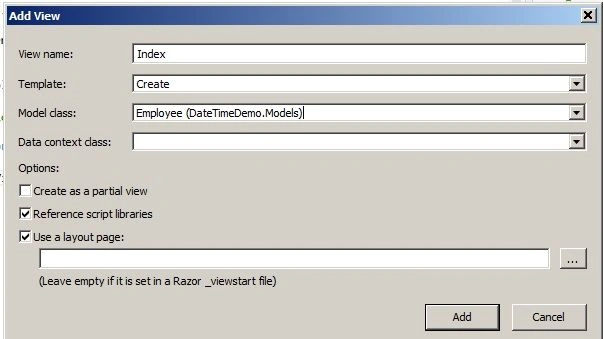
Step 6. Right-click anywhere on the Index action method and click add view then select the Employee model class and add that view of type Create as in the following.
Step 7. Then the Employee Create view will be automatically generated with the following code.
@model DateTimeDemo.Models.Employee
@{
    ViewBag.Title = "Index";
}
<h2>Index</h2>

@using (Html.BeginForm())
{
    @Html.AntiForgeryToken()

    <div class="form-horizontal">
        <h4>Employee</h4>
        <hr />
        @Html.ValidationSummary(true, "", new { @class = "text-danger" })
        <div class="form-group">
            @Html.LabelFor(model => model.EmpId, htmlAttributes: new { @class = "control-label col-md-2" })
            <div class="col-md-10">
                @Html.EditorFor(model => model.EmpId, new { htmlAttributes = new { @class = "form-control" } })
                @Html.ValidationMessageFor(model => model.EmpId, "", new { @class = "text-danger" })
            </div>
        </div>
        <div class="form-group">
            @Html.LabelFor(model => model.EmpName, htmlAttributes: new { @class = "control-label col-md-2" })
            <div class="col-md-10">
                @Html.EditorFor(model => model.EmpName, new { htmlAttributes = new { @class = "form-control" } })
                @Html.ValidationMessageFor(model => model.EmpName, "", new { @class = "text-danger" })
            </div>
        </div>
        <div class="form-group">
            @Html.LabelFor(model => model.DOB, htmlAttributes: new { @class = "control-label col-md-2" })
            <div class="col-md-10">
                @Html.EditorFor(model => model.DOB, new { htmlAttributes = new { @class = "form-control", placeholder = "Employee Date Of Birth", @readonly = "true" } })
                @Html.ValidationMessageFor(model => model.DOB, "", new { @class = "text-danger" })
            </div>
        </div>
        <div class="form-group">
            <div class="col-md-offset-2 col-md-10">
                <input type="submit" value="Create" class="btn btn-default" />
            </div>
        </div>
    </div>
}
<div>
    @Html.ActionLink("Back to List", "Index")
</div>
@section Scripts {
}
Anandu G NathPosted Feb 21, 2024, 6:22 AM
Nice article
Jasmine MerchantPosted Nov 16, 2020, 6:16 AM
Great article with step by step guidance, solved my problem
shiva kskPosted Jun 19, 2020, 6:49 AM
Hi you have edit date code send me manish
Mahavir SharmaPosted Jun 13, 2019, 5:02 AM
Nice Article and solved my problems thanks
احمد صدقیPosted Mar 15, 2019, 1:07 AM
How can I add TimePicker in it?
Babeyo ShafiqPosted Jan 26, 2019, 2:44 AM
Thanks alot, great help.
DennisPosted Dec 17, 2018, 1:39 PM
I am using MVC 5.2. Would you happen to know why placeholder is not working?
Yogesh VedpathakPosted Dec 26, 2017, 5:37 AM
Nice article but how to change backcolor of DatePicker ?.
satyesh soniPosted Nov 10, 2017, 12:10 AM
Hi, what can i do, if i want date in dd/MM/yyyy format. your code is displayed date 02/Nov/2017. i don't want it. kindly help me..my email is [email protected]
Siddi Khadar ValiPosted Sep 7, 2017, 7:10 AM
Thanks you Manish for the Article, Explained the concept in very simple steps. A beginner like me can follow the article and understand the concept very easliy.. Please keep sharing.. I tried the below step to resolve the css issue Updated the path of the jquery-ui.css in Step 11 of the articale as bundles.Add(new StyleBundle("~/Content/cssjqryUi").Include( "~/Content/themes/base/jquery-ui.css"));
Sibin ThomasPosted Aug 10, 2017, 12:25 AM
I am not getting the 'datetimepicker' design properly.
gitika vyasPosted Jun 21, 2017, 5:05 AM
It works fine bit good work fine but not show previos and next button on datetimepickerut not show next and previous image in datetime picker
Zaid AhmedPosted Apr 22, 2017, 11:38 AM
It gives me an error of layout page render...... what should i do?
abhishek singhPosted Apr 20, 2017, 7:08 AM
Nice Article..Thanks a lot .
Ramadoss EPosted Dec 12, 2016, 5:03 AM
Nice Article. Easy to Understand
AathiraPosted Oct 24, 2016, 12:28 AM
Great tutorial .Thanks a lot :)
Tarkesh NimjePosted Jun 16, 2016, 6:01 AM
pls tell me how to add timepicker i want to show only time
Ricardo SanchezPosted Jun 12, 2016, 1:04 PM
It fails with over 100 errors
Onald BautPosted May 8, 2016, 4:38 PM
At last.. WooooW!!!!, it worked for me too.. Thanks alot!!
Vipan SharmaPosted Jan 25, 2016, 2:43 AM
its not working for me :(
moeen moeenPosted Dec 27, 2015, 8:47 AM
thanks it helped me
Doc CanadaPosted Aug 26, 2015, 2:02 PM
A good tutorial, easy to understand and follow for someone like myself that is new to ASP.NET and MVC. My thanks for sharing!
Manish Kumar ChoudharyPosted Apr 27, 2015, 4:20 AM
Thanks Santhakumar Munuswamy for reading and commenting on this article.
Manish Kumar ChoudharyPosted Apr 27, 2015, 4:20 AM
Thanks Bruno Péterson.
Santhakumar MunuswamyPosted Apr 25, 2015, 8:07 AM
Thanks for nice article
Santhakumar MunuswamyPosted Apr 25, 2015, 8:07 AM
Good work
Bruno PétersonPosted Apr 21, 2015, 12:24 PM
Thanks for share it!
Manish Kumar ChoudharyPosted Apr 15, 2015, 3:51 AM
Thanks Gowtham Rajamanickam.
Gowtham RajamanickamPosted Mar 13, 2015, 5:24 AM
Good article !
Manish Kumar ChoudharyPosted Feb 28, 2015, 1:43 PM
Thanks Vithal Wadjem sir.
Vithal WadjePosted Feb 28, 2015, 1:04 PM
nice
Tom MohanPosted Feb 27, 2015, 11:52 AM
Your are welcome
Manish Kumar ChoudharyPosted Feb 27, 2015, 11:51 AM
Thanks Tom Mohan sir.
Tom MohanPosted Feb 27, 2015, 10:52 AM
nice
Manish Kumar ChoudharyPosted Feb 27, 2015, 8:21 AM
Thanks Abhay Kumar.
Abhay KumarPosted Feb 27, 2015, 7:37 AM
very helpful. Thanks for sharing.
Manish Kumar ChoudharyPosted Feb 27, 2015, 7:06 AM
Thanks Shridhar Sharma sir.
Shridhar SharmaPosted Feb 27, 2015, 6:59 AM
nice article..
Sibeesh VenuPosted Feb 27, 2015, 5:48 AM
Manish Kumar Choudhary You are welcome.
Manish Kumar ChoudharyPosted Feb 27, 2015, 4:56 AM
Thanks Khargesh Rajput.
Khargesh RajputPosted Feb 27, 2015, 4:43 AM
nice sir
Manish Kumar ChoudharyPosted Feb 27, 2015, 4:02 AM
Thanks Joginder Banger sir.
Manish Kumar ChoudharyPosted Feb 27, 2015, 4:02 AM
Thanks Sibeesh Venu.
Joginder BangerPosted Feb 27, 2015, 3:33 AM
yeah Good one sir again...
Sibeesh VenuPosted Feb 27, 2015, 3:24 AM
Nice one!!!
Manish Kumar ChoudharyPosted Feb 27, 2015, 1:16 AM
Thanks Rahul Saxena sir.
Rahul Kumar SaxenaPosted Feb 27, 2015, 1:02 AM
Good Work Manish Kumar Choudhary....