

Introduction
SharePoint Framework is gaining popularity, with its adoption being materialized by so many developers for client-side customization in SharePoint. In this article, we will learn how to call an External API and get non-SharePoint based data to display in SPFx web part. We have to understand that SPFx provides us with some inbuilt library to access any web service, so the possibilities are endless, as we can interact/integrate SharePoint with any product/technologies which expose data via a web service or API.
Today, we are going to call one simple API web service to get COVID 19 stats data, which is publicly available via the RAPID API platform. Before we move ahead, let's first talk about the Rapid API platform. Simply put, Rapid API is a platform that allows developers to host their custom API and made it publicly available to consumers who want to use it. Basically, it is the API marketplace. Many of the API hosted are either free, freemium, or premium based subscription which we can use. It provides a single SDK to access multiple API endpoints by different developers/companies. You can read more at this link.
For our demo, we are going to use one such API available.
- API Main URL - https://rapidapi.com/Gramzivi/api/covid-19-data
- This has 4 to 5 endpoints to get a different kind of data like, get world stats, get daily reports totals, get data by country etc...
- The endPoint which we will use - https://rapidapi.com/Gramzivi/api/covid-19-data?endpoint=apiendpoint_35f69513-ea31-48fd-a97d-4e2c8165d0b3
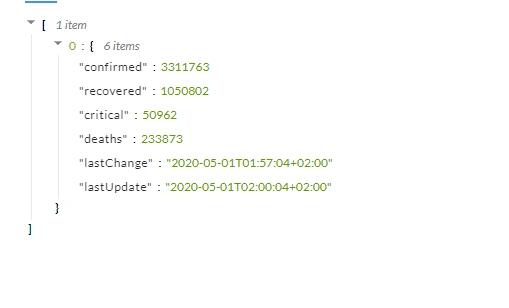
- This endpoint will provide us with total COVID 19 stats world data, like total confirmed, recovered, critical, deaths, last change timestamp, list update timestamp.
Below is just a screenshot of the sample response that we will get:
We need to subscribe to the above API and it will provide us with API Key, we will need this key in our code to call the API.
So now let us jump to SPFx part. Assuming you know how to create a simple React SPFx web part. If you are first-timer, you can follow this article to get an idea of how create a react based web part. Please note that you can do this in No javascript framework or vue.js.
In our example, below are details of our demo solution which we will be referring to:
- solution name - spfx-covid-stats
- webpart name - covidStats
- Entry component - CovidStats.tsx
Step - Passing WebPart context to React component
We would need to use a web part context to call an external API using httpClient class available with this object. This class provides us with a method to make get and post methods to any API.
Open src\webparts\controls\components\ICovidStatsProps.ts
Modify the code to what's shown below:
- import { WebPartContext } from "@microsoft/sp-webpart-base";
- export interface ICovidStatsProps {
- context: WebPartContext;
- }
Open src\webparts\controls\CovidStatsWebPart.ts
Modify render method to pass the context.
- public render(): void {
- const element: React.ReactElement<ICovidStatsProps> = React.createElement(
- CovidStats,
- {
- context: this.context
- }
- );
- ReactDom.render(element, this.domElement);
- }
Please note we have just added the line ‘context:this.context’
Step - Create a ServiceProvider
Now let's create a Service Provider class where we will write a method to get data from External API and that will be called inside our component.
Create a new file at src\ServiceProvider.ts:
- import { HttpClient, IHttpClientOptions, HttpClientResponse } from '@microsoft/sp-http';
- import { WebPartContext } from '@microsoft/sp-webpart-base';
- import { Constants } from './webparts/Constant';
- export class ServiceProvider {
- private wpcontext:WebPartContext;
- public constructor(context: WebPartContext) {
- this.wpcontext= context;
- }
- private httpClientOptionsForGlobal: IHttpClientOptions = {
- headers: new Headers({
- "x-rapidapi-host": "covid-19-data.p.rapidapi.com",
- "x-rapidapi-key": "<REPLACE WHIT WITH YOUR APIKEY>"
- }),
- method: "GET",
- mode: "cors"
- };
- public async getTotals() {
- var response = await this.wpcontext.httpClient
- .get("https://covid-19-data.p.rapidapi.com/totals", HttpClient.configurations.v1,this.httpClientOptionsForGlobal);
- console.log(response);
- var responeJson : any = await response.json();
- return responeJson;
- }
- }
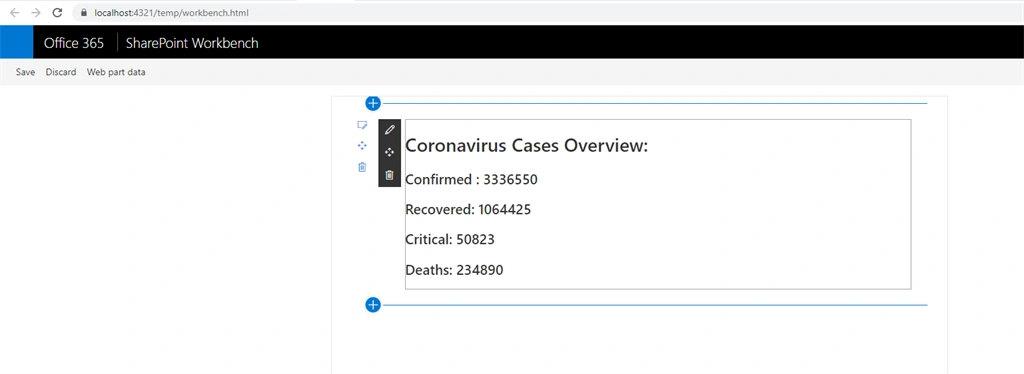
legendgod legendgodPosted Sep 9, 2020, 11:38 PM
What is the usage of line "import { Constants } from './webparts/Constant'; "?
Rikam PalkarPosted May 5, 2020, 8:48 AM
Appreciate the share.