

Introduction
Amazon Web Services (AWS) provides scalable, reliable, and high-performance cloud computing resources, one of which is Amazon Elastic Block Store (EBS). Amazon EBS volumes are durable block-level storage devices that can be attached to Amazon EC2 instances. These volumes can be used for various purposes, from storing application data to providing storage for databases. In this article, we’ll explore how to create an EBS volume in AWS and discuss its various uses.
What is an Amazon EBS Volume?
An Amazon EBS volume is a network-attached, persistent block storage device that can be attached to an EC2 instance. These volumes behave like traditional hard drives and can store data like operating systems, applications, and other files. EBS volumes are highly available and provide fault-tolerant storage, meaning that data is stored redundantly across multiple facilities within an AWS region.
Prerequisites
Before creating an EBS volume, ensure that.
- You have an AWS account with the necessary permissions to create resources like EC2 instances and EBS volumes.
- You know the region where you want to create the volume and where your EC2 instances are running.
- You have an EC2 instance to attach the volume to (optional but typical for many use cases).
Steps to Creating an EBS Volume in AWS
Step 1. Log in to the AWS Management Console.
- Open the AWS Management Console.
- Navigate to the EC2 Dashboard by typing "EC2" in the search bar and selecting it from the list of services.
Step 2. Go to the Volumes Section.
- In the EC2 Dashboard, find the Elastic Block Store section in the left-hand navigation panel.
- Click on Volumes under Elastic Block Store.
- Click on the Create volume button located at the top of the Volumes page.
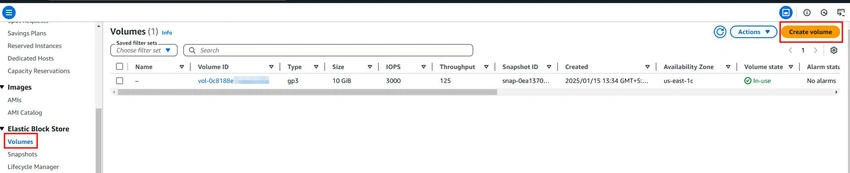
- In the Create Volume wizard, you will be prompted to configure various settings for the new volume.
Step 3. Configure the Volume.
- Volume Type: Choose the type of volume you need (e.g., General Purpose SSD (gp2), Provisioned IOPS SSD (io1), Throughput Optimized HDD (st1), etc.). The type depends on your performance and storage requirements.
- Size: Specify the size of the volume. The default size is usually 8 GB, but you can adjust this based on your needs. EBS volumes can range from 1 GB to 16 TB.
- Availability Zone: Choose the Availability Zone where the volume will be created. Ensure it matches the zone of your EC2 instance for seamless attachment.
- IOPS (Optional): For certain volume types like io1, you can specify the number of IOPS (Input/Output Operations Per Second) required for your application.
- Encryption: You can choose to enable encryption for your volume, which will ensure that your data is encrypted at rest. By default, new volumes are unencrypted, but enabling encryption enhances data security.
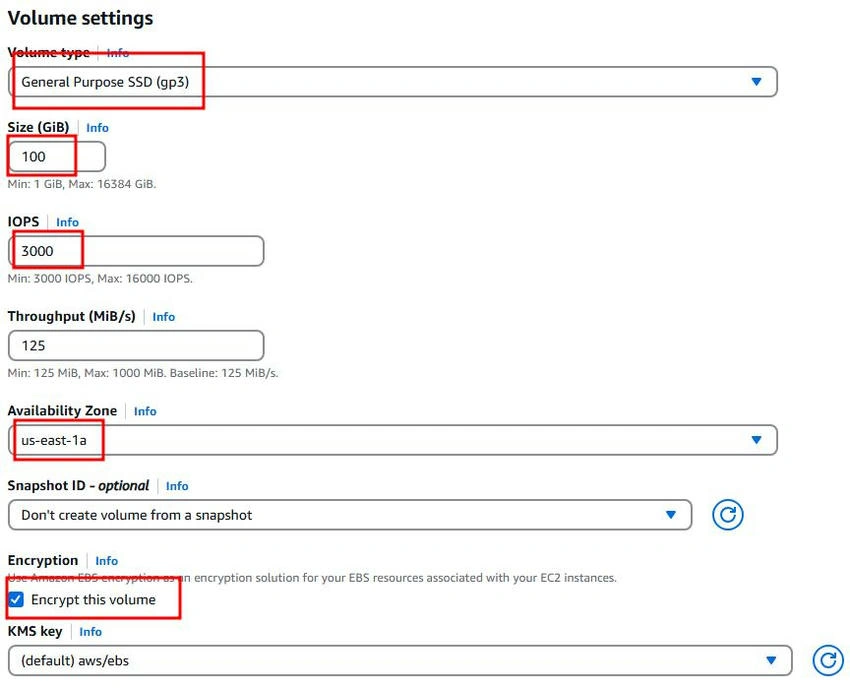
Step 4. Review and Create.
After configuring the volume settings, click on Create Volume. The volume will be created and will appear in the Volumes section.
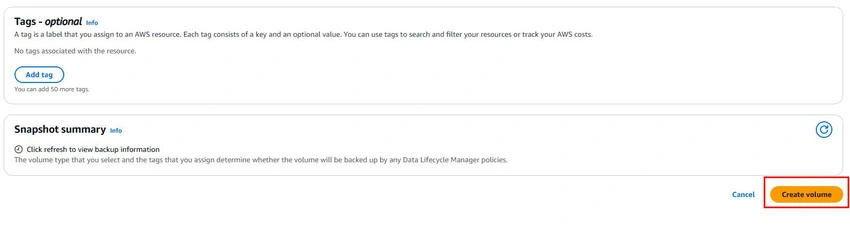
Step 5. Attach the Volume to an EC2 Instance.
- After the volume is created, you will see it listed in the Volumes section.
- Select the volume and click the Actions button, then choose Attach Volume.
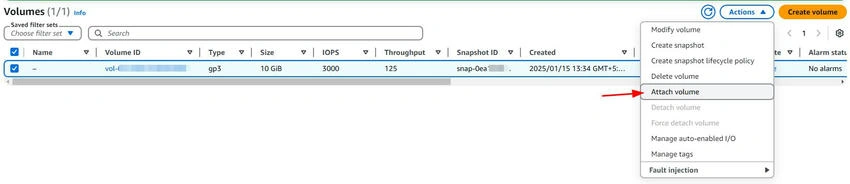
- Select the EC2 instance to attach the volume to and specify the device name (e.g., /dev/sdf).
- Click Attach.
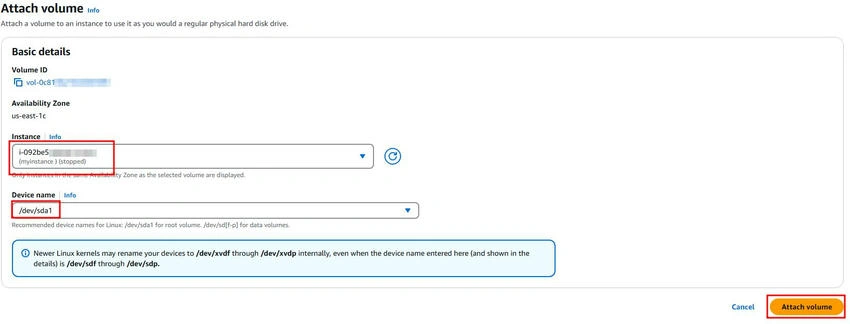
- Once the volume is attached, the EC2 instance will be able to access it, just like any other block device.
Step 6. Format and Mount the Volume (If Necessary).
If the volume is new and unformatted, you will need to format it before use. SSH into your EC2 instance and use standard Linux or Windows utilities to format and mount the volume, for example.
- On Linux, use commands like mkfs and mount.
- On Windows, use the Disk Management tool to initialize and format the volume.
Conclusion
Amazon EBS volumes are powerful tools for managing storage in AWS, enabling persistent, scalable, and high-performance storage for EC2 instances and other AWS services. Whether you’re storing application data, creating backups, or hosting a database, EBS volumes provide the flexibility and reliability you need. By following the steps outlined in this article, you can quickly create and manage EBS volumes to support your AWS-based workloads.
Understanding how to create and use volumes in AWS is essential for building scalable and fault-tolerant applications, making it a key component of your cloud infrastructure.
Join the conversation! Your thoughts help the community grow.