

Introduction
Today, I have provided an article showing how to display SQL table data in a ListBox in ASP.NET. In this article, we create a table in a SQL Server database and drag a ListBox control on the aspx page in ASP.NET. After that we create a connection string object to connect to the database with the application and read data from the database using the select command. All you need to do is implement and hook it up to your requirement or need. First of all you start Visual Studio .NET and make a new ASP.NET web site using Visual Studio 2010.
Creating Table in SQL Server Database
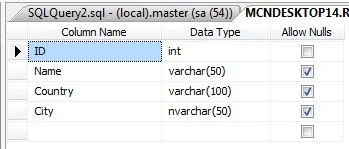
Now create a table named UserDetail with the columns id, name, country, city. Set the identity property=true for id. The table looks as in the following:
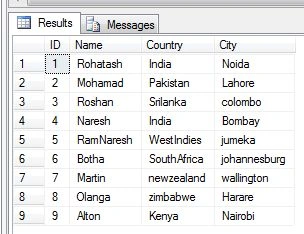
Now insert some values in this table. The table looks like this:
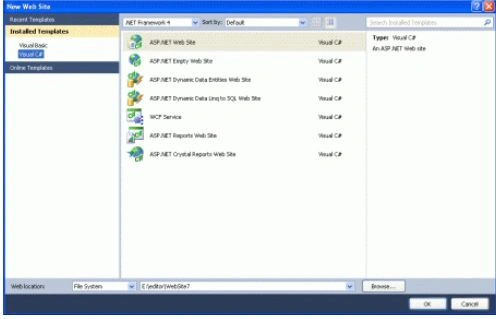
Now you must create a web site.
- Go to Visual Studio 2010
- New-> Select a website application
- Click OK
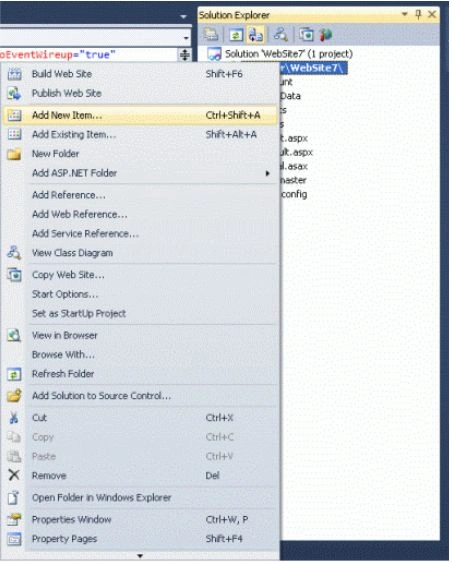
Now add a new page to the website.
- Go to the Solution Explorer
- Right-click on the Project name
- Select add new item
- Add new web page and give it a name
- Click OK
Design the page and place the required control in it. Now drag and drop one ListBox control on the form. That displays SQL Server table data. Let's have a look at a practical example.

.aspx Code
<%@ Page Language="C#" AutoEventWireup="true" CodeFile="Default2.aspx.cs" Inherits="Default2" %>
<!DOCTYPE html PUBLIC "-//W3C//DTD XHTML 1.0 Transitional//EN" "http://www.w3.org/TR/xhtml1/DTD/xhtml1-transitional.dtd">
<html xmlns="http://www.w3.org/1999/xhtml">
<head runat="server">
<title></title>
</head>
<body>
<form id="form1" runat="server">
<div>
<asp:ListBox ID="ListBox1" runat="server" BackColor="#FF99FF" ForeColor="Black"
Height="205px" Width="260px"></asp:ListBox>
<br />
<br />
</div>
</form>
</body>

gin tokiPosted Jun 17, 2019, 11:04 AM
Hi Rohatash , is it possible to print the result and not include all the data from number 4 and number 9 to UI , without deleting the info from the database? .how to do that? Thanks!
Rohatash KumarPosted Oct 15, 2012, 10:50 PM
Thanks. snehal
snehal gawariPosted Oct 13, 2012, 12:51 AM
best solution thank you
kianu rievesPosted Oct 6, 2012, 2:39 AM
These threads are organized into thread blocks, and each thread has a global thread block index, and a local thread index within its thread block. http://www.dapfor.com/en/net-suite/net-grid/tutorial/data-grouping
Chirag ShahPosted Sep 30, 2012, 9:24 AM
I am new for asp.net. This is help me to display the data from db table into Listbox. Now i want to insert multipal values from Listbox into db (Sql 2005 server).