

Cyber crimes are one of the fastest growing crimes on the planet. Most of the hackers hack a website through your Web browser and spywares. Cyber security experts are one of the most in-demand jobs in USA. One of the most important ways to start securing your website is by implement SSL. In this article, author talks about about how to implement SSL on your website without costing you a dime.
Hey folks!
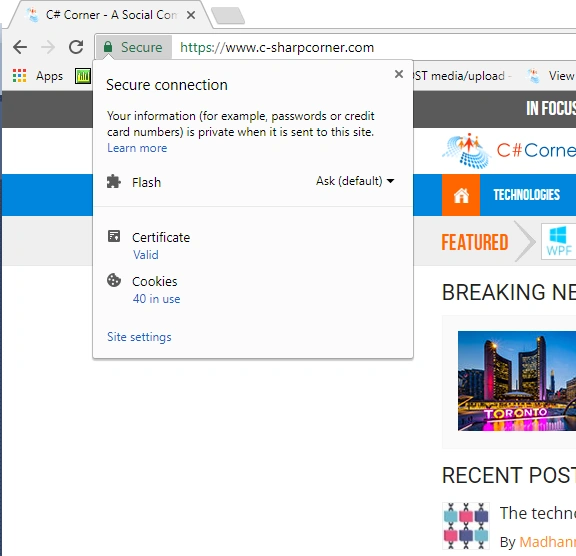
Have you noticed C# Corner is now equipped with SSL? Just look in the address bar of your browser to locate HTTPS written at the start of the URL.

Yes, the website is now running on HTTPS and is more secure than ever. Importantly, the SSL Certificate we have applied is free and open source. And yes, we, the development team, had to burn extra oil of the office lamps to implement this SSL. Here is a walk-through of the process so as to make you acquainted with the process of how to implement the SSL without spending a single cent.
Before making the website HTTPS, let's understand what SSL is.
SSL (Secure Socket Layer) is a cryptographic protocol which was developed by Netscape in the 90s, which enhances the web application security and enables a secure communication over the internet. TLS (Transport Layer Security), a successor over the SSL developed by IETF (Internet Engineering Task Force), enables transport layer security and improves the SSL security.
Now, the question is - what is HTTPS?
HTTPS is an abbreviation of HyperText Transfer Protocol Secure. In very simple terms, HTTPS means Hypertext Transfer Protocol with SSL/TLS.
Cost of an SSL Certificate
Guys we know that if we want to make a site HTTPS, we need to purchase an SSL certificate from an authentic SSL seller, such as Godaddy, Comodo, Digicert etc. Commonly, if you purchase an EV (Extended validation) Multi-Domain SSL certificate, its cost is around $489.00 USD/year.

As I said, we have applied a free and open source SSL for C# Corner; let me share with you how can you enable HTTPS on your website for free.
Enable HTTPS on your website for Free
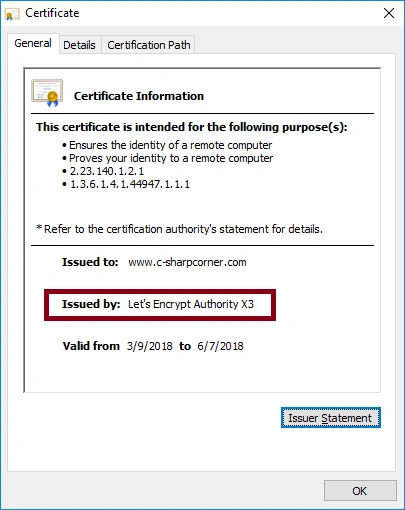
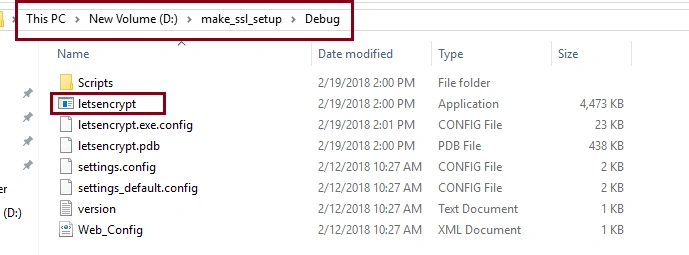
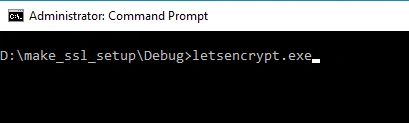
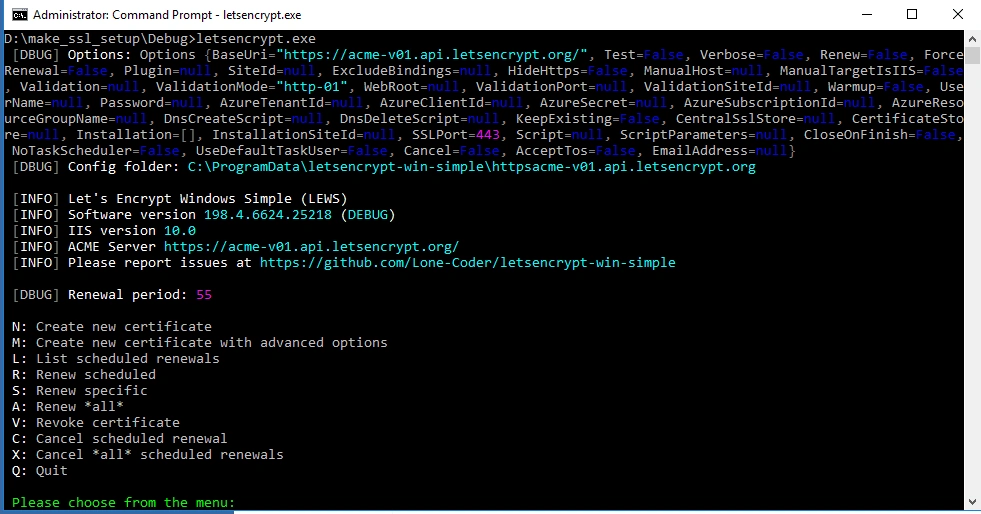
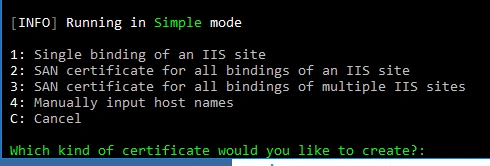
Yes! there is an open source SSL available, that is Let's Encrypt which is implemented on C# Corner. If you want to verify that, please follow the following procedure.
Guys we know that if we want to make a site HTTPS, we need to purchase an SSL certificate from an authentic SSL seller, such as Godaddy, Comodo, Digicert etc. Commonly, if you purchase an EV (Extended validation) Multi-Domain SSL certificate, its cost is around $489.00 USD/year.
As I said, we have applied a free and open source SSL for C# Corner; let me share with you how can you enable HTTPS on your website for free.
Enable HTTPS on your website for Free
Yes! there is an open source SSL available, that is Let's Encrypt which is implemented on C# Corner. If you want to verify that, please follow the following procedure.
Aayush BiswasPosted Jun 16, 2021, 3:37 AM
Hi I am trying to make my website HTTPS but pls say what i will open in VS code and what I will Run pls tell quickly
Pankajkumar PatelPosted May 18, 2021, 1:11 PM
Nice article!
Ansh SaxenaPosted Oct 2, 2018, 10:25 PM
how to differentiate between a radio button and a text box placed in asp: repeated tag. i.e if the show of a row in datasource is 0 then a textbox is visible if show is 1 for second row then a radio button is visible
Vikas SharmaPosted May 18, 2018, 2:53 AM
A Simple ACME Client for Windows have some error. not compiled.
Ajith MohanPosted Apr 25, 2018, 10:36 AM
Gr8 share. Have been searching for this for quite sometime.... THX
Bryian TanPosted Apr 15, 2018, 11:14 PM
Do you have instruction for share hosting environment?
Tridip BhattacharjeePosted Apr 9, 2018, 5:58 AM
Also discuss how to renew the certificate when it will reach expiry date....what to do?
Tridip BhattacharjeePosted Apr 9, 2018, 5:57 AM
When we generate certificate then can we specify expiry date or expiry date will be generated automatically?
Tridip BhattacharjeePosted Apr 6, 2018, 6:54 AM
Sorry to say this article is not fully completed one. suppose some one never work with https before then here you should mention what we need to do in asp.net mvc project and then how could we attach the certificate when the site is hosted in IIS. so please come with a new article where you will mention all steps in details.
أحمد GalalPosted Apr 5, 2018, 9:29 AM
All time get this error [DBUG] FileNotFoundException: FileNotFoundException {Message="Could not load file or assembly 'System.Runtime, Version=4.1.0.0, Culture=neutral, PublicKeyToken =b03f5f7f11d50a3a' or one of its dependencies. The system cannot find the file s pecified.", FileName="System.Runtime, Version=4.1.0.0, Culture=neutral, PublicKe yToken=b03f5f7f11d50a3a", FusionLog="WRN: Assembly binding logging is turned OFF .\r\nTo enable assembly bind failure logging, set the registry value [HKLM\\Soft ware\\Microsoft\\Fusion!EnableLog] (DWORD) to 1.\r\nNote: There is some performa nce penalty associated with assembly bind failure logging.\r\nTo turn this featu re off, remove the registry value [HKLM\\Software\\Microsoft\\Fusion!EnableLog]. \r\n", Data=[], InnerException=null, TargetSite=System.Collections.Generic.List` 1[PKISharp.WACS.Target] GetBindings(Boolean, Boolean), StackTrace=" at PKIShar p.WACS.Plugins.TargetPlugins.IISBinding.GetBindings(Boolean hideHttps, Boolean l ogInvalidSites)\r\n at PKISharp.WACS.Plugins.TargetPlugins.IISBinding.PKISharp .WACS.Plugins.Interfaces.ITargetPlugin.Aquire(IOptionsService optionsService, II nputService inputService, RunLevel runLevel) in D:\\SVN\\win-acme-master\\letsen crypt-win-simple\\Plugins\\TargetPlugins\\IISBinding.cs:line 52\r\n at PKIShar p.WACS.Program.CreateNewCertificate(RunLevel runLevel) in D:\\SVN\\win-acme-mast er\\letsencrypt-win-simple\\Program.cs:line 225\r\n at PKISharp.WACS.Program.< >c.<MainMenu>b__0_0() in D:\\SVN\\win-acme-master\\letsencrypt-win-simple\\MainM enu.cs:line 24\r\n at PKISharp.WACS.Program.MainMenu() in D:\\SVN\\win-acme-ma ster\\letsencrypt-win-simple\\MainMenu.cs:line 41\r\n at PKISharp.WACS.Program .Main(String[] args) in D:\\SVN\\win-acme-master\\letsencrypt-win-simple\\Progra m.cs:line 78", HelpLink=null, Source="letsencrypt", HResult=-2147024894} [EROR] FileNotFoundException: Could not load file or assembly 'System.Runtime, Version=4.1.0.0, Culture=neutral, PublicKeyToken=b03f5f7f11d50a3a' or one of its dependencies. The system cannot find the file specified.
Ashish VishwakarmaPosted Apr 3, 2018, 4:30 AM
Hey Sourabh Somani, you valuable comments got me researching more about SSL and other security stuff, now I understand my SSL certificate is shared one with cloudflare. I checked ways to use Let's Encrypt in my website which can't be used with GitHub pages. I chosen to host my website with GitHub pages because of Jekyll support. If I move it somewhere then all those Jekyll build and CD stuffs I need to take care. so I don't have to near future plans to move from GitHub pages. But yes I'll be keep looking for a way to use own certificate rather than shared one with GitHub pages if they support it. Thanks :)
Mahesh ChandPosted Mar 25, 2018, 7:55 AM
It may not be a bad idea to write an article on Auto renewal and link this article in that for the reference.
jasmin patelPosted Mar 22, 2018, 11:57 PM
Can i use let's encrypt certificate to any shared hosting server which is not provided let's encrypt ssl certificate?if yes then how i can use certificate, can you post article like this article
Sourabh SomaniPosted Mar 21, 2018, 7:40 AM
Ashish Vishwakarma One thing I am not getting cloudflare uses digicert certificate for their own site why they don't use there own.... let's Encrypt uses their own certificate this is the best thing..... Thanks hope you are getting it.
Sourabh SomaniPosted Mar 21, 2018, 7:37 AM
Ashish Vishwakarma Cloudflare’s free SSL service doesn’t provide any kind of EV green bar SSL for your site. While you can upgrade to full SSL which does provide this functionality, the service is no longer free at that point. Let's Encrypt is working on that soon they will come with feature
Sourabh SomaniPosted Mar 21, 2018, 7:37 AM
Ashish Vishwakarma Cloudflare’s free SSL service doesn’t provide any kind of EV green bar SSL for your site. While you can upgrade to full SSL which does provide this functionality, the service is no longer free at that point. Let's Encrypt is working on that soon they will come with feature
Sourabh SomaniPosted Mar 21, 2018, 7:37 AM
Ashish Vishwakarma Cloudflare was infamously hacked earlier last year, exposing lots of sensitive user information. While it appears they have resolved and tightened security since then, it’s still important to be aware of this development.
Sourabh SomaniPosted Mar 21, 2018, 7:37 AM
Ashish Vishwakarma Cloudflare encrypts the connection between the visitor and the cached version of your site on Cloudflare, but it doesn’t encrypt the connection between your site and your server. While this means that site visitors can feel secure while visiting your site, there is still the chance that your server connection will be compromised. While you can upgrade to a full SSL implementation that does enable this setup, that is not part of the free service.
Ashish VishwakarmaPosted Mar 21, 2018, 6:06 AM
I am using certificate from cloudflare for free in my website https://www.ashishvishwakarma.com
Upendra Pratap ShahiPosted Mar 21, 2018, 5:02 AM
Nice one information shared....
Pranav MittalPosted Mar 20, 2018, 11:18 PM
The last image is really funny. This exactly shows the super excitement.
Nigel FernandesPosted Mar 20, 2018, 5:51 PM
Good to know , is there any drawbacks to this ?
Afzaal Ahmad ZeeshanPosted Mar 20, 2018, 4:30 PM
Haha, the graphics are amazing man. Well explained!
Tridip BhattacharjeePosted Mar 20, 2018, 7:02 AM
If possible please guide me details how SSL certificate secure a site from hacker. how private key, public key used to make the communication secure? thanks
Tridip BhattacharjeePosted Mar 20, 2018, 7:01 AM
Let's Encrypt you said free. can it be strong and secure like which often people purchase from godady etc site?
Mahesh ChandPosted Mar 20, 2018, 5:30 AM
LOL! Nice graphics. Good work.
Dharmraj ThakurPosted Mar 20, 2018, 4:37 AM
Thanks for share... its great way... I heared somewhere that somethimes impression of any website in google is also matters which SSL you have. Is it true? Is let's encrypt good for the SEO?
Sagar Pandurang KapPosted Mar 20, 2018, 4:03 AM
Very much helpfullllll.
Ankit SharmaPosted Mar 20, 2018, 3:45 AM
Thanks for great article Sourabh. Can you please tell me how can i implement this on a on a website which is hosted on wordpress?