

Introduction
In this article, we are going to create a web application using .Net 6.0 and ASP.Net Core and also implement JWT Authentication.
JWT stands for JSON Web Token digitally signed using a secret key by a token provider. It helps the resource server to verify the token data using the same secret key.
JWT consists of three parts:
- Header: encoded data of the token type and the algorithm used to sign the data.
- Payload: encoded data of claims intended to share.
- Signature: created by signing (encoded header + encoded payload) using a secret key.
Here I am going to use Visual Studio 2022 and SQL Server 2014.
Creating Tables
First, we will create a database named “JWTAuthentication” or we can use any name and create two tables “UserInfo” and “Employee”. Open SQL Server and paste the below query to create the tables.
USE [JWTAuthentication]

CREATE TABLE [dbo].[UserInfo](
	[UserId] [int] IDENTITY(1,1) NOT NULL,
	[DisplayName] [varchar](60) NOT NULL,
	[UserName] [varchar](30) NOT NULL,
	[Email] [varchar](50) NOT NULL,
	[Password] [varchar](20) NOT NULL,
	[CreatedDate] [datetime] NOT NULL,
	CONSTRAINT [PK_UserInfo] PRIMARY KEY CLUSTERED
	(
		[UserId] ASC
	)
)
INSERT [dbo].[UserInfo] VALUES (N'Amit Mohanty', N'Admin', N'[email protected]', N'$admin@2022', CAST(N'2022-01-17 14:47:58.207' AS DateTime))


CREATE TABLE [dbo].[Employee](
	[EmployeeID] [int] NOT NULL,
	[NationalIDNumber] [nvarchar](15) NOT NULL,
	[EmployeeName] [nvarchar](100) NULL,
	[LoginID] [nvarchar](256) NOT NULL,
	[JobTitle] [nvarchar](50) NOT NULL,
	[BirthDate] [date] NOT NULL,
	[MaritalStatus] [nchar](1) NOT NULL,
	[Gender] [nchar](1) NOT NULL,
	[HireDate] [date] NOT NULL,
	[VacationHours] [smallint] NOT NULL,
	[SickLeaveHours] [smallint] NOT NULL,
	[rowguid] [uniqueidentifier] ROWGUIDCOL  NOT NULL,
	[ModifiedDate] [datetime] NOT NULL,
	CONSTRAINT [PK_Employee] PRIMARY KEY CLUSTERED
	(
		[EmployeeID] ASC
	)
)
INSERT [dbo].[Employee] VALUES (1, N'295847284', N'Michael Westover', N'adventure-works\ken0', N'Vice President of Sales', CAST(N'1969-01-29' AS Date), N'S', N'M', CAST(N'2009-01-14' AS Date), 99, 69, N'f01251e5-96a3-448d-981e-0f99d789110d', CAST(N'2014-06-30 00:00:00.000' AS DateTime))
INSERT [dbo].[Employee] VALUES (2, N'245797967', N'Raeann Santos', N'adventure-works\terri0', N'Vice President of Engineering', CAST(N'1971-08-01' AS Date), N'S', N'F', CAST(N'2008-01-31' AS Date), 1, 20, N'45e8f437-670d-4409-93cb-f9424a40d6ee', CAST(N'2014-06-30 00:00:00.000' AS DateTime))
INSERT [dbo].[Employee] VALUES (3, N'509647174', N'Pamela Wambsgans', N'adventure-works\roberto0', N'Engineering Manager', CAST(N'1974-11-12' AS Date), N'M', N'M', CAST(N'2007-11-11' AS Date), 2, 21, N'9bbbfb2c-efbb-4217-9ab7-f97689328841', CAST(N'2014-06-30 00:00:00.000' AS DateTime))
Create the Application
Here we will create a new project using ASP.NET Core Web API and .Net 6.0. Now open Visual Studio 2022 and follow the below steps.
Step 1
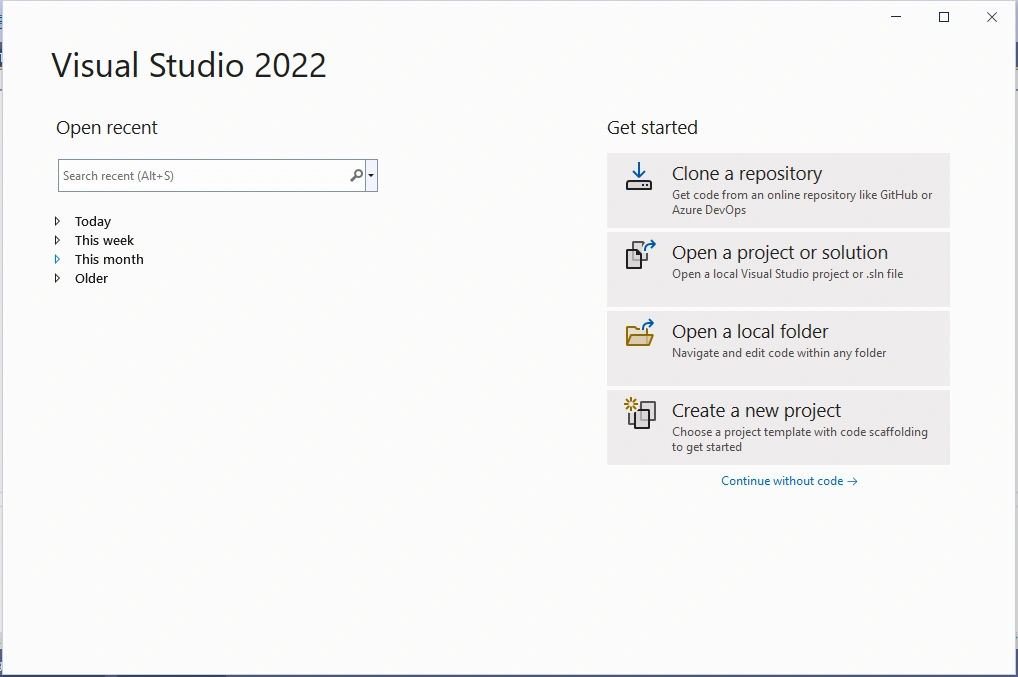
Step 2
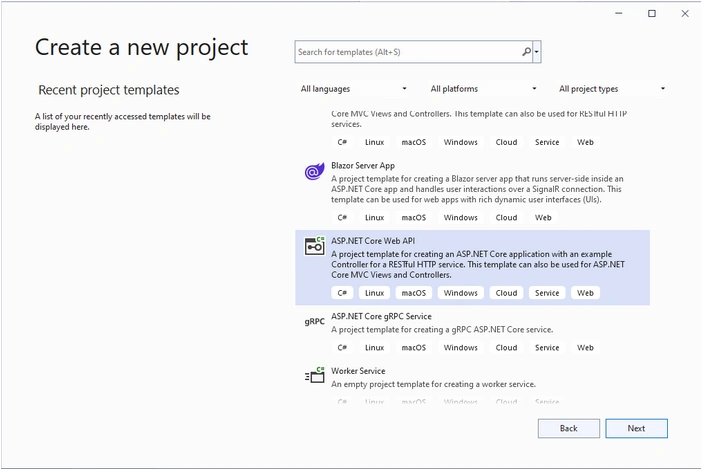
In this step, we will select the “ASP.NET Core Web API” project type.
Step 3
Step 4
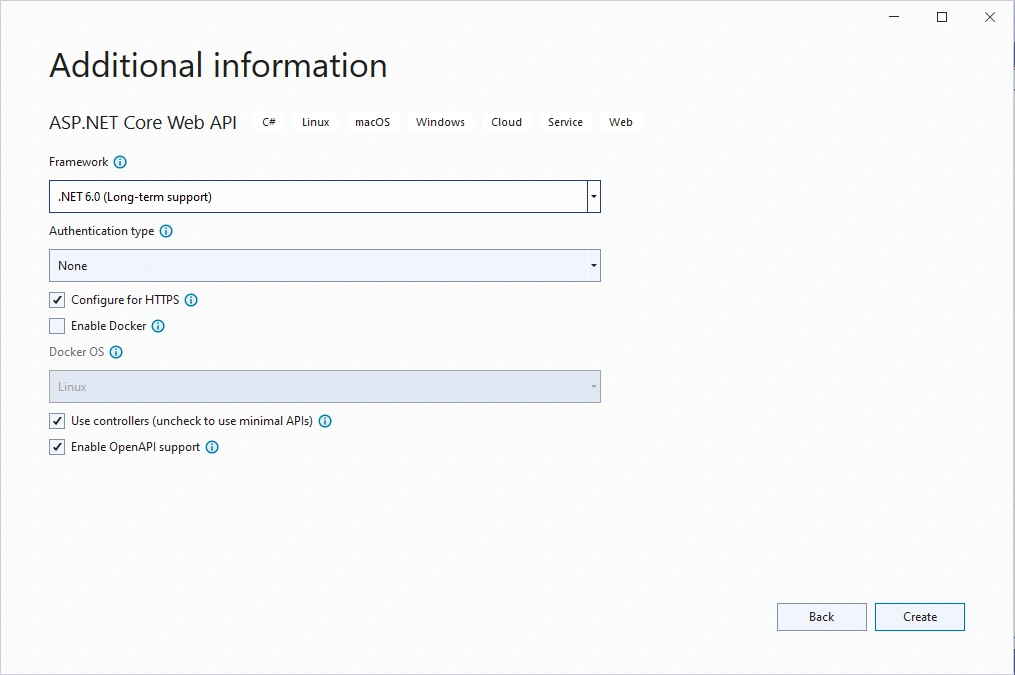
Here we will select Framework type as .NET 6.0 and also select the ASP.NET Core hosted option.
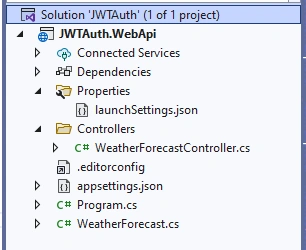
Now, our application will be created with a folder structure as given in the below image.
Install Required Nuget Packages
Go to the “Tools” menu, select NuGet Package Manager > Package Manager Console and then run the below commands to add database provider and Entity Framework Tools.
=> Install-Package Microsoft.EntityFrameworkCore
=> Install-Package Microsoft.EntityFrameworkCore.SqlServer
=> Install-Package Microsoft.AspNetCore.Authentication.JwtBearer
Adding the Model to the Application
Now we will create two Model classes that will contain the UserInfo and Employee model properties.
To do that right-click on the “JWTAuth.WebApi” project and add a New Folder as “Models”.
Then right-click on the “Models” folder and add two classes as “UserInfo.cs” and “Employee.cs”.
Now open the “UserInfo.cs” file and paste the below code to it.
namespace JWTAuth.WebApi.Models
{
    public class UserInfo
    {
        public int UserId { get; set; }
        public string? DisplayName { get; set; }
        public string? UserName { get; set; }
        public string? Email { get; set; }
        public string? Password { get; set; }
        public DateTime? CreatedDate { get; set; }
    }
}
Now open the “Employee.cs” file and paste the below code to it.
namespace JWTAuth.WebApi.Models
{
    public class Employee
    {
        public int EmployeeID { get; set; }
        public string? NationalIDNumber { get; set; }
        public string? EmployeeName { get; set; }
        public string? LoginID { get; set; }
        public string? JobTitle { get; set; }
        public DateTime BirthDate { get; set; }
        public string? MaritalStatus { get; set; }
        public string? Gender { get; set; }
        public DateTime HireDate { get; set; }
        public short VacationHours { get; set; }
        public short SickLeaveHours { get; set; }
        public Guid? RowGuid { get; set; }
        public DateTime ModifiedDate { get; set; }
    }
}
Adding Data Access Layer to the Application:
Now we will create a “DatabaseContext.cs” class where we define database connection. To do that right-click on the “JWTAuth.WebApi” project and add a folder as “Models”. Add the “DatabaseContext.cs” file to the “Models” folder and put the below code to it.
using Microsoft.EntityFrameworkCore;

namespace JWTAuth.WebApi.Models
{
    public partial class DatabaseContext : DbContext
    {
        public DatabaseContext()
        {
        }

        public DatabaseContext(DbContextOptions<DatabaseContext> options)
            : base(options)
        {
        }

        public virtual DbSet<Employee>? Employees { get; set; }
        public virtual DbSet<UserInfo>? UserInfos { get; set; }

        protected override void OnModelCreating(ModelBuilder modelBuilder)
        {
            modelBuilder.Entity<UserInfo>(entity =>
            {
                entity.HasNoKey();
                entity.ToTable("UserInfo");
                entity.Property(e => e.UserId).HasColumnName("UserId");
                entity.Property(e => e.DisplayName).HasMaxLength(60).IsUnicode(false);
                entity.Property(e => e.UserName).HasMaxLength(30).IsUnicode(false);
                entity.Property(e => e.Email).HasMaxLength(50).IsUnicode(false);
                entity.Property(e => e.Password).HasMaxLength(20).IsUnicode(false);
                entity.Property(e => e.CreatedDate).IsUnicode(false);
            });

            modelBuilder.Entity<Employee>(entity =>
            {
                entity.ToTable("Employee");
                entity.Property(e => e.EmployeeID).HasColumnName("EmployeeID");
                entity.Property(e => e.NationalIDNumber).HasMaxLength(15).IsUnicode(false);
                entity.Property(e => e.EmployeeName).HasMaxLength(100).IsUnicode(false);
                entity.Property(e => e.LoginID).HasMaxLength(256).IsUnicode(false);
                entity.Property(e => e.JobTitle).HasMaxLength(50).IsUnicode(false);
                entity.Property(e => e.BirthDate).IsUnicode(false);
                entity.Property(e => e.MaritalStatus).HasMaxLength(1).IsUnicode(false);
                entity.Property(e => e.Gender).HasMaxLength(1).IsUnicode(false);
                entity.Property(e => e.HireDate).IsUnicode(false);
                entity.Property(e => e.VacationHours).IsUnicode(false);
                entity.Property(e => e.SickLeaveHours).IsUnicode(false);
                entity.Property(e => e.RowGuid).HasMaxLength(50).IsUnicode(false);
                entity.Property(e => e.ModifiedDate).IsUnicode(false);
            });

            OnModelCreatingPartial(modelBuilder);
        }

        partial void OnModelCreatingPartial(ModelBuilder modelBuilder);
    }
}
Now we will create another two folders “Interface” and “Repository” to handle database-related operations.
Right-click on the “JWTAuth.WebApi” project and add two new folders as “Interface” and “Repository”.
Now add an interface to the “Interface” folder, name it as “IEmployees.cs” and put the below code to it.
using JWTAuth.WebApi.Models;

namespace JWTAuth.WebApi.Interface
{
    public interface IEmployees
    {
        public List<Employee> GetEmployeeDetails();
        public Employee GetEmployeeDetails(int id);
        public void AddEmployee(Employee employee);
        public void UpdateEmployee(Employee employee);
        public Employee DeleteEmployee(int id);
        public bool CheckEmployee(int id);
    }
}
Now add a class name as “EmployeeRepository.cs” to the “Repository” folder, which will inherit “IEmployees” interface, and put the below code to it.
using JWTAuth.WebApi.Interface;
using JWTAuth.WebApi.Models;
using Microsoft.EntityFrameworkCore;

namespace JWTAuth.WebApi.Repository
{
    public class EmployeeRepository : IEmployees
    {
        readonly DatabaseContext _dbContext = new();

        public EmployeeRepository(DatabaseContext dbContext)
        {
            _dbContext = dbContext;
        }

        public List<Employee> GetEmployeeDetails()
        {
            try
            {
                return _dbContext.Employees.ToList();
            }
            catch
            {
                throw;
            }
        }

        public Employee GetEmployeeDetails(int id)
        {
            try
            {
                Employee? employee = _dbContext.Employees.Find(id);
                if (employee != null)
                {
                    return employee;
                }
                else
                {
                    throw new ArgumentNullException();
                }
            }
            catch
            {
                throw;
            }
        }

        public void AddEmployee(Employee employee)
        {
            try
            {
                _dbContext.Employees.Add(employee);
                _dbContext.SaveChanges();
            }
            catch
            {
                throw;
            }
        }

        public void UpdateEmployee(Employee employee)
        {
            try
            {
                _dbContext.Entry(employee).State = EntityState.Modified;
                _dbContext.SaveChanges();
            }
            catch
            {
                throw;
            }
        }

        public Employee DeleteEmployee(int id)
        {
            try
            {
                Employee? employee = _dbContext.Employees.Find(id);

                if (employee != null)
                {
                    _dbContext.Employees.Remove(employee);
                    _dbContext.SaveChanges();
                    return employee;
                }
                else
                {
                    throw new ArgumentNullException();
                }
            }
            catch
            {
                throw;
            }
        }

        public bool CheckEmployee(int id)
        {
            return _dbContext.Employees.Any(e => e.EmployeeID == id);
        }
    }
}
Now we will add “DatabaseContext”,“IUser” and “UserManager” reference to the “Program.cs” file of the“JWTAuth.WebApi” project.
Open the “Program.cs” file and put the below code to it.
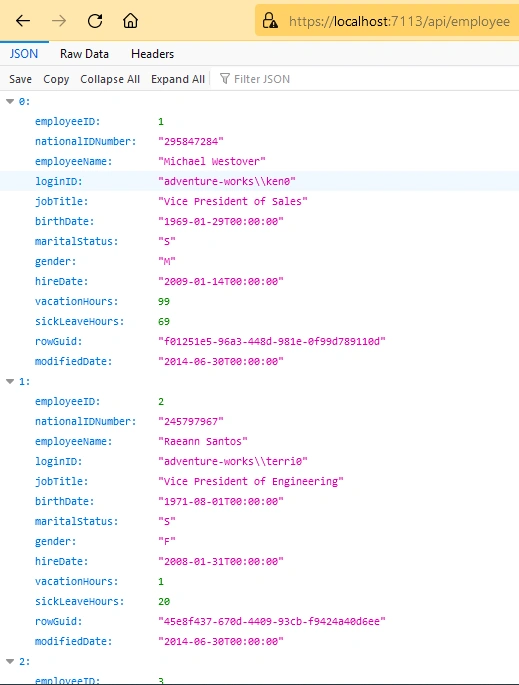
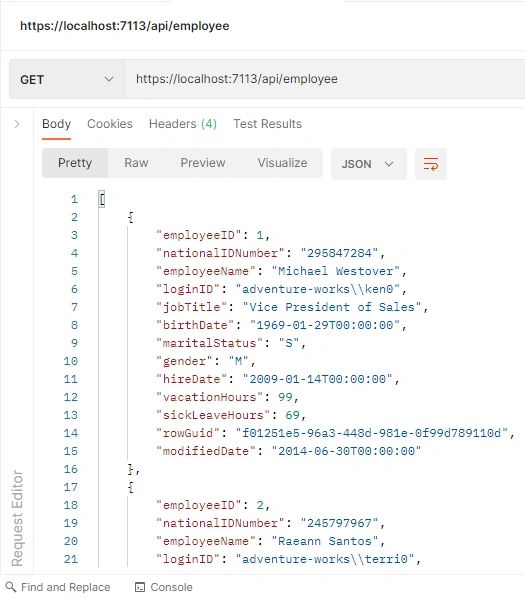
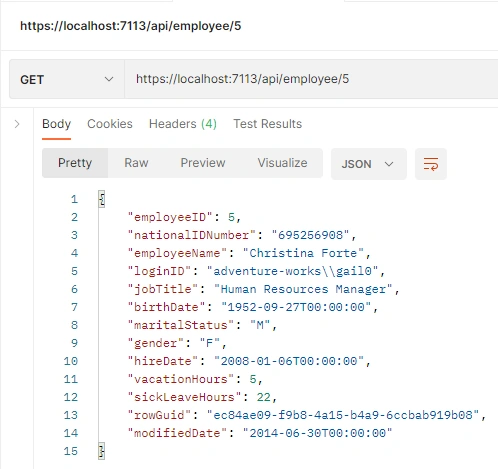

Simon ZandbergPosted Jun 4, 2024, 6:24 AM
This is a brilliant article Amit and one of the most concise and useful I've ever seen in many years. Easy to follow, great flow and useful examples. I've book marked it for easy reference for the next time I need to set up JWT authorization and authentication, but also for quick access to setting up projects needing Controllers etc.
vinod chityalaPosted May 15, 2024, 7:16 AM
Thank you sir.
Rajiv singhPosted Apr 14, 2024, 5:45 PM
Thanks sir
saad khatriPosted Jan 18, 2023, 9:22 AM
THANKYOU! WORKING EXAMPLE
Mohammed SalahiPosted Dec 19, 2022, 8:42 AM
Thanks Amit it work perfectbut how i can add refresh token to this example
Mohammed SalahiPosted Dec 19, 2022, 8:41 AM
Worked PERFECT!
Avi AmanPosted Nov 14, 2022, 12:00 PM
How to implement registration ?
Edgar MorenoPosted Oct 5, 2022, 10:23 PM
Perfect Example!! Thanks a lott
Mohan DevalPosted Sep 15, 2022, 7:55 PM
Do you have a similar example for JWS & JWE..?
Renjith JPosted Jul 19, 2022, 4:20 AM
Thanks for the article. JWT token validation and authorization works fine using postman. When using swagger UI, we can generate the token and even add it to the Authorize popup. However, when we try to GetEmployee information using swagger ui, token validation fails. Getting the following error. Also I tried to capture the error details in the response as below. "Error: response status is 401" { "error": "invalid_token", "error_description": "This request requires a valid JWT access token to be provided" }. Not sure if this issue is related to Swagger UI.
Rodrigo Alarcón SantiniPosted Jun 17, 2022, 11:26 PM
Worked JUST PERFECT!
Mizanur RahamanPosted Jun 11, 2022, 6:58 AM
Thank you so much for nice article. It is very helpful. But a want to store my credential(email & password) into any class. Can I do it? If possible please help me...
Muhammad NadeemPosted Jun 10, 2022, 8:54 AM
Very nice article I was really need this.
Atlanta GeekPosted May 27, 2022, 7:30 PM
How do I get the contents of the payload in my Map.Get
Alejandro B. MartinPosted Mar 10, 2022, 6:33 AM
So images say to create a wen api core project but you said to create an "Blazor WebAssembly App" SO TOTALLY CONFUSING, PLEASE GO AND CORRECT
Arvind SinghPosted Feb 11, 2022, 4:22 AM
Nice article....
Hamid KhanPosted Jan 25, 2022, 11:58 AM
Very well details explanation..............
Ranganath PrasadPosted Jan 25, 2022, 10:03 AM
Good one. But have a question. i have seen the same implementation in previous version of .net core. How is this implementation of yours (.Net 6) different from previous versions ? Whatvare the additions in .net 6 when it comes to jwt implementation ?