

This article shows how to make a Login Form using session state in ASP.Net C#. It has the two inputs username and word and a login button. When the user clicks the login button the user is redirected to a new page (his account page). In this account page we have a logout button. When he clicks he goes out from his account page and returns to his login page with the saved username and word, the user doesn't need to fill it in again, it is saved in the session using a browser cookie.
INITIAL CHAMBER
Step 1
Open your Visual Studio 2010 and create an Empty Website, provide a suitable name (LoginForm_demo).
Step 2
In Solution Explorer you get your empty website, then add two web forms and a SQL Server Database as in the following.
For Web Form:
LoginForm_demo (your empty website) then right-click then select Add New Item -> Web Form. Name it Login_demo.aspx. Again get to the same process and add another web form and name it Redirectpage.aspx.
For SQL Server Database
LoginForm_demo (your empty website) then right-click then select Add New Item -> SQL Server Database. (Add a database inside the App_Data_folder).
DATABASE CHAMBER
Step 3
In Server Explorer, click on your database (Database.mdf) then select Tables -> Add New Table. Make the table like this.
Table tbl_data (Don't Forget to make ID as IS Identity -- True)
Figure 1: Data Table
Now enter some data in your database by going to Tables then right-click then select Show Table Data and enter whatever you want to add in the username and word. I had entered this data. 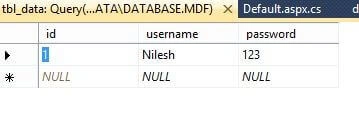
Figure 2: Enter the Data
We will match this username and word so if the data is correct, the user is redirected to his account page or otherwise the user gets an error message.
DESIGN CODE
Step 4
Now make some design for your application by going to Login_demo.aspx and try the code as in the following.
Login_demo.aspx
- <body>
- <form id="form1" runat="server">
- <div >
- <table style="width:100%;">
- <caption class="style1">
- <strong>Login Form</strong>
- </caption>
- <tr>
- <td class="style2">
- </td>
- <td>
- </td>
- <td>
- </td>
- </tr>
- <tr>
- <td class="style2">
- Username:</td>
- <td>
- <asp:TextBox ID="TextBox1" runat="server"></asp:TextBox>
- </td>
- <td>
- <asp:RequiredFieldValidator ID="RequiredFieldValidator2" runat="server"
- ControlToValidate="TextBox1" ErrorMessage="Please Enter Your Username"
- ForeColor="Red"></asp:RequiredFieldValidator>
- </td>
- </tr>
- <tr>
- <td class="style2">
- word:</td>
- <td>
- <asp:TextBox ID="TextBox2" TextMode="word" runat="server"></asp:TextBox>
- </td>
- <td>
- <asp:RequiredFieldValidator ID="RequiredFieldValidator1" runat="server"
- ControlToValidate="TextBox2" ErrorMessage="Please Enter Your word"
- ForeColor="Red"></asp:RequiredFieldValidator>
- </td>
- </tr>
- <tr>
- <td class="style2">
- </td>
- <td>
- </td>
- <td>
- </td>
- </tr>
- <tr>
- <td class="style2">
- </td>
- <td>
- <asp:Button ID="Button1" runat="server" Text="Log In" onclick="Button1_Click" />
- </td>
- <td>
- <asp:Label ID="Label1" runat="server"></asp:Label>
- </td>
- </tr>
- </table>
- </div>
- </form>
- </body>
You will get something like this: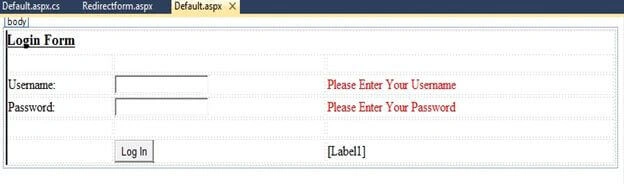
Figure 3: Output1
CODE CHAMBER
Step 5
We will make some code in the Login_demo.aspx.cs page so that our login form works.
Login_demo.aspx.cs
Figure 4: Login Demo
- using System;
- using System.Collections.Generic;
- using System.Linq;
- using System.Web;
- using System.Web.UI;
- using System.Web.UI.WebControls;
- using System.Data;
- using System.Data.SqlClient;
- public partial class _Default: System.Web.UI.Page {
- protected void Page_Load(object sender, EventArgs e) {
- }
- protected void Button1_Click(object sender, EventArgs e) {
- SqlConnection con = new SqlConnection(@
- "Data Source=.\SQLEXPRESS;AttachDbFilename=|DataDirectory|\Database.mdf;Integrated Security=True;User Instance=True");
- SqlCommand cmd = new SqlCommand("select * from tbl_data where username=@username and word=@word", con);
- cmd.Parameters.AddWithValue("@username", TextBox1.Text);
- cmd.Parameters.AddWithValue("word", TextBox2.Text);
- SqlDataAdapter sda = new SqlDataAdapter(cmd);
- DataTable dt = new DataTable();
- sda.Fill(dt);
- con.Open();
- int i = cmd.ExecuteNonQuery();
- con.Close();
- if (dt.Rows.Count > 0) {
- Session["id"] = TextBox1.Text;
- Response.Redirect("Redirectform.aspx");
- Session.RemoveAll();
- } else {
- Label1.Text = "You're username and word is incorrect";
- Label1.ForeColor = System.Drawing.Color.Red;
- }
- }
- }
RedirectForm.aspx
- <%@ Page Language="C#" AutoEventWireup="true" CodeFile="Redirectform.aspx.cs" Inherits="Redirectform" %>
- <!DOCTYPE html PUBLIC "-//W3C//DTD XHTML 1.0 Transitional//EN" "http://www.w3.org/TR/xhtml1/DTD/xhtml1-transitional.dtd">
- <html
- xmlns="http://www.w3.org/1999/xhtml">
- <head runat="server">
- <title></title>
- </head>
- <body bgcolor="#ffff99">
- <form id="form1" runat="server">
- <div>
- <p>
- <strong style="font-size: xx-large">Hello Everyone! Welcome to my Page.
- </strong>
- </p>
- </div>
- <asp:Image ID="Image1" runat="server" Height="335px"
- ImageUrl="~/2.jpg" Width="817px" />
- <p>
- </p>
- <p>
- <asp:Label ID="Label1" runat="server"></asp:Label>
- </p>
- <p>
- <asp:Button ID="Button1" runat="server" Height="47px" onclick="Button1_Click"
- Text="Logout" Width="92px" />
- </p>
- </form>
- </body>
- </html>
- using System;
- using System.Collections.Generic;
- using System.Linq;
- using System.Web;
- using System.Web.UI;
- using System.Web.UI.WebControls;
- public partial class Redirectform: System.Web.UI.Page {
- protected void Page_Load(object sender, EventArgs e) {
- Label1.Text = Session["id"].ToString();
- }
- protected void Button1_Click(object sender, EventArgs e) {
- Session.RemoveAll();
- Response.Redirect("Default.aspx");
- }
- }
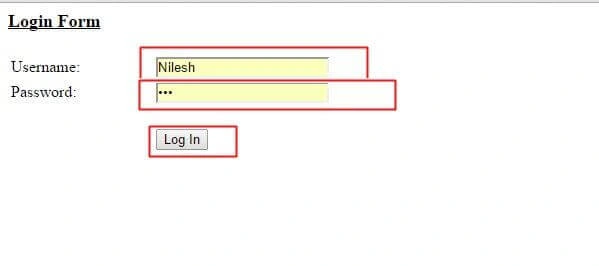
Figure 5: Login Form
Here I entered my username and word as “Nilesh” and “123”. When you login it will check the database if the details are correct then you will be redirected to other page otherwise not.
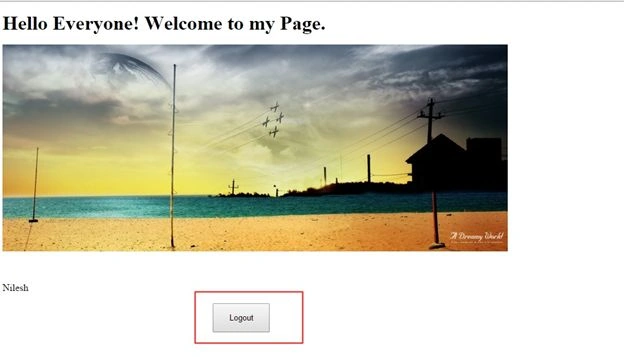
Figure 6: Welcome Page
Now as you logout from the account you again return to the loginform.aspx page with the saved username and word.
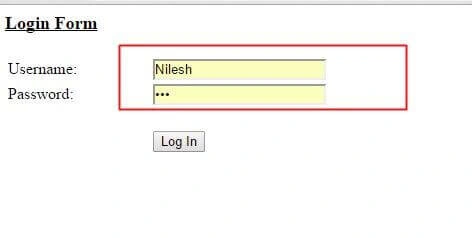
Figure 7: Login Page
Thank you for reading. Have a nice day. I hope you like it.
ajay chauhanPosted Aug 12, 2022, 12:23 AM
When i login in account and press browser back button it forward on login page without logout and same on logout. when i logout and press back button it again fwd on redirect page. can you please solve this?
Mayank VermaPosted Feb 24, 2021, 9:19 AM
Hi I am getting an error when going to third page from redirect page. Error:object reference not set to an instance of an object in c# session. (First Page Default, Second page Redirect page and third page third.aspx )
Adewusi OluwatobiPosted Dec 29, 2018, 9:16 AM
Hello bro, pls how can I code until admin approval before a user can login pls I need the code urgently
lokesh nallagondaPosted Feb 20, 2018, 9:12 AM
How to create a full gmail like application using c#
Vivek ArzarePosted Oct 11, 2017, 5:06 AM
Hello Nilesh Sir, Actually i need session is long time active in web application in web server but here my login is not do this things please help me and guide how to do for this issue.
Narayan PrajapatPosted Aug 11, 2017, 5:04 AM
Hi Nilesh Jadav Sir, Muje is login session ke bad isi user ka database change krna hai to uska bi code chahiye
ram CPosted Feb 1, 2017, 3:35 AM
Hi Nilesh Jadav, Can i get this code for MVC 4 using jQuery ? Thanks in advance:-)
Sarath MayaPosted Jan 28, 2017, 2:17 AM
How to add the photo in image controller?
Arvind MorePosted Dec 5, 2016, 6:02 AM
Dhanyawad bhava............. updates det raha
Arvind MorePosted Aug 17, 2016, 4:39 AM
Thnxxx Bhava.......
Suresh MolabantiPosted Jul 21, 2016, 9:17 AM
Nice one
masoud noorPosted Apr 12, 2016, 7:43 AM
THats great......work
Nilesh wanarePosted Feb 25, 2016, 4:53 AM
thanks nilesh sir...its very helpful...
Micah DavidPosted Jan 29, 2016, 2:19 PM
How do I pass the username to URL like this: localhost:6778/micah56
Ashish SahPosted Nov 5, 2015, 1:50 AM
what if i want to end the session after say 10 minutes per user and direct him to the login page as soon as the session ends.
James YoungPosted Nov 1, 2015, 3:39 PM
Plain text passwords? That's just awful. Username + password can be NULLs? Checking existence of record with select * causes extra work for the server. Well, at least you're not concatenating the user input into the SQL...
Arul RPosted Oct 28, 2015, 5:43 AM
Nice share!!!
AbedElHamid AlWahidyPosted Oct 20, 2015, 5:28 AM
good one Nilesh
Gina ApriantiPosted Aug 22, 2015, 1:20 PM
thank you brothers.
Vipul MalhotraPosted Jul 6, 2015, 7:39 AM
nice
Santhakumar MunuswamyPosted Jun 27, 2015, 11:40 AM
Thanks for nice one
Rajeesh MenothPosted Jun 26, 2015, 2:05 AM
Good One
Jaipal ReddyPosted Jun 26, 2015, 1:00 AM
nice