

Initial Chamber
Step 1
Open Visual Studio 2010 and create an Empty Website. Name it imageeffect_demo.
Step 2
In Solution Explorer you will get your empty website, then add a Web Form to your website as in the following.
For Web Form:
Go to your empty website imageeffect_demo, right-click and Add New Item as Web Form. Name it imageeffect_demo.aspx.
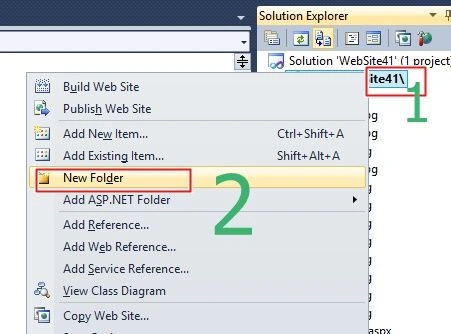
Create a new folder in Solution Explorer using right-click on the website, then clicking on Add New Folder. The following image will provide a better idea.
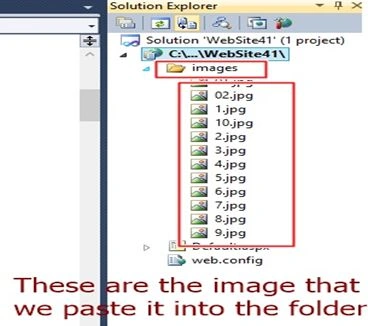
Now just select the images from anywhere you want to add to your application and paste it into “New Folder” as in the following image.
Design Chamber
Step 3
Now to build our application using HTML and CSS. Open your imageeffect_demo.aspx page and write the following code.
Imageffect_demo.aspx
Imageffect_demo.aspx
- <%@ Page Language="C#" AutoEventWireup="true" CodeFile="Default.aspx.cs" Inherits="_Default" %>
- <!DOCTYPE html PUBLIC "-//W3C//DTD XHTML 1.0 Transitional//EN" "http://www.w3.org/TR/xhtml1/DTD/xhtml1-transitional.dtd">
- <html
- xmlns="http://www.w3.org/1999/xhtml">
- <head runat="server">
- <title></title>
- <style type="text/css">
- {
- -webkit-box-sizing: border-box;
- -moz-box-sizing: border-box;
- -ms-box-sizing: border-box;
- box-sizing: border-box;
- }
- /* This is your Body CSS */
- body {
- background: #FAFAD2;
- }
- /* This is your Image CSS */
- .image {
- border: 10px dashed #fff;
- float: left;
- height: 300px;
- width: 300px;
- margin: 10px;
- overflow: hidden;
- -webkit-box-shadow: 5px 5px 5px #111;
- box-shadow: 4px 4px 4px #111;
- }
- /* This is your Grow Effect CSS */
- .groweffect img {
- height: 300px;
- width: 300px;
- -webkit-transition: all 1s ease;
- -moz-transition: all 1s ease;
- -o-transition: all 1s ease;
- -ms-transition: all 1s ease;
- transition: all 1s ease;
- }
- /* This is your Grow Image Effect CSS */
- .groweffect img:hover {
- width: 400px;
- height: 400px;
- }
- /* This is your Shrink Effect CSS */
- .shrinkeffect img {
- height: 400px;
- width: 400px;
- -webkit-transition: all 1s ease;
- -moz-transition: all 1s ease;
- -o-transition: all 1s ease;
- -ms-transition: all 1s ease;
- transition: all 1s ease;
- }
- /* This is your Shrink Image Effect CSS */
- .shrinkeffect img:hover {
- width: 300px;
- height: 300px;
- }
- /* This is your Sidepan Effect CSS */
- .sidepaneffect img {
- margin-left: 0px;
- -webkit-transition: margin 1s ease;
- -moz-transition: margin 1s ease;
- -o-transition: margin 1s ease;
- -ms-transition: margin 1s ease;
- transition: margin 1s ease;
- }
- /* This is your Sidepan Image Effect CSS */
- .sidepaneffect img:hover {
- margin-left: -200px;
- }
- /* This is your Tilt Effect CSS */
- .tilteffect {
- -webkit-transition: all 0.5s ease;
- -moz-transition: all 0.5s ease;
- -o-transition: all 0.5s ease;
- -ms-transition: all 0.5s ease;
- transition: all 0.5s ease;
- }
- /* This is your Tilt Image Effect CSS */
- .tilteffect:hover {
- -webkit-transform: rotate(-10deg);
- -moz-transform: rotate(-10deg);
- -o-transform: rotate(-10deg);
- -ms-transform: rotate(-10deg);
- transform: rotate(-10deg);
- }
- /* This is your Morph Effect CSS */
- .morpheffect {
- -webkit-transition: all 0.5s ease;
- -moz-transition: all 0.5s ease;
- -o-transition: all 0.5s ease;
- -ms-transition: all 0.5s ease;
- transition: all 0.5s ease;
- }
- /* This is your Morph Image Effect CSS */
- .morpheffect:hover {
- border-radius: 50%;
- -webkit-transform: rotate(360deg);
- -moz-transform: rotate(360deg);
- -o-transform: rotate(360deg);
- -ms-transform: rotate(360deg);
- transform: rotate(360deg);
- }
- /* This is your Black and white Effect CSS */
- .bnweffect {
- -webkit-transition: all 1s ease;
- -moz-transition: all 1s ease;
- -o-transition: all 1s ease;
- -ms-transition: all 1s ease;
- transition: all 1s ease;
- }
- /* This is your Black and white Image Effect CSS */
- .bnweffect:hover
- {
- -webkit-filter: grayscale(100%);
- }
- .style1
- {
- text-decoration: underline;
- }
- .main
- {
- margin:0px 0px 0px 150px;
- }
- </style>
- </head>
- <body>
- <h1 align="center" class="style1">Image Effect Gallery</h1>
- <form id="form1" runat="server">
- <div class="main">
- <div class="groweffect image">
- <img src="images/1.jpg"alt="portrait"/>
- </div>
- <div class="shrinkeffect image">
- <img src="images/2.jpg" alt="city"/>
- </div>
- <div class="sidepaneffect image">
- <img src="images/9.jpg" alt="city"/>
- </div>
- <div class="tilteffect image">
- <img src="images/4.jpg" alt="city"/>
- </div>
- <div class="morpheffect image">
- <img src="images/7.jpg" alt="city" />
- </div>
- <div class="bnweffect image">
- <img src="images/10.jpg" alt="city" />
- </div>
- </div>
- </form>
- </body>
- </html>

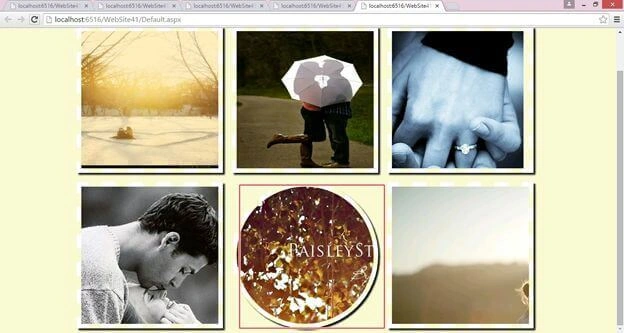
I hope you liked this. Here I have attached the source code for reference.
Thank you for reading. Have a nice day.
Arul RPosted Oct 28, 2015, 5:45 AM
Nice share!!!