

Introduction
Reading the Excel Sheet in Next JS through the xlsx.
Preconditions
- Javascript
- Basic knowledge of Next JS
- Node.js
- V.S. Code,Visual Studio
We cover the below things,
- Create Next application
- Installation of xlsx
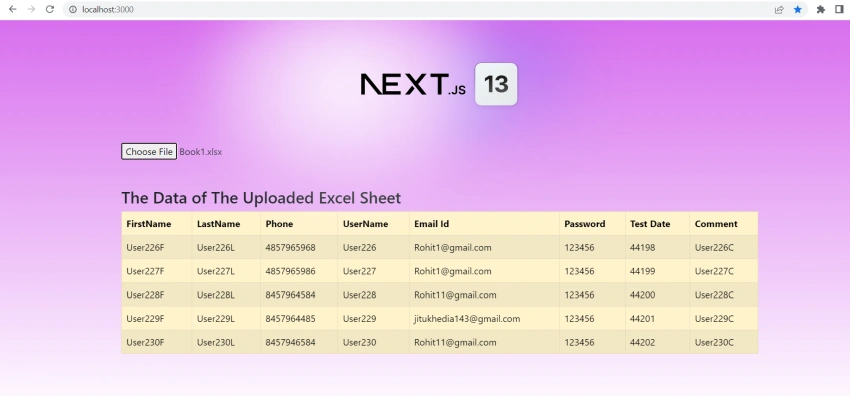
- How to Read Excel Sheet in Next js using xlsx.
Step 1
Run the following command to create Next JS application.
npx create-next-app nextjsappreadexcel
cd nextjsappreadexcel
npm run dev
Step 2
Run the below command for installing xlsx.
npm i xlsx
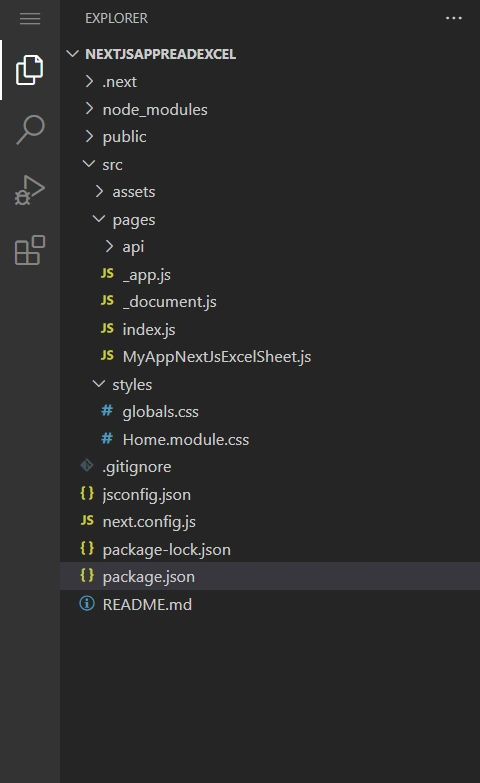
Create the files according to the below image.
Step 3
Add the below code in the index.js
import Head from 'next/head'
import Image from 'next/image'
import { Inter } from 'next/font/google'
import styles from '@/styles/Home.module.css'
import MyNextJsExcelSheet from './MyAppNextJsExcelSheet'

const inter = Inter({ subsets: ['latin'] })
export default function Home() {
  return (
    <>
      <Head>
        <title>Create Next App</title>
        <meta name="description" content="Generated by create next app" />
        <meta name="viewport" content="width=device-width, initial-scale=1" />
        <link rel="icon" href="/favicon.ico" />
        <link rel="stylesheet" href="https://unpkg.com/primeflex@^3/primeflex.css" />
        <link rel="stylesheet" href="https://unpkg.com/primeflex/themes/saga-blue.css" />
        <link rel="stylesheet" href="https://unpkg.com/primeflex/themes/arya-blue.css" />
        <link rel="stylesheet" href="https://unpkg.com/primeflex/themes/vela-blue.css" />
        <link
          rel="stylesheet"
          href="https://cdn.jsdelivr.net/npm/[email protected]/dist/css/bootstrap.min.css"
          integrity="sha384-rbsA2VBKQhggwzxH7pPCaAqO46MgnOM80zW1RWuH61DGLwZJEdK2Kadq2F9CUG65"
          crossorigin="anonymous"
        />
        <script src="https://cdn.jsdelivr.net/npm/react/umd/react.production.min.js" crossorigin></script>
        <script
          src="https://cdn.jsdelivr.net/npm/react-dom/umd/react-dom.production.min.js"
          crossorigin></script>
        <script
          src="https://cdn.jsdelivr.net/npm/react-bootstrap@next/dist/react-bootstrap.min.js"
          crossorigin></script>
      </Head>
      <main className={styles.main}>
        <div className={styles.center}>
          <Image
            className={styles.logo}
            src="/next.svg"
            alt="Next.js Logo"
            width={180}
            height={37}
            priority
          />
          <div className={styles.thirteen}>
            <Image
              src="/thirteen.svg"
              alt="13"
              width={40}
              height={31}
              priority
            />
          </div>
        </div>
        <div className={styles.grid}>
          <MyNextJsExcelSheet />
        </div>
      </main>
    </>
  )
}
Join the conversation! Your thoughts help the community grow.