

Introduction
An array is a collection of elements of the same data type stored in contiguous memory locations. There may be times when you need to remove an element from an array in your program.
For Syntax, you may want to remove an element that is no longer needed or update the Array by drawing a specific element in C#. To remove an element from an array in C#, you need to find the index of the element you want to remove, create a new array with a size one less than the original Array, and then copy all the elements from the original Array to the new Array except for the element you want to remove. Arrays are fixed in size, meaning you cannot add or remove elements from an array after creation. However, you can create a new array of different sizes and copy the elements from the original Array to the new One. This is known as resizing an array.
It's important to note that when you remove an element from an array, the remaining elements will be shifted to fill the gap left by the removed element. This means that the last element in the Array will become duplicated in the second-to-last position, and so on. Therefore, you'll need to adjust the length of the Array to reflect the removal of the element.
public bool Remove(R item);
The virtual public void RemoveAt (int index) index represents the element's zero-based index.
To remove an element from an array in C#, you can follow these steps
- Index of the element removed.
- Shift all the elements after that index one position to the left.
- Resize the Array by one less element.
- Remove an element from an object.
- Remove all items from a list in C#.
- Remove an element's first instance from an array.
Here's an example code that demonstrates how to remove an element from an array in C#.
Method 1. Index of the element removed
In this program. You can use the List <T>.Remove method to remove an element from a list by specifying the element itself. If you want to remove an element by its index, you can use the List <T>.RemoveAt method instead.
Here's an example of how to remove an element by index in C#.
 public class Program
    {
        public static void Main()
        {
            List<int> numbers = new List<int> { 1, 2, 3, 4, 5 };
            int indexToRemove = 2; // remove the third element (index 2)

            numbers.RemoveAt(indexToRemove); // remove the element at index 2

            // print the updated list
            foreach (int number in numbers)
            {
                Console.WriteLine(number);
            }
        }
    }
}
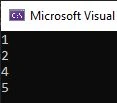
This program will remove the element at index 2 (the third element in the List since the first element has an index of 0). The output will be
Output
Method 2. Shift all the elements after that index one position to the left.
To shift all the elements after a given index one position to the left in C#, you can use a loop to iterate through the Array starting from the given index and shift each element one place to the left.
Here's an example code that demonstrates this.
  public class Program
    {
        public static void Main()
        {
        int[] arr = { 1, 2, 3, 4, 5 };
        int index = 2; // the index to start shifting from

        for (int i = index + 1; i < arr.Length; i++)
        {
            arr[i - 1] = arr[i];
        }

        // set the last element to zero
        arr[arr.Length - 1] = 0;

        // print the modified array
        Console.WriteLine("The modified array is:");
        for (int i = 0; i < arr.Length; i++)
        {
            Console.Write(arr[i] + " ");
        }
    }
}
This program modifies an integer array by shifting all elements to the left, starting from a given index and setting the last element to zero. Here is a step-by-step breakdown of the program.
1. Declare an integer array arr with five elements and initialize it with the values 1, 2, 3, 4, and 5.
2. Declare an integer variable index and initialize it with the value 2. This variable will determine the starting point for shifting the elements in the Array.
3. Use a for loop to iterate over the elements in the Array, starting from the index + 1 and shifting each element from one position to the left. Inside the loop, assign the current element's value to the previous element in the Array, i.e., arr[i - 1] = arr[i].
4. After the loop, set the value of the last element in the Array to zero, i.e., arr[arr.Length - 1] = 0.
5. Use another for loop to print out the modified Array. Print each element in the Array inside the loop followed by a space.
When you run this program, it will output the modified Array.
Output

Note that the elements at indices two and higher have been shifted one position to the left, and the last element has been set to zero.
Method 3. Resize the Array by one less element.
To resize an array by one less element in C#, you can create a new array with one less element than the original Array and then copy the elements from the original Array to the new Array. Here's an example



David MccarterPosted Apr 21, 2023, 4:43 PM
Removing and adding items to an array can be hard if not don't right. In my OOS NuGet package called Spargine, I have created many methods to help with this: Add(), AddFirst(), AddIf(), AddDistinct(), AddLast(), RemoveFirst(), RemoveLast and Upsert() (adds or updates). Give them a try :-)